Learning Claude Code best practices matters because adoption is already moving incredibly fast. Claude Code reportedly reached about $1B ARR six months after public launch, which shows how quickly engineering teams are testing it in real work.
You need a solid team process to keep up with this rapid adoption trend.
However, many online resources revolve around basic prompt engineering for Claude Code. We decided to go beyond that and give you 39 practices, workflow examples, and measurement guidance.
This article discusses how to structure Claude Code usage across planning, context, verification, MCP, review, and team governance.
Let's get started!
What Is Claude Code?
Claude Code is an agentic coding tool that reads your codebase, runs commands, edits files, and helps you complete software development work from the terminal or IDE.
Unlike autocomplete, Anthropic Claude Code can inspect code repositories, reason across multiple files, and run tests. It can also help with debugging, refactoring, documentation, and implementation work. That makes it part of a broader shift from simple AI coding assistants to AI coding agents that can carry out multi-step engineering tasks.
Some teams also use Claude Cowork for writing, planning, and idea refinement around engineering work. But for production code, Claude Code needs clearer boundaries than a general assistant.
In terms of enterprise interest, GitHub Copilot remains more established in organizations with over 5,000 employees, where adoption reaches 40%, according to JetBrains’ January 2026 survey of more than 10,000 professional developers. The study also found that 18% used Claude Code at work, up from roughly 3% in mid-2025.
Regardless of your company’s size, one thing holds true: a successful, long-term adoption requires your team to control context, review, and verification.
Pro tip: If you are still comparing Claude Code with other AI tools, our guide to the best AI coding assistants breaks down how different assistants perform across delivery speed, code quality, verification, and workflow fit.
Claude Code Best Practices for Engineering Teams
Claude Code delivers the best results when teams follow shared workflows. Here’s how to move from individual usage to a controlled engineering workflow.
Create a Claude Code Workflow Before Writing Code
Without a shared workflow, results vary too much between developers. Standardizing a few practices makes reviews, governance, and collaboration easier.
Here are four practices worth adopting:
- Follow an Explore → Plan → Implement → Verify workflow: Ask Claude to inspect the relevant files and explain the current behavior before generating a plan. Allow implementation only after the plan is reviewed. Require passing checks before the work moves to code review.
- Use plan mode for complex work before implementation: Plan mode is useful for authentication, billing, migrations, permissions, and other work with security or data risk. Require Claude to identify affected files, risks, tests, and rollout considerations before editing code.
- Use specifications, plans, or task documents for larger initiatives: For a multi-week feature, store scope, decisions, open questions, and acceptance criteria in plan.md or tasks.md. Written specifications create more consistent results than long chat threads when you adopt an AI SDLC.
- Break large initiatives into phases instead of asking Claude to deliver everything at once: According to the DORA 2026 report, more than 80% of respondents perceived that AI increased their productivity, but there’s also a potential J-Curve productivity drop during early AI adoption. To avoid this initial productivity dip during AI adoption, use smaller phases to reduce review overhead and give teams time to refine their workflow before scaling usage. As teams gain confidence, they can gradually expand Claude's responsibilities to more complex work.
Pro tip: Claude Code can make individual developers feel faster, but that doesn’t automatically mean the team ships better software. As our team explains in our guide on using AI for developer productivity, AI creates measurable value when it supports well-defined tasks, strong code review practices, and stable CI/CD pipelines.
Treat Context as a Limited Engineering Resource
Context quality is one of the strongest predictors of Claude Code effectiveness. Every unrelated file, command output, and correction can change what Claude pays attention to next.
Here are the context practices your team should use:
- Keep conversations focused on one objective: Each session should map to a single task, such as fixing a failing OAuth callback test or reducing review wait time on a specific service. This helps Claude focus on the relevant files, errors, and acceptance criteria.
- Start fresh sessions between unrelated tasks: When a developer moves from bug fixing to refactoring, start a clean session to prevent old assumptions from influencing the next task. This becomes more important as the context window fills up.
- Store plans, decisions, and research in markdown files: Use plan.md, notes.md, and tasks.md to preserve important information between sessions. These documents are more reliable than chat history.
- Use context buffers, notes, or plan documents for longer projects: A simple handoff.md file can capture what changed, what passed, what failed, and what still needs review. This makes it easier to continue work without reloading unnecessary context.
- Compact or clear context before quality degrades: Use /compact to preserve useful information while shrinking the context window. Use /clear when switching to a different task. Long conversations are useful for exploration, but they can eventually dilute the information Claude should prioritize. XML tags can help separate requirements, constraints, and examples. Prefilled responses can help enforce a consistent review or reporting format across the team.
Build Strong Project Memory With CLAUDE.md
CLAUDE.md gives Claude stable project memory that all engineers can access. As such, you won’t have to repeat setup prompts because the whole team documents the rules Claude should consistently follow.
Here are the practices that keep it useful:
- Keep CLAUDE.md concise and high signal: The larger the file becomes, the more attention Claude spends on low-value instructions. Review it regularly and remove outdated rules.
- Include coding standards, build commands, testing instructions, and project-specific rules: Useful entries include commands such as npm run test and pnpm lint, along with branch naming conventions, migration requirements, feature-flag policies, and release constraints. Language-specific guidance should be documented alongside the files it affects.
- Avoid documenting things Claude can discover from the codebase: Focus on decisions, constraints, and requirements that are not obvious from the codebase. Examples include backward-compatibility requirements for API changes or a policy requiring authorization tests for all public endpoints.
- Store specialized knowledge in skills instead of CLAUDE.md: Skills are better suited for repeatable tasks such as security reviews, accessibility audits, migration reviews, or release-note generation. They also let you define workflow-specific instructions and output formats.
- Version-control CLAUDE.md and treat it as a team asset: Store it in Git and review changes like any other project file. Keep project notes, progress updates, and task tracking in separate documents so CLAUDE.md remains focused on durable guidance instead of transient project history.
Give Claude Code Ways to Verify Its Work
Verification is what turns AI-generated code into reviewable engineering work. A claim that something works is not enough. Teams need evidence.
These are the verification practices worth standardizing:
- Require tests, builds, linters, or validation scripts: For example, ask Claude to run npm test, pnpm lint, pytest, go test ./..., or the exact CI command your team uses. This gives the session a pass/fail signal.
- Ask Claude to provide evidence of success: Its answer should include the command it ran, the output summary, and any failures it could not fix. You can also use response constraints if your team needs the answer to have a fixed structure.
- Write failing tests before implementing fixes when appropriate: This works particularly well for regressions. The failing test confirms the bug exists, while the passing test confirms the fix addresses the observed behavior. Use a strong response formatting so reviewers can scan these tests faster.
- Use screenshots and visual verification for UI work: For dashboard, frontend, or design-related changes, ask Claude to compare screenshots against the expected result. Visual regressions can slip through even when automated tests pass.
- Focus on root causes instead of suppressing errors: McKinsey found that generative AI reduced task completion time by 35-45% for coding tasks, but the gains fell below 10% for high-complexity work. Those findings suggest that AI delivers the most value when tasks are straightforward and easy to verify. As complexity increases, teams need stronger validation practices to ensure speed gains do not come at the expense of quality. AI can generate plausible fixes that eliminate error messages, bypass failing tests, or patch visible issues without resolving the underlying problem, which is why testing and code review remain critical.
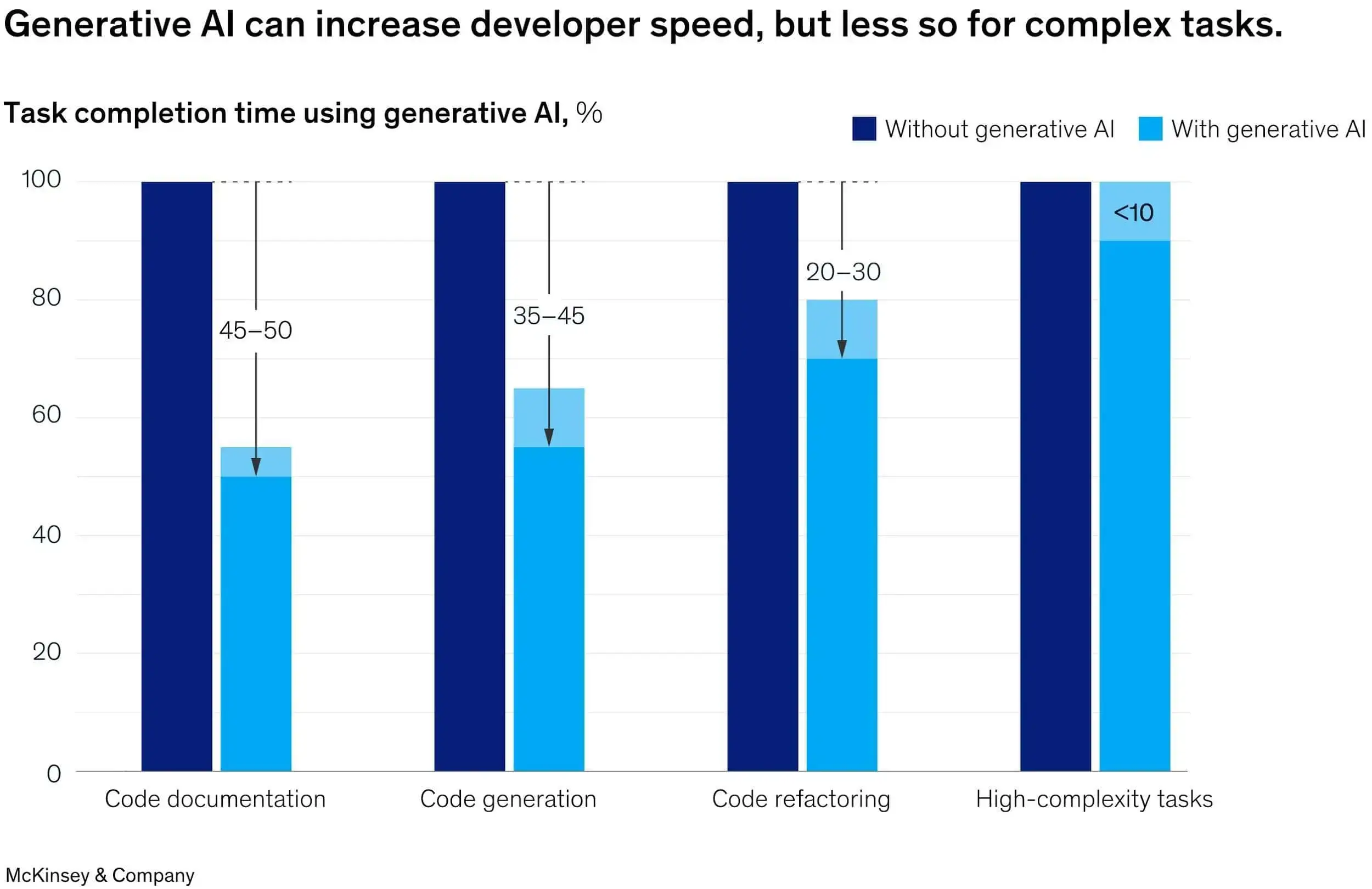
Source: McKinsey
Pro tip: Verification does not end when Claude finishes a task. Teams should monitor whether AI-assisted changes pass review faster, create less rework, and move through the delivery pipeline without increasing instability. Axify’s AI impact measurement framework explains how to connect AI-assisted development with delivery flow, risk, cost, and engineering outcomes.
Use Claude Code Commands and Automation Carefully
Automation reduces repetitive work, but it also amplifies mistakes when assumptions are wrong. The safest approach is controlled automation with clear guardrails.
Here are the automation practices we recommend:
- Configure permissions intentionally: Define which commands are safe to run without approval, such as npm run lint, npm test, or gh issue view. This reduces approval fatigue while keeping higher-risk actions visible.
- Use auto mode only within defined guardrails: Auto mode works best for scoped tasks where Claude can inspect, edit, test, and report on the result. Avoid using it for infrastructure changes, secret management, or destructive database operations.
- Use hooks to enforce non-negotiable requirements: Hooks can run formatters after edits, block changes to protected folders, or trigger validation scripts before work is considered complete. Automated enforcement is more reliable than prompt formatting because it applies rules consistently, cannot be skipped accidentally, and catches violations at the moment they occur. This is more effective than relying on the model to remember every instruction.
- Use hooks to prevent secret leakage or unauthorized changes: For example, block writes to .env files, reject commits containing private keys, or require human approval when Claude modifies migrations or infrastructure code.
- Leverage CLI tools instead of browser workflows when possible: Tools such as gh, aws, gcloud, sentry-cli, and internal command-line utilities produce structured, reproducible outputs. Good Claude Code commands should be specific, reproducible, and safe enough for another engineer to rerun.
Scale Claude Code With Skills, Subagents, and MCP Servers
As Claude Code adoption grows, teams eventually need more than prompts and chat history. Skills, subagents, and MCP servers help standardize workflows, reuse expertise, and connect Claude to the systems engineers already use.
Below, we discuss two areas worth defining early.
Claude Code MCP Best Practices
MCP works best when Claude needs access to live information that does not exist in the repository.
Here are the Claude Code MCP practices to follow:
- Connect MCP servers only when they provide clear workflow value: An MCP integration should reduce context switching or provide access to data Claude genuinely needs. The Model Context Protocol is useful for this because it lets an assistant call external systems through scoped tools. Avoid adding integrations simply because they are available.
- Use MCP integrations for issue tracking, design systems, databases, and operational tooling: For example, Claude can read a Jira issue, inspect a Figma design, query a staging database, or check a Sentry error before proposing a fix. Axify’s MCP is especially useful because it brings live engineering intelligence into the assistants leaders already use. It exposes DORA metrics, cycle time, delivery signals, AI adoption, and team health as read-only tool calls, with OAuth-based access and existing Axify permissions. That means a VP or engineering manager can ask “Which teams improved cycle time with/ without adopting AI?”, review delays, rework, or adoption by the team without opening several dashboards.
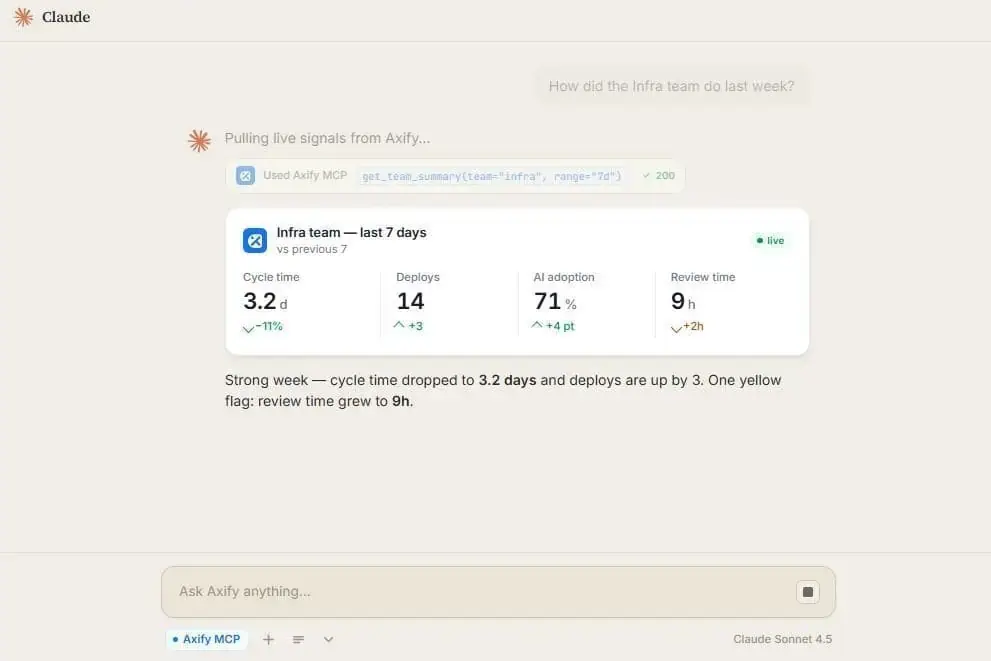
- Evaluate whether a reusable skill can solve the problem before adding another MCP dependency: A skill is easier to inspect because the instructions can be accessed from your repository. So if a workflow depends on stable internal rules, use a reusable skill. An MCP integration is best if you need live data from your other systems. Claude Code integrations include Jira, GitHub, GitLab, Azure DevOps, Bitbucket, Sentry, Grafana, plus other AI assistant integrations like Axify.
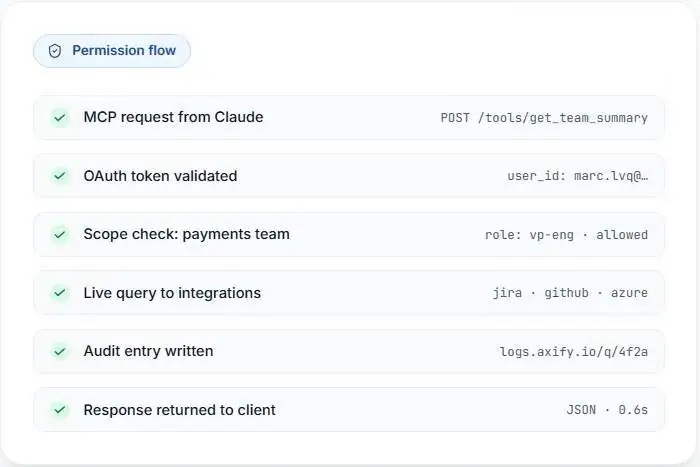
- Review MCP usage through a security and governance lens: Check which data the server can access, who can query it, whether requests are logged, and whether write actions exist. Access should follow the same governance standards as any other engineering system. For example, Axify MCP is read-only, permission-scoped, and designed so the assistant cannot query a team that’s not visible in Axify.
Claude Code Skills and Subagent Best Practices
Skills and subagents help teams reuse expertise instead of rewriting instructions for recurring tasks. They work best for narrow and easy to review tasks.
Here are the best practices to apply for Claude Code skills and subagents:
- Create reusable skills for recurring engineering workflows: A skill can define how your team reviews migrations, writes release notes, validates accessibility, or handles incident fixes. Include examples only when they reduce ambiguity; too many of them make the skill harder to maintain.
- Document common failure patterns: A "gotchas" section can capture lessons learned from previous projects, such as missing tenant checks, incorrect feature-flag cleanup, or stale generated SDKs.
- Use subagents for specialized reviews and investigations: A security reviewer can inspect authentication changes, a testing reviewer can identify coverage gaps, and a documentation reviewer can validate developer-facing content without affecting the implementation workflow.
- Assign narrowly scoped responsibilities: Specific instructions produce better results than broad roles. “Review this diff for authorization bypass risk in the billing service” is more effective than assigning a generic senior engineer persona.
- Use independent reviewers to reduce implementation bias: The agent that implements a change should not be the only one evaluating it. A separate reviewer can identify assumptions, edge cases, and missing tests from a fresh context.
Establish Team-Level Review and Governance Processes
Once Claude Code becomes part of the delivery process, you need standards around review expectations, ownership, rollback procedures, and measurement. We advise you to define them before AI-generated changes reach production.
When using Claude Code for teams, apply the governance practices below:
- Maintain architectural documentation and project plans: Claude performs better when service boundaries, deployment rules, API ownership, and incident procedures are well documented and maintained alongside the code.
- Review Claude-generated work against explicit requirements: AI-coauthored pull requests can be around 1.7x more likely to contain issues. Reviewers should compare changes against the original issue, specification, test plan, and acceptance criteria. The goal is to verify that the implementation solves the intended problem, not simply that the code looks reasonable, which is the main risk of vibe coding.
Pro tip: Axify’s AI Adoption and Impact feature helps leaders see actual usage, adoption rate, active users, users with licenses, acceptance rate, and delivery impact. That way, you can assess whether it’s genuinely used well in your company.
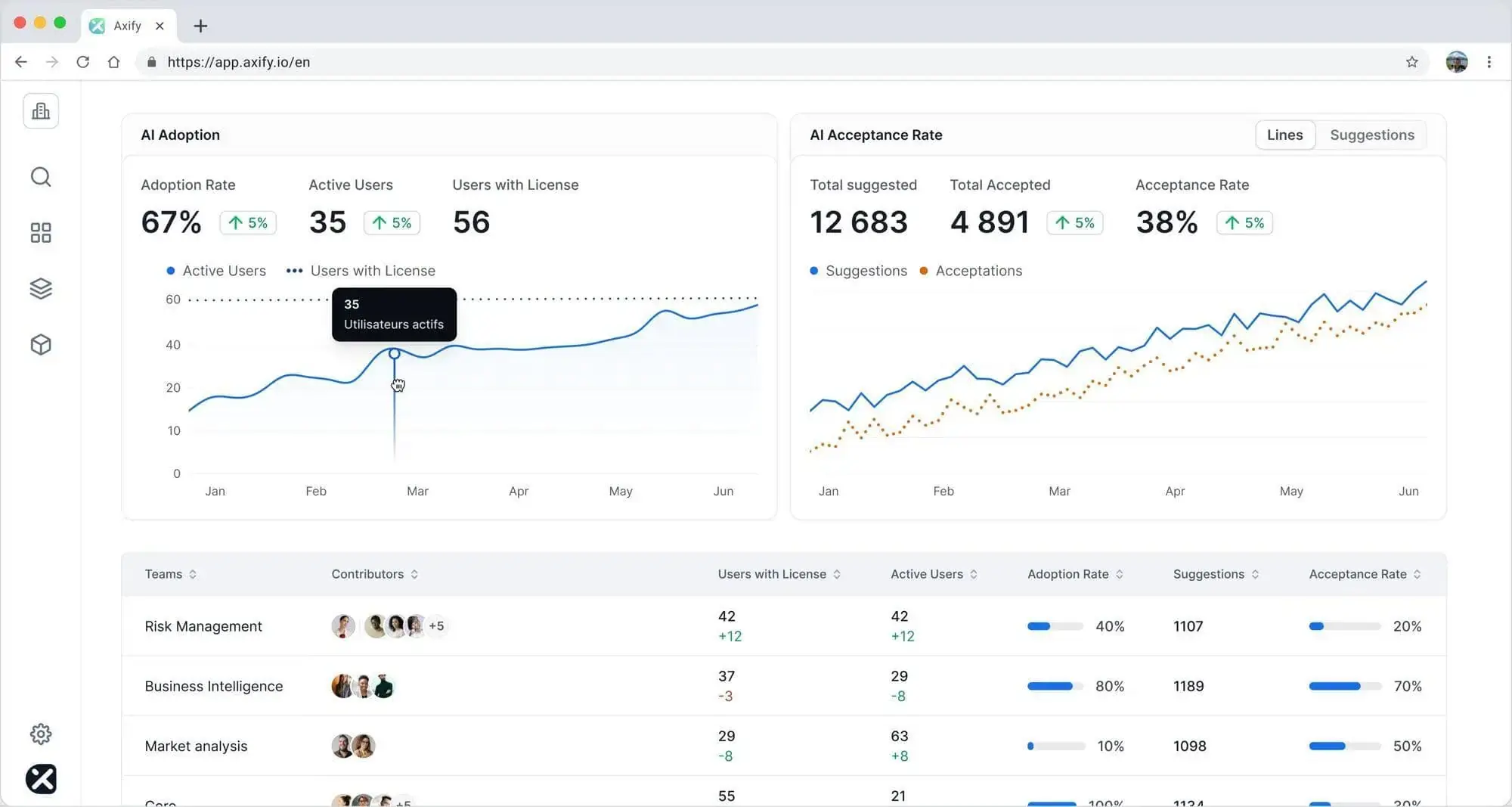
- Use separate review passes for security, correctness, and edge cases: Security review checks authorization, secrets, injection risks, and data handling. Correctness review checks requirements. Edge-case review checks failure modes, empty states, retries, and rollback paths.
- Treat Git as the source of truth for changes: Diffs, commit history, test results, and CI output are more reliable than chat conversations. Use established Git review practices to maintain accountability and ownership.
- Define when engineers should rewind, restart, or abandon a flawed path: If Claude keeps patching around a bad design, use /rewind, start a fresh session, or ask for a clean rewrite. If the same task repeatedly requires rewrites, it may be worth reevaluating whether the model you chose is the right fit for the assigned work.
Axify has an AI Model Comparison Tracking feature so engineering leaders can understand which assistant or model works best for refactoring, debugging, review, test writing, or documentation. Cross-model workflows should be measured by task type, review cost, and delivery impact.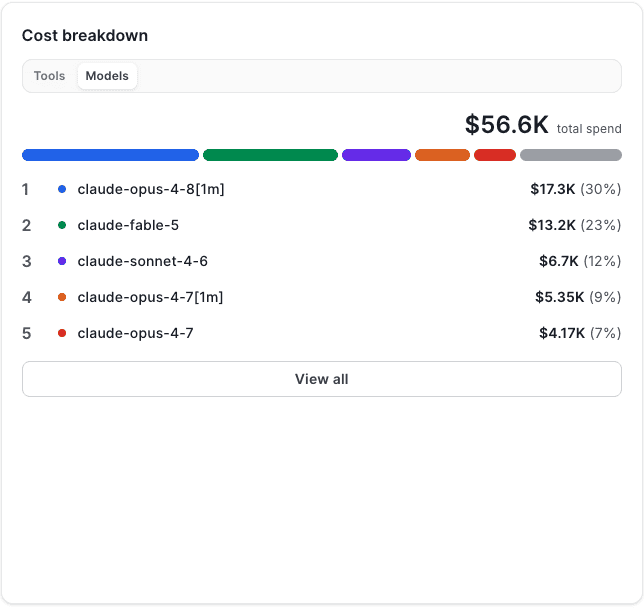
- Compare Claude Code ROI against other assistants: Different tools often perform better on different tasks. Claude Code may excel at debugging, refactoring, or repository-wide investigations, while another assistant may be more cost-effective for documentation, test generation, or smaller code changes. Measure performance by task type, review effort, delivery impact, and cost.
Speaking of costs, the 2026 DORA ROI report provides a useful framework for evaluating those tradeoffs. Its sample model assumes:
- 12.5% net time savings per developer, which is roughly one hour per workday
- 12% more deployments
- 12% more features delivered after AI adoption
But DORA also warns that those gains can be reduced by verification effort, delivery instability, and downstream bottlenecks created by faster code generation.
That’s why AI ROI should be measured at task level.
Compare assistants against the same baseline: measure cycle time, review effort, rework, change failure rate, throughput, and cost before and after adoption. Our guide on measuring Claude Code real impact walks through that baseline step by step.
A tool that saves time during implementation may still create less value overall if it increases review overhead or production issues.
You can also use the Cost Assessment feature in Axify’s AI Adoption and Impact view. This shows whether spend on Claude Code and other assistants connects to shipped work, shorter cycle time, lower rework, and acceptable review cost. It also lets you forecast future costs.
Claude Code Workflow Examples for Engineering Teams
Examples make the best practices above easier to apply. So, here are three workflows your team can adapt to real engineering work.
Example #1: Implementing a New Authentication Flow
Start in plan mode and ask Claude to inspect the current auth service, session handling, and OAuth callback route. For example:
“claude
/init
# Plan mode:
Read src/auth, src/routes/oauth, and docs/auth.md.
Create a plan for adding Google OAuth with tests and rollback notes.
Then review the plan before implementation. Claude should map the user flow, name the files it will change, and list security checks. After implementation, run:
npm test -- auth
npm run lint”
A human reviewer should inspect the diff before merge, especially scopes, token handling, redirects, and session expiration.
Example #2: Investigating and Fixing a Production Bug
Start by isolating the bug with the exact error, affected endpoint, and recent deploy window. Search code with rg "callbackUrl" or a similar command before editing.
“sentry-cli issues info ISSUE_ID
rg "callbackUrl" src/
npm test -- oauth-callback”
Next, ask Claude to create a failing reproduction first. Then let it implement the fix, rerun the test, and explain the root cause. Use an independent review pass for the final diff.
Example #3: Fixing Performance Issues with an MCP
With MCP connected to Sentry and Grafana, Claude can inspect an error and confirm the runtime pattern in logs.
“claude mcp add sentry
claude mcp add grafana”
Ask Claude to review the Sentry issue, confirm the flow in Grafana, and propose a narrow fix. The reviewer should still check query cost, cache behavior, and user experience impact before merge.
Conclusion: From AI Usage to AI Accountability
The most mature Claude Code teams will maintain a small “AI change log” beside their technical change log. Each entry should record which assistant helped, what task it handled, which checks passed, what the reviewer changed, and whether the change created follow-up work.
After four weeks, that log becomes a practical coaching tool. It shows which workflows are safe, which tasks need tighter specs, and where training should focus next.
The challenge is that this process becomes difficult to maintain as AI adoption grows across multiple teams, tools, and workflows. At that point, leaders need a scalable way to understand adoption, costs, review effort, and delivery impact across the organization.
Axify helps engineering leaders track those signals automatically, making it easier to understand where AI creates value and where it introduces hidden costs.
Book a demo today to learn more.
FAQs
How to install Claude Code?
Claude Code can be installed through Anthropic's native installer, Homebrew, WinGet, or npm. After installation, authenticate with your Claude account and open Claude Code inside the project repository where you want to work.
Is Claude Code free?
Claude Code is not free for sustained professional use. Access depends on your Claude subscription, enterprise plan, or API usage, so teams should review usage limits, access controls, and expected costs before a broader rollout.
Does Claude Code have a web interface?
Yes. Claude Code is available through a web interface in addition to its terminal, desktop, and IDE experiences. Engineering teams sometimes prefer the terminal or IDE because they provide direct access to repositories, tests, Git workflows, and local development tools.
Is there a Claude Code for Linux?
Yes, Claude Code works on Linux. You can install it through the official installer or npm, then run it in the repository where you want assistance with implementation, debugging, tests, documentation, or review preparation.
How to use Claude Code?
Start by opening Claude Code inside your project repository and giving it a clearly scoped task. For more complex work, follow an Explore → Plan → Implement → Verify workflow. The best results come from clear requirements, well-defined constraints, and objective checks that confirm the change works as intended. Use metadata tagging to organize documentation, specifications, architectural decisions, and project notes.
Can Claude Code work with an embeddings API?
Yes. Teams building internal AI workflows can combine Claude Code with an embeddings API to improve document retrieval, knowledge search, and context management. This is particularly useful when Claude needs access to large collections of technical documentation, specifications, or engineering decisions that would not fit into a single context window.