AI
17 minutes reading time

Claude Code doesn’t just suggest code. It can read context, plan work, edit files, run checks, and help move a task closer to completion. That changes how you measure productivity.
This is part of the broader AI SDLC shift. AI changes how work moves through planning, coding, review, testing, deployment, and maintenance, and not just how code gets written.
Because that impact spreads across the delivery flow, licenses and usage volume won’t tell you whether Claude Code is helping your team deliver faster. You need to know whether assisted work resolves tickets sooner, reaches review in better shape, and avoids extra testing, rework, or production risk.
This article explains which metrics to track, how to compare Claude-assisted work against normal delivery patterns, and how to assess ROI without treating more AI-generated output as proof of developer productivity.
P.S. Try Axify AI Adoption and Impact to connect AI usage with delivery metrics. It helps you compare adoption, acceptance, and delivery changes across teams.
Claude Code changes productivity measurement because it’s an AI agent built for delegated, multi-step work inside the delivery workflow.
Anthropic describes it as an agentic coding system that reads your codebase, changes files across the project, runs tests, and produces code that can move toward review or commit. Its docs also explain that it runs in your terminal, gathers context, takes action, verifies results, and repeats that loop as the task requires.
By comparison, a typical AI coding assistant helps during the coding phase. It suggests lines, functions, or edits while a developer stays in control of each step.
Here’s exactly how Claude Code works and why this affects how to track its impact.
Claude models commonly support 200,000-token context windows, while newer long-context modes support up to 1M tokens. That gives Claude Code more project context when it plans edits across files, follows dependencies, or checks how one change affects another part of the codebase.
Because Claude Code can work with more context, developers can delegate larger tasks: multi-file refactoring, technical debt cleanup, stacked PR preparation, or parallel work across independent branches.
So with Claude Code, you’re measuring whether a larger delegated task reaches a useful result.
Instead of asking whether a developer accepted a snippet, ask whether Claude-assisted work reached review, passed validation, and merged with fewer human corrections.
Claude Code’s value depends on what it completes, but also on what that completion costs the team.
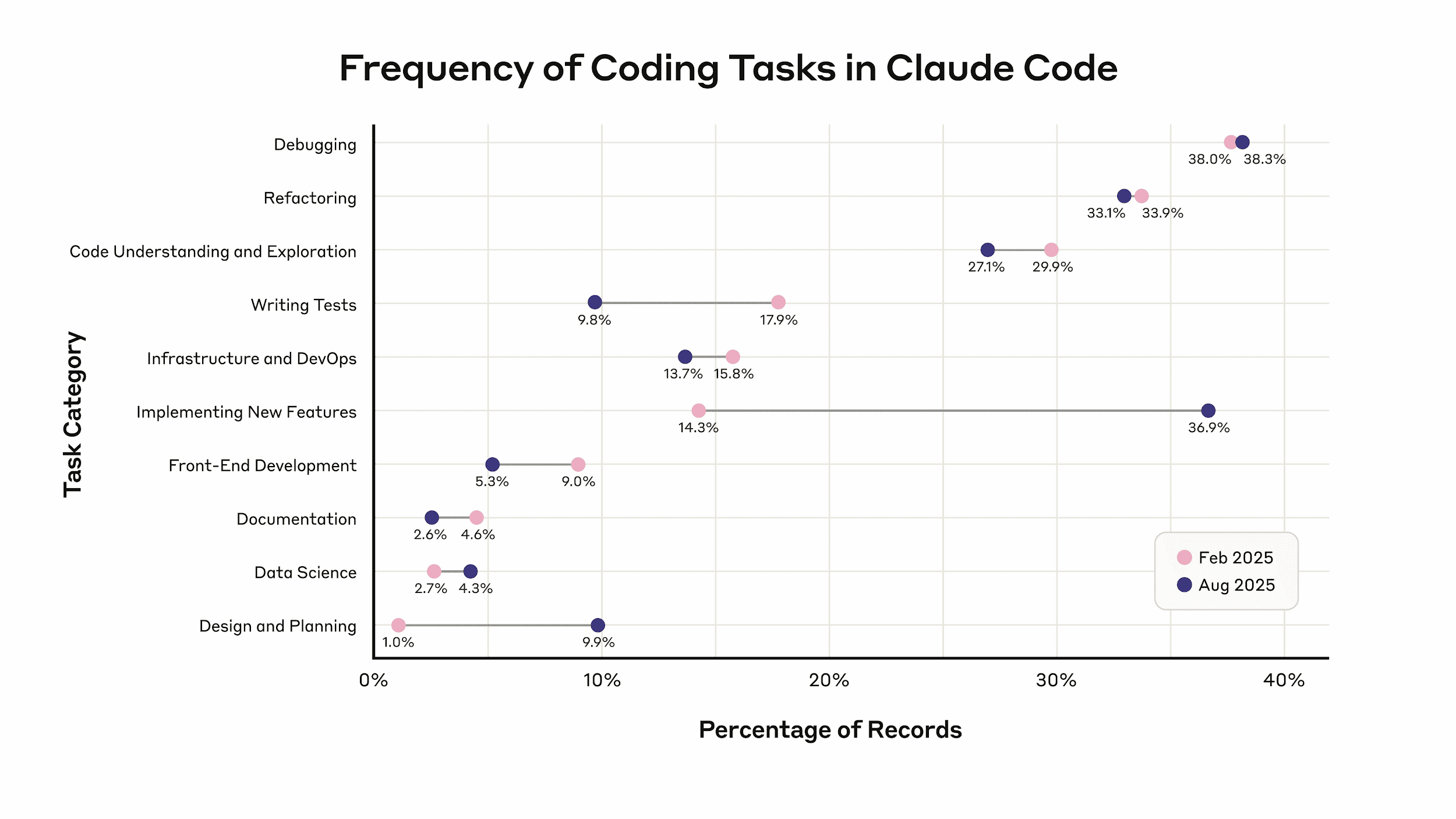
Anthropic’s internal usage data shows that Claude Code now performs about 20 autonomous actions before human input, up from about 10 six months earlier. The same report says usage for code design and planning grew from 1% to 10%, while feature implementation grew from 14% to 37%.
Source: Anthropic
That shift matters because larger autonomous sessions create different review and cost questions. A longer session may reduce manual coding time, but it can also produce more files to inspect, more assumptions to validate, and more token spend to justify.
So, engineering leaders should measure Claude Code’s impact by looking at delivery outcomes. This includes PR throughput, cycle time, review time, deployment frequency, and cost per completed unit of work.
You should also measure review effort, rework, task complexity, session length, parallel agent usage, and cost per completed task.
A few benchmarks can still help frame Claude Code’s productivity impact. Here’s what the available research shows.
The data shows Claude Code can raise individual output, but you should not treat that output as proof that the team delivers faster. Let’s explain:
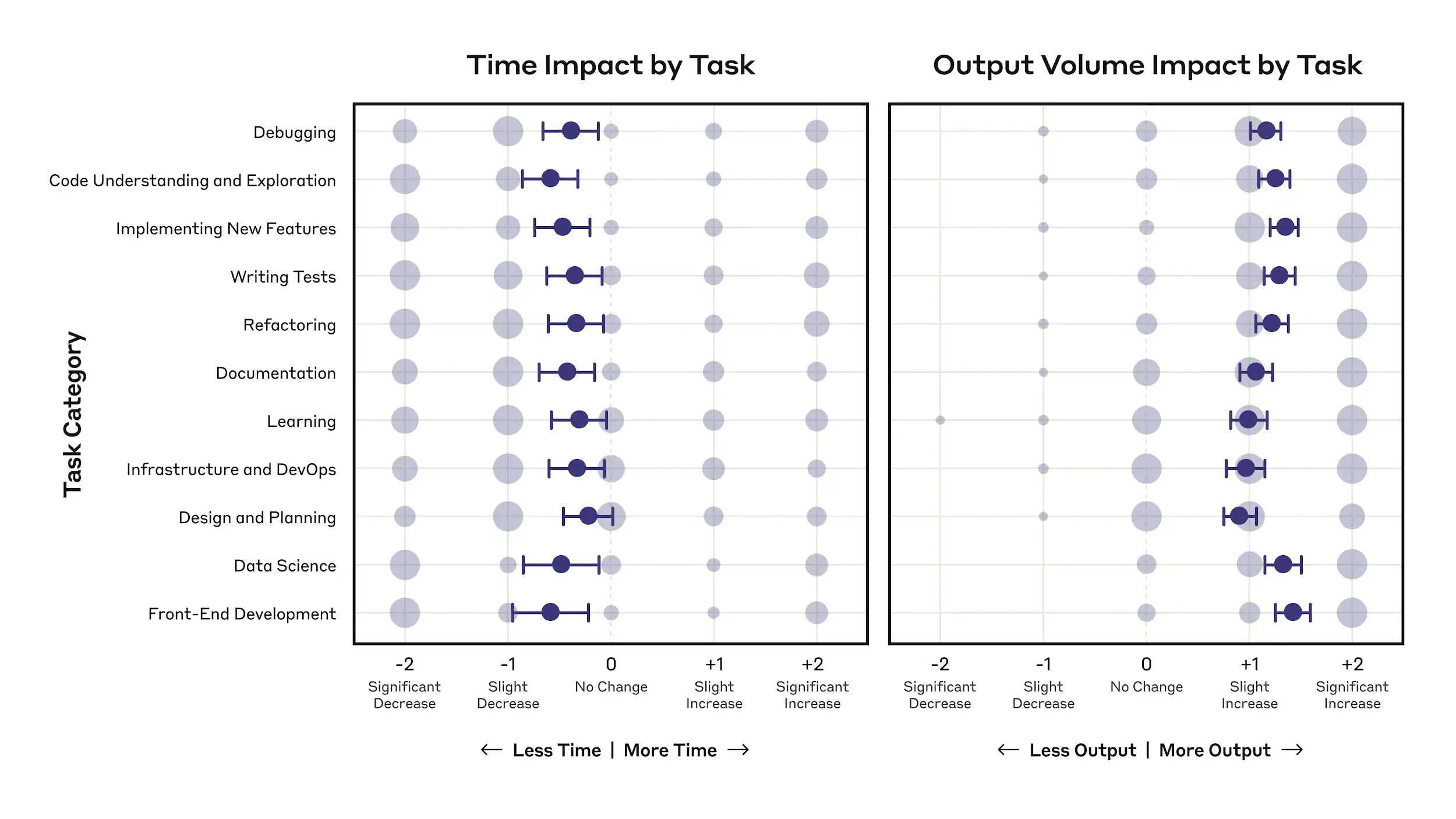
Anthropic’s internal research found that engineers self-reported a 50% productivity boost and used Claude in 59% of their daily work. This was more than 2x higher than the prior year.
That same pattern was supported by a 67% increase in merged pull requests per engineer per day after Claude Code adoption. This gives you a useful signal, but it still needs to be checked against team-level flow.
Source: Anthropic
That brings us to the next point.
Higher Claude Code output still has to pass through the rest of the delivery system. Code must be reviewed, revised, tested, merged, and released before it creates value for users.
That is where the productivity story becomes more complicated. Anthropic found that more than half of employees could fully delegate only 0-20% of their work to Claude. It also noted that some engineers spent more time on Claude-assisted tasks because they had to debug, clean up, or understand code they did not write.
Independent Claude Code research points to the same review gap. A study of 567 Claude Code-generated GitHub pull requests across 157 open-source projects found that 83.8% were accepted and merged. But 45.1% of merged pull requests still needed human changes.
So the issue is not whether Claude Code can produce useful work. It can. The issue is whether that work moves cleanly through review and validation.
If code generation speeds up but reviewers spend more time checking, editing, or correcting the output, the bottleneck shifts instead of going away.
This maps closely to what we covered in our article on the impact of AI coding tools. Faster code generation can reduce coding-stage activity, while increasing review duration, rework, or QA effort.
So Claude-assisted work should be measured by team-level metrics, like task completion, mergeability, review time, rework, and ticket or PR resolution time.
The task mix also changes what the data shows.
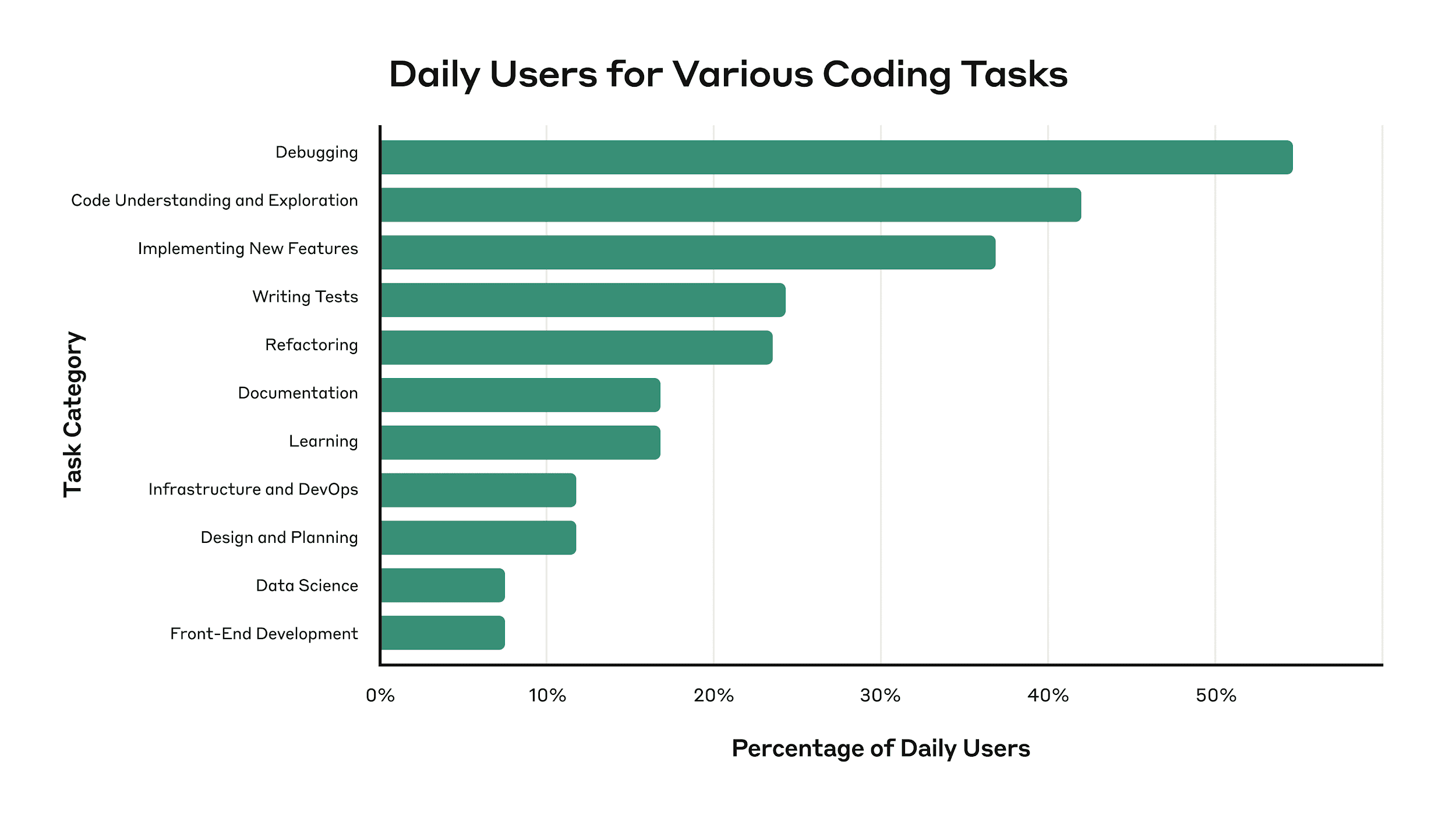
Claude Code does not affect every task in the same way. Anthropic found that Claude was used daily for debugging by 55% of engineers and for code understanding by 42%. Feature implementation is also becoming a larger use case.
Source: Anthropic
And each task type needs a different productivity signal.
There is another measurement issue: some Claude-assisted work may be valuable even if it does not appear in normal velocity reports.
Anthropic found that 27% of Claude-assisted work involved tasks that would not have been done otherwise, such as exploratory work, documentation, or small quality fixes. These tasks should be tracked separately because they represent added engineering value, not faster completion of planned sprint work.
Codebase context also changes the result.
METR found that experienced developers working on familiar repositories took 19% longer with AI tools, even though they believed AI had made them 20% faster.
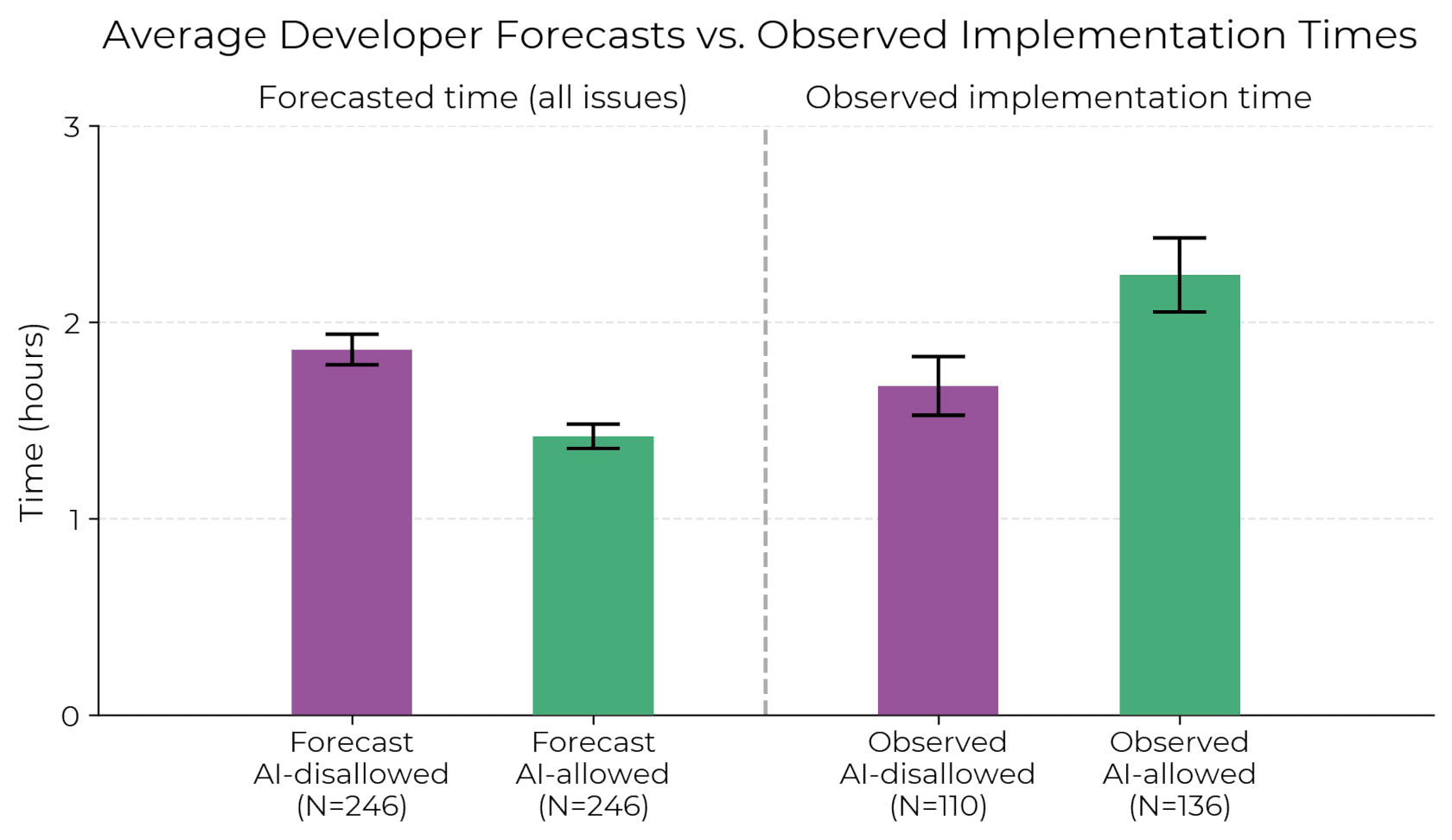
Source: METR
That does not mean Claude Code is ineffective.
It means teams need to measure where it works best. In complex legacy systems, tacit knowledge, unclear ownership, and undocumented constraints can make AI-generated work harder to trust.
In those cases, you also need to track review effort, rework, and whether the output was safe to merge.
And there’s another issue to consider:
Parallel Claude Code sessions change the productivity math because you can tackle several independent workflows at the same time. But, as we said before, that only helps when the extra output is reviewed, merged, tested, and delivered without raising cost faster than completed work.
Claude Code can run parallel sessions through Git worktrees. Each worktree gives a session its own branch and directory, so one session can work on a bug fix while another prepares a refactor or writes tests.
Fun fact: Orbilon Technologies reported that Boris Cherny, head of Claude Code at Anthropic, shipped 300 pull requests in December 2025 while running five or more AI agents at once.
Treat that as an edge case, though.
This ability changes measurement because one developer can now start several AI-assisted workstreams at once.
This is different from assistant-based workflows, where the developer usually accepts or rejects suggestions inside one active task. With parallel agents, the developer becomes more like a reviewer and coordinator across several tasks.
That’s why you now have to assess how many of those workstreams produced changes that were reviewed, merged, and delivered without extra rework. So, parallel sessions need their own metrics, such as completed tasks, merged PRs, review duration, rework, conflicts, and cost per completed unit of work.
Parallel sessions are most useful when the work can be split cleanly. For example, one agent can inspect frontend files, another can check backend logic, and another can review tests.
A GitHub-hosted guide gives a concrete example: analyzing a 28,000-line TypeScript service can take a single agent about 2-3 hours, while an agent team can split the work across controllers, services, and data layers and finish in about 45 minutes.
That kind of time reduction is useful, but it does not remove the coordination cost.
Someone still needs to check whether the outputs agree with each other, whether the proposed changes conflict, and whether the final result is safe to merge.
The same guide notes that agent teams work best for read-heavy tasks and can struggle when multiple agents edit shared files, such as API contracts or database schema changes. In those cases, conflicts can move the delay from coding to review, integration, or testing infrastructure.
That means you should track both time saved and coordination cost. Useful metrics include the ones we mentioned in the section above.
Parallel Claude Code sessions can raise costs quickly because each session consumes tokens or API usage. A 4-agent setup can cost close to 4x more than a single session if each agent runs similar work in parallel.
That cost is not a problem by itself.
The problem is when your spend grows faster than completed work. So, track cost per resolved ticket, cost per merged PR, and cost per deployed change. You won’t get much useful info if you only measure usage through sessions, prompts, or API calls.
For example, let’s say your team reviews Claude Code usage over the same two-week period as its delivery metrics. Parallel sessions produced 12 pull requests, but only 7 were merged, 3 needed major rework, and 2 were still waiting for review at the end of the period.
That gives you a clearer cost view than raw session count.
We believe that the correct way is to compare Claude Code spend against completed work in the same review period. This includes resolved tickets, merged PRs, deployed changes, and rework after review.
But the incorrect pattern is to count every generated pull request as productivity. That breaks decision-making because a PR that waits in review, creates merge conflicts, or never reaches production still consumes review time and AI spend.
So, for Claude Code, cost should always be tied to completed delivery outcomes.
That brings us to the next point.
Claude Code should be measured at the workflow level. The goal is to see whether Claude-assisted work moves through the SDLC faster, with less rework, stable quality, and a reasonable cost.
Adoption metrics show how/ how well your teams have implemented Claude Code. That means measuring:
Delivery metrics show whether Claude-assisted output accelerates completed work and improves its quality. Compare Claude-assisted and non-Claude work by the same team, task type, and review period.
For example, compare Claude-assisted and non-Claude work within the same task type. If Claude-assisted refactoring tasks close faster without increasing review comments or rework, that may be a good use case. If Claude-assisted bug fixes close faster but reopen more often, the team may need stronger validation rules before expanding Claude Code to that work type.
Cost metrics matter more for agentic tools because usage can scale with every session, model call, and parallel workflow. The goal is to see whether higher spend produces more completed work and, ultimately, optimize those costs as much as possible.
Pro tip: If you want a broader structure for tracking AI impact across adoption, delivery, quality, and cost, read our AI measurement framework guide.
When you’re trying to measure Claude Code’s impact on productivity, you can make the following errors:
The first mistake is measuring what one developer creates instead of what the team finishes. A developer may produce 3x more lines of code with Claude Code, but that extra output can sit in review if reviewers are already overloaded.
That’s why you should assess your DORA and flow metrics before and after the Claude Code implementation. These tell you whether your workflow, plus your software speed and stability, improved. The mistake is counting generated code or PR volume alone.
Even autonomous output needs human verification, which takes time. Claude Code can create changes across multiple files, tests, and dependencies, so reviewers usually need more context before approving the PR.
If review time is not tracked, you miss potential delays that follow cycle time improvements. So, try to answer this: Did Claude-assisted PRs pass faster, require fewer review cycles, and merge without extra fixes?
Pro tip: If Claude-assisted PRs are increasing your review time, read our AI code review tools guide to find other, more useful alternatives.
Context quality affects Claude Code’s output. On legacy systems with poor documentation and no CLAUDE.md files, the tool has less guidance on architecture rules, test commands, ownership, and coding standards.
That’s why you shouldn’t compare teams with strong project context against teams without it. If one team has clear instructions and another does not, you may be measuring setup quality rather than Claude Code’s actual impact.
High usage does not mean high productivity. Token spend should be connected to completed delivery outcomes, such as merged PRs, resolved tickets, deployment frequency, and rework.
Otherwise, you only know that Claude Code was active. You don’t know whether that activity produced work that passed review, reached production, or reduced effort for the team.
Some Claude-assisted work creates value because it would not have been done manually. As we noted above, Anthropic found that 27% of Claude-assisted work fell into this category. We’re talking about exploratory work, documentation, testing, and small quality fixes.
These tasks may not increase normal sprint velocity, but they can still improve long-term delivery health. Track them separately as incremental work, so they don’t get confused with planned feature delivery or ignored because they fall outside standard velocity reporting.
A Claude Code ROI model should ensure that implementing this AI agent makes your team more profitable. Here’s what we advise.
Start by measuring how your team delivers work before Claude Code changes the workflow. The goal is to understand your normal delivery pattern, so use a mix of:
Compare baselines at the team and task-type level. For example, compare bug fixes against bug fixes, refactors against refactors, and feature work against feature work. A single power user’s Claude output should not be compared with the team’s prior average because task mix, review ownership, and delivery paths differ too much.
This baseline gives you the “before” picture. After Claude Code adoption, you can see whether the tool improved delivery, shifted effort into review, increased rework, or changed cost per completed unit of work.
This is especially important when teams use parallel sessions. Four agents running at once may reduce elapsed time, but they can also increase token spend, review effort, and coordination work.
So you should assess whether the cost per accepted unit of work stayed reasonable after review, rework, and deployment are included.
For that, we encourage you to track Claude Code cost against the delivery outcome that matters for each task, such as:
Claude Code can move through a task loop: understand the ticket, inspect files, make changes, run tests, fix failed checks, and prepare the work for review. Your ROI model should measure that whole loop.
So, track where the agent needed human help or failed to complete the loop:
This gives you a more accurate ROI picture. Claude Code may be valuable even when it doesn’t simply “write faster code,” because the benefit may come from reducing the manual effort needed to investigate, plan, test, and correct a task. But if the agent frequently needs redirection, produces unclear plans, or creates PRs that are hard to review, the cost of autonomy rises.
Once you know where Claude Code helps, don’t treat the result as a single yes/no ROI answer. Use the data to define where the agent should be used, where it needs guardrails, and where it should not be expanded yet.
For example:
This makes ROI operational. Instead of asking whether Claude Code is “worth it” in general, you define the conditions where it creates value. That gives you a practical rollout model: expand proven use cases, improve weak ones, and pause usage where the agent creates more cost than delivery benefit.
Pro tip: If you need a deeper breakdown of which numbers to track before and after AI rollout, read our AI performance metrics guide.
Claude Code is useful if it improves your workflow, increasing software speed and quality, and thus helping you bring more value to end users faster. Axify helps you track its impact and, more importantly, use that visibility to make better engineering decisions.
Axify AI Adoption and Impact gives you a team-level view of how Claude Code is used and whether that usage changes delivery.
License adoption is not a relevant metric. Axify tracks actual usage, confidence through acceptance rate, and habitual use through interaction volume. That gives you a cleaner view of whether Claude Code is part of daily work or only used by a few early adopters.
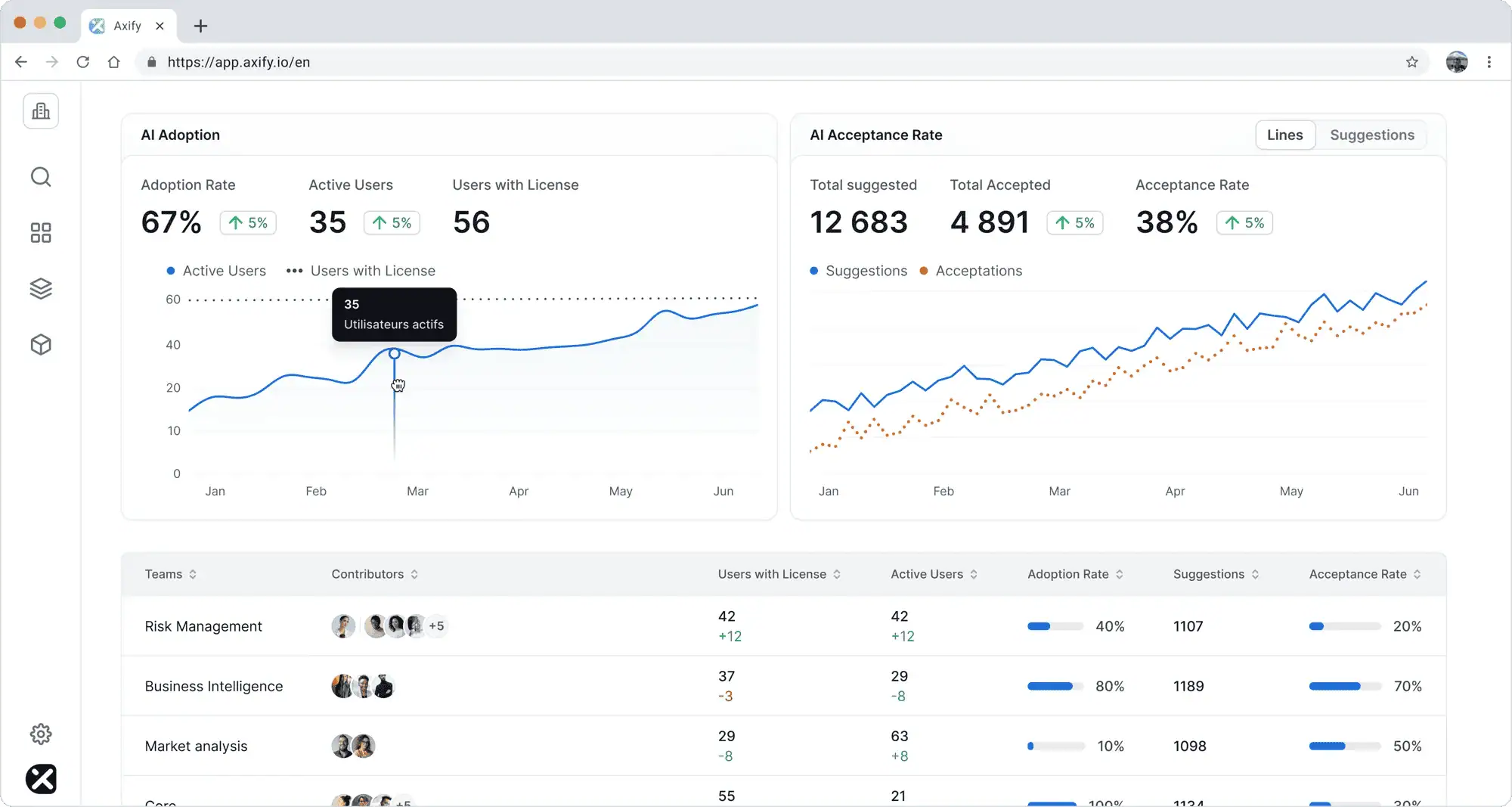
This feature also compares your team’s performance before and after you get AI support from Claude. Basically, it compares differences in cycle time, throughput, rework, PR quality, and other essential metrics before and after AI adoption.
Axify also lets you analyze trends by team, project, or line of business. That matters because Claude Code typically performs differently across task types, repositories, and team contexts.
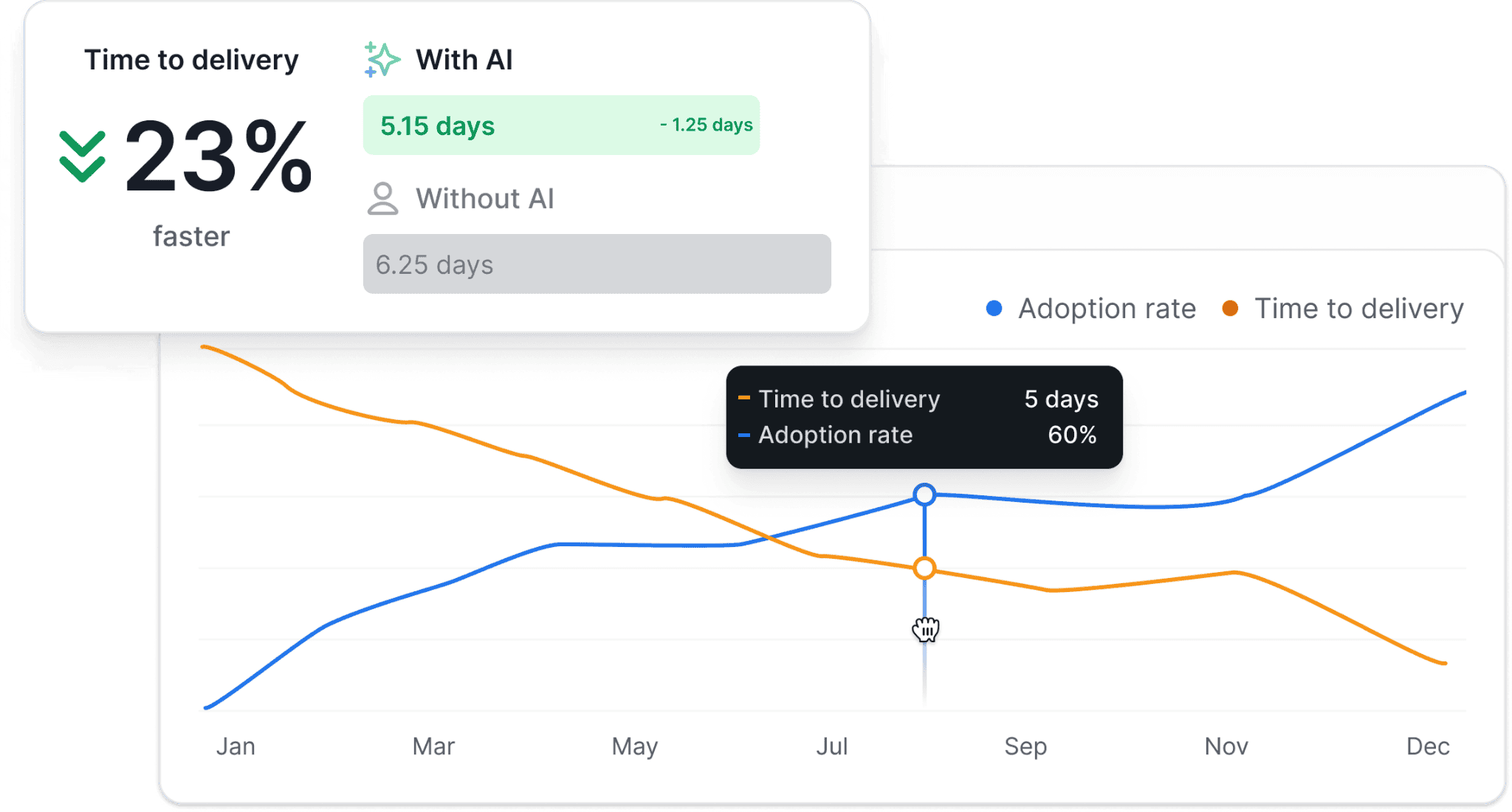
This helps you see where Claude Code works best. For example, it may perform well on contained refactors or test cleanup, but require more guardrails for legacy feature work, security-sensitive changes, or tasks with unclear acceptance criteria.
Cost is the next layer.
Axify AI cost insights let you compare Claude Code spend with delivery data. That makes the question more concrete: did higher Claude Code spend line up with more merged PRs, resolved tickets, and shorter delivery time, or did it create more output that stayed in review?
Axify MCP lets you query Axify data from MCP-compatible AI clients instead of manually checking several dashboard views. Claude is one supported example, but the same approach can work with other MCP-compatible tools.
For Claude Code measurement, that means you can ask questions such as:
“Which teams used Claude Code on the most completed tasks last month, and how did rework change?”
or:
“Compare Claude-assisted refactoring work with non-Claude refactoring work by review duration, merge rate, and defects.”
Axify MCP pulls from Axify’s connected engineering data, including Jira, Azure DevOps, GitHub, GitLab, Bitbucket, and AI tool integrations. It also follows your existing Axify permissions. In v1, it is read-only, so leaders can query delivery data without giving the AI client write access to the workspace.
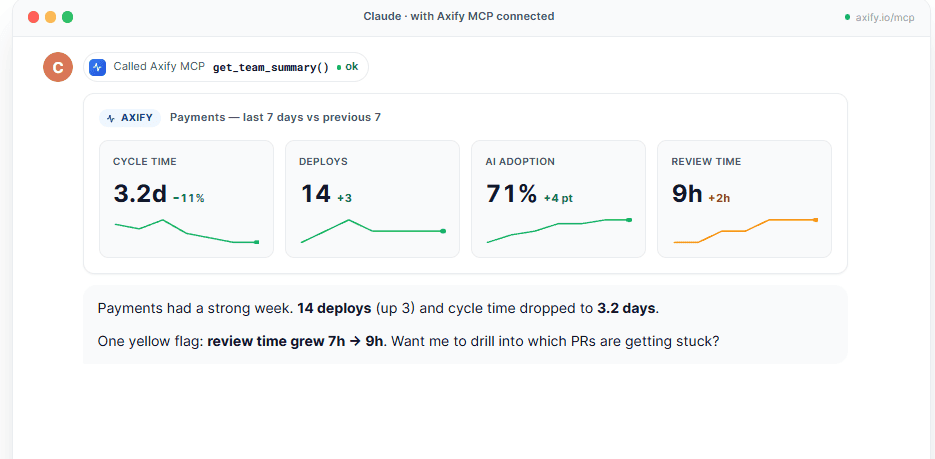
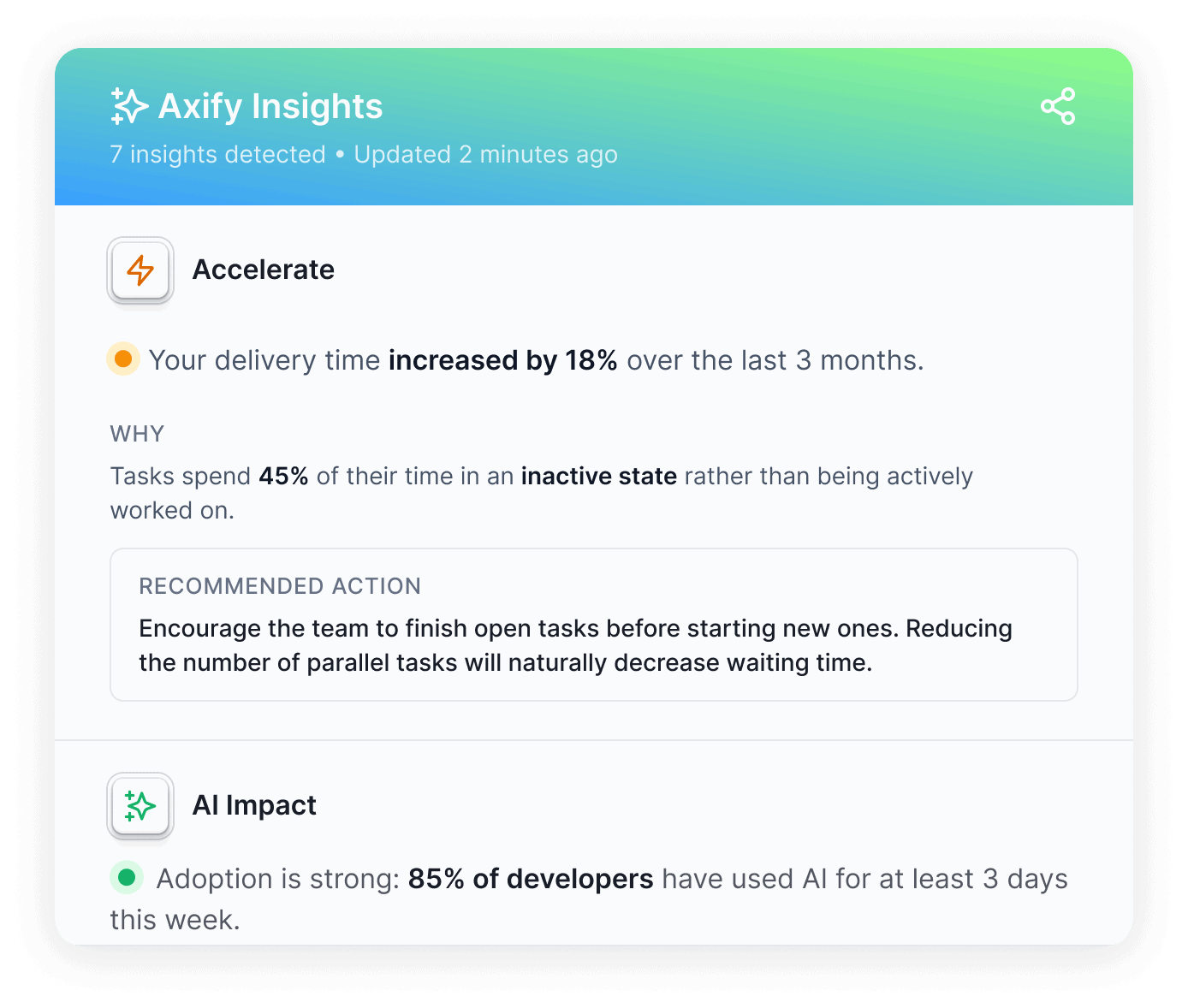
Axify Intelligence helps turn Claude Code measurement into workflow decisions. It analyzes your delivery data, surfaces relevant insights, explains likely causes, and recommends actions based on your team’s actual context.
For Claude Code, this matters because the impact is rarely just “faster” or “slower.” An agent may resolve certain task types faster, but need better context, tighter task boundaries, stronger validation, or different review rules.
Axify Intelligence can help you identify patterns such as:
From there, Axify Intelligence suggests practical next steps, such as improving task scoping, adjusting review ownership, reducing WIP, strengthening validation rules, or narrowing Claude Code use to proven task types. You can then apply recommended changes directly from the Axify platform.
Start your free trial to see how Axify connects Claude Code usage to your delivery metrics and better engineering decisions.
