AI
15 minutes reading time

AI is already changing how your teams plan requirements, write code, review pull requests, run tests, deploy changes, and respond to incidents.
But faster output from AI coding assistants does not automatically mean faster delivery. Review queues, QA capacity, security checks, and release approvals can still slow work after code is generated.
That is the real leadership problem behind AI SDLC. You need to see where AI reduces waiting time, where it adds validation work, and whether delivery stability changes after adoption.
So, in this article, you’ll see how AI-assisted development changes each SDLC stage. You’ll also learn which delivery signals to compare before and after AI adoption (+ the best tools for this).
P.S. Try Axify to connect your AI usage with cycle time, review time, testing trends, rework, rollback signals, and DORA metrics. It helps you see whether the AI tools you implemented impact your software delivery for the best (or not).
| Traditional SDLC stage | How AI changes it | Main benefit | New risk/constraint |
| Requirements | Synthesizes feedback and drafts specs | Faster scoping | Weak context/wrong assumptions |
| Design | Accelerates prototyping and architecture exploration | Faster iteration | Shallow design decisions |
| Development | Code generation and refactoring | Higher coding speed | Review bottlenecks |
| Deployment | Smarter release checks and rollback support | Safer releases | Governance gaps |
| Maintenance | Anomaly detection and remediation suggestions | Faster issue detection | Noisy or misleading signals |
The software development lifecycle, or SDLC, is a theoretical model that explains how your software moves from an idea to running code in production.
It’s not always one linear process, with strict steps that every team follows the same. Instead, it gives your team a common understanding of the tasks typically needed in software development:
Each phase creates a decision point. This means what should be built, how it should be built, how it will be validated, and how production risk will be handled.
In an AI-native software development lifecycle, those phases still exist. The difference is that AI changes how the work inside each phase progresses and how long it takes to complete.
So, let’s examine that next.
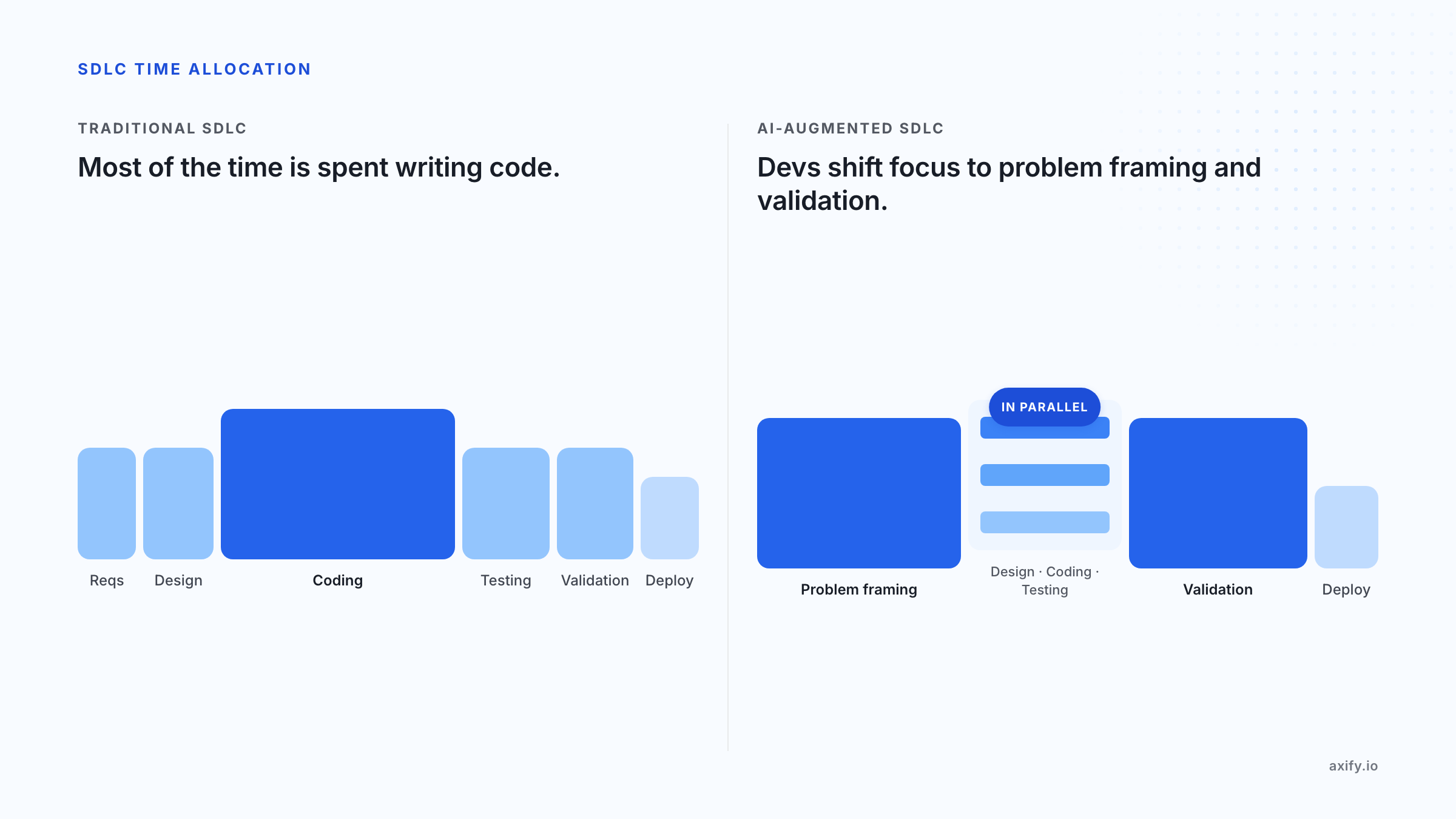
Traditional SDLC work usually concentrates effort in coding. With AI, more of your dev focus shifts to problem framing, review, testing, and validation.
Here’s what that looks like in practice:
Let’s discuss those changes in more detail for each SDLC stage:
AI changes planning by helping you turn scattered inputs into usable requirements faster. Natural language processing or NLP can summarize customer calls, support tickets, analytics notes, and stakeholder comments. Meanwhile, predictive analysis can flag delivery risks based on similar past work.
Market trend analysis can also help product teams compare internal requests with external demand before the scope is locked.
From our experience, AI makes this SDLC longer.
Developers now need to spend more time defining the problem clearly before implementation starts. That means sharper requirements, better acceptance criteria, clearer constraints, and stronger specs.
Even so, this use is catching momentum.
A 2025 practitioner study surveyed 55 software professionals and found that 58.2% already use AI in requirements engineering. At the same time, 69.1% view its impact as positive or very positive.
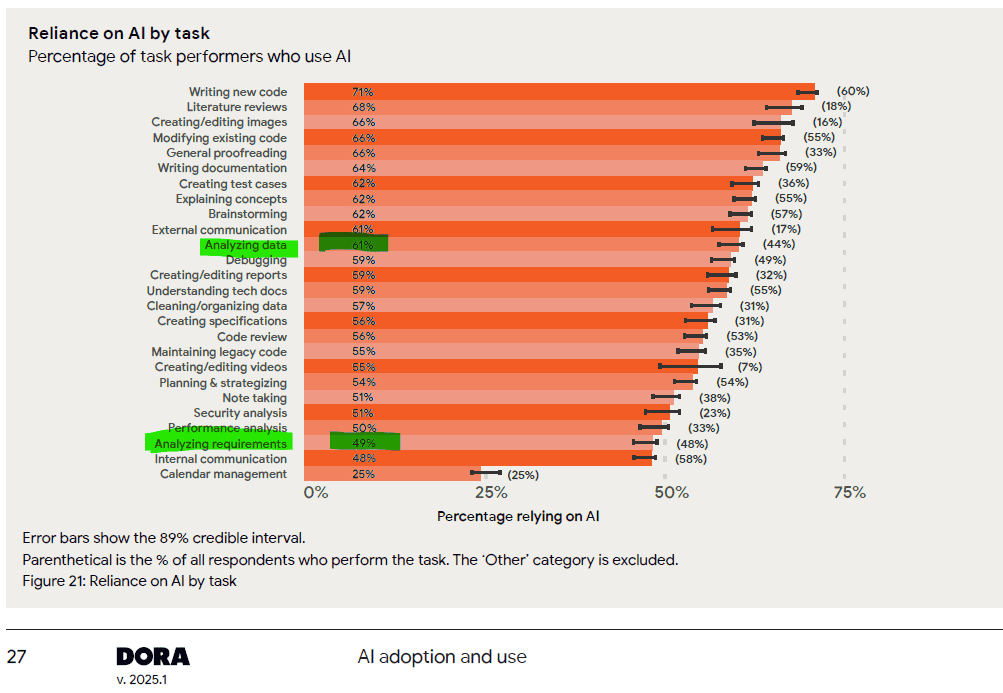
That’s not far from what the DORA 2025 report suggests; 61% of developers use AI for data analysis and 49% of them for requirement analysis.
When requirements and specs become the main input for AI-assisted implementation, design starts speeding up. AI can help with architecture optimization, UI/UX options, flow diagrams, prototypes, and code design patterns.
But those outputs need review against your actual system constraints. This includes service ownership, latency needs, data access, scalability, security, and long-term maintenance.
And this is where senior engineers matter more. Their job shifts from drawing every option manually to judging whether the proposed design fits your system, your team’s skills, and your future change path.
Coding is where AI adoption is most visible. This is because code generation, code completion, AI pair programming, and code review automation can reduce the time spent producing first drafts.
Tools like GitHub Copilot can suggest functions, refactor code, draft tests, and summarize pull requests. In fact, a controlled study on GitHub Copilot found that developers with Copilot completed a JavaScript task 55.8% faster than developers without it.
That can be useful, but it also changes the pressure point.
The leadership question is whether that saved coding time reduces cycle time or simply moves more work into review and QA.
Faster coding makes testing more important because the system now receives more generated output that still needs proof.
AI tools can support unit testing, regression testing, UI testing, visual testing, test maintenance, and bug prediction. Machine learning can also help identify risky areas based on previous defects, changed files, ownership history, or recurring failure patterns.
That can shorten the testing phase because AI helps generate test cases, update tests, detect risky areas, and run broader checks with less manual effort. But it does not remove the need for validation.
Validation becomes more important (and thus longer) because your team still needs to confirm that the tests:
A test can pass while the feature still solves the wrong problem or misses an important edge case.
A 2025 systematic review found that AI test-case generation studies reported accuracy rates of 93.82% and 98.08% in test-case generation. That level of output can help your team expand test coverage, but reviewers still need to check whether the tests validate real product behavior, security rules, and failure paths.
This is why QA should shift earlier into the workflow instead of becoming the last overloaded checkpoint.
After testing, AI changes deployment by adding more intelligence to release checks, pipeline feedback, rollback planning, and incident response. CI/CD automation can use build results, test failures, configuration changes, and performance signals to catch release risk earlier.
But automated deployment support still needs governance. Someone must define which changes can move through a fast path, which changes require manual approval, and which rollback criteria matter for production. Without those rules, faster release checks can create inconsistent decisions across teams.
Maintenance becomes more data-driven when AI reads logs, traces, alerts, incidents, and deployment history. Pattern detection can show repeated failure paths, while anomaly identification can flag unusual behavior before users report a problem.
Self-healing systems can restart services, adjust resources, or trigger runbooks for known issues. But these systems can also create noisy alerts or suggest fixes without enough business context.
That is why code maintenance still needs human judgment. Your team needs to verify whether the suggested fix solves the root cause, affects related services, or creates maintenance risk in the next release.
This leads us to the benefits that you can see in real workflows.
AI creates value when it improves a certain SDLC stage, streamlining workflow and increasing productivity. But it doesn’t add too much value when it simply adds more generated output.
Besides, one of the lessons in the DORA State of DevOps report in 2025 is this: AI is an amplifier. If your team already has strong engineering practices, AI can improve productivity and make the workflow more efficient. It can lead to:
But if your process has weak requirements, large PRs, slow reviews, poor testing, or unclear ownership, AI may simply increase output while increasing review load, rework, and delivery risk.
AI creates pressure wherever your workflow cannot absorb faster output. Below, we discuss the main challenges you need to solve to streamline your AI-driven development life cycle.
Poor context appears when large language models draft requirements, code, or tests without enough product, system, or customer detail. Stack Overflow’s 2025 Developer Survey found that 46% of developers distrust the accuracy of AI tools.
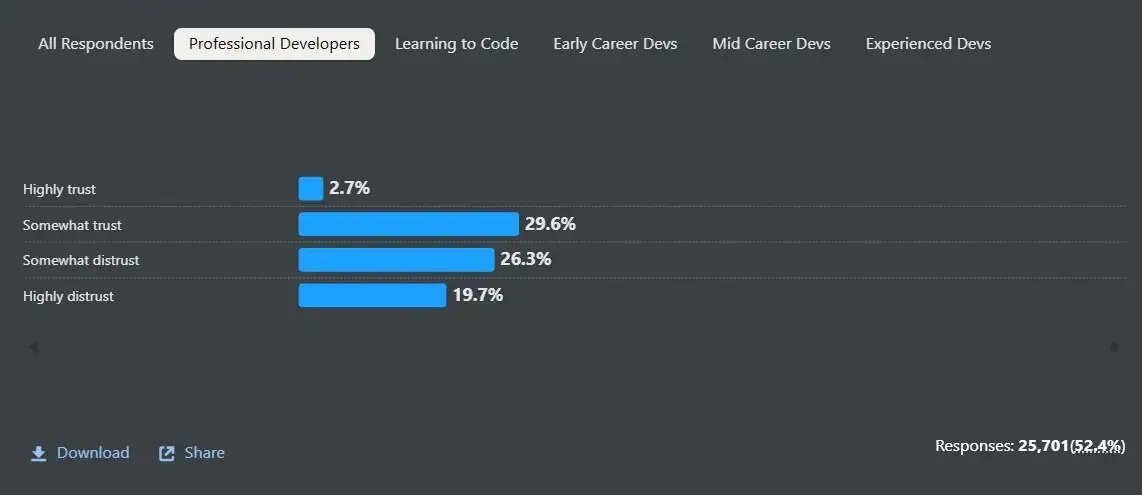
Source: Stack Overflow’s 2025 Developer Survey
By contrast, the DORA 2025 report shows that 30% of developers trust the AI-generated output little or not at all. If you include those who only “somewhat” trust it, you get to 76%.
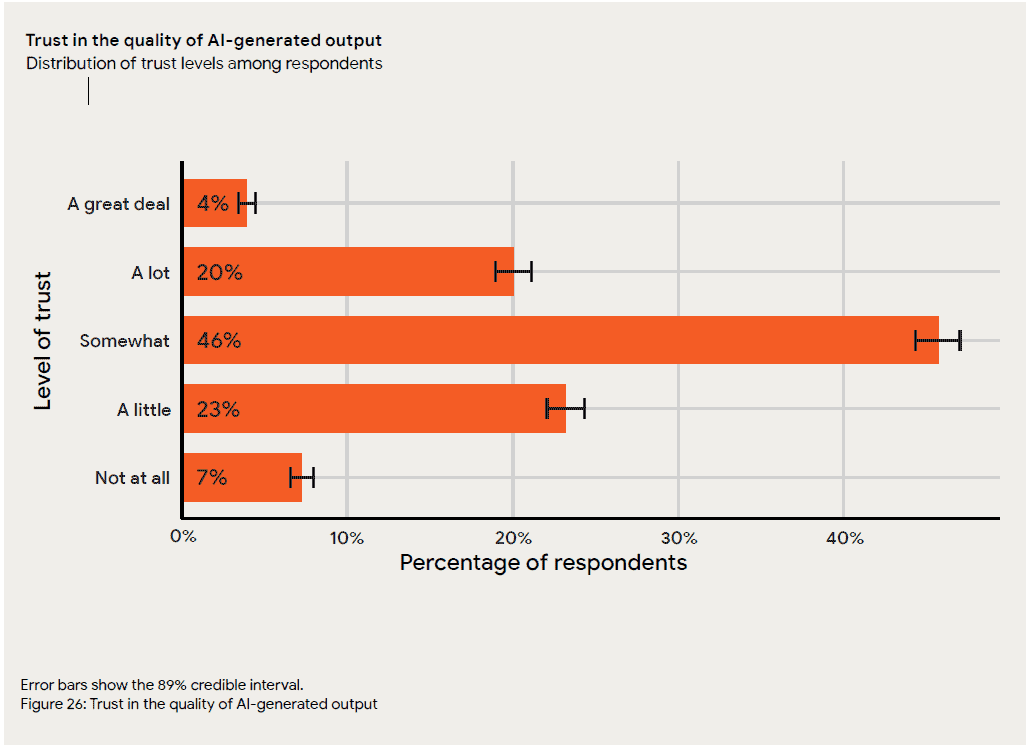
This explains why your team still needs a stronger system context and workflow feedback.
Fix: Feed AI tools clearer specs, repo context, architecture rules, and past review comments so outputs fit your delivery environment.
Once code generation increases, review queues can become the new constraint.
Sonar’s 2026 State of Code report found that 95% of developers spend at least some effort reviewing, testing, and correcting AI output, while 59% describe that effort as moderate or substantial. That means teams need clearer review rules for AI-assisted work.
Fix: Use risk-based triage, smaller PRs, automated checks, and explicit rules for which AI-generated changes need senior review. For example, low-risk boilerplate changes may follow the standard review path, while security-sensitive, customer-facing, or architecture-level changes should get deeper review.
Faster coding creates less value if QA waits until the end of the workflow. Sonar also found that 82% of developers agree that AI helps them code faster, but 96% do not fully trust that AI-generated code is functionally correct. So testing needs to move earlier in the SDLC.
Fix: Add adaptive validation, generated test suggestions, and QA review for risky user paths before PRs pile up.
AI-generated code can introduce security challenges that are easy to miss during speed-focused adoption. In fact, Veracode found that 45% of AI-generated code tests introduced risky security flaws.
Fix: AI governance needs to include policy checks, dependency scanning, secrets detection, and human review for sensitive flows. That’s why you should implement DevSecOps best practices. Make sure your security checks run in the same CI/CD workflow as builds, tests, and deployment gates, not as a separate review after the work is finished.
More prompts, licenses, or accepted suggestions don’t prove delivery impact. The real question is whether you see a shorter cycle time, lower review delay, fewer defects, or more stable deployments after AI adoption.
Fix: Track AI usage next to software delivery metrics. Axify helps you compare those metrics before and after AI adoption and make better business decisions. But we’ll discuss that below.
Teams also need help learning how to use the new AI tools productively; otherwise, your investment won’t pay off. For example, Pluralsight’s 2025 AI Skills Report found that 65% of organizations abandoned AI projects because of a lack of AI skills among staff. At the same time, 38% abandoned multiple AI initiatives for the same reason.
Fix: Your leadership programs should teach prompting, validation, review habits, and escalation rules.
Next, it helps to see how teams usually adopt AI in practice.
AI is being adopted progressively in software teams.
One useful way to frame this progression is Dan Shapiro’s 2026 AI autonomy model. It maps AI-assisted development across five levels: from autocomplete and discrete tasks, to multi-file changes, AI-directed feature work, spec-to-deliverable workflows, and finally “dark factory” autonomy.
|
Horizon |
Level | Label | Description |
| Individual Productivity | 0 | Autocomplete | AI suggests the next line. The developer still writes everything. |
| 1 | Discrete Tasks | The developer assigns a specific task and reviews the output. | |
| 2 | Multi-file | AI manages changes across multiple connected files. | |
| Transition | 3 | AI Direction | The developer directs and reviews at the feature level, not line by line. |
| Agentic Autonomy | 4 | Spec → Deliverable | The developer writes a spec, AI builds and tests. Human oversight remains. |
| 5 | Dark Factory | Maximum autonomy. Applicable in certain contexts — not a universal target. |
From Axify’s perspective, the practical goal for most enterprise teams is not to jump straight to full autonomy. It’s to move deliberately from level 1–2 usage, where AI improves individual productivity, toward level 3–4 workflows, where AI supports feature-level execution while humans still own architecture, validation, governance, and release decisions.
Experimental teams use AI in small, personal ways. Developers rely on autocomplete, prompt-based snippets, or one-off code explanations, but the workflow around tickets, pull requests, testing, and deployment stays mostly the same.
This maps to the early levels of the AI development lifecycle, where AI helps with discrete tasks but does not change how the team delivers.
Acceleration-first teams move into multi-file edits, code generation, and AI pair programming. Coding gets faster, but review, QA, and release checks still depend on the same manual process.
This is where many teams feel they’re making progress without actually seeing that progress reflected in shorter delivery times. After all, more code reaches review, but the review capacity has not changed.
Workflow-integrated teams connect AI to coding, testing, and review. At this stage, AI starts supporting test generation, pull request summaries, risk checks, and review triage.
This is closer to level 3, where developers direct AI at the feature level and spend more time validating design choices, edge cases, and system fit. Axify can be useful for your team here because you can see if AI usage affects cycle time, review time, defects, and deployment stability.
AI-native teams are the realistic target for most enterprise software teams. This aligns with level 4: spec to deliverable, where AI can build and test more of the work, but human oversight remains.
Level 5, sometimes called a “dark factory,” may work in narrow startup contexts. But it is not the right default for systems with security, compliance, customer risk, and legal accountability.
A better AI-native approach keeps humans responsible for architecture, validation, governance, and final delivery decisions while AI handles more execution across the workflow.
After you understand your adoption pattern, measurement becomes the next decision point. AI adoption only becomes useful at scale if you can compare your productivity, velocity, and software quality before and after AI entered the process.
So, start with data collection from the tools your teams already use, then connect AI activity to the delivery flow. Axify’s AI Adoption and Impact feature supports this by showing which AI tools your teams use, how often they use them, and whether accepted AI suggestions line up with shorter delivery times.
That matters because usage alone can tell you who is active. But it cannot tell you whether work reaches production faster or with fewer delivery risks.
With this feature, you can track these signals together:
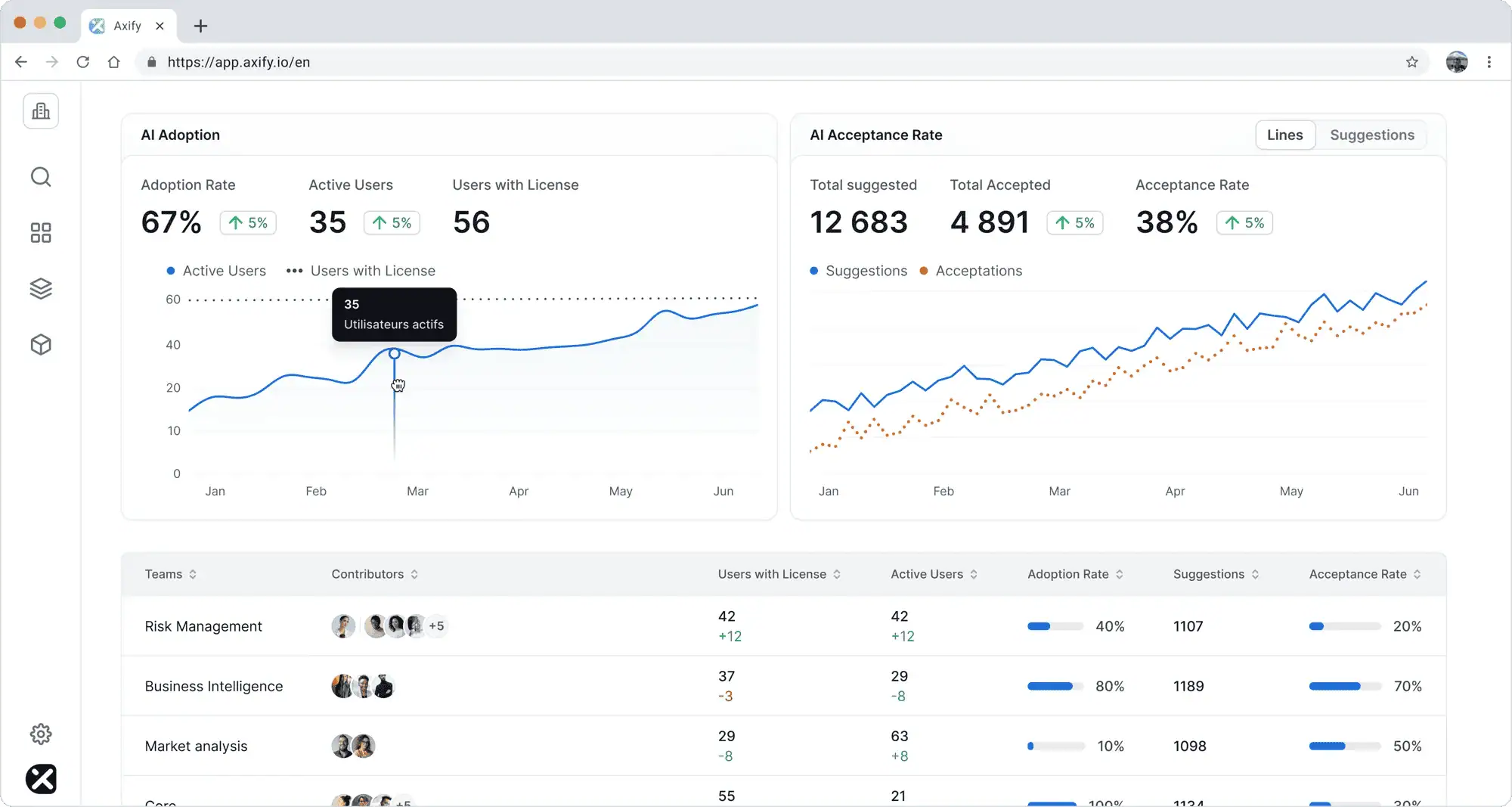
This comparison should stay at the team, project, or portfolio level. Don’t compare individual developers with each other. A person’s cycle time can be affected by task complexity, reviewer availability, dependencies, QA queues, release timing, or production incidents they don’t control.
Axify MCP can also help you measure AI’s impact on your SDLC by letting you ask natural-language questions inside any MCP-compatible AI assistant (like Claude or Cursor). For example, you can ask how your engineering metrics changed after AI adoption without manually switching between dashboards.
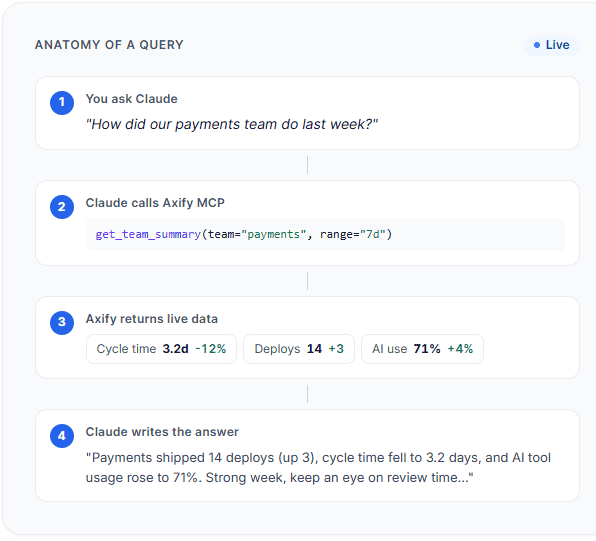
You can also ask more specific questions, such as which team has the lowest cycle time and the lowest AI adoption so you can identify different kinds of useful patterns.
Pro tip: Read our guide on AI performance metrics if you want a deeper breakdown of what to track. It explains how to separate AI activity from delivery change without turning measurement into developer scoring.
AI tools now sit across the delivery chain, but each category solves a different problem. These are the main tool types you can implement across your SDLC.
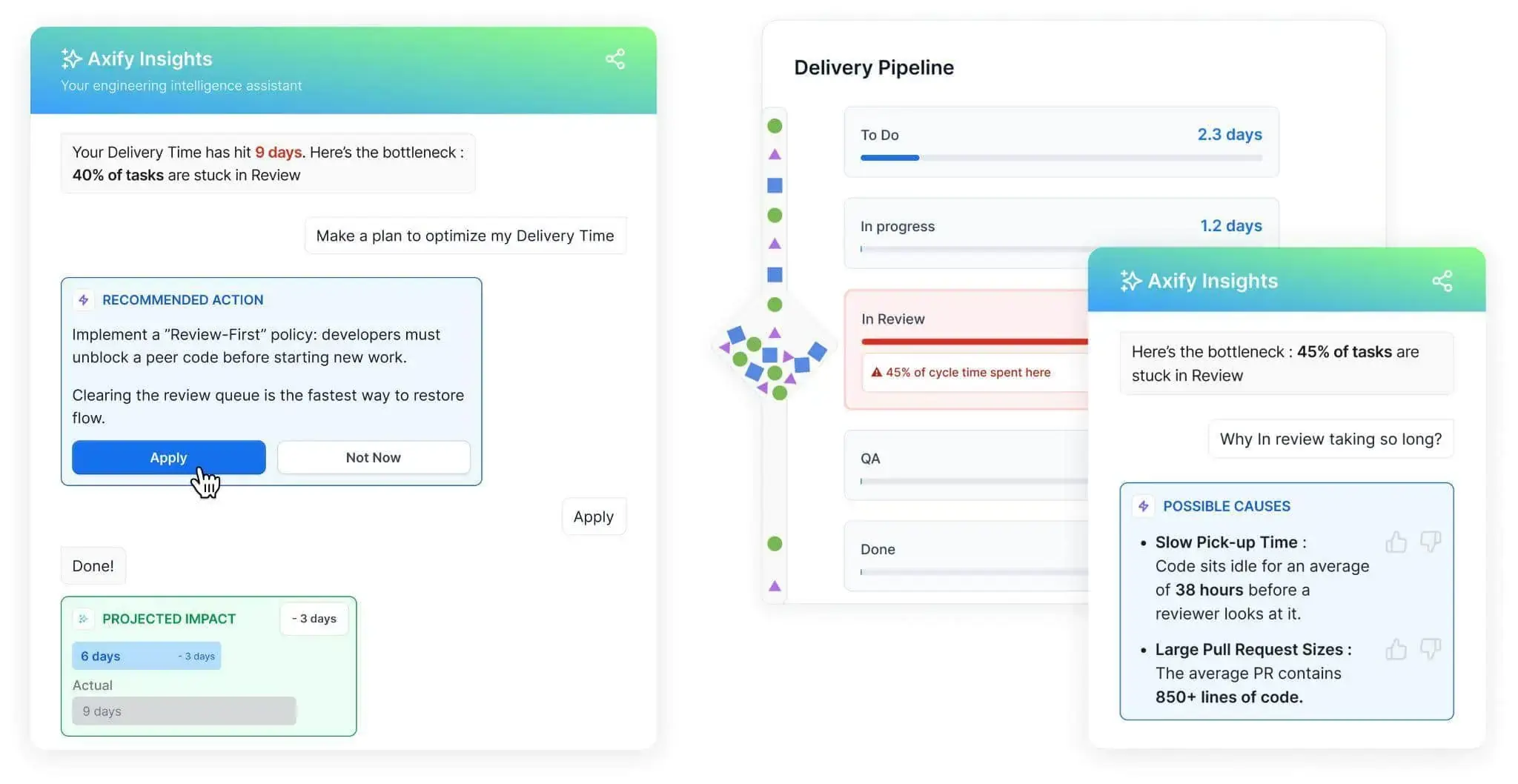
Axify Intelligence is the best fit when you need to connect AI adoption to delivery performance. It analyzes your delivery data, identifies bottlenecks, explains likely causes, and recommends workflow changes that you can make to fix your issues.
For example, if review time increases after AI adoption, Axify can point to larger pull requests, slower pickup time, or too much work in progress. That gives you a team-level decision: adjust review ownership, reduce PR size, or change WIP limits before AI-generated output creates more delay.
Planning tools use AI to summarize stakeholder notes, support tickets, customer calls, and backlog items. Jira with Atlassian Intelligence, IBM Watson NLP, and similar AI-powered solutions can draft requirements or user stories faster. Still, product and engineering need to validate scope, edge cases, and acceptance criteria before development starts.
Design tools such as Figma AI, Uizard, Lucidchart AI, and Miro Assist can create mockups, diagrams, user flows, and architecture options. They are useful for early alternatives, but senior engineers still need to review system boundaries, data flow, performance risk, and ownership.
Coding assistants include GitHub Copilot, Amazon Q, Google Gemini Code Assist, Tabnine, and Sourcegraph Cody. They support code generation, completion, refactoring, documentation, and PR summaries. The risk is that faster code output can increase review and testing load.
Testing tools such as Testim, Applitools, Functionize, Katalon Studio, BrowserStack, and Mabl can support test creation, visual testing, regression checks, and bug prediction. You can use them to expand validation earlier in the workflow rather than to remove QA judgment.
CI/CD and deployment tools such as CircleCI, GitHub Actions, Jenkins, Harness, Azure DevOps, GitLab, Ansible AI, and Terraform AI can support pipeline fixes, release checks, rollback planning, and infrastructure as code workflows.
Observability tools such as New Relic AI, Dynatrace Davis AI, Datadog AI, Splunk AI Ops, PagerDuty, and incident.io can support anomaly detection, incident triage, and remediation suggestions. The goal is faster diagnosis with human review for production risk.
AI changes where engineering effort goes. Before AI-generated output exceeds your team’s ability to review, test, and release it safely, adjust the parts of your SDLC that absorb that extra work.
Faster code generation can create more pull requests than reviewers can handle. Large AI-assisted PRs can also make risky changes harder to spot and delay merge decisions.
Set clear PR size rules. For example, ask teams to keep each PR focused on one change, split large AI-generated updates into smaller reviewable parts, and define when a PR needs senior review. Low-risk changes can follow a faster path, while changes involving architecture, security, data access, or high-impact services need deeper review.
AI can generate code, tests, and documentation quickly, but the output still needs proof. Add automated tests, formatting checks, security scans, and review agents that run before merge or deployment. This gives AI-generated work a feedback loop and helps your team catch errors before QA becomes the final overloaded checkpoint.
AI output should be measured against delivery data because faster code only matters if the full system improves. Compare AI-assisted work with cycle time, review time, defect trends, rollbacks, deployment frequency, and failed deployment recovery time. These metrics show whether AI is shortening delivery, overloading reviewers, reducing quality, or increasing production risk.
Governance should define where AI can assist, where human approval is required, and which data cannot enter external tools. For example, generated code that touches authentication, payments, privacy, or infrastructure should follow stricter review and scanning rules. This keeps adoption practical without slowing every change.
Senior engineers should spend less time writing first drafts and more time defining constraints. Their work shifts to architecture fit, system boundaries, scalability, error handling, observability, and long-term maintenance. AI can speed execution, but senior judgment decides what should be accepted, changed, or rejected.
From our experience, tool access is not enough. Teams need to learn how to write useful specs, break work into AI-friendly tasks, review generated output, and route risky or unclear changes to the right reviewer. The goal is a team that can direct AI safely, validate its work, and keep delivery stable.
The next phase of AI in the SDLC will not be about adding more tools to the same workflow. It will be about connecting planning, coding, testing, deployment, and operations into tighter validation loops.
So, here are the changes you should watch:
AI changes the SDLC by moving pressure from writing code to framing problems, validating output, and protecting release stability. Faster coding only matters if your software delivery accelerates, too, without decreasing in quality.
Axify helps you compare AI adoption with delivery data across teams, projects, and time windows, so you can see where AI reduces delay and where it creates new constraints. More importantly, it helps you make good engineering decisions based on that data.
Book a demo with Axify today to see exactly how we can improve release confidence and turn faster software delivery into a competitive advantage.
Most teams start with coding because it delivers immediate speed gains. However, applying AI to testing or code review creates more balanced improvements, since those stages frequently become bottlenecks once coding accelerates. The best starting point depends on where your current delivery process is bottlenecked.
AI can generate large volumes of code quickly, which increases the risk of inconsistent patterns or hidden complexity. To prevent this, teams need better requirement analysis, strong review guidelines, automated validation, and clear architectural standards. Without these controls, faster output can lead to long-term maintenance issues.
Smaller teams tend to see faster gains because they have fewer process constraints and can adopt AI tools more quickly. Large enterprises may have more resources to roll out AI at scale, but they also need stronger governance. Without clear review rules, security controls, quality checks, and impact measurement, AI can increase output while creating more delivery risk.
AI can automate specific tasks within each phase, such as generating code or creating test cases, but it does not replace the need for architectural decisions, trade-offs, or accountability. Instead of removing stages, AI changes how work is performed within them.
Start with a narrow use case where impact is easy to observe, such as code reviews or test generation. Introduce AI alongside existing workflows instead of replacing them, then track how key delivery metrics change during the next few weeks. Once you see consistent improvements, expand usage to adjacent stages. This approach avoids introducing new bottlenecks before your system is ready to absorb the increased output.