AI
19 minutes reading time

Most GitHub Copilot vs. Claude Code comparisons stop at official features. That helps for a quick scan, but it leaves a gap when your team needs to decide how AI should fit into their real, day-to-day, engineering work.
According to the 2025 Stack Overflow Developer Survey, 56.4% of professional developers either don’t use AI for complex tasks or believe it’s ineffective at handling them. The same survey found that 69% don’t plan to use AI for project planning, while 76% don’t plan to use it for deployment and monitoring.
Those numbers raise an important question.
Different AI tools excel at different parts of the software development lifecycle. A solution that works well for code generation may be less effective for repository-wide changes, planning, review workflows, or operational tasks.
That’s why comparing GitHub Copilot and Claude Code requires understanding how each tool fits into your engineering processes, governance requirements, and delivery goals.
In this article, you’ll see how Copilot and Claude Code compare across all of these dimensions.
You’ll also see when to choose one tool, when to use both, and how to measure whether either one improves engineering performance.

If you’re short on time, these are the practical differences you should understand first:
| Category | GitHub Copilot | Claude Code |
| Best fit | GitHub-native, IDE-first assistance | Deeper task execution and codebase exploration |
| Main workflow | Inline help, chat, PR support, cloud agent | Terminal/IDE agent work, planning, file edits, commands |
| Adoption | Easier for GitHub and VS Code teams | Stronger setup discipline is required |
| Governance | More managed through GitHub and enterprise controls | More flexible, with more permission and tool-access decisions |
| Measurement risk | Licenses may look like adoption | Usage may grow without cost and outcome visibility |
GitHub Copilot is GitHub’s AI coding assistant for writing, editing, reviewing, and maintaining code inside the tools that many developers already use. It started with inline suggestions, then expanded into chat, IDE agent mode, pull request support, model selection, pull request summaries, and the Copilot cloud agent.
The tool’s strongest advantage is its fit with GitHub, IDEs, PRs, branches, and enterprise controls. That makes it easier for your team to add AI into the existing development workflow without asking developers to rebuild their day.
Its scale also matters for leaders. Large-scale adoption can be a useful signal when you’re evaluating platform maturity, enterprise readiness, and long-term vendor investment.
And GitHub Copilot definitely delivers:
Microsoft said in its FY2025 Q4 earnings call that GitHub Copilot had 20 million users, Copilot Enterprise customers grew 75% quarter over quarter, and 90% of the Fortune 100 used GitHub Copilot.
Pro tip: For a deeper measurement setup, read our guide to GitHub Copilot metrics before you compare tool impact across teams.
Claude Code is Anthropic’s agentic coding tool for planning changes, reading a codebase, editing files, running commands, and working through software tasks from the terminal or IDE. It supports structured workflows through CLAUDE.md, hooks, skills, subagents, and MCP.
The tool’s strongest advantage is deeper autonomous work on larger coding tasks. Claude Code can inspect a repository, explain unfamiliar logic, propose a plan, make changes, run tests, and adjust based on feedback. That gives it stronger agentic capabilities when the task needs more than a small suggestion.
Anthropic’s internal study of 132 engineers and 200,000 Claude sessions also shows that developers use Claude more each year. Respondents reportedly used Claude for about 60% of their work, up from about 28% a year earlier.
That increase likely reflects a combination of improving model capabilities, greater trust in AI-assisted workflows, and developers learning where agentic tools can add the most value.
Pro tip: Read our guide to measuring Claude Code impact before you compare tool impact across teams.
From our point of view, any useful tool comparison starts with how each tool changes your daily work. Below, we discuss the main differences engineering leaders should review before choosing between GitHub Copilot and Claude Code:
Copilot still feels closest to a pair programmer inside your editor. It helps while developers write functions, ask questions, update tests, and move through familiar IDE work. That workflow can suit teams that want broad adoption with minimal process change because developers remain in control of implementation decisions.
Claude Code feels closer to delegating a scoped task to an autonomous agent. A developer can ask it to investigate a bug, inspect related files, create a plan, change the implementation, run checks, and explain what changed. That makes it stronger for multi-file edits where the work depends on understanding several parts of the repository.
The tradeoff is autonomy. Copilot generally keeps developers in the driver's seat, while Claude Code can take ownership of larger portions of a task.
Current research adds an interesting layer to this comparison.
A 2026 survey of more than 900 software professionals found that Claude Code had become the most-used AI coding tool among respondents and also the most-loved tool overall, with 46% of respondents naming it as their favorite.
Company size adds another layer to the decision.
That pattern suggests the choice could be less about which tool is objectively better and more about how much autonomy, flexibility, and organizational change a company is willing to support.
Copilot fits teams that already operate in GitHub, VS Code, JetBrains IDEs, and PR-based collaboration.
Developers can use it during normal coding, ask questions in chat, move from issue context to implementation, and keep work inside the systems they already know. That makes rollout easier because the tool meets developers where they already spend time.
Claude Code fits developers who are comfortable with terminal-first workflows and explicit task control.
It works well when a developer wants to explore the repository, create a plan, approve steps, run commands, and iterate through the task. So, it may appeal more to senior developers, platform teams, and engineers who already use command-line automation heavily.
Claude Code gives teams more explicit ways to shape context.
A CLAUDE.md file can define repository rules, setup commands, architectural notes, test instructions, and preferred conventions. Developers can also use planning steps, compacting, subagents, and clearer prompts to keep larger tasks under control.
Copilot has a different advantage.
It can use GitHub repository context, issues, PRs, IDE files, and team-level configuration to support work inside your existing delivery system. Features such as Copilot Memory also improve consistency because the tool can reinforce team conventions, coding preferences, and other recurring patterns.
Remember: Of course, both tools’ performances decline when instructions are vague, the context window is overloaded, or the repository has unclear boundaries. This is especially true in a legacy codebase where old patterns, partial migrations, and inconsistent tests make inference harder.
The Stack Overflow survey we cited above supports this concern: 66% of respondents said the most common AI problem was AI solutions that are “almost right”. Also, 45.2% said debugging AI-generated code is the more time-consuming task now.
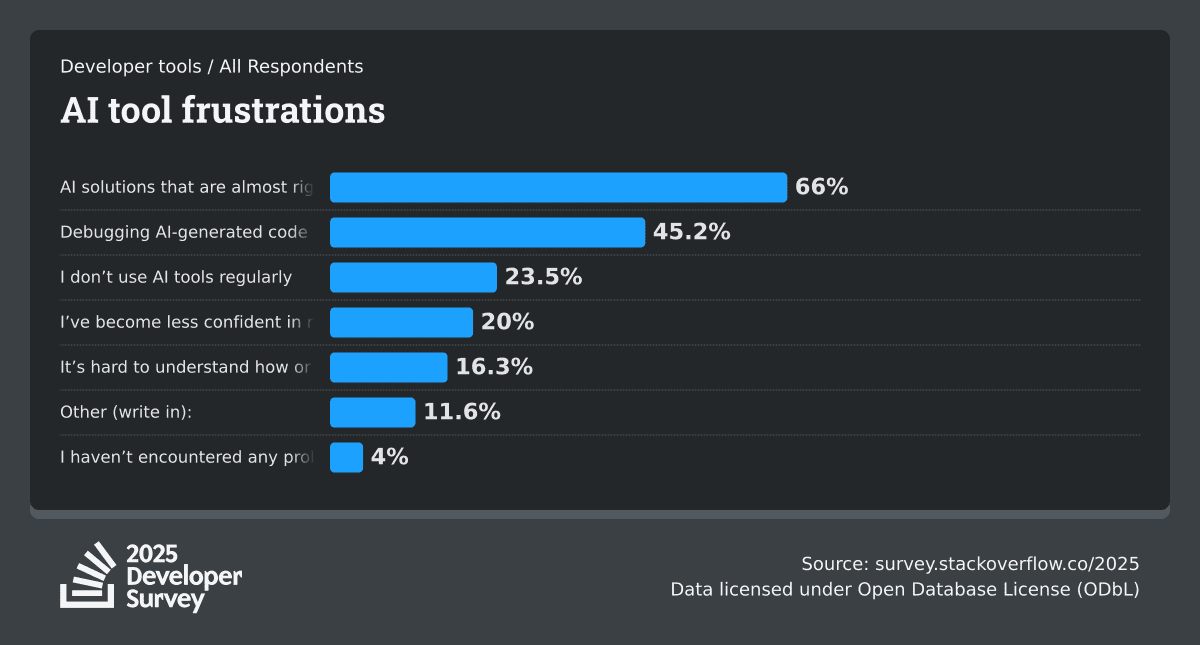
These findings suggest that successful AI adoption depends as much on engineering practices and workflow design as it does on model quality. So whether you choose GitHub Copilot or Claude Code, you need clean context and strong review practices to get reliable results.
Claude Code is strongest when the developer can separate exploration, planning, and implementation.
A practical workflow is Explore, Plan, Implement:
Copilot is moving in the same direction through its cloud agent. It can research a repository, plan changes, create a branch, and prepare PRs for review. This makes Copilot more useful for issue-to-PR work than older comparisons suggest. Still, the experience feels more managed because the workflow is tied closely to GitHub.
As such:
In Anthropic’s internal study cited above, the number of autonomous actions Claude could take in a session increased from 9.8 to 21.2. Meanwhile, human interventions dropped by 33%, from 6.2 to 4.1. Task complexity also rose from 3.2 to 3.8 on a 5-point scale, which suggests agent teams are becoming more useful for longer technical work.
Copilot's biggest advantage is its integration with GitHub. Teams can adopt it without making major changes to how code moves through pull requests, reviews, approvals, and deployment pipelines.
Claude Code can also work with Git repositories and development tools. It can create branches, inspect diffs, run tests, and prepare pull requests. However, your teams need clearer guidelines around command execution, validation requirements, and review responsibilities because the tool operates more autonomously.
For code review, the key question is whether AI reduces engineering effort overall or simply shifts work from implementation to validation.
GitHub's original controlled experiment found that developers completed a coding task 55% faster with Copilot. That can increase development throughput, but another study found that after Copilot adoption, experienced developers reviewed 6.5% more code and saw a 19% drop in original code productivity.
Anthropic reports a similar pattern at a larger scale. The company says code output per engineer increased by 200% over the previous year, making code review a growing bottleneck. Before introducing its dedicated Claude Code review system, only 16% of pull requests received substantive review comments. That figure later increased to 54%.
The takeaway is similar for both tools. Faster code generation creates value only when review processes scale alongside it. Otherwise, teams risk replacing implementation time with review and validation work.
Claude Code gives teams more flexibility through commands, hooks, permissions, skills, subagents, and MCP. This is useful when your team wants custom automation around local setup, test commands, documentation updates, release checks, or internal engineering workflows. It also means the team must document what the tool is allowed to do.
Copilot gives teams a more managed structure. Agent mode, custom instructions, GitHub-native automation, enterprise policy controls, and Copilot Conversations fit well when leaders want AI inside a platform that already supports access management and audit paths.
The tradeoff is simple.
Claude Code’s integration story is one of its strongest points.
Through the Model Context Protocol, teams can connect coding work to internal tools, databases, design systems, observability platforms, documentation, and project management systems. This is valuable when developers need an AI tool that can understand more than source files.
Copilot is strongest inside the GitHub and Microsoft ecosystem. If your engineering organization already uses GitHub, Microsoft Entra, Visual Studio Code, Azure DevOps connections, and GitHub Advanced Security, Copilot fits the existing platform strategy more naturally.
Copilot may feel safer for GitHub-centric enterprises because much of the governance model already exists within GitHub. Permissions, repository access, branch rules, PR checks, enterprise policies, and audit logs can be managed through the same control framework. That can make security and compliance reviews easier.
Claude Code provides greater autonomy, but teams must define governance controls more deliberately. Without clear rules, developers can give the tool broader access than a task requires. Teams typically need policies covering command execution, secrets, local environment access, MCP servers, hooks, Git permissions, and approved automation paths.
Stack Overflow’s 2025 survey helps explain why many organizations approach AI adoption cautiously. After all, 86.9% of respondents were concerned about accuracy, while 81.4% had security or privacy concerns.
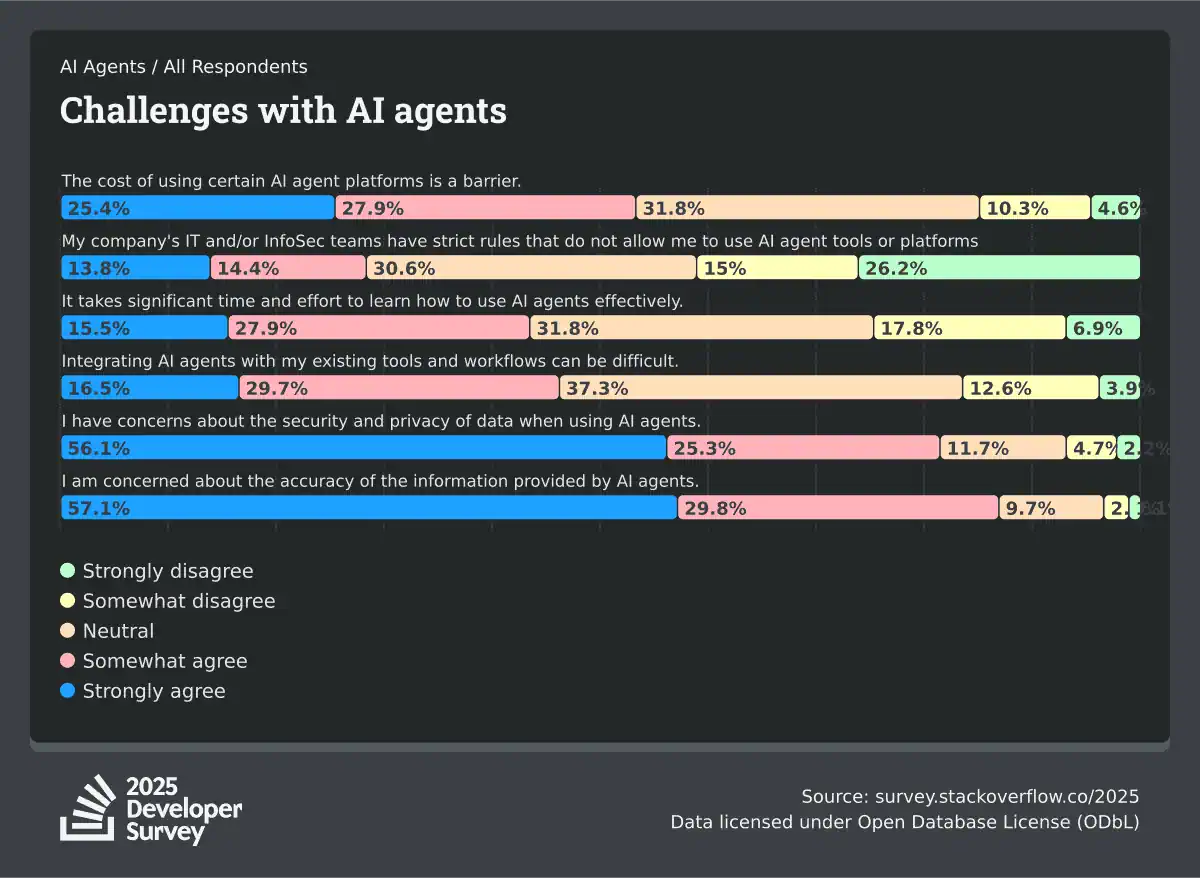
Those concerns map directly to enterprise rollout. Before your team expands usage, we advise you to define security practices around secret exposure, command approval, logs, repository access, generated tests, and reviewer evidence.
The model question is becoming harder for engineering leaders. Copilot now gives teams model choice through its catalog and AI credit system. Claude Code gives teams access to Anthropic models that are strong for reasoning, planning, and longer task execution.
That means the practical question becomes which model should be used for which task.
Thinking about tokens should also become part of your cost management analysis because deeper reasoning uses more capacity, so it’s more costly.
That’s why you need visibility into which models are being used in your company, which tasks they support, how much they cost, and whether they improve delivery performance.
Pro tip: Axify has expanded its AI Adoption and Impact feature to help engineering leaders answer these questions. Our tool gives you visibility into AI model usage across teams, so you can see which models your developers use, where AI costs accumulate, and whether premium models are really worth it.
Another pro tip: Check out your delivery metrics across teams to see how your AI tools affect your workflow. This helps you set practical guardrails around AI spending while maintaining engineering velocity. You can do this from the Axify platform (we’ll show you how below).
Since June 1, 2026, GitHub Copilot pricing has combined plan fees with usage-based billing. Individual plans include Pro at $10 per month with $15 in AI credits, Pro+ at $39 with $70 in credits, and Max at $100 with $200 in credits. Business and Enterprise plans start at $19 and $39 per user per month.
Code completions remain included in paid plans, but chat, agent mode, code review, premium models, and other AI features consume credits based on the selected model and token usage. Once the included allowance runs out, teams either stop paid usage or incur additional charges under an administrator-defined budget. Copilot therefore has clear plan tiers, but total cost still depends on how teams use its metered features.
Claude Code pricing is also usage-sensitive. Anthropic’s cost documentation reports an average of approximately $13 per developer per active day and $150-$250 per developer per month for enterprise deployments. Actual spending depends on task complexity, model choice, session length, and how often developers use the tool.
In both cases, current invoices show only what teams have already spent. They don’t show how costs may change as adoption grows, as teams move toward more agentic workflows, or as developers choose more expensive models.
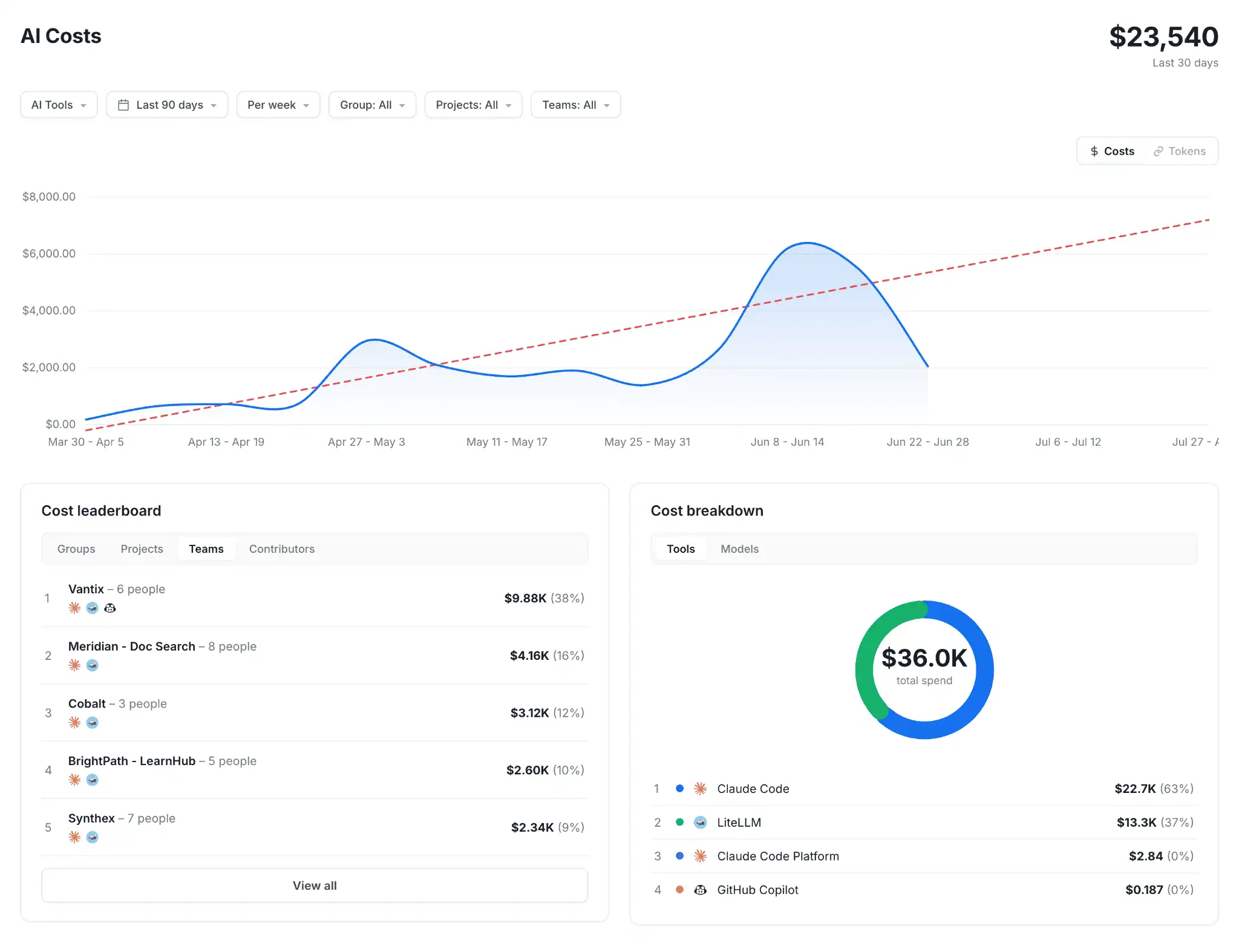
Axify helps you see all that.
Axify’s AI cost feature shows your current spend by tool but also forecasts your future costs based on adoption and usage trends. That way, it’s easier to understand where your AI budgets are headed and plan accordingly.
Copilot may have lower adoption friction, especially for GitHub and VS Code teams, because it fits into tools developers already use. Developers can start with inline help, then expand into chat, PR support, and issue-based work. That makes it easier to roll out across teams with different AI maturity levels and experiences.
Claude Code requires a more deliberate rollout because it changes how developers interact with AI. Instead of only accepting suggestions, they need to scope tasks, write repository instructions, review plans, inspect diffs, and decide which commands the tool can run. That learning curve can pay off, but teams should treat it as part of the adoption plan.
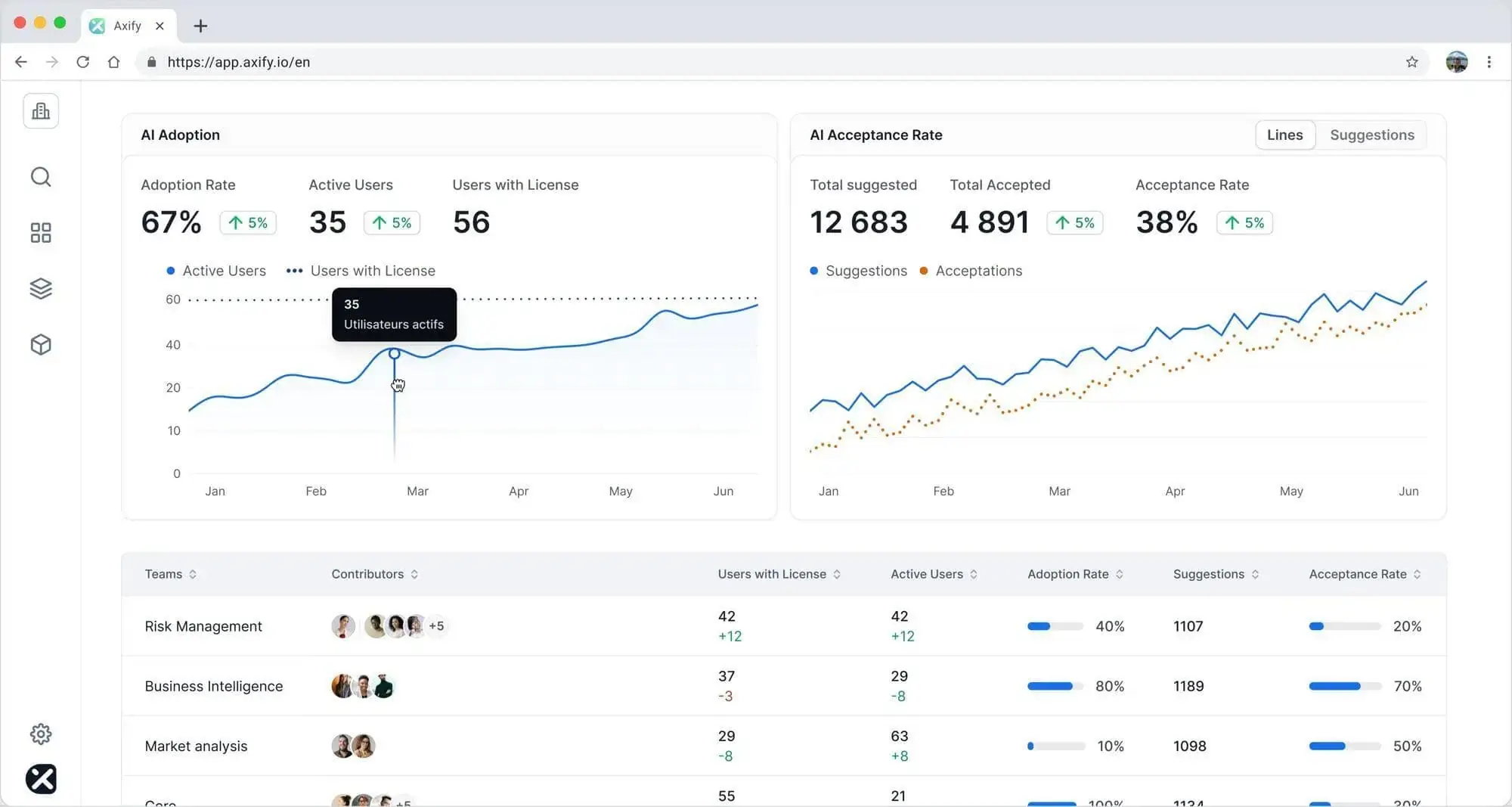
So, if you want to plan your team’s adoption, you need to learn to check how it’s going instead of simply looking at the number of licenses you bought. That means tracking who uses each tool, which tasks they use it for, which developer groups adopt it consistently, and whether they all use it after the first trial period.
Axify’s AI Adoption feature can help you with that info by tracking AI adoption by tool, team, and line of business, with signals for actual usage, confidence, and habitual use.
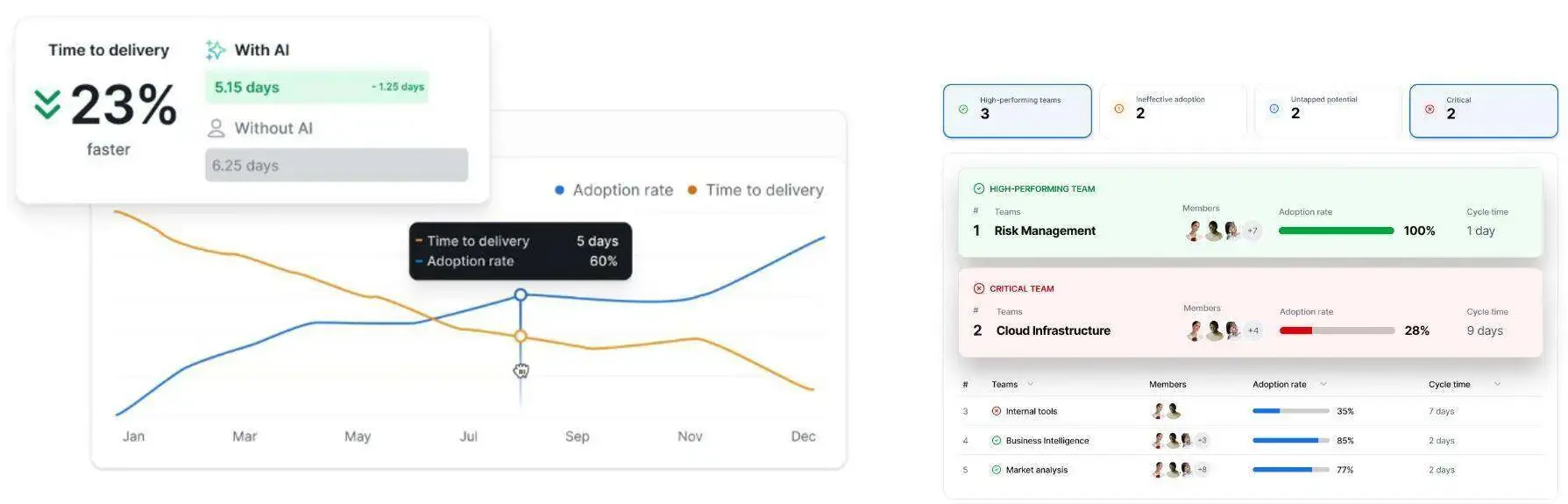
We can all agree that the best tool is the one that improves your delivery. That means your team should measure metrics like cycle time, throughput, review wait time, PR size, rework, defects, or failed deployment recovery time before and after adoption.
Warning: Perceived productivity can be incredibly wrong even in mature teams, so don’t rely on it.
We base this warning on a METR randomized controlled trial that studied 16 experienced open-source developers working on 246 tasks in mature repositories where they had an average of 5 years of prior experience.
Developers expected AI to make them 24% faster, and after the study, they felt it had indeed made them 20% faster. But the measured completion time was actually 19% slower when AI tools were allowed. If that 39 percentage point difference happens in your own company, you need to be aware of it because it translates into slower delivery and slower time to market. Of course, these will snowball into a slew of negative effects for your company.
Luckily, Axify’s AI impact feature helps you compare your performance very accurately before and after AI support. It connects adoption to metrics like delivery speed, cycle time, throughput, rework, or PR quality and even delays and bottlenecks by team, project, or line of business.
For deeper analysis, Axify's MCP server makes that data available inside Claude, Copilot, or any other AI tool you’re planning to adopt.
Instead of manually exploring dashboards to piece together an answer, leaders can ask questions directly in natural language. That includes straightforward questions such as “How did the platform team perform last week?” and more complex ones such as “Which teams increased AI adoption without improving cycle time?” or “Which teams ship the fastest despite low AI usage?”
Here’s what that looks like in Claude:
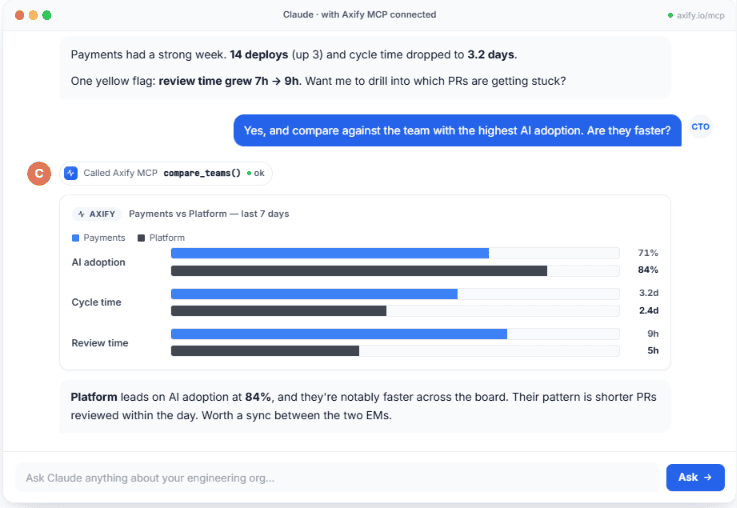
As you can see, this becomes especially useful for compound questions that span multiple metrics, teams, or time periods because the AI can connect the underlying data and return a single answer.
Choose GitHub Copilot if your team wants AI assistance embedded into the development workflow with minimal process change. Choose Claude Code if your team wants more autonomous task execution across planning, implementation, testing, and repository analysis.
The better choice depends on your team’s workflow, risk tolerance, and measurement maturity, so look at the decision criteria below.
Copilot also works well when your main goal is standardization. If every team already uses GitHub issues, branches, checks, and PRs, Copilot gives you a cleaner path to policy management and rollout.
Claude Code is especially useful when developers need to investigate unfamiliar logic, prepare larger implementation plans, or connect coding work to internal systems. However, you need to closely document how it should inspect files, run commands, and prove changes before review. Otherwise, implementation can easily fail.
A 2026 arXiv study found that no single agent was best across all task categories. So, a mature setup usually uses Copilot for everyday assistance and Claude Code for scoped agentic work.
For example, your team may use Copilot for small test updates, API usage reminders, and PR descriptions. At the same time, Claude Code can handle a planned migration from one logging library to another across several services.
Another example is onboarding. Copilot can help a new developer understand a function inside the IDE. Claude Code can inspect a service, explain the request path, identify configuration files, and propose a setup checklist.
Many organizations approach AI adoption as a standardization exercise. They look for one tool, one rollout plan, and one way of working.
The comparison between GitHub Copilot and Claude Code suggests that may be the wrong goal.
Some developers benefit most from fast suggestions inside their existing workflow. Others get more value from delegating larger tasks to an AI agent that can investigate, plan, and execute work across a repository. Trying to force everyone into the same pattern may leave value on the table.
So, figure out which tool works best for which teams, workflows, and types of work.
Axify helps engineering leaders understand who is using AI, how they’re using it, whether they improve your delivery outcomes, and whether they’re worth the cost. Basically, it helps you get value from AI in the way that makes the most sense for your work.
Contact us today to learn more!
GitHub Copilot is better for teams that want broad AI adoption with minimal workflow disruption, especially GitHub-native teams. Claude Code is better for teams that want deeper planning, repository exploration, command execution, and more flexible agentic work.
Claude Code is worth switching to only when your team needs deeper task execution than Copilot provides. For many teams, adding Claude Code for specific workflows is safer than replacing Copilot across every developer group at once.
Neither has a fully fixed cost. Copilot provides a clearer baseline through monthly plan fees (ranging from $10/month for Pro to $100/month for Max) and included AI credits. However, chat, agent, and premium-model usage consumes AI credits and may create overages. Claude Code spending scales more directly with model and token usage; Anthropic reports enterprise averages of $150–$250 per developer per month. Teams evaluating either option should compare cost alongside adoption, usage patterns, and delivery outcomes.
A common approach is to use Copilot for developer assistance and Claude Code for task execution. Copilot helps engineers work faster with day-to-day implementation, code reviews, testing, and collaboration workflows, while Claude Code can take ownership of larger investigations, refactors, debugging sessions, and implementation tasks.