DORA Metrics
12 minutes reading time

.png?width=1200&name=Axify%20blogue%20header%20(25).png)
When a deployment fails, you need to detect the issue early and restore service quickly. That matters because every minute spent diagnosing bugs, checking alerts, rolling back changes, and fixing an outage is time you cannot spend shipping new work.
So, if you want to improve recovery time, you first need to understand how to measure it inside your delivery flow.
That’s why in this article, we’ll look at failed deployment recovery time, discussing:
Let’s start.
Failed deployment recovery time is one of the original four (now five) DORA metrics set by the Google-established DORA (DevOps Research and Assessment) group.
These metrics measure software delivery throughput and instability, and we’ll discuss their relationship in a second. For now, let’s see what failed deployment recovery time is.
Failed deployment recovery time is a DORA metric that measures the time required to fix a deployment that fails in production.
It involves measuring the total time needed to:
Here's how that looks in Axify:
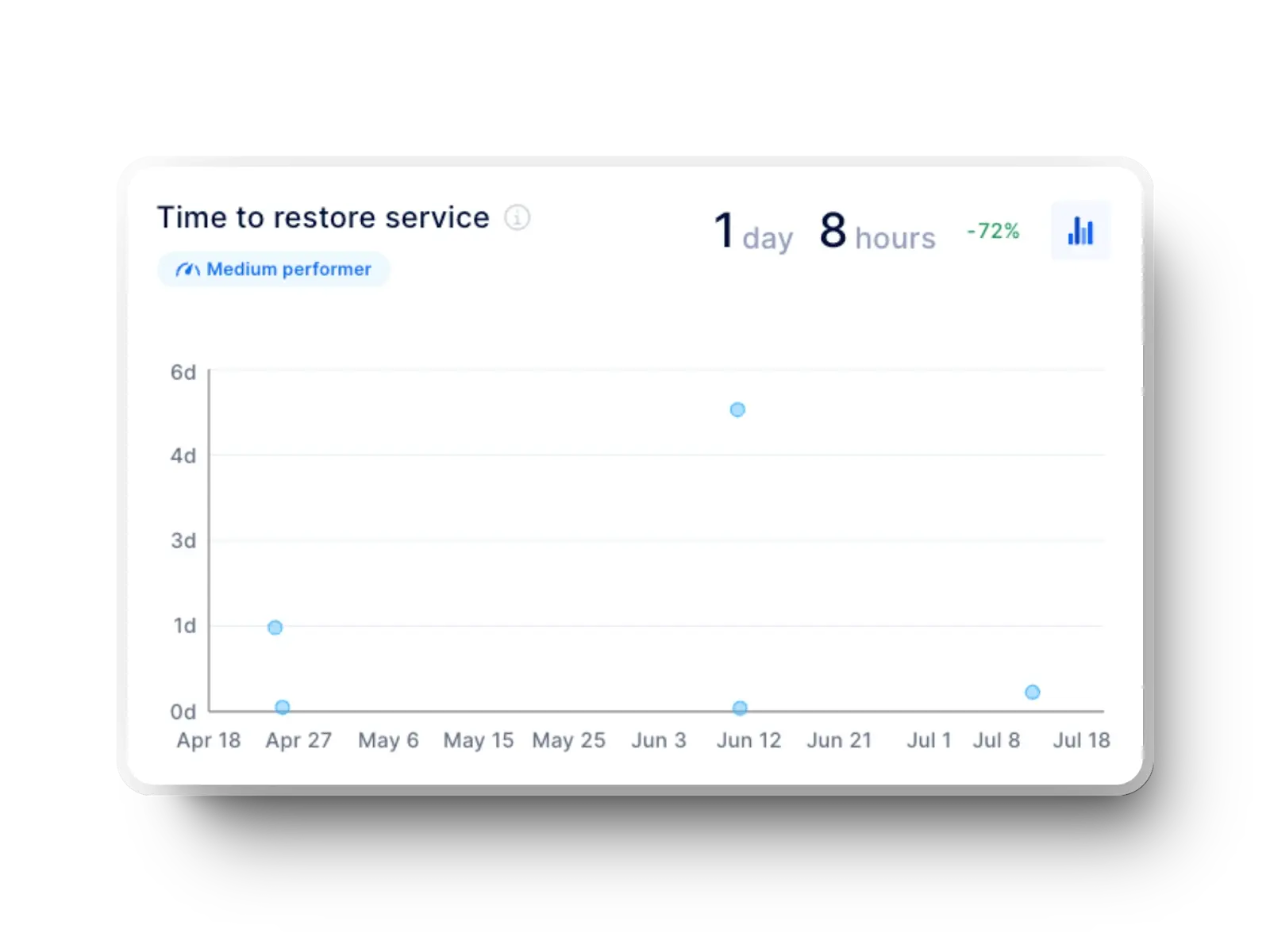
In other words, failed deployment recovery time assesses how quickly your team can identify and resolve issues that affect your software systems. It's an important metric to track since it helps you identify flaws in your software delivery pipeline.
Failed deployment recovery time should be measured and reported regularly, i.e., daily, weekly, or monthly, to track changes in incident response times over time.
An increased failed deployment recovery time may indicate problems with the incident response process, with system reliability, or code review processes.
DORA renamed MTTR to failed deployment recovery time to improve measurement precision and alignment with software delivery performance.
The DORA group originally defined its four landmark metrics in 2014. In that report, failed deployment recovery time appeared as mean time to recover (MTTR).
However, MTTR captured recovery from any kind of incident, including infrastructure outages, third-party failures, or network issues. This broad definition introduced noise and weakened its connection to the delivery process itself. As a result, teams could appear to perform poorly even when their deployment practices were solid, simply because they were affected by factors outside their control.
The updated metric narrows the scope to failures caused specifically by changes in production, making it directly tied to the act of shipping software. This improves causality and ensures all DORA metrics evaluate the same system, from deploying changes to observing their impact and recovering when those changes introduce issues.
By focusing only on failures teams are responsible for, failed deployment recovery time becomes more actionable and better aligned with delivery quality. In turn, this encourages practices like safer releases, faster rollback mechanisms, and tighter feedback loops after each deployment.
Failed deployment recovery time is the current DORA term, while MTTR and time to restore service (TTRS) are legacy names still widely used. All three describe recovery speed, but they differ in scope. MTTR and TTRS typically include all incidents, regardless of origin, whereas failed deployment recovery time isolates only deployment-caused failures.
This narrower definition makes the metric more actionable and ensures consistency within the DORA framework, where all metrics are meant to evaluate software delivery performance specifically.
Failed deployment recovery time matters because it shows how quickly you restore service after a deployment causes an incident, which directly affects delivery continuity and user impact.
When recovery is slow, time is lost across detection, diagnosis, rollback, and validation, typically due to gaps in monitoring tools or unclear ownership. As a result, delays compound and reduce your ability to ship new changes. So, improving this metric helps you maintain flow while limiting disruption.
To see how this fits into delivery performance, you need to look at how DORA structures its metrics. Failed deployment recovery time is now grouped with throughput metrics, alongside lead time for changes and deployment frequency. Metrics in this group show how efficiently teams keep delivery flowing, even when something goes wrong.
Instability is now measured separately through change failure rate and deployment rework rate, which show how often deployments introduce issues or require corrective work.
According to some sources, DORA initially grouped MTTR as a stability metric because it reflects how quickly a system could return to a healthy state after an incident. In other words, the original framework considered this metric more directly tied to the system’s operational reliability.
Over time, they realized that recovery speed, when tied specifically to deployment-caused failures, is not just about stability but about how efficiently delivery continues after disruption.
Of course, speed and recovery must improve together to support reliable delivery.
As such, high-performing teams combine fast deployments with rapid recovery from failures, which translates into strong software delivery performance.
Every minute of downtime increases cost and affects user trust, especially when incidents require escalation or manual fixes.
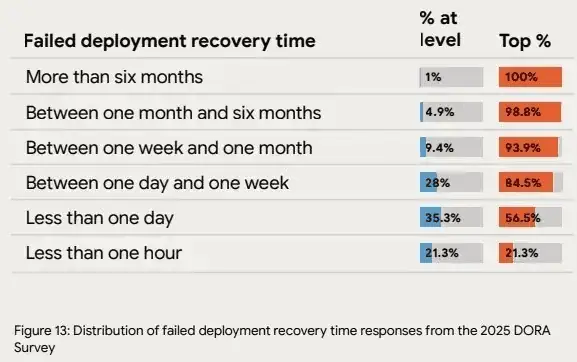
For context, the DORA 2025 report shows that high-performing teams recover in under one hour, while low performers take over a week. In our experience, that gap reflects differences in observability tools, response workflows, and decision speed.
And we advise you to hone your processes so recovery becomes fast, predictable, and repeatable, even under pressure.
After all, faster recovery reduces disruption, supports consistent releases, and keeps teams focused on delivering value instead of reacting to incidents. In turn, this leads to faster time to market, higher competitive advantage, and a bigger ROI.
To improve recovery, you first need a clear way to measure it across your delivery flow. That starts with defining when recovery begins and ends. Below are the key elements you use to calculate this metric in practice.
The formula to calculate failed deployment recovery time is:
| Failed Deployment Recovery Time = Total Recovery Time ÷ Number of Failed Deployments |
For example, if two failed deployments caused a total of 60 minutes of downtime over a 24-hour period, your average recovery time is 30 minutes.
To calculate it:
This calculation becomes useful once you connect it to real recovery behavior. In most cases, delays happen between alert creation and engineer response, or during rollback validation. These delays, not the time to find the fix itself, are what stretch recovery time.
Teams with automated monitoring and clear response workflows reduce detection and decision time, which directly shortens recovery. Even small delays at each step compound across the sequence, which is why high-performing teams recover 6,570x faster than low performers.
A team deploys 50 times a month, and three of those deployments fail.
Recovery times are 45 minutes, 2 hours, and 30 minutes, for a total of 195 minutes. Dividing by three gives a failed deployment recovery time of 65 minutes.
This places the team close to high-performing benchmarks. In practice, it suggests their detection, response, and rollback processes are well controlled, with little delay between identifying the issue and restoring service.
Manual tracking relies on engineers logging incident start and end times consistently, which rarely happens in practice. Incidents span multiple tools, time zones, and handoffs, so timestamps get missed, rounded, or recorded differently.
Over time, this leads to gaps, biased averages, and metrics you cannot trust. As systems scale and deployments increase, manual tracking breaks down completely, making it impossible to understand real recovery performance.
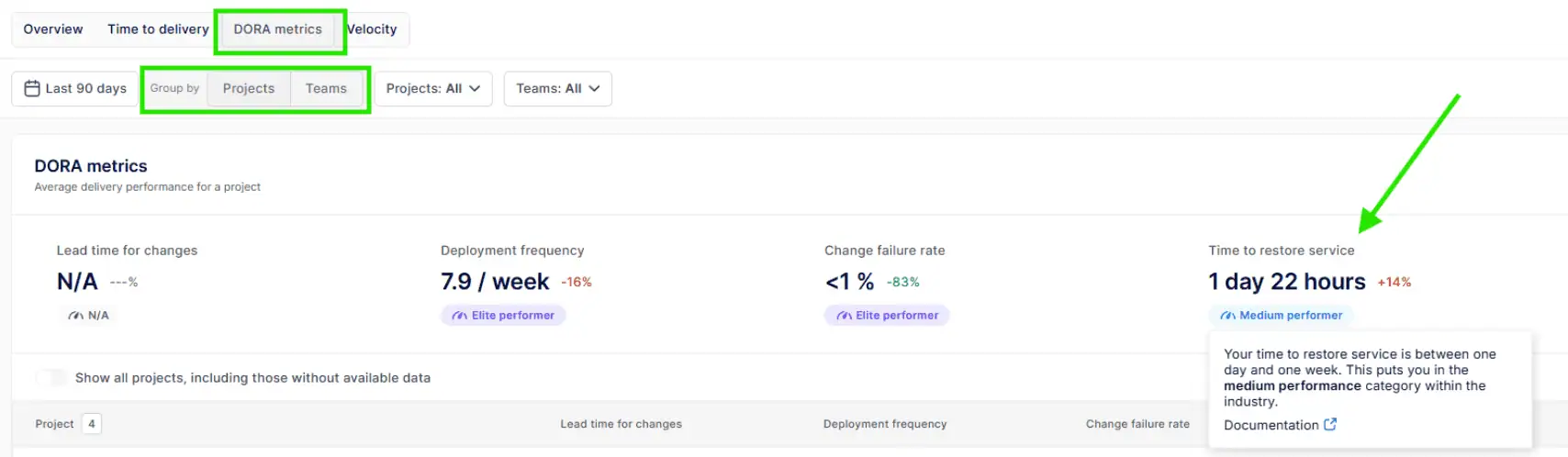
Axify removes this friction by capturing recovery signals directly from your delivery and incident data. Once you log in, go to the DORA metrics dashboard and navigate to “time to restore service.”
You can view this metric at both project and team level, along with trends over time and performance benchmarks.
Project level :
Team level :
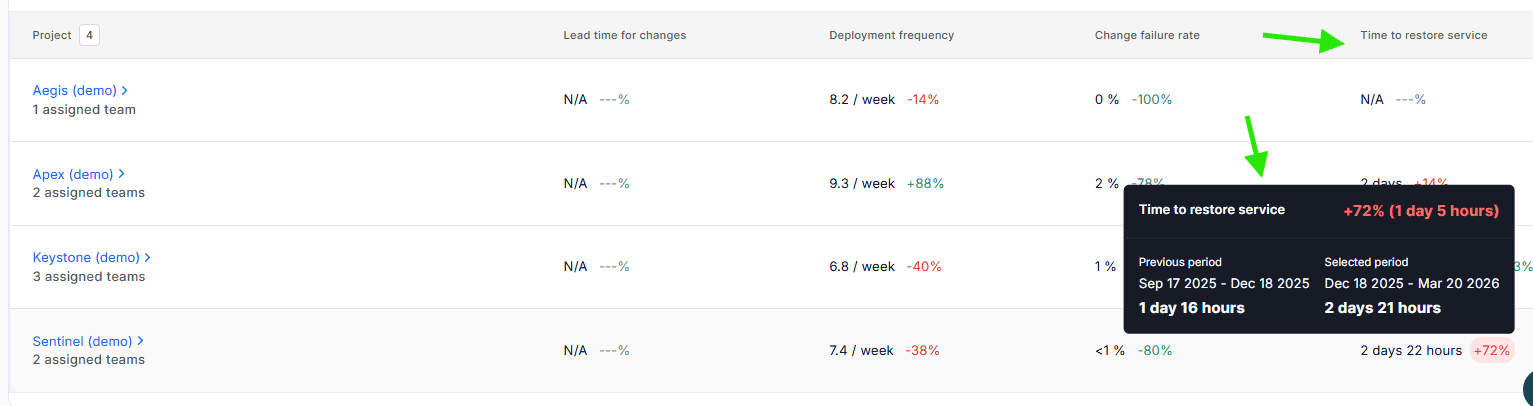
As such, you get a consistent view of how long recovery actually takes, with context around changes, failures, and outcomes.
Axify also surfaces insights behind the metric. You can identify where delays occur, compare teams, and understand whether recovery time is improving or degrading across periods.
The AI Impact feature in Axify takes this further by showing how recovery time changes before and after AI adoption.
This helps you connect tooling decisions to measurable outcomes. Instead of assuming AI improves incident response, you can see whether detection, decision-making, and resolution actually became faster, and by how much.
To improve recovery time, you need clear reference points. So, here are the benchmarks that show how your performance compares to industry patterns.
Here is a clear comparison table based on the DORA 2024 report and DORA 2025 report:
| Category | 2024 DORA (Performance Levels) |
2025 DORA (Distribution of Teams) |
| Elite / Best | Less than 1 hour |
21.3% recover in < 1 hour |
| High | Less than 1 day |
35.3% recover in < 1 day |
| Medium | Less than 1 day |
28% recover in 1 day–1 week |
| Low | 1 week to 1 month |
9.4% recover in 1 week–1 month |
| Very Low | Not explicitly defined |
4.9% take 1–6 months |
| Extreme cases | Not explicitly defined |
1% take > 6 months |
DORA is clearly shifting from fixed performance tiers to a distribution view. Instead of neat categories, the 2025 data shows where teams actually cluster, which is more realistic but also more revealing.
What stands out is that:
For engineering leaders in 2026, the implication is clear.
Benchmarking against a single label like “high performer” is no longer enough. The goal is to understand:
Different performance indicators are defined to facilitate the tracking of failed deployment recovery time values:
From our experience, benchmarks help, but only when used correctly. So:
Failed deployment recovery time is a useful metric to determine incident response times and identify ways for process improvement, but it still has some limitations:
Recovery time increases when the response chain doesn’t work properly. First, delayed alerts slow detection after a failed deployment. Then, unclear logs extend the diagnosis. Next, slow rollbacks delay response. Finally, manual verification blocks restoration. As a result, each step adds time, and overall recovery performance drops.
Let’s review these causes for a poor failed deployment recovery time in more depth.
Recovery time starts when the service fails. It doesn't start when your team notices the problem. Any delay in detection extends the full recovery window before diagnosis even begins.
So, when you rely on manual checks, inbox reports, or customer complaints, you lose time before anyone can respond. In contrast, monitoring tools, logging systems, uptime monitors, automated health checks, and alerting pipelines can flag failures as they happen.
This gives your team a clear starting point for diagnosis. Without that visibility, alerts arrive late, incident triage starts late, and rollback or fix deployment starts late. As a result, failed deployment recovery time rises even when the code fix itself is straightforward.
Once a failure is detected, recovery slows down if your team has not agreed on how to respond. An outage puts pressure on everyone at once, including users, support, and business stakeholders.
So, before the incident starts, you need clear:
Without that structure, time is lost deciding who owns the issue, who approves rollback, where updates should be posted, and what step comes next.
That delay affects diagnosis, response, and restoration in sequence. In practice, even a simple deployment rollback can stall when ownership is unclear. Hence, failed deployment recovery time rises for procedural reasons.
Once your team has diagnosed the issue, recovery still slows down if deployment and rollback depend on manual work.
A fix may already exist, but the deployment recovery time keeps rising when someone must:
That is why poor automation affects both recovery time and deployment frequency.
In contrast, CI/CD pipelines with automated rollback reduce the time between response and restoration because the recovery path is already defined. So, when a deployment fails, your team can revert the change quickly, validate service health, and move back to normal operation without extra manual delay.
Even with fast detection and response, recovery slows down when your architecture makes it hard to isolate the issue. In monolithic systems or tightly connected services, a single failed deployment can affect large parts of the application, which makes troubleshooting more complex.
For example, when a large batch fails in production, your team must inspect multiple components before deciding what to roll back. This extends both diagnosis and response time.
In contrast, smaller deployments and loosely coupled services allow targeted rollback. A single service can be reverted without affecting the rest of the system, which shortens recovery and restores service faster.
To reduce recovery time, you need to shorten each step in the recovery chain: detect, diagnose, respond, and restore. Each delay compounds the next. So, here are the most effective ways to remove friction across that sequence.
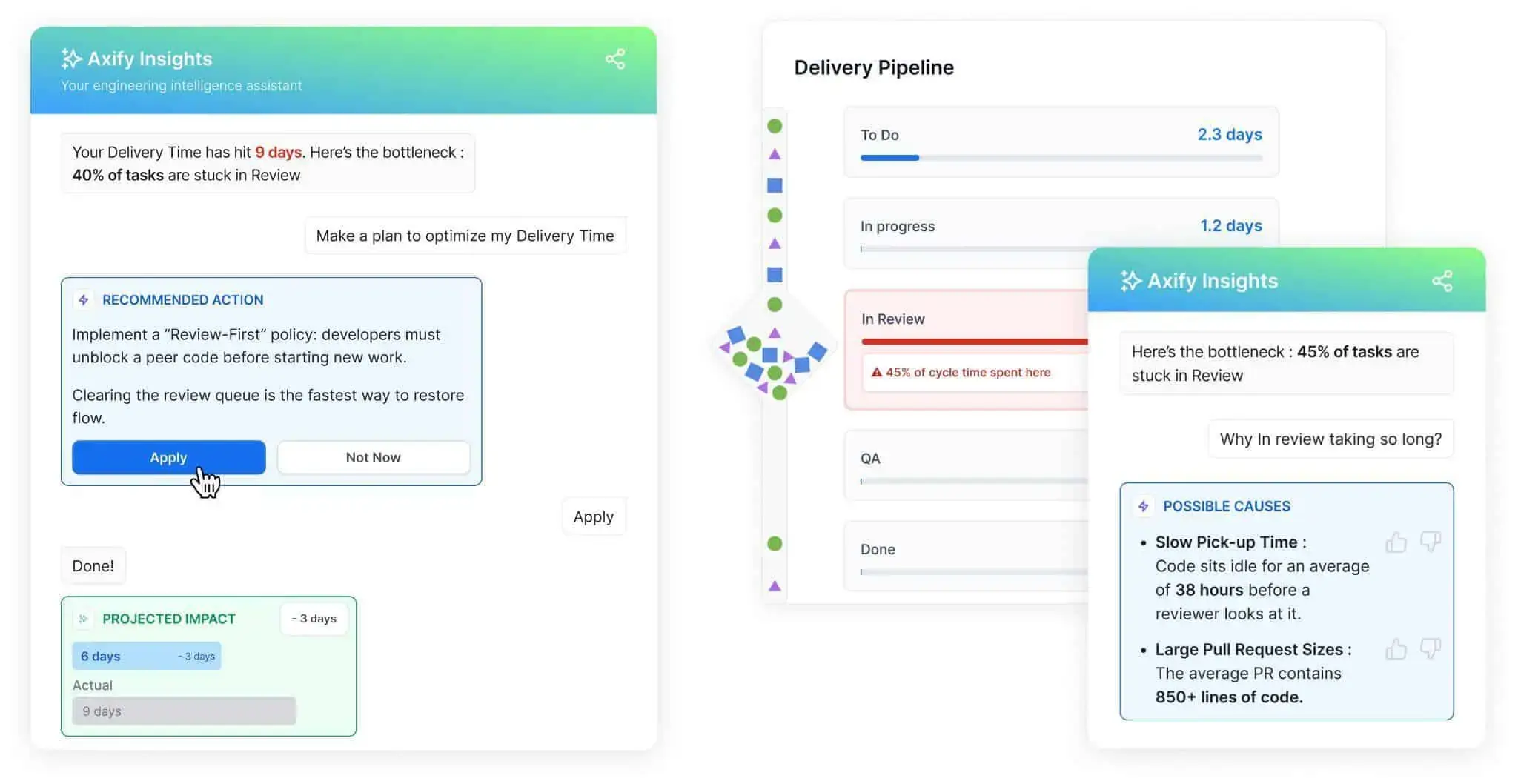
First, you need visibility into where time is actually lost. Axify Intelligence analyzes your delivery workflow and surfaces bottlenecks with clear explanations and recommended actions.
For example, if pull requests sit in review for too long, the platform shows that delay and suggests specific changes, such as prioritizing review queues. This matters because slow review cycles delay both diagnosis and response when a deployment fails.
Pro tip: The interface allows you to interact directly with its intelligent AI chatbot. Instead of reading static dashboards, you can ask questions and get contextual answers based on your delivery history. The result is faster decision-making and targeted improvements.
Here's what that looks like in practice:
Next, detection must happen immediately. Application performance monitoring, synthetic checks, and real-time alerts ensure failures are detected within minutes (not hours).
If alerts arrive late, diagnosis cannot begin. So, we advise you to integrate these alerts with on-call rotation tools to notify the right person without delay.
For example, a failed deployment that triggers latency spikes should automatically page the responsible team. That way, you can start the recovery process faster.
Once you’ve detected the problem, you must also respond quickly. Feature flags allow you to disable a problematic change without redeploying code.
This tactic corresponds to the response step. Instead of preparing a hotfix, your team can turn off the feature and stabilize the system.
For example, if a new API endpoint causes errors after deployment, toggling the flag removes the failure path instantly. The result is faster stabilization while the root cause is investigated.
Recovery speed depends on how your deployments are handled. CI/CD pipelines with automated rollback reduce the need for manual intervention when a release fails.
Manual rollback introduces delays: approval chains, scripts, and coordination slow down restoration.
In contrast, automated pipelines can monitor system health after deployment. If errors exceed a threshold, the system automatically rolls back to the last stable version. This shortens the path from response to full restoration.
Clear coordination is just as important as tooling. A defined incident response playbook ensures everyone knows their role when something goes wrong.
Without this clarity, teams lose time figuring out who should act. With it, responsibilities are clear: one person handles rollback, another investigates, and another communicates updates.
We advise you to practice your playbook regularly so your teams can execute it smoothly under pressure. We also encourage post-incident reviews, which help refine the process over time.
As we advised you before, reduce the size of what can fail. Deploying smaller batches limits the effects and simplifies diagnosis because your team can quickly identify what caused the issue.
For example, a single pull request deployment is easier to roll back than a batch of multiple features. As a result, both deployment frequency and recovery time improve together.
Finally, diagnosis depends on how well you can see and understand system behavior. Observability provides the data needed to understand failures quickly.
Structured logs, metrics, and traces show what changed and where the failure occurred. For example, a spike in error rates tied to a specific service narrows the investigation scope immediately.
This reduces diagnosis time, which directly reduces overall recovery time.
To improve recovery time, you need to understand how it interacts with the rest of your delivery system. Each DORA metric reflects a different part of the same workflow.
So, here are the key relationships that explain where time is gained or lost.
First, consider how often your team deploys. Frequent deployments usually mean smaller batches, which makes failures easier to diagnose and roll back. That’s why high deployment frequency tends to correlate with lower failed deployment recovery time.
However, if testing and validation are weak, frequent deployments can increase the number of failures. As a result, teams may end up recovering more often, which offsets the benefits of smaller changes and keeps overall recovery time high.
These two metrics measure different parts of the same sequence. One shows how often you enter the recovery phase, and the other shows how efficiently you move through it.
For example, a low failure rate with slow recovery typically points to process issues. Detection may be delayed, or rollback may require manual coordination. On the other hand, a high failure rate with fast recovery suggests strong response and restoration, but weak pre-deployment validation.
After you diagnose the issue, your team must create, review, and deploy a fix. So if recovery requires deploying a hotfix, lead time for changes directly affects recovery time.
Deployment rework rate measures the proportion of deployments that are unplanned and triggered by incidents in production.
While failed deployment recovery time shows how quickly you restore service after a failed deployment, rework rate shows how often incidents lead to additional, unplanned deployments to fix or stabilize the system. In other words, one measures recovery speed, and the other measures how much reactive deployment activity your system generates.
For example:
Failed deployment recovery time reflects how efficiently you move through detection, diagnosis, response, and restoration after a deployment failure. When delays occur in alerts, rollback, or validation, recovery slows, and the delivery flow breaks.
Following the best practices shown throughout this guide reduces downtime and keeps your team focused on shipping value instead of reacting to incidents.
Now, the next step is to make those improvements measurable and actionable. Axify connects your pipelines, incidents, and workflows to surface where time is lost and how to fix those delays.
Contact Axify today to see how you can reduce recovery time and improve delivery performance.

A good MTTR means restoring service in under one hour for high-performing teams and within one day for most stable teams. This reflects how quickly you move from detection to full restoration. Shorter recovery times usually indicate fast alerting, clear diagnosis, and reliable rollback paths.
MTTR measures how quickly you recover after a failure, while MTTF and MTBF measure how often failures occur. In practice, MTTR focuses on the response and restoration phases. This distinction helps you separate reliability issues from recovery efficiency inside your pipeline.
Yes, MTTR can improve even if the failure frequency remains unchanged. Faster detection, clearer diagnosis, and automated rollback reduce recovery time without reducing incident count. For example, better alerting and pipeline automation shorten the path from failure to restoration.
Axify tracks MTTR by linking incidents to deployment events, pipeline activity, and recovery actions in real time. Our SEI platform shows where delays occur across detection, diagnosis, and restoration, so you can act on them immediately.
Yes, Axify Intelligence identifies bottlenecks that increase MTTR by analyzing your delivery history and incident patterns. It shows where time is lost, such as slow reviews or delayed rollbacks, and suggests specific actions that you should take to fix it. This allows you to connect recovery delays to concrete workflow issues and fix them quickly.