AI
13 minutes reading time


21 GitHub Copilot Metrics That Show What Actually Changes in Your Delivery

Github Copilot Metrics Axify

You might already see Copilot helping you complete tasks 55% faster inside your IDE. But what’s less clear is how that speed affects the rest of your delivery system. More code changes how pull requests move, how reviews queue, and how pipelines behave under load.

And this is where GitHub Copilot metrics can bring some clarity. The problem is GitHub mainly tracks code and collaboration events, not what happens in production.

So the real question becomes: what actually changes across your workflow?

In this article, you’ll connect GitHub Copilot usage metrics to delivery outcomes. You’ll see how to measure impact across your value stream and more.

Pro tip: We advise you to treat Copilot adoption as a system change. Axify imports data from your development tools and AI assistants, then correlates AI usage with delivery metrics like cycle time and DORA metrics. This helps you understand how AI affects your workflow and where it creates gains or friction. Next, use Axify’s AI Intelligence to see recommended actions you can validate and apply directly. Contact us today to learn more!

What Are GitHub Copilot Metrics?

GitHub Copilot metrics reflect how AI-assisted coding is used within your development workflow. They capture signals such as suggestion volume, acceptance rates, and interaction patterns inside the IDE.

On their own, these signals describe usage.

However, increased reliance on AI tools can lead to faster code production, which can change how work moves through the system. As more code is generated in less time, teams may see more pull requests, increased review load, and greater pressure on testing and validation stages.

This shift matters at scale. GitHub Copilot has reached around 20 million users, and a significant share of developers actively use it in their workflows. As adoption grows, more code enters the system faster, which can expose bottlenecks beyond coding itself.

To help you navigate this, we’ve summarized key Copilot usage signals based on official documentation and organized them into clear categories.

Adoption and Activity Metrics

This category of metrics shows how widely your teams are adopting and using Copilot in their daily work. These signals show where AI enters your workflow and how consistently teams rely on it. Here are the key adoption and activity metrics you can track:

  1. Daily/weekly/monthly active users: This measures how many developers use Copilot over time, usually through a usage metrics dashboard with a 28-day rolling window. Stable usage indicates consistent entry points for AI-generated changes, while uneven patterns typically lead to inconsistent flow across teams.
  2. Agent adoption: This tracks how often features like agent mode generate or modify code. As adoption increases, more code updates are introduced automatically. If you don’t do it carefully, you can increase PR volume and shift pressure toward review capacity.
  3. Average chat requests per active user: This reflects how frequently developers interact with Copilot during tasks. Higher request counts usually signal deeper reliance, which reduces coding time but may increase time spent validating outputs.
  4. User-initiated interaction count: This captures how frequently developers actively prompt Copilot. It reflects user engagement and shows where AI actively shapes development decisions.

Suggestion and Acceptance Metrics

Once adoption is clear, the next step is understanding how Copilot suggestions translate into actual code changes. These metrics show how frequently your team uses the generated code and what happens to it afterward:
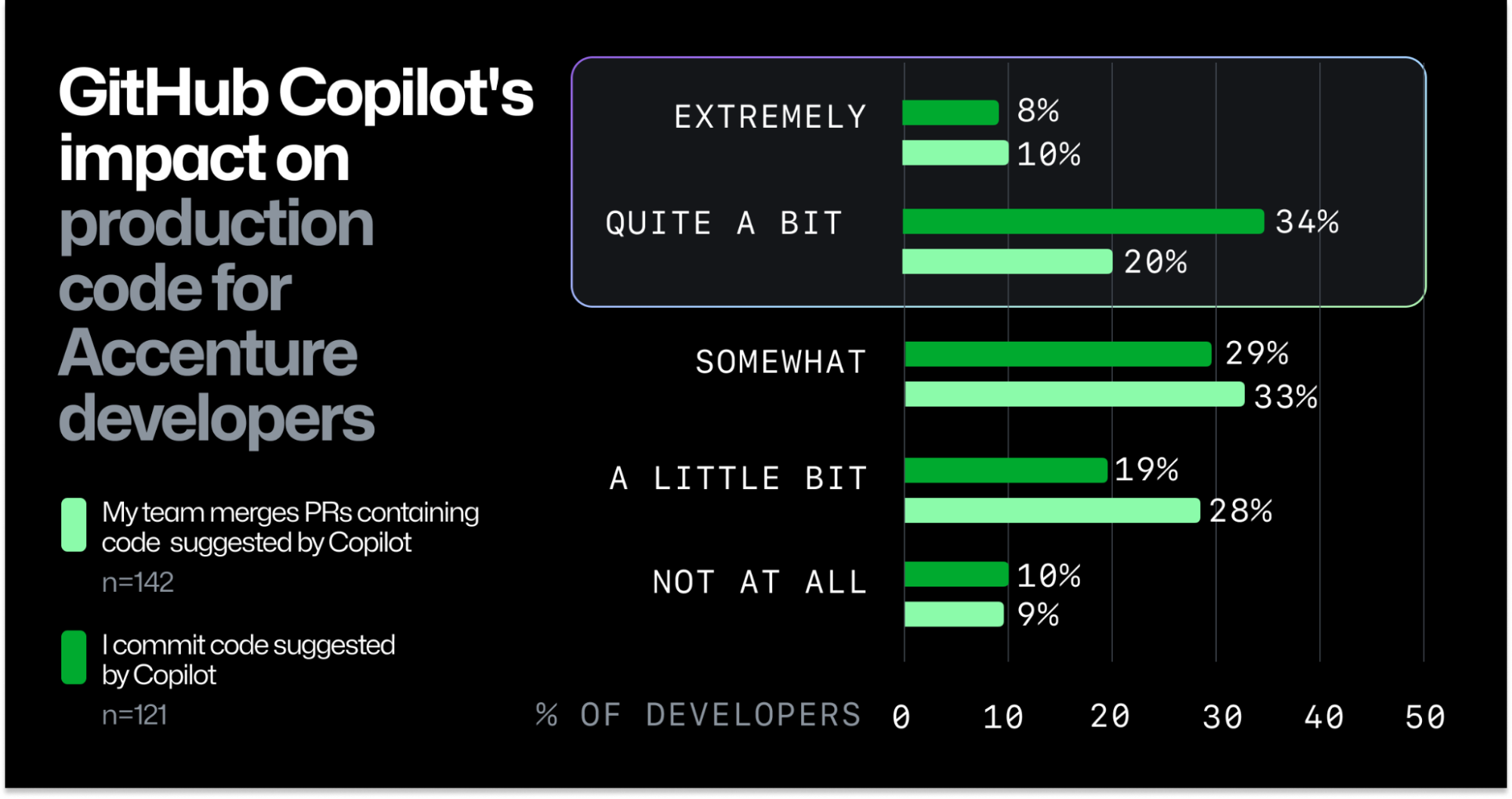
  1. Code completions suggested/accepted: This measures how many suggestions Copilot generates versus how many are accepted. To put things into perspective, consider this: according to GitHub research, developers accept about 30% of suggestions on average. That means most generated code is reviewed and rejected, which shifts effort from writing code to evaluating it.
  2. Code acceptance activity count: This tracks how many accepted suggestions are integrated into your codebase. The same research shows that around 88% of accepted Copilot-generated code remains in final submissions. Once accepted, code is likely to move forward in the delivery process.
  3. Code completion acceptance rate: This reflects the ratio between accepted and suggested completions. Higher rates can indicate stronger trust in AI outputs, but also highlight where review and validation effort should be focused.
  4. Code generation activity count: This captures how frequently Copilot generates code. One prompt can produce multiple suggestions, and acceptance is tracked per suggestion, not per prompt.

A bar chart illustrating GitHub Copilot's impact on Accenture developers' production code, showing percentages across categories like 'extremely' to 'not at all' for both merging and committing Copilot-suggested code.

Source: GitHub Research

Code Generation Metrics (Lines of Code)

After you understand what gets accepted, the next step is measuring how much code actually enters your system. These metrics show the volume and nature of code additions introduced through AI-assisted work.

Here are the key code generation metrics you can track with Copilot:

  1. Lines of code added/deleted: This measures how much code is introduced or removed during development. Larger additions typically result in bigger pull requests, which can increase your review effort and slow down merge flow.
  2. Agent-initiated vs. user-initiated changes: This distinguishes between code written directly by developers and code generated through Copilot. A higher share of agent-driven changes means more automated input, which means you may need additional validation during review.
  3. Agent contribution percentage: This shows how much of your code changes come from AI assistance. Higher percentages indicate stronger reliance on AI, which can influence how your teams approach testing and code review.
  4. Average lines deleted by agent: This tracks how much code Copilot removes or replaces. Frequent deletions reflect refactoring or iteration, which can signal evolving requirements or adjustments to earlier changes.
  5. LoC per model/language: This compares output across models and development environments. Different contexts can produce different code patterns, which may affect consistency in how changes are reviewed and merged.

Model and Feature Usage Metrics

The model and feature usage metrics below explain variation in code output across tools, languages, and environments.

  1. Model usage by chat mode: This shows how Copilot is used across different modes, such as inline suggestions or chat-based prompts. Each mode produces different types of output, which can influence how changes are introduced into the workflow.
  2. Model usage by language: This tracks how output varies across programming languages. For example, Tenet research shows that Python projects can reach up to 40% AI-generated code, while JavaScript and TypeScript range between 30% and 35%. This matters because higher generation rates usually increase validation effort and review load.
  3. Totals by IDE: This measures where Copilot is used across development environments. Different IDEs support different workflows, which can affect how code is written and reviewed.
  4. Totals by feature: This captures usage across Copilot features such as chat or inline completion. Comparing these patterns helps identify which usage patterns may require more review or validation effort.

Pull Request Activity Metrics

Once code is generated and accepted, it enters your delivery flow through pull requests. This is where coding speed meets system constraints like review capacity and pipeline stability.

To make that visible, these are the key pull request activity metrics you can track with GitHub Copilot:

  1. PRs created: This measures how many changes are submitted for review. Higher volumes typically follow increased AI usage, which can expand review queues and delay merges.
  2. PRs reviewed: This tracks how many pull requests go through review. GitHub has recorded over 60 million Copilot-assisted code reviews. That shows how review activity scales with AI-generated changes and affects team capacity.
  3. PRs created by Copilot: This reflects how many pull requests include AI-generated code. According to the same GitHub research from before, 91% of developers report their teams merged PRs containing Copilot-generated changes. That means AI output regularly reaches production workflows.
  4. PRs reviewed by Copilot: This measures how often Copilot assists with review. In practice, reviews can be completed in under 30 seconds per cycle, which accelerates feedback collection but may shift effort toward validation and follow-up changes.

From experience, I treat these metrics as signals of activity, and don’t use them to judge my teams’ performance. That’s because they show adoption and AI-assisted work, but they do not confirm that delivery performance improved.

GitHub Copilot Metrics: Pros and Cons

GitHub Copilot metrics make AI usage visible, but they do not show whether delivery improves or slows down. Not every signal leads to a useful decision, especially when delivery depends on multiple stages.

So, it’s important to understand both their strengths and limitations.

What GitHub Copilot Metrics Do Well

These metrics are useful for understanding how AI is used across your system and where it enters the workflow. More specifically, they help you:

  • Measure adoption at scale: These metrics show how widely Copilot is used across teams, usually with organization-level visibility. This helps identify where AI is actively contributing to development and where adoption is limited.
  • Quantify AI-generated code: Tracking generated code volume shows how much work is influenced by AI. This becomes important when assessing how much code enters your system through automated assistance.
  • Track acceptance behavior: These metrics show how frequently developers accept AI suggestions. As a benchmark, around 96% of Copilot users start accepting its suggestions quickly after adoption, which reflects early trust and immediate impact on coding behavior.
  • Provide visibility across the enterprise: These metrics give a consistent view of usage across teams and projects. This supports decisions about rollout, training, and where to focus your adoption efforts.

Where GitHub Copilot Metrics Fall Short

We believe that these are the main issues you should watch out for:

  • Hard to select essential metrics: When multiple tools are used, data becomes fragmented. We have seen teams struggle to combine metrics from different assistants, which makes it difficult to understand the full impact on delivery.
  • Copilot metrics focus on activity, not flow: Coding usually represents less than 10% of total delivery time. So, we can easily notice how faster code generation increases PR size and review queues, while lead time for changes stays the same. Take it from us, more output does not mean faster delivery. That’s why you need to track delivery        metrics too (and we’ll explain how to do that in the next section below).
  • Individual metrics can be misleading: At Axify, we avoid using individual-level data for performance evaluation. It typically leads to gaming, ignores system constraints, and creates pressure that reduces collaboration. Individual metrics work better for adoption support, coaching, and identifying friction.

How to Measure GitHub Copilot’s Impact on the Entire Value Stream

Copilot usage increases code output, but delivery impact depends on how that work moves through your system. To evaluate that shift, you need to track some essential metrics across your value stream and DORA baseline.

Let’s explain in more detail.

The Impact of Copilot on the SDLC

In a traditional SDLC, most effort sits in coding. AI like Copilot speeds up design, coding, and testing, which means output increases. You will see more code, more pull requests, and faster iteration cycles. This puts pressure on the rest of the system, moving effort:

  • Upstream into problem framing, requirements, and constraints
  • Downstream into validation and review

The work itself also changes. Instead of writing code line by line, developers spend more time on:

  • Validating generated code (tests, error handling, edge cases)
  • Defining architecture constraints (design consistency, separation of concerns)
  • Maintaining system quality (performance, security, observability)
  • Managing long-term structure (technical debt, coupling, maintainability)

In other words, developers are defining constraints, validating outputs, and ensuring that faster delivery does not degrade system quality.

To support this, teams need a strong verification loop:

  • Automated tests executed after each change
  • Validation checks on generated code (formatting, constraints, standards)
  • Review processes that keep pace with increased PR volume

Without these controls, faster code generation increases rework and instability instead of improving delivery.

Of course, you need to track key metrics to make sure you’re genuinely improving software delivery. That leads us to the next points.

Value Stream Metrics to Track Alongside Copilot Usage

Copilot increases code output, so the next question is how that output moves through and affects your delivery system. These metrics show where higher coding speed accelerates flow and where it creates delays:

  • Cycle time: Tracks how long a task takes from start to finish within your workflow. When cycle time increases after Copilot adoption, it typically signals growing queues or rework caused by larger or more frequent changes.
  • Review time: Measures how long pull requests wait for and go through review. Longer review times usually follow increased PR volume, which slows down merge flow.
  • Work in progress: Shows how many tasks are active at the same time. Higher WIP usually leads to longer waiting times, especially when teams start more work than they finish.

DORA Metrics to Monitor

Copilot metrics show activity, but you still need system-level signals to understand delivery impact. The analytics approach in this Claude document supports this by combining usage and contribution data with PRs and delivery outcomes.

So, you should track these DORA metrics alongside Copilot usage:

  • Deployment frequency: Watch how often code reaches production after Copilot adoption. If coding speeds up but releases stay flat, the constraint likely sits in CI, approvals, or release coordination.
  • Lead time for changes: Measures how long it takes for a change to reach production, from the first commit to a successful deployment. If coding becomes faster but the lead time for changes stays the same, the delay has shifted to review, testing, or deployment stages.
  • Change failure rate: Check whether increased AI-generated code introduces more defects. A rise here typically points to gaps in validation, testing, or review depth.
  • MTTR (Failed Deployment Recovery Time): Measure how quickly incidents are resolved after deployment. If AI increases change volume, recovery processes must keep pace to avoid prolonged disruptions.

Copilot usage only matters if it improves system-level performance. To understand its real impact, you need to connect usage signals with delivery outcomes and identify where gains are created or lost.

You can also track these DORA metrics within Axify:
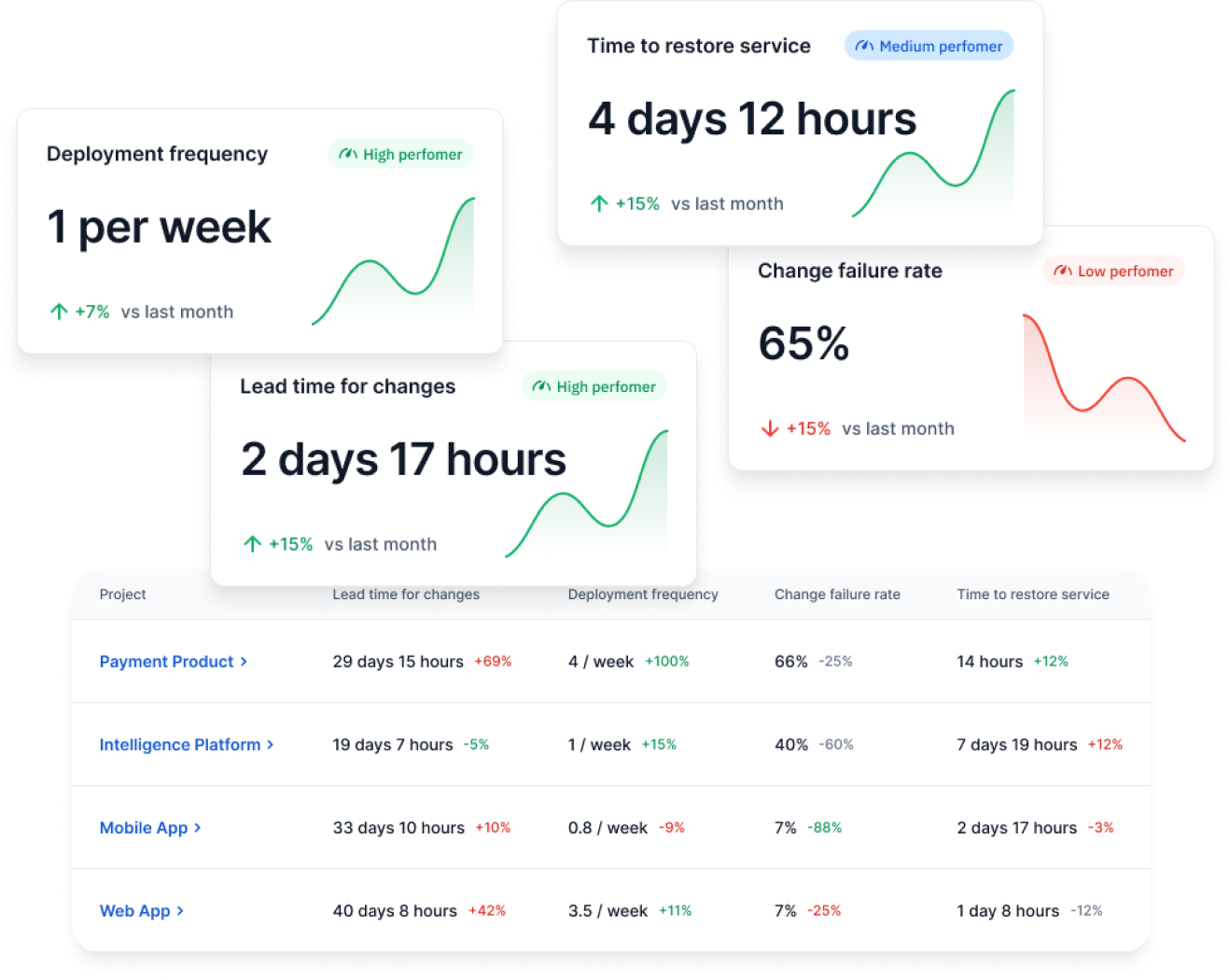
Dashboard displaying key DORA metrics: deployment frequency, lead time for changes, time to restore service, and change failure rate, with trends and project-specific data.

Questions Engineering Leaders Should Ask Before Implementing GitHub Copilot Metrics

Before tracking Copilot data, align it with how work actually flows through your system. Otherwise, increased output risks shifting bottlenecks instead of improving delivery.

To ground that evaluation, these are the questions to review:

  • Have you mapped your value stream? Without a clear view from commit to production, it is difficult to see where faster coding creates delays.
  • Where is your current constraint? Identify where work slows down today, whether in development, review, testing, or deployment. This helps you decide where Copilot can be applied effectively instead of accelerating the wrong part of the system.
  • Can review processes absorb higher throughput? More pull requests increase review load, which can slow down merge cycles if capacity stays fixed.
  • Is CI stable enough? Frequent failures or long build times will offset any gains from faster code generation.
  • Do you have baseline DORA metrics? A baseline allows comparison over time, so changes in delivery performance can be measured correctly.

When taken together, this checklist connects Copilot signals with system behavior. It can help you act on data instead of reacting to it.

How to Run a Before-and-After GitHub Copilot Impact Analysis

Measuring impact requires more than tracking usage. It depends on comparing how your whole system behaves before and after adoption, and how your productivity is affected.

To structure that analysis, these are the steps you should follow:

1. Establish a Baseline (3-6 Months)

Start with historical delivery data across your workflow. This includes lead time, cycle time, review time, and deployment frequency. A stable baseline creates a reference point, so you can tie significant changes in your trendlines to Copilot adoption.

2. Track Copilot Adoption Levels

Next, monitor how widely and consistently teams use Copilot. Adoption is not binary. Some engineers rely on it heavily, while others use it occasionally. This step matters because uneven adoption produces uneven effects across the system.

3. Compare Team-Level Delivery Metrics

Once adoption data is in place, compare delivery metrics across teams and time periods. For example, if one team increases code output while another does not, differences in review time or deployment frequency help explain whether higher output leads to faster delivery or added congestion.

4. Analyze Bottleneck Shifts

Faster coding tends to shift constraints, especially in teams with poor workflows. According to the 2025 DORA report, AI amplifies existing organizational capabilities, whether good or bad. This is called the "AI Mirror Effect."

So, if your organizational capabilities are less than perfect you may notice that Copilot can increase your pull request volume, but your review queues may grow, too. And if more changes reach CI, build times or failure rates may rise.

These shifts show where your system absorbs or resists increased throughput.

5. Validate Impact on Engineering Workflow Metrics

Finally, connect all signals back to the system performance. Look at how changes in coding speed affect flow efficiency, stability, and release cadence. This step confirms whether improvements are real or limited to earlier stages of development.

Copilot metrics show where AI enters your workflow and how your teams are using it. So the next step is not more AI adoption/ usage tracking, but connecting those signals to how work actually flows through your system.

Aggregate Signals Across the Delivery System

That connection starts with data consolidation. Axify aggregates Copilot data with pull request activity, CI/CD performance, and issue tracking. This matters because each dataset reflects a different stage of delivery.

Each dataset reflects a different part of the delivery process. When viewed together, they help you understand how increased code output affects review load, pipeline activity, and overall delivery flow.

Map Changes Across the Value Stream

Once data is unified, Axify’s Value Stream Mapping shows how work moves from commit to production. From our experience, we know that delays usually accumulate in handoffs and queues and not in coding time itself.

This is why faster code can still result in slower delivery. With this view, you can locate where throughput is affected and understand how bottlenecks shift inside the SDLC after adoption.
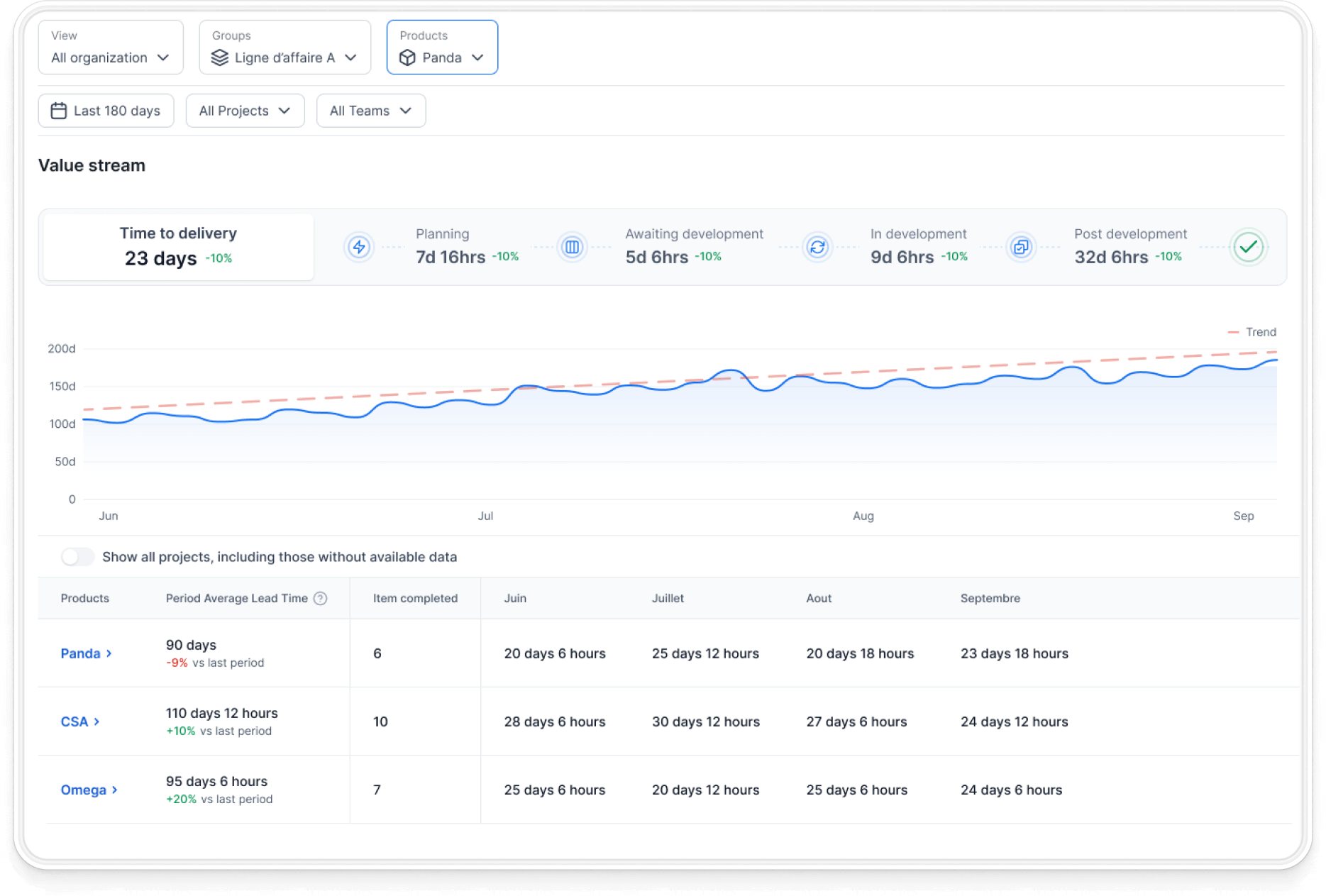
GitHub Copilot metrics dashboard showing value stream mapping, time to delivery, and development bottleneck breakdowns. Includes a line graph depicting trend over time and a table detailing lead times for different products like Panda, CSA, and Omega.

Track AI Impact and Surface Insights

And then, Axify’s AI Adoption and Impact feature tracks how AI usage changes your delivery behavior as AI usage increases. This feature connects your teams’ AI usage patterns to delivery metrics such as review time, deployment cadence, and failure rates.

This helps you assess whether AI improves delivery or introduces new constraints.
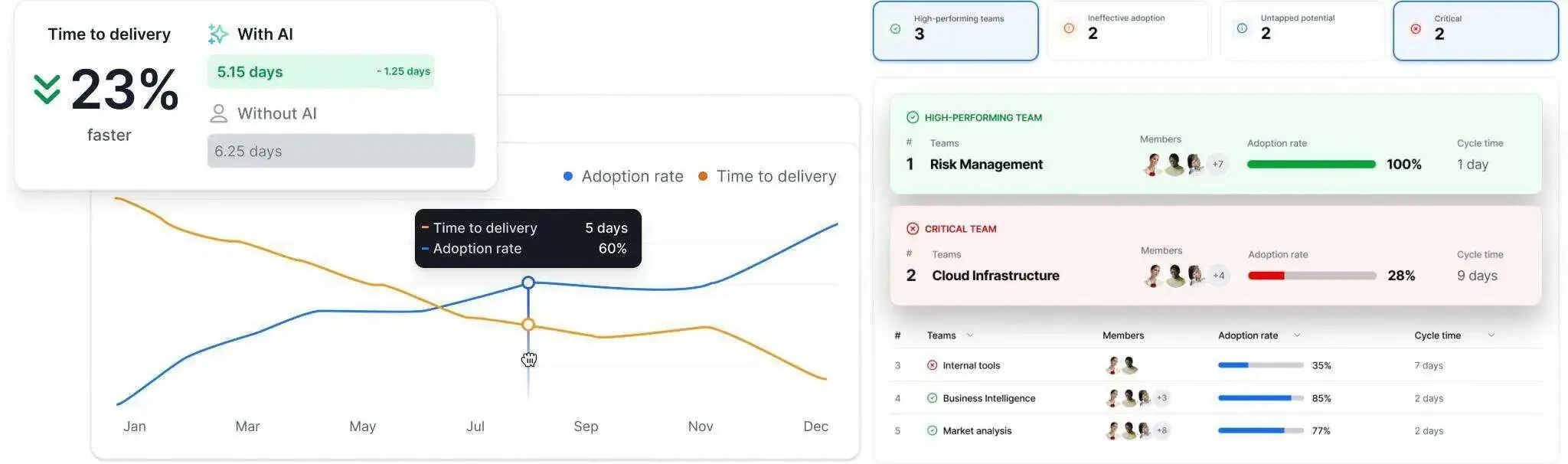
A dashboard showing GitHub Copilot metrics, including "Time to delivery" with and without AI, adoption rate, cycle time, and team performance, with a 23% faster delivery with AI.


Move from Insight to Action

Finally, Axify AI Intelligence analyzes your historical patterns, team behavior, and system constraints to recommend concrete actions that you can take to fix your issues.

For example, if review time increases after AI adoption, it can surface this trend and suggest areas to investigate, such as review capacity or workflow design. Teams can then validate these insights and adjust their processes accordingly to increase operational efficiency.
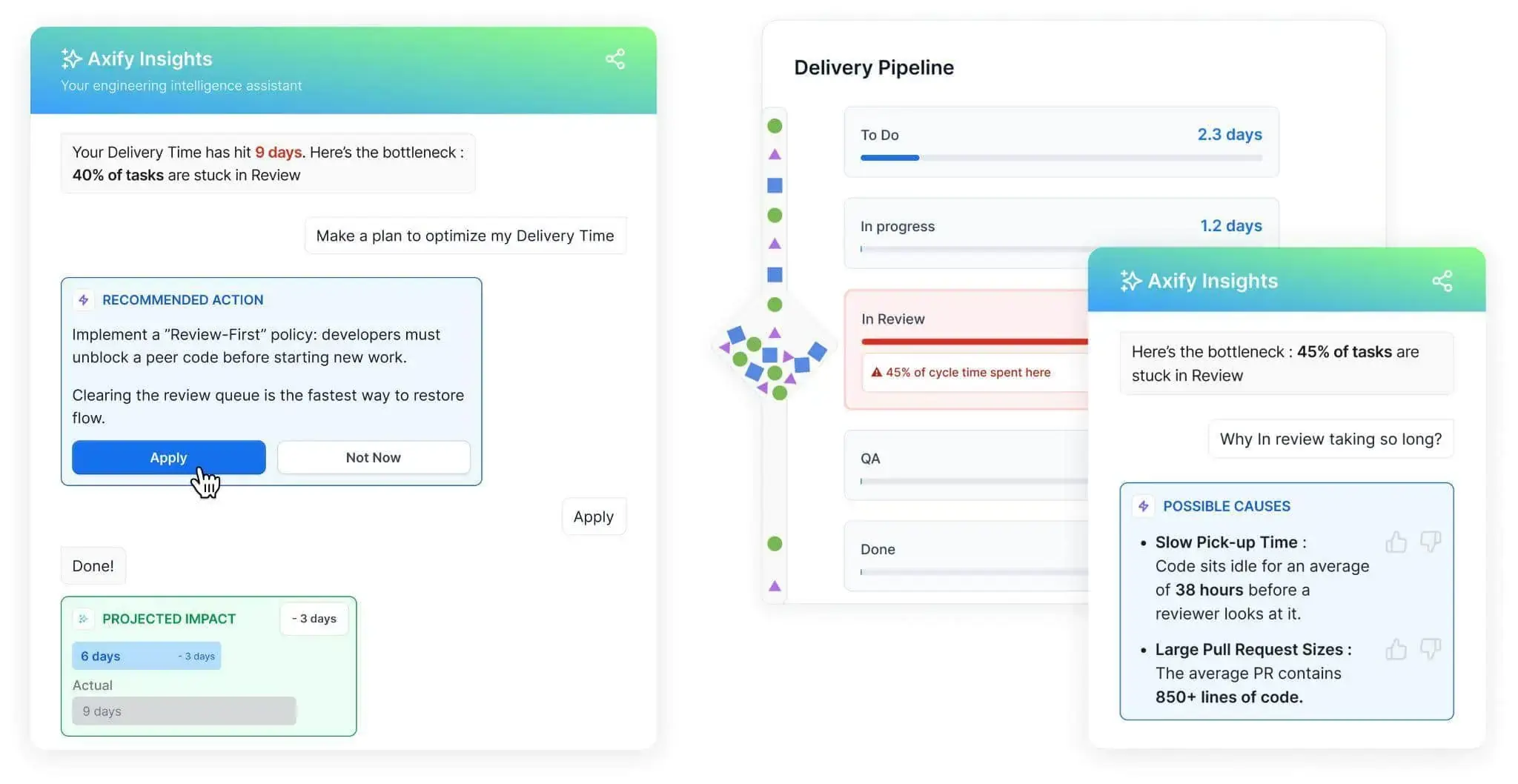
Axify Insights dashboard showing delivery pipeline bottlenecks, recommended actions, and projected impact for improving operational efficiency.


All this helps you move from isolated metrics to system-level decisions grounded in real delivery behavior. Book a demo with Axify

FAQs

What are the most important GitHub Copilot metrics for engineering leaders?

The most important Copilot metrics are adoption rate (measured by active licenses vs. inactive licenses, license activation rates, and IDE usage), suggestion acceptance rate, and code completion activity. These show how widely Copilot is used across your organization, how much developers rely on it, and how much code it generates. On their own, they reflect usage, not delivery impact.

How do you calculate GitHub Copilot ROI in a software team?

You calculate ROI by comparing delivery performance before and after adoption. This includes flow and DORA metrics, time to market, and so forth. The goal is to determine whether increased code output leads to faster or more stable delivery, bringing value to users faster.

How can you tell if GitHub Copilot is improving developer productivity?

You can assess this by looking at how faster code generation affects the rest of the workflow. If pull request throughput improves and deployments become more frequent without increasing failures, productivity has improved. If delays shift to review or testing, the overall system has not improved.

Should GitHub Copilot metrics be tracked at the team or individual level?

Copilot metrics are more meaningful at the team level because delivery performance depends on shared workflows. Individual metrics, usually derived from IDE telemetry, are better suited for understanding usage patterns and identifying friction, but shouldn't be used for evaluating individual performance.

How long should you measure GitHub Copilot's impact before evaluating results?

You should measure impact over several months, typically three to six, to establish a reliable baseline and observe system-level changes. Short-term results aren't trustworthy because they may reflect temporary fluctuations.

What tools can integrate GitHub Copilot metrics with delivery metrics?

Some platforms combine Copilot usage data with delivery metrics such as DORA and value stream metrics by integrating with tools like GitHub Enterprise, CI/CD systems, and issue tracking platforms. This helps connect coding activity with system-level performance.

How do GitHub Copilot metrics compare to traditional developer productivity metrics?

Copilot metrics focus on usage signals such as IDE usage and code generation, while traditional metrics focus on delivery performance and organizational-level outcomes. Used together, they help explain how activity translates into production impact.