Delivery Performance
12 minutes reading time

Engineering organizations can lose time and money when work stalls between planning, coding, review, testing, and deployment. These delays become harder to assess as teams adopt artificial intelligence, since faster coding doesn’t automatically entail faster or more reliable delivery.
This article takes a practical approach to operational efficiency in software development. Here, you’ll learn which factors and principles shape efficient delivery and how process mapping and capacity planning can expose bottlenecks.
You’ll also see which performance metrics to track and how to use them for process optimization without circumscribing performance to individual developer output.
P.S. Axify connects AI adoption and cost data with delivery metrics, which can help engineering leaders assess whether AI tools contribute to faster, higher-quality delivery. Its AI Impact and AI Cost dashboards, Axify Intelligence, and MCP access provide up-to-date data on usage, spend, flow, and delivery trends.
Let’s get started!
Operational efficiency in software development means improving delivery speed, reliability, and team focus while reducing delays, unnecessary work, and rework.
These improvements shouldn’t lead to overloading developers or treating individual output as a measure of efficiency. Generic operational efficiency focuses more broadly on lowering costs while maintaining the same output and quality.
In practice, software companies improve operational efficiency through workflow automation, streamlined CI/CD pipelines, clearer priorities, and better resource management. The relevant key performance indicators include throughput, cycle time, change failure rate, recovery time, error rates, and delivery cost.
Together, these metrics show whether your business processes are becoming faster and more reliable at the team or product level.
For AI-augmented teams, operational efficiency also means measuring whether AI tools improve throughput, cycle time, quality, and cost efficiency. Higher AI usage alone doesn’t show whether software delivery has improved.
The formula for operational efficiency is:
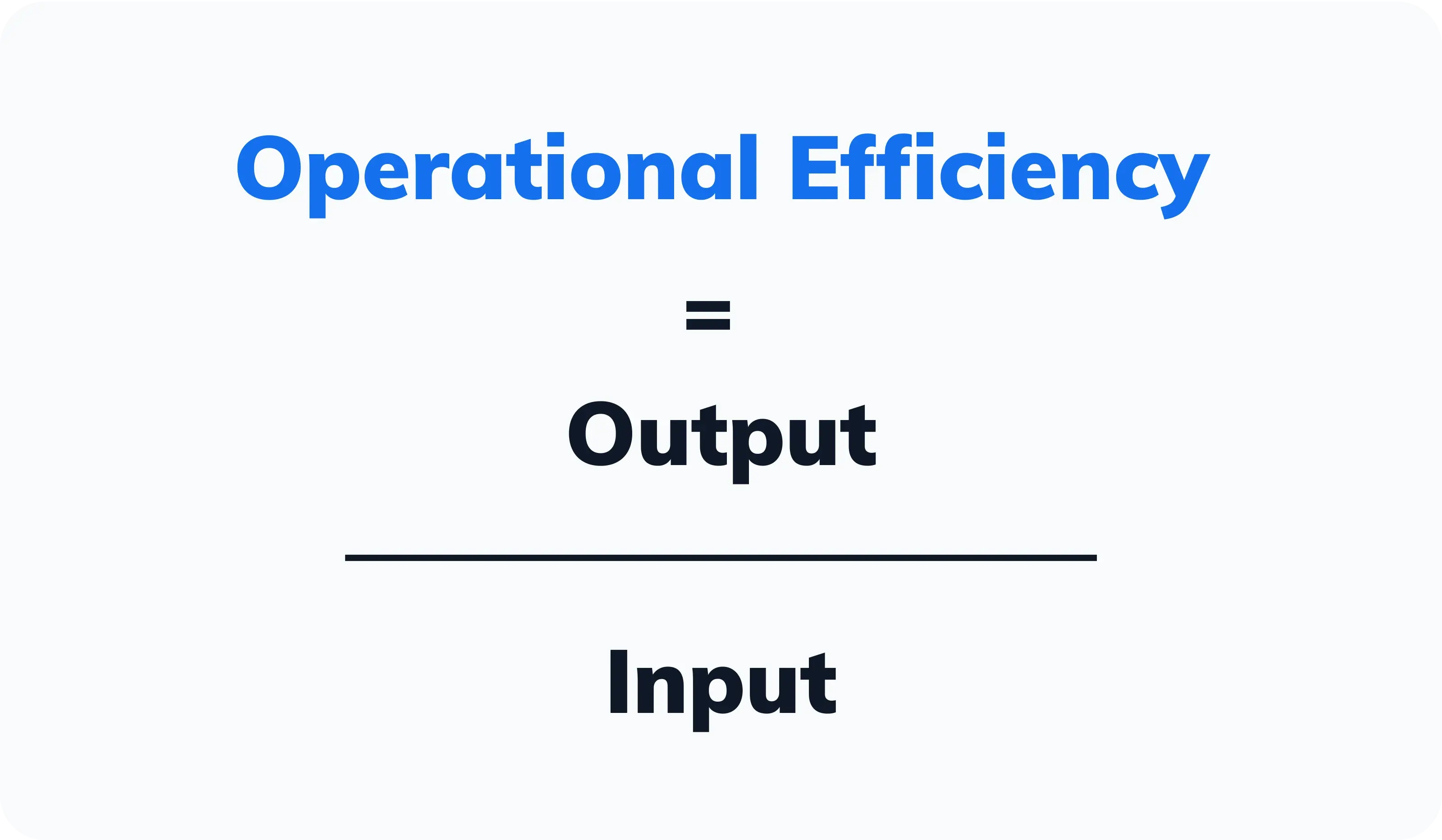
For software teams, the formula is useful when you define value and resources at the team or product level and compare them over the same period.
Value can include
Resources can include
These measures use different units, so you should compare one or more related outcomes against specific inputs instead of combining everything into one score.
For example, compare two eight-week periods to see whether a team shipped more customer-facing work with the same engineering time while reducing lead time and failed deployments. Then review any increase in tool or AI subscription costs to determine whether the improvement justifies the added spend.
A poor way to use this formula would be to compare individual pull request counts against salary costs. Pricing, review dependencies, incident work, and task complexity make individual attribution unreliable and can hide rising rework or declining quality.
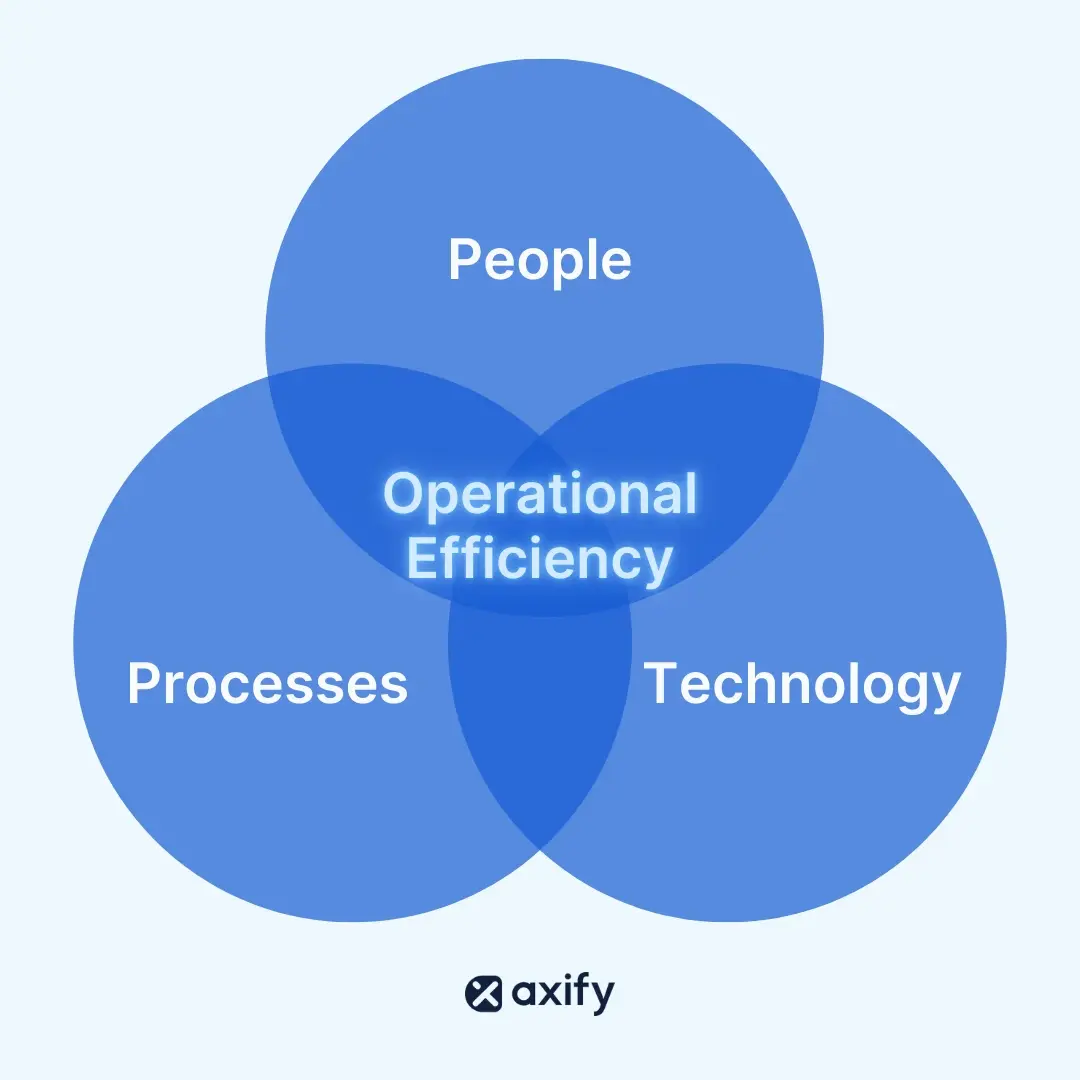
The three key operational efficiency factors are people, processes, and technology. Each one affects how efficiently software teams turn planned work into reliable releases. Let’s look at what they entail:
Operational efficiency depends on your team’s expertise, alignment, available capacity, and well-being. Developers, project managers, and engineering leaders need clear priorities and enough time to complete reviews, testing, and technical work without constant context switching.
Efficiency can decline when teams are overloaded, responsibilities are unclear, or delivery pressure leads to burnout and lower employee morale. For this reason, the people factor should be reviewed at the team level rather than through individual output metrics. Our guide to developer productivity explains which team-level measures to use instead.
Metrics like lines of code don’t account for task complexity, collaboration, review dependencies, or incident work.
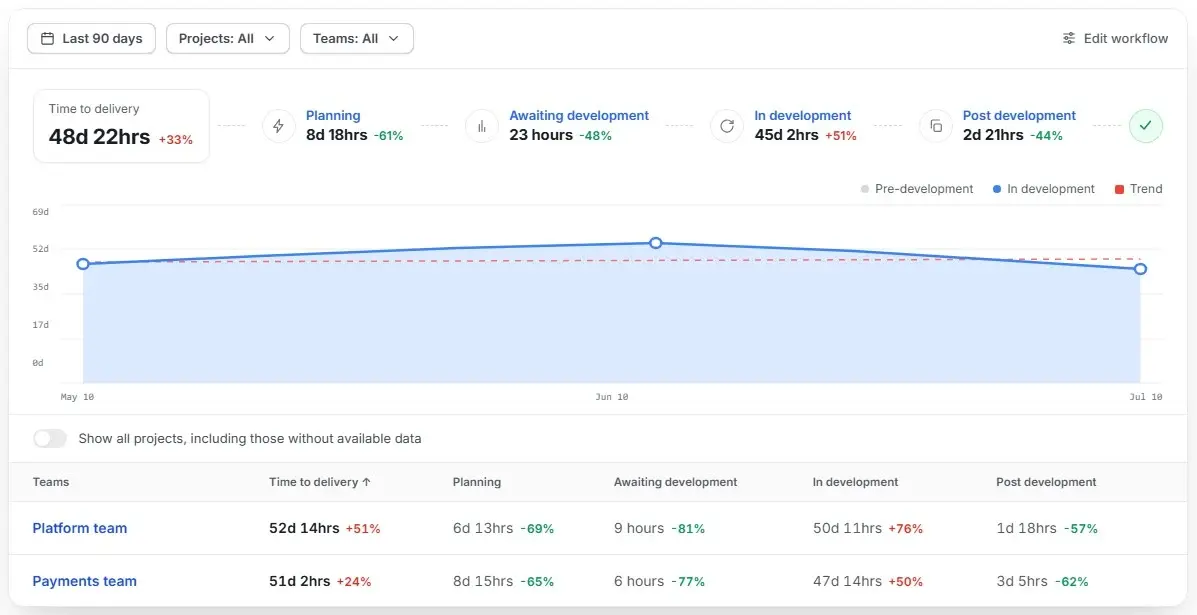
Efficient processes help work move from planning through development, review, testing, and deployment with fewer delays and less rework. Value stream management supports this process streamlining by mapping each delivery stage and showing where work waits, returns to an earlier stage, or accumulates as work in progress. Then, it creates better workflows.
Axify’s VSM capabilities give teams visibility into cycle time, bottlenecks, and flow across the software delivery lifecycle. This workflow analysis helps you identify whether you need an entire process overhaul or whether you need to pay attention to a specific handoff.
Technology supports operational efficiency through workflow automation, monitoring, and access to reliable delivery data. AI coding tools add another consideration because they can accelerate code generation while increasing the amount of work entering review, testing, security checks, and deployment.
Any time saved during coding may have limited value if rework or review time increases later in the software development lifecycle.
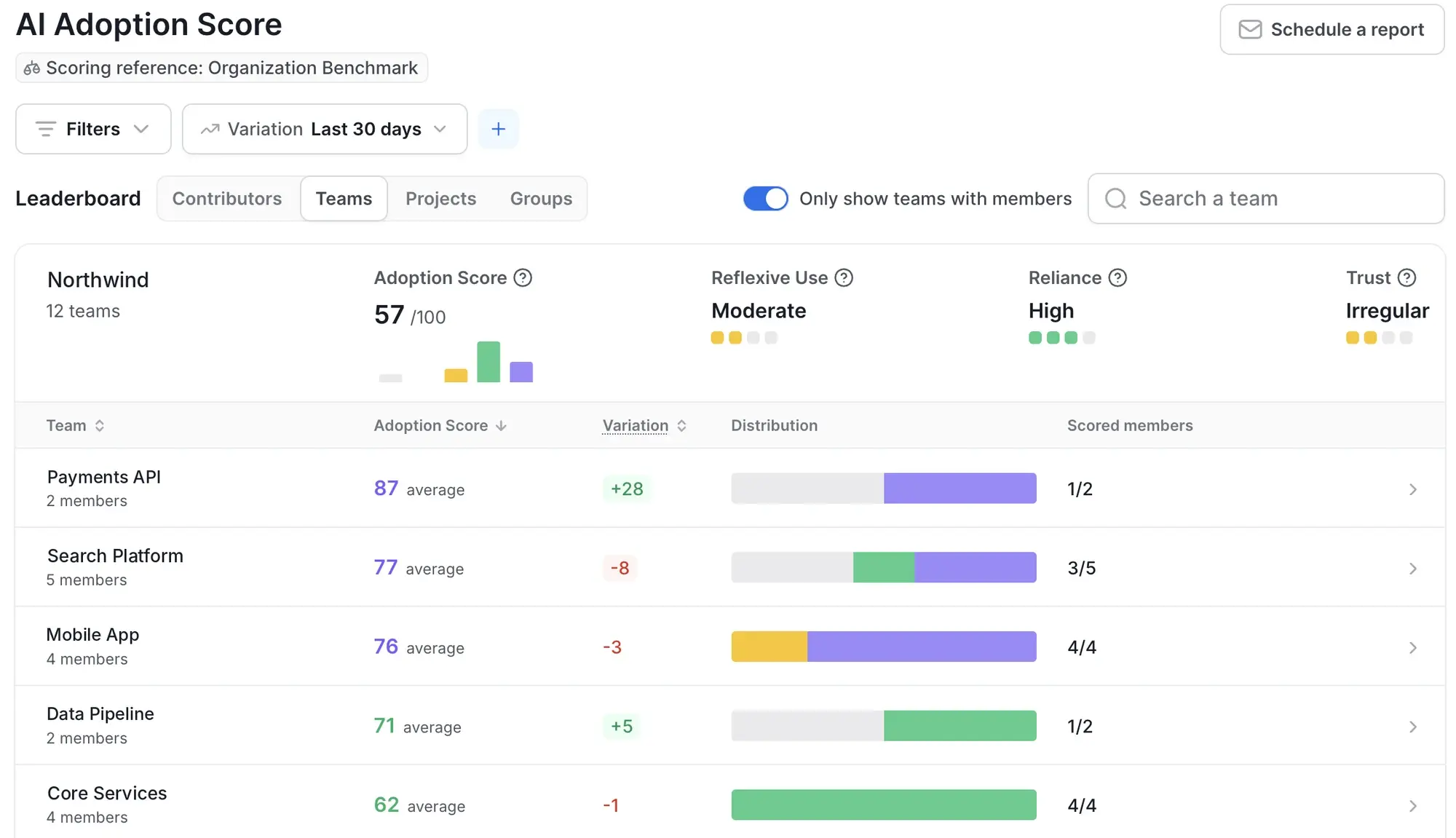
Axify’s AI Adoption and Impact connects adoption and spend with delivery metrics, including an AI adoption score built on reflexive use, reliance, and trust. This helps engineering leaders see whether higher AI usage is followed by faster and more cost-efficient delivery or by added costs and downstream delays.
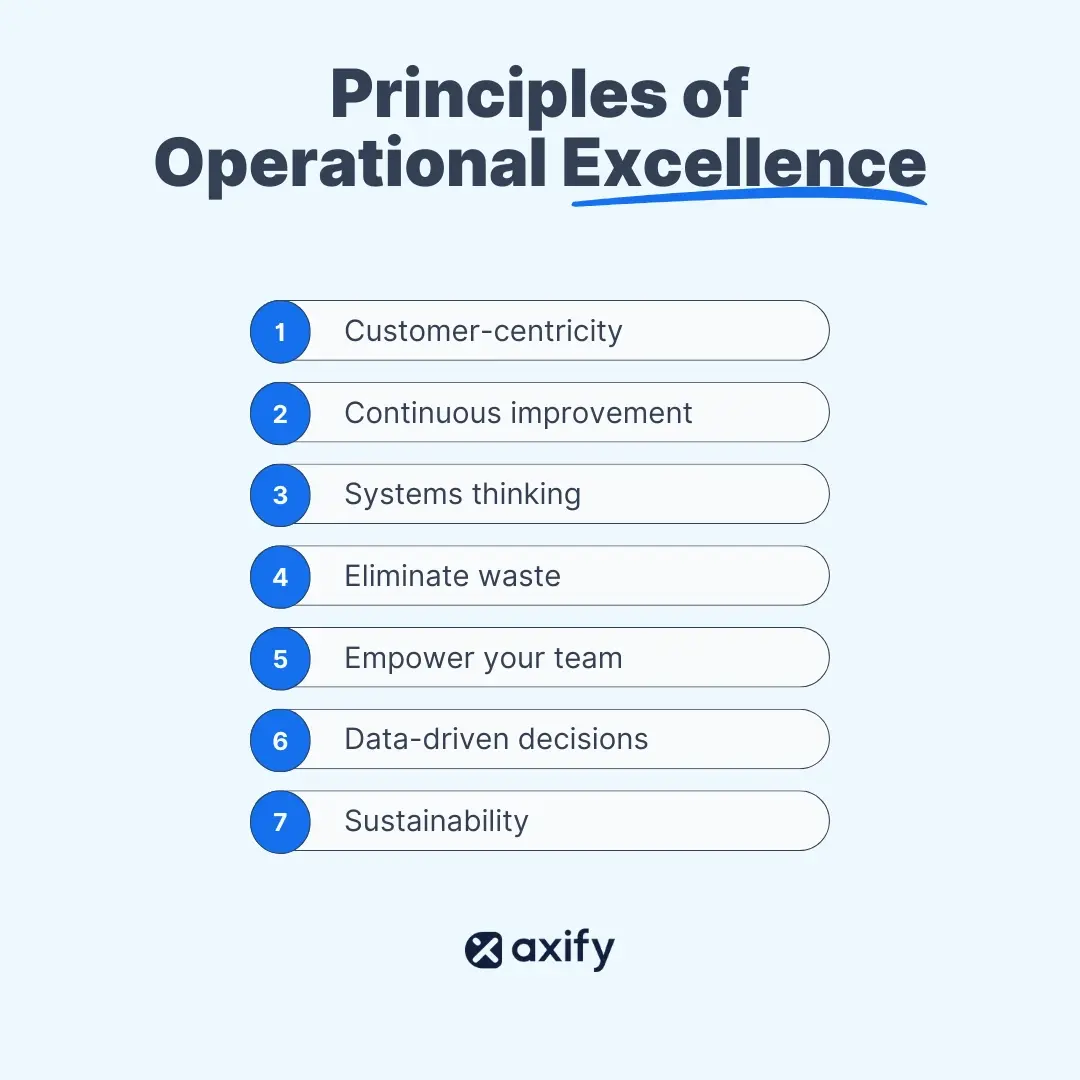
Operational excellence is rooted in the DevOps mindset, and that’s why it emphasizes efficient decision-making and process improvement. Key principles include:
"Agile processes promote sustainable development. The sponsors, developers, and users should be able to maintain a constant pace indefinitely."- Agile Manifesto
“Build projects around motivated individuals. Give them the environment and support they need, and trust them to get the job done.”- Agile Manifesto
Operational efficiency affects several areas that engineering leaders are responsible for:
Operational efficiency requires a balanced view of delivery speed, reliability, work allocation, and cost. Review these metrics at the team or product level using consistent definitions and reporting periods. Comparisons across individuals or unrelated teams can mislead because work complexity, review dependencies, and incident load differ.
Here are the main four groups of metrics to track.
Flow metrics show how quickly and consistently work moves from development through review, testing, and completion. Improvements should reduce waiting and rework while maintaining quality.
These are the main flow metrics:
DORA metrics help teams review delivery speed and stability together. The benchmarks below come from the 2025 State of AI-Assisted Software Development report.
That report covers five DORA metrics: the four core metrics plus rework rate.
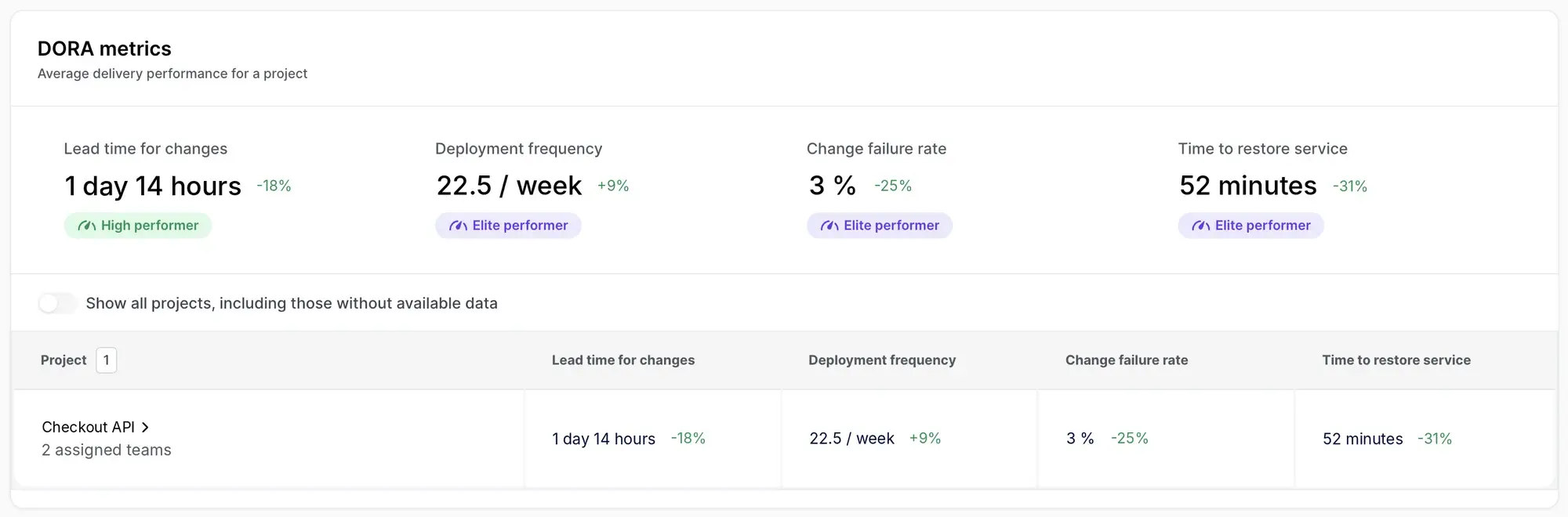
Axify’s DORA metrics dashboard tracks the four core metrics: lead time for changes, deployment frequency, change failure rate, and failed deployment recovery time.
Work investment metrics show where your engineering capacity goes. They help leaders see when incidents, technical debt, or unplanned requests are reducing the time available for product work.
These are the main work investment metrics:
AI metrics connect AI usage and spend with software delivery outcomes. Always focus at the team or workflow level because shared reviews, task complexity, and release dependencies make individual attribution unreliable.
Here are the AI efficiency metrics to track:
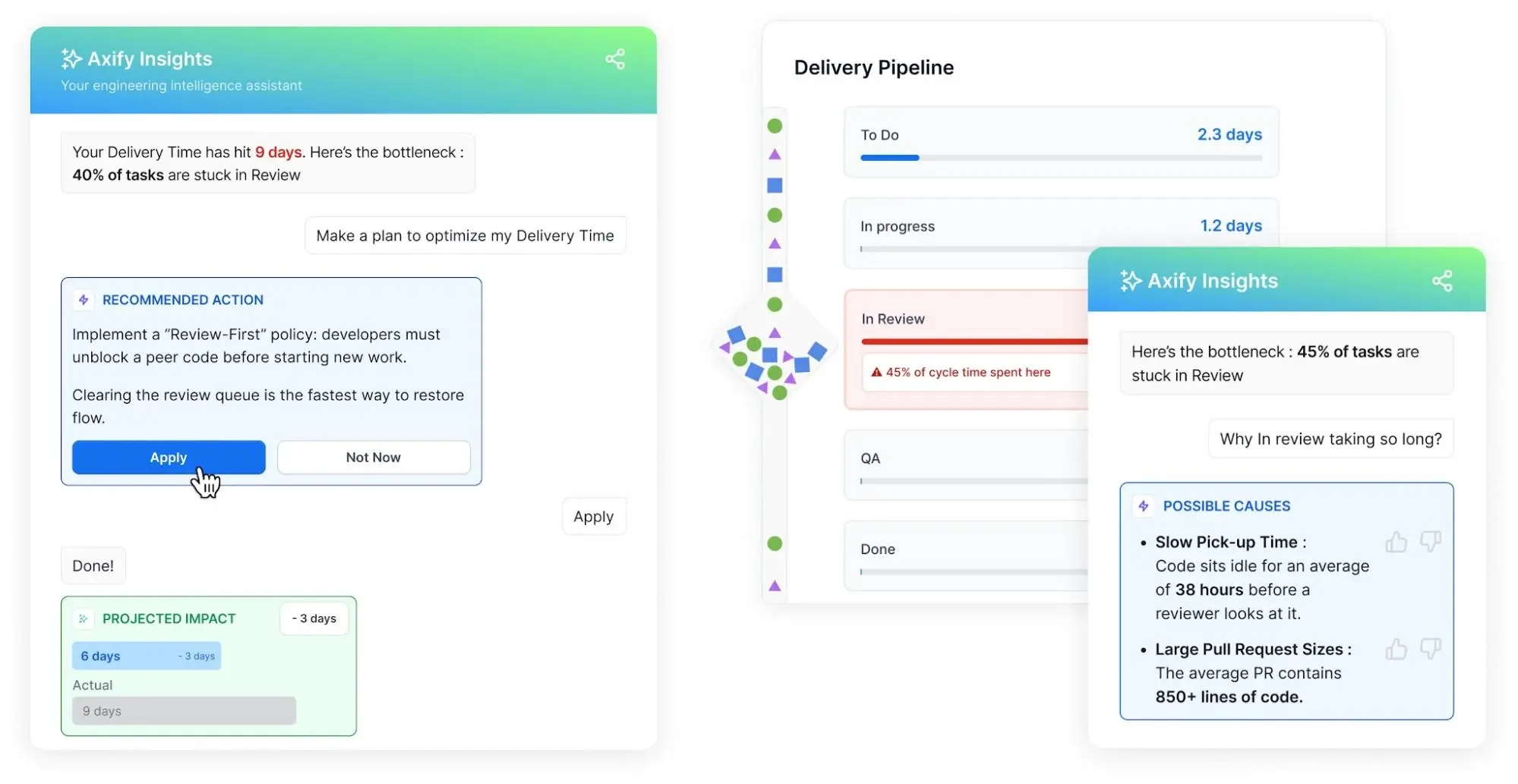
Many challenges remain hidden because engineering data is split across tools or reviewed only at scheduled intervals. Examining the full delivery flow makes it easier to pinpoint where time, capacity, and spending are being lost.
Some of the common challenges that companies face in achieving operational efficiency include:
Inconsistencies or undefined processes create inefficiencies, wasting employee time and increasing operational costs. They also make delivery times and outcomes harder to compare across teams.
Limited resources, whether in terms of human resources, technology, or budgets, can significantly impact operational efficiency by causing delays and inefficient processes. Teams may also postpone maintenance, testing, or process improvements to meet immediate priorities.
Poor collaboration among development teams and project managers can lead to missed deadlines, misaligned business activities, and suboptimal customer outcomes. This directly impacts team efficiency. Unclear ownership and incomplete handoffs can create additional waiting time and rework.
Accumulated technical debt due to unresolved bugs, outdated systems, or inefficient coding practices can slow operations and increase operating expenses. Over time, teams must spend more capacity maintaining existing systems instead of delivering planned product work.
Delivery data is usually spread across Jira, Git, CI/CD pipelines, incident tools, and AI tools. Without a shared view, software companies struggle to establish a reliable baseline of their operations and identify where delays or quality problems begin.
Excessive WIP divides attention across too many tasks and increases context switching. As more work remains unfinished, cycle times grow and delivery becomes less predictable.
Work may spend more time waiting for reviews, testing, approvals, or deployment than being actively developed. These delays can remain hidden when teams only track completion dates instead of time spent at each workflow stage.
Production incidents interrupt planned development and redirect engineering time toward investigation and recovery. Frequent interruptions make delivery commitments harder to meet, especially in complex cloud-native environments.
Multiple AI coding tools can increase subscription costs without clear evidence of better delivery outcomes. Usage data alone cannot show whether these tools improve cycle time, throughput, quality, or rework.
One team may improve coding speed while work continues to wait in review, testing, security, or deployment. This creates the appearance of higher productivity while the main system bottleneck remains unchanged.
Looking at one tool or one stage at a time hides the real problem. A team can look fast in its ticketing system and slow in code review, or fast at shipping and slow at recovering from failures. The only way to find the actual constraint is to look at the whole flow, from first commit to production, and compare stages against each other. The five checks below build on each other. The order matters.
For each stage (development, review, testing, deployment) measure time spent waiting against time spent actively worked on. Most delivery time is wait time, not work time, and it's usually concentrated in one or two stages. Whichever stage has the longest recurring wait is the one to investigate first: unclear ownership, too few reviewers, or an approval step that adds delay without adding safety.
Compare tasks started to tasks completed over the same period. If starts consistently exceed completions, the wait you found in step 1 is likely caused by too much work in progress, not a broken process. Lowering WIP limits and holding new requests until current work clears often fixes the wait without touching anything else.
Review all four core DORA metrics for the same team and period, together. If deployment frequency or lead time for changes is improving while change failure rate or recovery time is getting worse, the team is shipping the same problems sooner. Check release size, test coverage, and rollback procedures for the stage where that trade-off is happening.
Incident response, bug fixes, and rework get counted in the same throughput numbers as planned feature work, which makes planned work look slower than it is. Split the two. If rework and incident response make up more than roughly a quarter of total capacity in a period, the team has a stability problem, and no amount of reprioritizing the roadmap will fix it. The fix is reducing the rate of incidents and rework at the source.
If the team uses AI coding tools, compare cycle time, throughput, defect rate, and rework rate for the same workflow before and after adoption, alongside AI spend. Faster coding by itself doesn't tell you whether the workflow got cheaper. If defect rate or rework rose after adoption, the time saved in coding is being spent in review, testing, or incident response instead, and total cost may not have changed.
Each check above can point to a different stage: WIP might be high in review while the longest wait is in testing, or rework might be high while deployment frequency looks fine. Value stream mapping puts all five checks on one timeline so you can compare wait time across every stage at once. The stage with the longest total wait across the full flow, not any single metric, is the constraint to fix first. Fix it, then re-run the map. The next-longest stage is now the constraint.
Engineering leaders can improve operational efficiency through a few focused changes to planning and delivery. To improve efficiency, Axify experts recommend implementing these strategies:
Vague requests create clarification loops and unnecessary manual effort. This week, make sure every new request includes its business priority, owner, acceptance criteria, dependencies, and expected impact. Requests that lack this information should remain in intake until the missing details are added.
Pull requests usually remain idle when reviewer ownership is unclear. For the next sprint, set a rule that every PR should receive its first review within 24 hours. Each team should also have backup reviewers who can step in when the primary reviewer is unavailable.
Past sprints can show how much capacity incidents, bugs, and urgent requests usually consume. If these tasks take around 20% of the team’s time, plan roadmap work against the remaining 80%. Keep this buffer visible and adjust it as the amount of unplanned work changes.
Release delays typically begin when teams follow different testing and deployment requirements. This month, create one checklist covering deployment requirements, rollback plans, testing expectations, monitoring, and ownership. Teams can then review missed items after each release and update the checklist when recurring gaps appear.
AI adoption becomes easier to assess when each tool has a defined purpose. Choose the first workflows where AI can help, such as test generation, PR summaries, documentation, incident summaries, or legacy code exploration.
For each workflow, document the required human review and compare AI cost with cycle time, defects, and rework over the same period.
Engineering teams usually sense that something is slowing delivery down, but relying on intuition rarely points to the actual cause. Real progress comes from measuring the right things: where work stalls, whether new tools actually help, and whether “faster” numbers translate into better outcomes. The examples below walk through four common efficiency questions, each paired with the data needed to answer them and a way to check whether a change actually worked.
A QA stage can look busy on paper while tickets actually spend most of their time waiting for review. To see where that delay occurs, build a value stream map using Jira statuses, pull request timestamps, testing records, and CI/CD events from the same four- to eight-week period.
The map should separate active testing time from time spent waiting for QA and show how often work returns to development. And if work waits three days for five hours of testing, investigate the queue before adding more test automation.
A root cause analysis can then show whether the delay comes from excessive WIP, missing acceptance criteria, unstable test environments, or limited QA capacity. After introducing one change, review the same flow metrics to see whether the delay decreases.
BDC took this approach with Axify, combining DORA metrics with value stream mapping. Within three months, its teams reduced time spent in quality control by up to 81% and time in pre-development activities by up to 74%.
Faster code generation does not confirm faster software delivery. A useful pre-adoption baseline should cover cycle time, PR review time, rework, and change failure rate for one team or workflow. After adoption, compare the same metrics across an equal period while keeping work types and definitions consistent.
This baseline matters because perceived productivity can differ from measured results. In METR’s early-2025 randomized study, experienced developers took 19% longer with AI tools even though they believed they had worked 20% faster. Its 2026 follow-up found possible speed improvements with newer tools, although the results remained uncertain.
For example, cycle time may fall during an eight-week period while support tickets for released defects rise. In that case, AI can remain in lower-risk workflows while review standards for production code are tightened. Individual comparisons are unreliable because task complexity and review dependencies differ.
AI tool waste is reflected in unused licenses, overlapping subscriptions, and expensive workflows with unclear delivery impact. A 30-day review should therefore correlate seat costs, active users, workflows, model usage, and output with cycle time, rework, and quality at the team level.
This way, you connect spending with delivery outcomes from the same period. Conversely, chat counts or suggestion volume only measure activity, so they cannot confirm ROI.
Your findings can then help you reclaim inactive seats, remove overlapping tools, and assign each tool to workflows where its use corresponds with better outcomes.
Large releases place more code into review, testing, and deployment at once, which makes delays and failures harder to isolate. A clear baseline should first cover median PR size, release size, lead time, deployment frequency, rework, and change failure rate.
During the next four weeks, backlog items can be divided into independently testable slices while branches remain short-lived and incomplete functionality stays behind feature flags. DORA identifies working in small batches as a capability associated with stronger software delivery and organizational performance. After five months with Axify, Newforma increased its deployment frequency by 2,150% and cut its lead time for changes by 63%.
The shift is working when lead time for changes falls and deployment frequency rises while failure and rework rates remain stable or improve. Deployment count alone is misleading because additional releases do not show whether customer value or reliability improved.
Different tools support different parts of software delivery, from planning and coding to deployment and incident response. Together, they give engineering leaders the data and workflow visibility needed to find delays, reduce manual effort, and improve resource allocation.
The main categories include:
Operational efficiency improves when engineering leaders can see how work moves through planning, development, review, testing, deployment, and incident response. This visibility makes excessive WIP, hidden waiting time, unplanned work, and rising AI costs easier to identify.
From there, data analytics can guide focused changes, while delivery and quality metrics show whether those changes produce measurable improvements.
A more predictable delivery system gives teams greater capacity for planned product work. It also helps customer-facing features and fixes reach production sooner, which can improve the customer experience without increasing failures or rework.
For a practical next step, read Axify’s guide to building a DORA metrics dashboard. It explains how to bring delivery data into one view and use DORA metrics to identify risks and bottlenecks.
Want to see where work waits across your own delivery flow? Start your 14-day free trial of Axify.

Operational efficiency in software development focuses on how reliably work moves from planning to production, while general business operations typically emphasize cost, output, and resource use. Software teams must also account for code reviews, testing, incidents, and technical debt because each can create downstream delays.
Operational inefficiency in engineering teams usually comes from excessive WIP, hidden waiting time, unclear intake, fragmented data, technical debt, and unplanned incidents. These problems compound because teams start more work while reviews, testing, or deployment remain the actual constraint.
AI tools create operational waste when costs rise without corresponding improvements in cycle time, quality, or rework. Unused licenses, overlapping subscriptions, and poorly reviewed output add expense, while data integration and anomaly detection can show where adoption creates delays or avoidable work.
Operational efficiency measures how effectively a team uses time, capacity, and spending to deliver software. Operational excellence is the broader discipline of improving that system continuously. Efficiency provides measurable results, while excellence includes the habits, leadership, and performance audits that sustain them as market conditions change.
Engineering leaders should review operational efficiency weekly at the team level, monthly at the product level, and quarterly for investment decisions. Weekly checks catch WIP and waiting-time changes, while longer periods reveal trends. Avoid individual rankings because task complexity, shared reviews, and incidents shape delivery results.