AI
13 minutes reading time

You’re consistently using AI coding tools for your daily engineering work, but their costs can’t be accounted for like simple software licenses with fixed annual prices you can plan around. AI tools mix flat subscriptions, usage-based tiers, and token consumption, and vendors can reprice any of those without notice.
In April 2026, Anthropic tested removing Claude Code access from the $20 Pro plan for a small share of new signups and moving that access behind higher Max plans. Anthropic reversed the change within hours after developer backlash. The test itself wasn’t the problem. The problem was that teams building workflows on a $20/month assumption had no warning before the pricing page changed.
That is where AI cost optimization matters. You need to connect tool spend with adoption, PR review time, rework, and delivery impact before pricing changes hit. That way, you’ll know if an AI tool is indeed useful or not.
Today, you will see how to compare your AI tool cost against workflow results. Also, we’ll show you what to keep, cut, downgrade, or review, and what platform to use for the job.
So, let’s start with the basics.

AI cost optimization is the process of identifying which AI tools, seats, and usage are producing delivery value and cutting the ones that aren’t.
Most teams now include AI spend in their budget reviews alongside headcount and infrastructure.
In fact, the FinOps Foundation’s 2026 State of FinOps survey found that 98% of respondents actively manage AI costs, up from 31% two years ago. But you must start with a correct assessment.
For your engineering teams, this includes:
At Axify, we treat AI cost optimization as a delivery decision.
The goal is to identify which tools, teams, and workflows justify their cost in delivery terms, then adjust access based on that evidence. Axify connects AI spend, adoption data, and software delivery metrics so you can see whether a tool is changing cycle time, review time, and rework rate, or just generating activity.
But we’ll discuss all that below.
For now, let’s see:
AI coding tool costs grow through five channels at once: seats, usage limits, token-based pricing, premium tiers, and the review and rework work that AI output creates downstream. A traditional SaaS license has a clear ceiling. Agentic AI tools don’t.
A pilot with 10 developers doesn’t predict what happens when 80 developers use Copilot, Claude Code, Cursor, and ChatGPT daily. More paid seats raise the baseline. Daily use changes how each seat costs you.
Agentic workflows are the main reason.
They read repository context, run multi-step plans, retry failed steps, and run sessions in parallel. Each of those operations bills tokens.
Agentic coding workflows can use 5x to 20x more tokens than standard code completions, which makes them the main cost variable in 2026. If your team bills agent runs the same way it billed autocomplete suggestions, the invoice will increase before planning catches up.
Vendor pricing changes add another variable, as we’ve seen from the Anthropic price change to Claude Code. Pierre Gilbert, our software delivery expert, explains it best:
Averages also hide the real cost drivers. A few heavy users can create a large share of cost, especially with long agentic sessions or premium models used for simple work. The typical developer may pay $70-$120 per month across 2-4 subscriptions, so tool overlap is hard to defend without clear resource allocation.
That overlap makes value harder to compare. Before consolidating tools, you need to see:
This leads us to the next section.
A useful AI cost model connects spend, adoption, and delivery results in the same review. Use the five steps to make clear engineering decisions about your AI tool costs.
Start with basic visibility. Before you judge whether an AI coding tool is worth the cost, you need to know what you pay for each tool and where that spend sits.
That means you should track Copilot, Claude Code, Cursor, Codex, and other agentic tools separately. A single “AI tools” budget line hides the difference between broad assistant use, premium IDE tools, and high-cost agentic sessions.
We advise you to track at least five fields:
This matters because unused and underused licenses are already a known problem in the SaaS niche. Some SaaS-management research estimates that organizations waste 30-40% of software spend on unused or underused licenses. That means your AI coding stack can face the same issue if seats are assigned during pilots and never reviewed later.
Don’t turn this first step into a full cloud FinOps process. Consider it the baseline data management you need before any AI cost review becomes useful.
After you know what each tool costs, the next step is to check whether people are actually adopting them in their daily workflows. Notice we said “adopting” instead of “using” because:
A developer may use AI rarely but for valuable work, such as a complex refactor, migration task, test expansion, or debugging session. The goal is to separate unused licenses from low-frequency but high-value usage.
That’s why at Axify, we recommend that you avoid cutting seats based on one quiet week.
Instead, you need to review:
The last point gives you an especially important context regarding usage frequency vs adoption.
For example, a backend team may use Claude Code for refactoring. A frontend team may rely on Cursor. And a platform team may test several AI systems against infrastructure scripts. Without that workflow context, license cleanup can remove a tool that is useful for a specific team and keep a tool that is active but low value.
Once you know who uses each tool, the next question is whether their usage changes the team’s delivery flow. High usage does not automatically mean high AI impact on software development.
Look for warning signs such as:
Then compare delivery metrics before and after AI tool implementation:
This step is important because your mere perception on the impact of AI can be deceitful.
In fact, Reuters covered a METR study where experienced open-source developers expected AI to make them 24% faster. They still believed they were 20% faster after implementing AI, even though they needed 19% more time to complete their tasks.
That’s a 40-point difference in perceived productivity versus real performance.
Even so, the study does not mean AI coding tools are useless. It means you should monitor each stage of your SDLC, especially considering design, review, waiting, and cleanup time. Most teams simply look at the code generation stage to see if they’re faster, which is a mistake.
Of course, you need to assess resource utilization in the right context.
A tool that increases your coding output but adds review queues won’t reduce delivery cost. Conversely, an AI tool with lower use may still pay off if it reduces work item ages for hard projects.
Pro tip: For a deeper measurement model, read our AI impact measurement guide. To estimate your return before you cut or expand a tool, try the free calculator in our guide to AI ROI.
Last month’s invoice doesn’t mean that’s how much you’ll always pay for your AI tools. AI costs change depending on your team’s adoption, usage intensity, and agentic workflows. Besides, AI tool companies may also change their prices.
So, your AI cost forecast should rely on the following data:
Unfortunately, most IT teams are taken by surprise by how much their AI tools cost. Even Uber spent its 2026 AI budget in just four months.
They’re not alone, either. Zylo reports that 77% of IT leaders experienced unexpected costs after a SaaS contract was signed. 78% reported unexpected charges tied to consumption-based or AI features in the past year.
To avoid those issues, connect active use with expected rollout and usage intensity across your AI tools.
For example, your forecast should include different scenarios, like what happens if:
Of course, your cost management strategies should rely on precise engineering data.
Your spend forecasts should account for LLM APIs, model selection, prompt engineering, and the types of task you use those tools for.
The goal is not to pick the cheapest AI tool but to keep the tools that create the best delivery value for their cost.
That means you can:
For optimum gen AI cost control, we advise you to:
For example, Claude Code may be worth the cost for complex refactors, but overkill for basic boilerplate. Copilot may be efficient for broad daily assistance but less effective for autonomous work. Lastly, Cursor may help some teams move faster, but overlap with tools already licensed.
All this pays off in the long run.
In fact, better license management can cut software spending by up to 30%, according to G2.
That means reclaiming unused seats, consolidating overlapping tools, and matching license tiers to real engineering workflows rather than vendor defaults.
Remember that your goal is not to “spend less at any cost.” Keep funding the AI workflows that produce measurable delivery gains, and downgrade, reassign, or cut the ones that don’t.
The AI cost optimization framework above leans more towards the theoretical side. If you need more practical tactics on how to optimize your AI costs, keep reading below:
Not every developer needs the same AI tool, tier, or agentic capacity. So, assign access based on the work each developer actually does. This includes broad assistants for routine code suggestions, and agentic coding tools for complex refactors, migrations, or multi-file changes. We recommend reviewing the role, repository, and team context before changing access for any developer.
Agentic workflows can run several steps before a developer sees the final change, and each step bills tokens. Define when developers should use long-running agents, parallel sessions, or premium models, and when they shouldn’t.
For example: reserve agentic capacity for refactoring, test generation, or debugging across several files. Use lightweight code suggestion tools for small edits where an agent would be overkill.
Agents cost more when they guess at codebase structure, naming conventions, or how files relate to each other. Better documentation, maintained README files, coding standards, and scoped tickets reduce failed runs, retries, and incomplete output. Clearer prompts and clearer context produce smaller changes that need less cleanup, on cheaper models.
If AI-generated PRs take longer to review or produce more rework, that reviewer time is part of the tool’s real cost. A cheaper tool becomes expensive when senior reviewers spend extra hours validating unclear changes.
Track PR size, review time, comments per review, rejection rate, and rework for AI-generated work, and add the time cost to the tool’s invoice when comparing tools.
Pricing and usage limits change fast. To switch vendors when costs change, you need data on which tool was used for which workflow, what it cost, and what it produced.
Keep records of tool usage, task type, cost, and delivery results so you can compare your AI tools against the same workflows. Without that data, a vendor switch is reactive: you’re choosing under time pressure with no way to compare. With it, you can compare current performance to alternatives and decide based on numbers.
AI cost optimization means using only the AI tools that improve your workflow, software delivery quality, and stability. Axify’s features help you assess what AI assistants are indeed useful, so let’s review them below.
Axify AI Adoption and Impact measures more than mere license counts.
Activated seats are important, but they’re not the sole proof of adoption.
Axify tracks which AI tools are used, how often each developer uses them, which teams adopted them, and whether suggestions are accepted in real development work. We monitor three dimensions: actual usage, confidence level (acceptance rate), and habitual use.
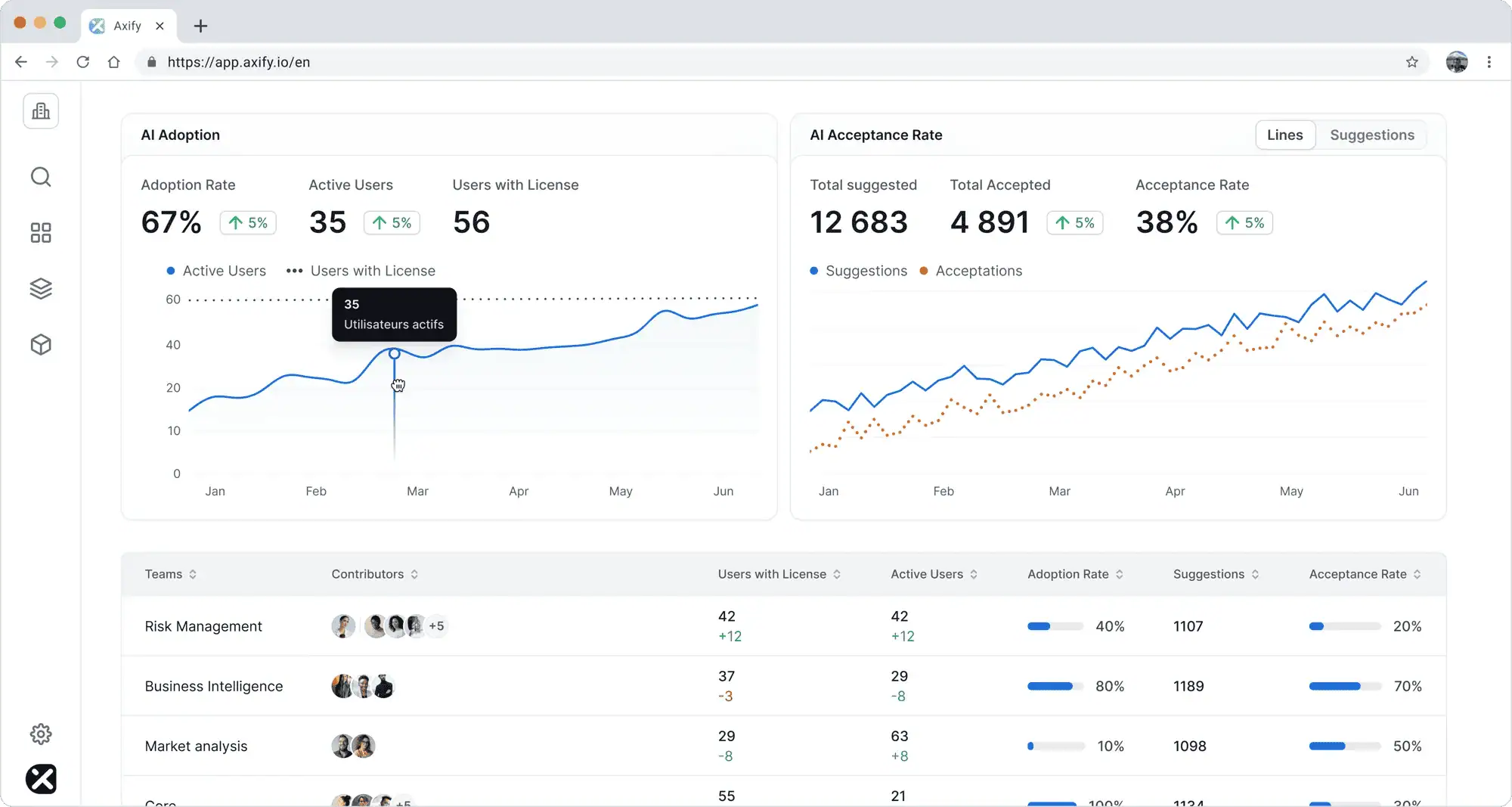
This separation between paid access and real workflow adoption is what makes cost decisions defensible.
You need the team, project, and tool context before you downgrade seats, reassign them, or cancel a subscription.
Axify then connects adoption to delivery impact. You can compare delivery performance before and after AI adoption, and across teams with different adoption levels:
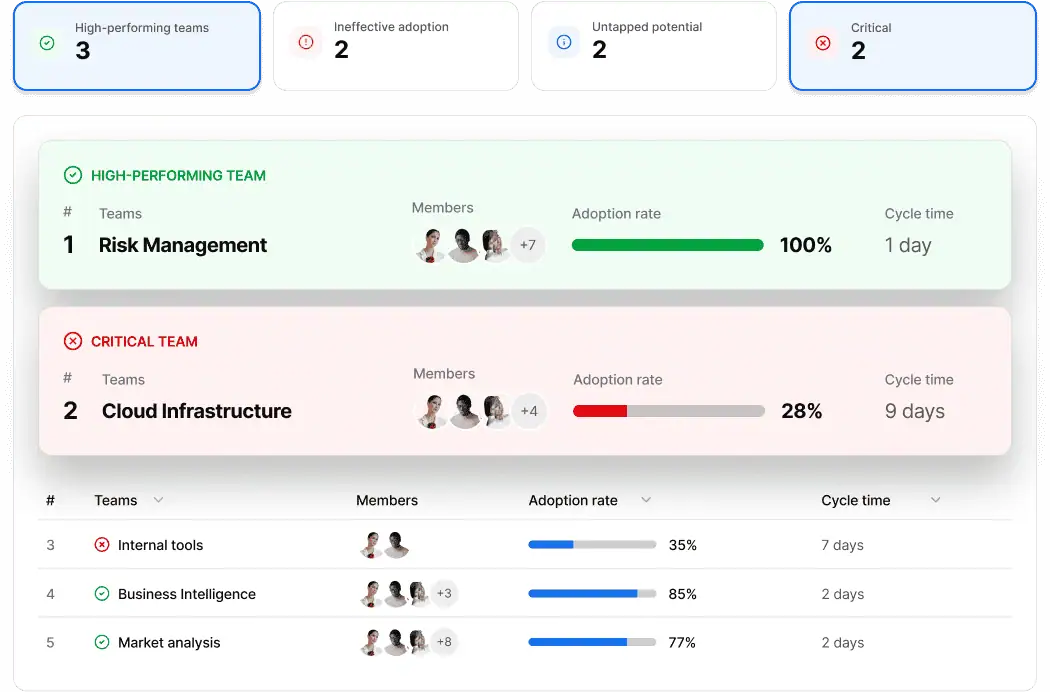
An upcoming cost insights feature inside AI Adoption and Impact will let you compare AI spend against delivery results in the same view, so AI cost review stops being a finance-only conversation.
Axify MCP lets engineering leaders ask cost-to-impact questions inside the AI tools their teams already use. It provides DORA metrics, cycle time, AI adoption data, and team health data to MCP-compatible clients like Claude, ChatGPT, Gemini, Microsoft Copilot, and more.
You can ask very specific questions like:
or
Axify MCP lets your AI assistant query live Axify data and answer from it, so the answer is very precise.
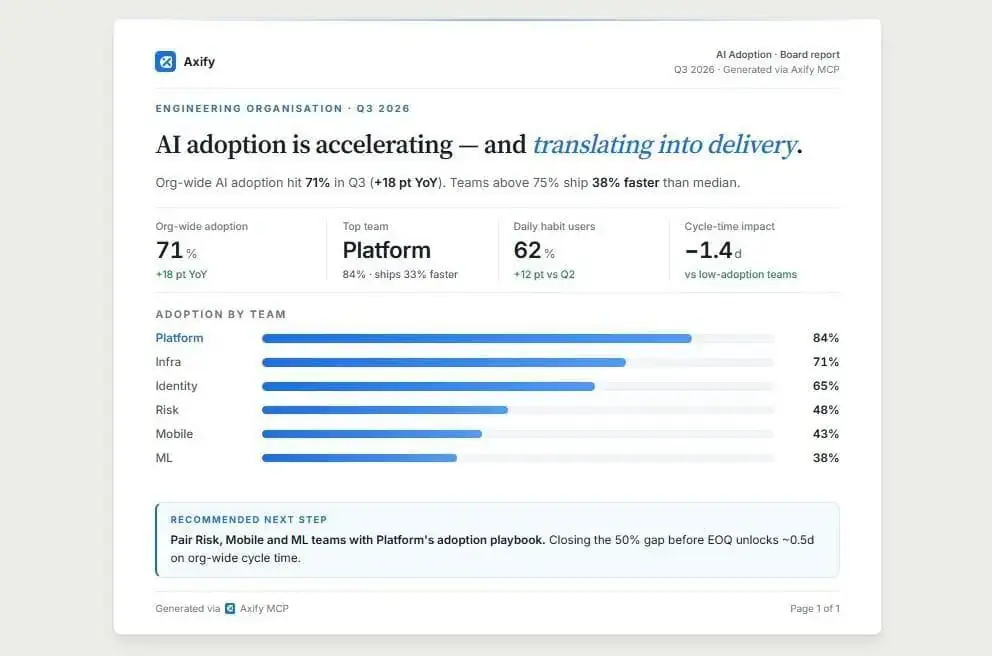
It also protects access boundaries. The MCP server uses OAuth, respects your existing Axify role and team scope, and is read-only in v1. So a VP of Engineering can ask portfolio-level questions, while a manager only sees the teams they already have permission to view.
That keeps AI-assisted analysis useful without opening data access beyond your current Axify setup.
Axify Intelligence helps you make better engineering decisions.
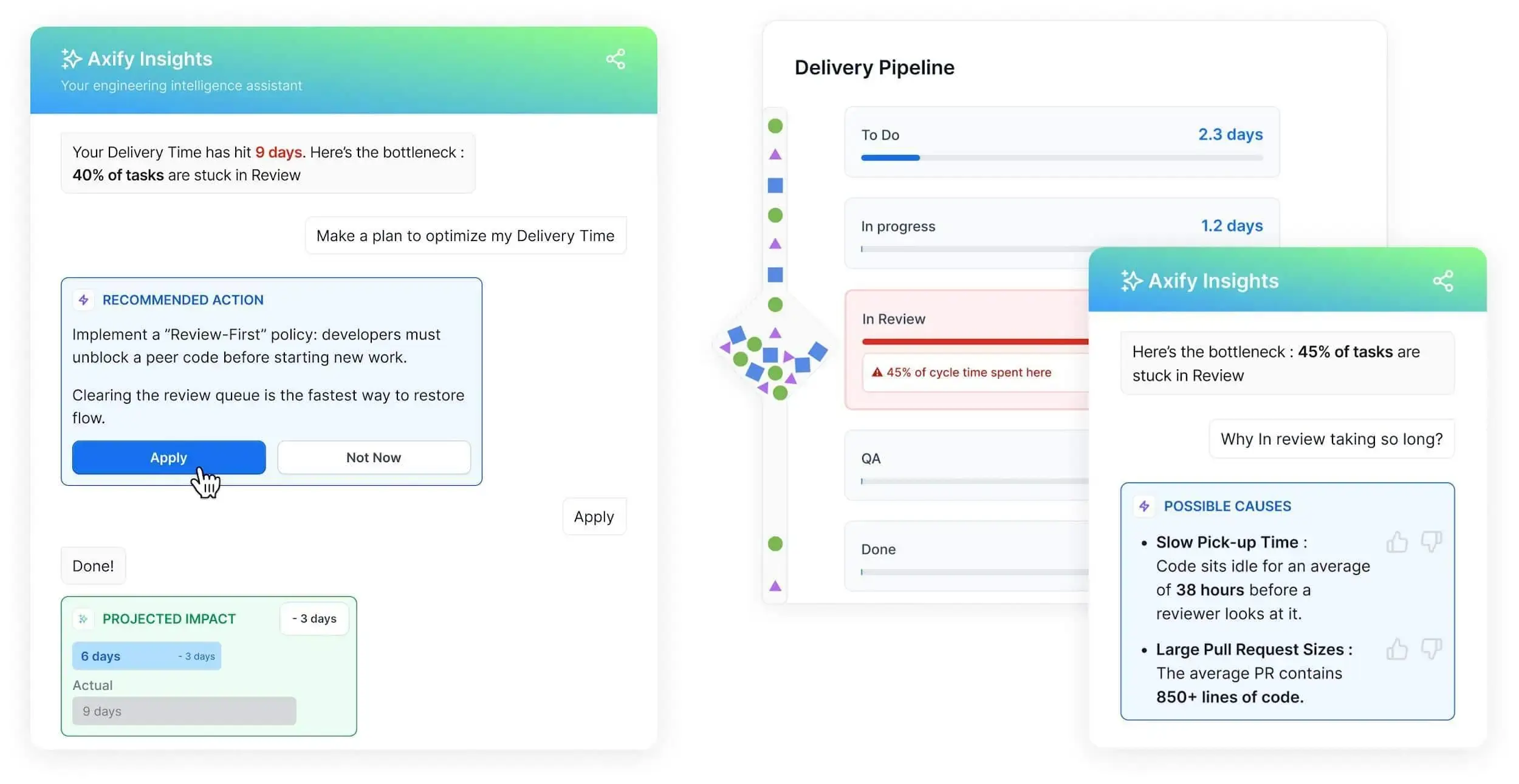
It analyzes delivery performance, identifies where certain metrics show negative trends, explains the likely causes, and recommends specific actions tied to the workflow that caused the change.
This matters for AI cost optimization because good engineering decisions rely on solid insights.
For example, a high-cost AI tool is worth keeping if the team using it has shorter cycle time and less rework. The same tool needs limits if it generates a high volume of triage suggestions that on-call engineers re-do anyway, because the model’s accuracy doesn’t match the team’s incident complexity.
Let’s say that your delivery time increases because tasks spend more time in review. Axify Intelligence flags the review backlog and recommends actions like changing review ownership or setting clearer WIP limits.
The same diagnostic logic applies to AI cost reviews: when AI spend rises but cycle time doesn’t fall, Axify Intelligence identifies where the bottleneck actually sits, so the team can decide whether the AI tool, the workflow, or the review process is what needs to change.
One pattern worth ending on: the teams that handle AI cost well are the ones who treat AI cost reviews as a recurring engineering conversation.
Vendor pricing will change again. New models will ship. Adoption will grow in places you didn’t forecast. Each of those events resets the cost-to-impact math for at least one tool in your stack, and the teams that catch it early are the ones with a regular cadence for asking “is this still worth it?”
So, pick a review cadence (quarterly works for most teams), assign someone to own it, and protect the time on the calendar. The framework in this article does the work once you make the meeting happen.
To run that review with live AI adoption, spend, and delivery data in one place, book a demo with Axify today.

Start with your expected number of active users, then separate base licenses from usage-based costs, premium tiers, and agentic workflows. A safe budget should also include a buffer for heavy users, since a small group can drive a large share of usage.
Remove or downgrade a license when the seat shows little or no usage over a reasonable period, such as 60 or 90 days, and there is no evidence that the developer uses it for occasional high-value work. Avoid making decisions based on a single week of low activity.
Compare them on the same task types, teams, and repositories. Look at how each tool affects completion time, review time, rework, developer adoption, and total cost. A cheaper tool is not always better if it creates more cleanup work.
There is no universal benchmark. A broad assistant may need regular weekly usage to justify the license, while an agentic tool may be valuable with lower usage if it handles complex work. The right utilization rate depends on the tool’s role and cost.
Hidden costs usually come from longer code reviews, rework, failed agent runs, messy PRs, duplicate tools, unused licenses, and premium plans assigned to people who do not need them. These costs do not always show up in the vendor invoice.
A hybrid model usually works best. Centralize governance, security rules, budget visibility, and approved vendors, but let teams test tools based on their workflows. Engineering leaders can then standardize around tools that prove value across real delivery outcomes.