AI
7 minutes reading time

.webp?width=1200&name=Axify%20blogue%20header%20(13).webp)
If you're looking to boost your team's productivity and improve software quality, AI might be the key you’ve been missing. So, in this article, we’ll show you how integrating AI solutions into your software engineering processes can tackle bottlenecks, streamline workflows, and drive measurable results.
Ready to transform how your team works? Let’s get started.
AI software development involves using artificial intelligence tools, models, and agents for designing, coding, testing, shipping, and operating software. The goal is to automate tasks, increase efficiency, and enhance product quality.
But it’s important to differentiate between using AI to build software and building AI-powered products like machine learning models or generative AI apps. The first focuses on how teams work and how software is developed, while the latter involves creating AI systems themselves.
As the industry moves toward AI integration, it's clear that developers are leveraging these tools more than ever. In fact, the 2025 Stack Overflow Developer Survey report notes that around 84% of developers report using or planning to use AI tools in their development process.
Basically, more and more engineering leaders try to integrate AI in strategies aimed to increase productivity and quality within development teams.
Check out this video to see how AI enhances every step of the software development process:
AI software development relies on several key technologies that drive automation and improve productivity.
These include machine learning (ML) for predictive models, Large Language Models (LLMs) for natural language processing, and code generation tools like AI-driven assistants that suggest code in real time. For instance, code assistants may streamline the development process if you use them wisely, which reduces the time spent on repetitive tasks.
If you're interested in exploring how AI coding tools specifically impact developer workflows, check out our article on the best AI coding assistants. It dives deeper into how these tools can integrate into your existing processes, which can save you time and improve code quality.
Now, moving on, let’s talk about how AI can directly benefit software development.
AI adoption brings several key benefits to the software development process, many of which were noted in the 2025 State of AI-Assisted Software Development report. These benefits include improving productivity, reducing manual work, and enhancing code quality.
Here are some of the key advantages that AI offers if your team already has solid engineering foundations and well-defined delivery processes in place:
What to Read Next: Do AI Coding Assistants Really Save Time to Developers?
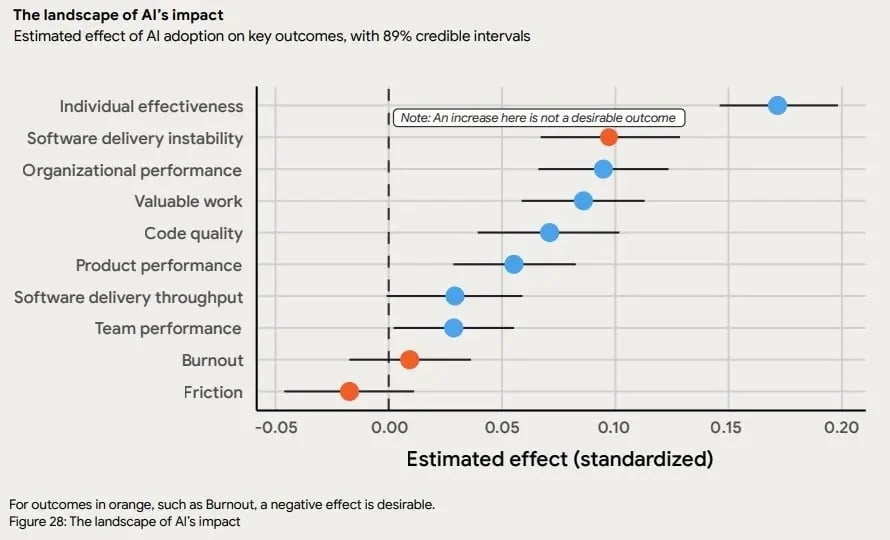 Source: 2025 State of AI-Assisted Software Development
Now, let’s look at how AI integrates across the entire software development lifecycle.
Integrating AI into the software development lifecycle can streamline every stage from design to deployment (again, if your workflow is already solid). Here are the key areas where AI can make a significant impact.
AI can help accelerate the requirements and discovery phase by supporting the following use cases:
Remember: Humans still make critical decisions like prioritization, trade-offs, and domain nuance. AI can assist in the process, but your expertise is important for understanding the specific needs and context.
In one study, 54.4% of AI adoption use cases involved human-AI collaboration (HAIC) rather than full automation. This shows the importance of human judgment in areas where AI can’t fully grasp the nuances.
The pitfalls to watch for include hallucinated requirements or over-generalization. AI-generated outputs may miss important details or make assumptions that don’t align with your specific project needs.
When you recognize these strengths and limitations, you can leverage AI to improve the requirements and discovery process while maintaining control over critical decisions.
AI tools can assist with design and architecture by providing support for key decisions:
However, it's important for you to validate factors such as cost, latency, security, and compliance. AI provides useful guidance, but the final judgment on these aspects remains in your hands.
AI plays a significant role in the coding and implementation phase. As we explained above, it can help you boost efficiency and reduce time spent on repetitive tasks. That’s why, according to the 2025 State of AI Code Quality report, 65% of developers say AI touches at least a quarter of their codebase.
Here are some practical uses of AI in this stage:
However, from our experience, it’s crucial to know when to accept, edit, or reject AI-generated code. Using AI-generated suggestions may not always align with your project’s standards, so it’s important to review them carefully.
Hidden bugs, style drift, and security vulnerabilities are common limitations of AI tools that require your attention before incorporating the code into production.
AI-driven tools can:
Despite these advancements, human oversight remains essential on this level as well. AI can struggle with flaky tests and may not fully capture the nuances of critical business flows.
So, you still need to validate that AI-generated tests align with real-world scenarios and are good enough to handle your system's complexities. AI can improve efficiency, but it's important to maintain control over key aspects of the testing process to prevent issues from slipping through the cracks.
AI can help you maintain code quality, enhance security, and ensure compliance throughout development. It can assist with static analysis, dependency scanning, and secret detection. This can help identify vulnerabilities early in the process.
AI tools also support policy checks, such as validating licensing requirements. This can ensure data residency rules are followed and confirm adherence to coding standards.
However, while AI tools are powerful, they are not infallible.
One study reported that 45% of AI-generated code contained security flaws, even when the models appeared to produce production-ready solutions. This shows the importance of manual review and security ownership.
So, you can’t fully outsource these responsibilities to AI.
You need to identify subtle flaws, address complex compliance requirements, and ensure that security practices align with your organizational standards.
When you integrate AI into your workflow, you can speed up the detection of vulnerabilities and streamline compliance tasks. But maintaining a vigilant, human-driven review process is still important to safeguard your codebase and systems.
AI tools can optimize your DevOps and CI/CD pipelines by predicting potential build and deployment failures. With it, you can anticipate problems before they disrupt the workflow.
This provides actionable suggestions for roll-back/ roll-forward strategies that minimize downtime. Plus, AI can intelligently group incidents and propose fixes to help you address issues quickly without overwhelming your team with redundant alerts.
At the same time, AI supports capacity planning by analyzing usage patterns and recommending cost optimization strategies. It ensures that your infrastructure is right-sized, so you can avoid wasteful over-provisioning or underutilization that could impact performance and costs.
Just by integrating AI into your operations, you gain better visibility into your development and deployment processes. AI enables smoother and more predictable release cycles, which reduces the risk of delays and ensures that resources are allocated effectively.
This empowers your team to focus on critical tasks while AI takes care of the repetitive operational work.
AI can streamline maintenance and documentation by automating tasks that traditionally take a lot of time. It can auto-generate documentation from your code, APIs, and change history to keep everything up to date with minimal effort.
In fact, according to the 2025 Stack Overflow Developer Survey report, nearly a quarter (24.8%) of developers use AI for creating or maintaining documentation.
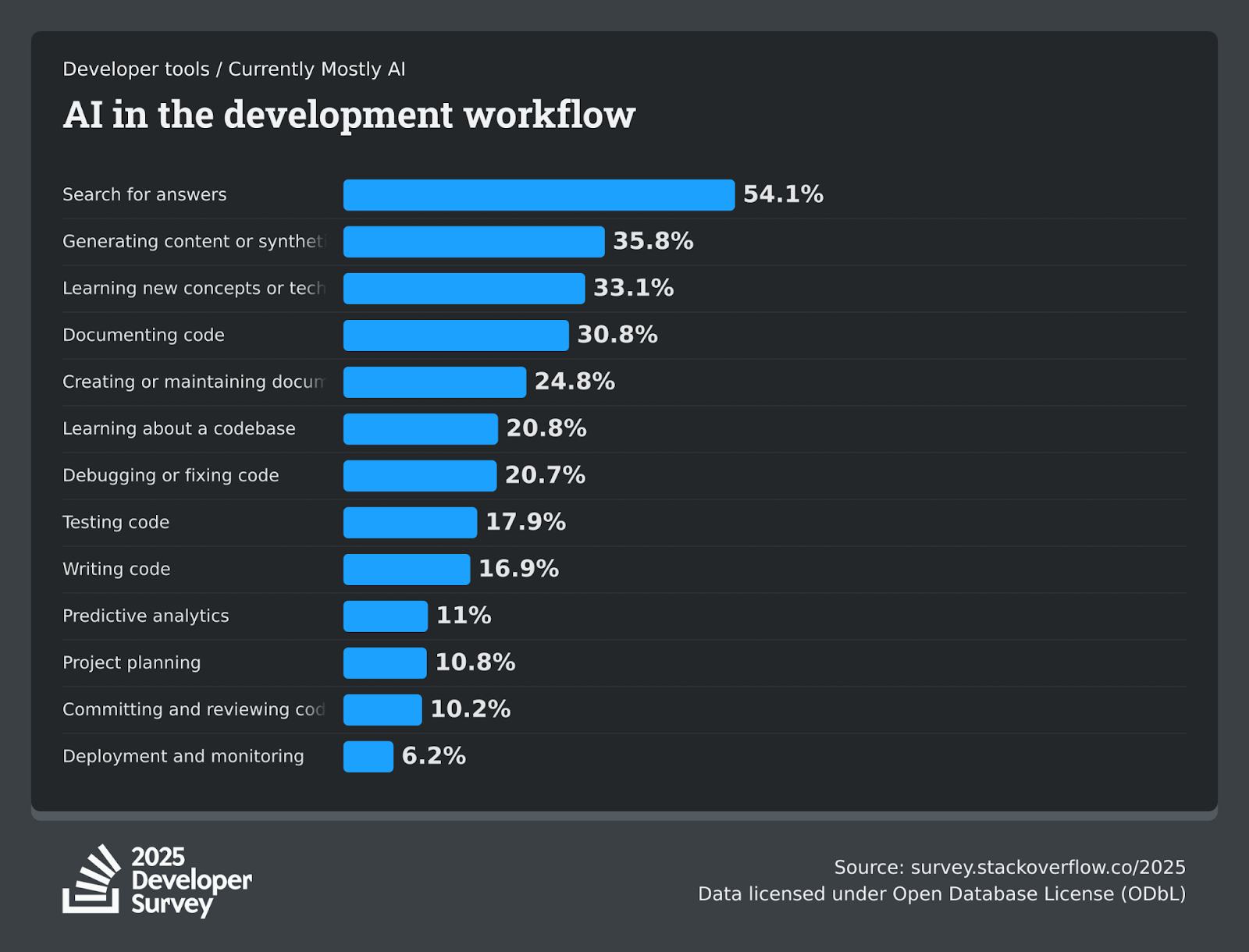
Source: 2025 Stack Overflow Developer Survey
AI-driven knowledge bots can also answer common "how does this service work?" queries. This can provide your team with instant access to essential information. That’s why over 54% of developers use AI to search for answers, according to the 2025 Stack Overflow Developer Survey mentioned above.
Additionally, AI suggests refactors, identifies deprecations, and points out cleanup tasks. It can help you maintain code quality and ensure that technical debt doesn’t build up over time.
While AI offers tremendous benefits, there are significant risks and limitations in software development. As mentioned earlier, AI can amplify both strengths and weaknesses in your processes, and understanding this reality is important for effective integration.
Our team at Axify believes that these are some of the key risks:
Integrating AI into your development process requires a structured approach to ensure success. Here are the steps to get you on the right track:
Measuring the impact of AI on software delivery is essential to ensure it’s driving tangible improvements. Here are the core delivery metrics you should track before and after implementing AI:
In addition to these core metrics, there are AI-specific metrics to track:
Axify can centralize these signals through its AI Performance Comparison tool. This feature measures the real impact of AI adoption by comparing your team’s performance with and without AI tools. It clearly shows its impact on delivery time, DORA metrics, and other key indicators.
.png?width=2441&height=1484&name=AI%20Impact%20Beautyshot%20-%20FR%20(1).png)
Today, we’ve seen how AI tools can enhance developer productivity, improve code quality, and streamline CI/CD pipelines. When you measure key metrics like cycle time, deployment frequency, and others, you can assess AI’s true impact. But to ensure maximum benefit, start small, scale wisely, and keep your team’s workflow optimized.
If you're ready to take the next step, contact Axify to learn more on how to integrate AI into your development process and measure its impact effectively.
No, AI will not replace software engineers. AI will automate repetitive tasks and assist with coding, but human expertise is still essential for software architecture, design decisions, and critical problem-solving.
To stay relevant, developers must understand how to guide AI tools, such as code review assistants or automated testing platforms. Skills in deep learning, prompt engineering, and evaluating AI-generated outputs will be critical for continued success.
Choose AI tools that align with your team's existing workflow and technology stack. Look for tools that integrate well with your CI/CD pipelines and can enhance code optimization or support pair programming for maximum impact.
No, it's not always safe to paste proprietary code into AI assistants unless strict data privacy measures are in place. Many AI tools store prompts, which could expose sensitive data or intellectual property.
Typically, you can expect to see measurable improvements in developer productivity within 4-8 weeks. Metrics like deployment frequency and change failure rate should show the impact of AI tools in this timeframe.
To avoid slowdowns, start small and focus on high-leverage tasks, such as code completion or test generation for a single team. Ensure that AI-generated outputs are always reviewed and validated to prevent errors that could slow your process.