AI
8 minutes reading time

AI coding assistants promise speed, yet you might still face delivery friction. That's because gains inside these tools don’t always translate into faster deliveries, and you’re left sorting out where their real impact sits.
Now, we might have the answer you're looking for...
In this article, we’ll look at the latest data to see how AI tools influence actual productivity gains. But first, let’s look at what these assistants do and what they miss.

AI coding assistants offer faster autocomplete, streamlined refactoring, clearer documentation drafts, and automated scaffolding for unit tests. These improvements reduce friction in everyday tasks and free up time for more impactful work.
Even so, the limits appear fast. They don’t handle review cycles, testing, or deployment delays, where real time loss usually happens.
As context, many teams now lean heavily on these tools. According to Elite Brains, 41% of all code is AI-generated, with 256 billion lines written in 2024. And the 2025 State of AI Code Quality report notes that 82% of developers use an AI assistant daily or weekly.
These signals show how common adoption has become. Yet they also show how much scrutiny you need when you assess real outcomes.
That brings us to the next point...
Time saved inside the AI coding editor doesn’t guarantee shorter delivery cycles because faster coding doesn’t remove the constraints that slow your work down. Even if AI coding tools help you produce snippets or handle small code generation tasks, the real delays can happen elsewhere.
Handoffs, stalled reviews, and gaps in testing absorb most of the time in your pipeline.
When AI boosts code output but the delivery pipeline doesn’t evolve with it, teams usually end up slower. If your code reviews still take days, testing can’t keep up, deployments remain manual or fragile, or QA environments get overloaded, you’re simply pushing more work into the same bottlenecks.
That imbalance causes work to pile up in queues, increases WIP across the team, and ultimately drags down delivery speed, even if your developers are writing code faster than ever.
It looks at cycle time, lead time for changes, work that stalls during development, and the patterns that lead to extra fixes or corrections. These signals help you see where time slips after the first commit and where improvements will last.
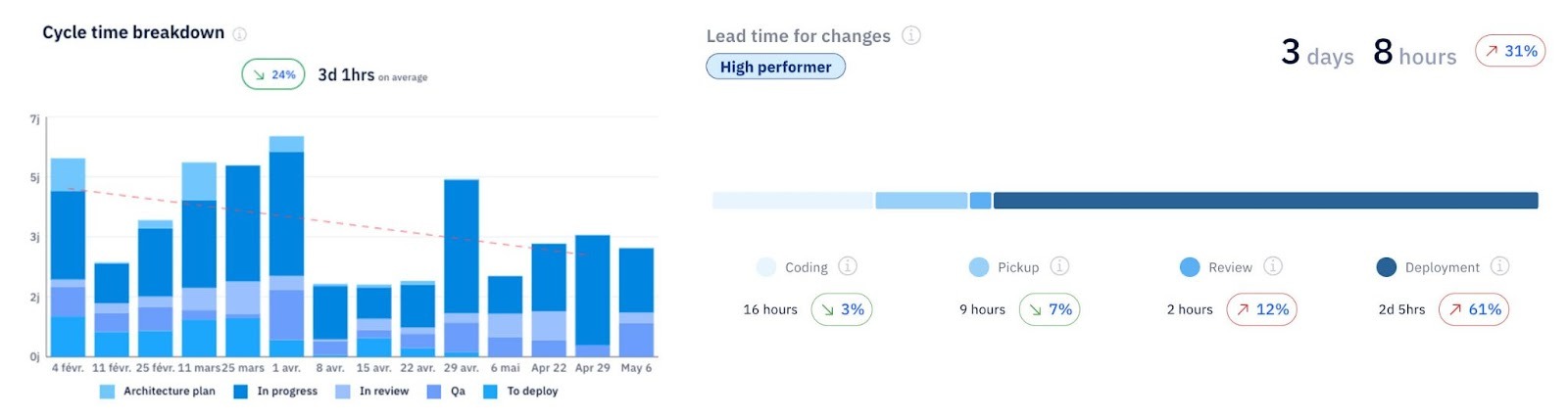 Next, let’s look at what current data says about these AI coding tools and how their impact varies across teams.
Recent studies give you a clearer picture of how these tools behave in real conditions. While early claims focused on faster coding, the research shows a more complex pattern across teams and environments.
To ground the discussion, here are the key findings from the most widely cited reports. Each presents different outcomes, and together they highlight why successful adoption requires careful measurement rather than broad assumptions.
Thoughtworks looked closely at how AI coding tools influence delivery performance, and the results help you separate promise from reality.
Average cycle time improvement landed in the 10-15% range, which is far below the 50% gains promoted in earlier claims.
The study also shows that the value you get depends heavily on the type of work you use AI coding assistants for.
These tools perform best on boilerplate work, structured code generation, and automated test creation. Their biggest gains come from repeatable patterns where the model has enough context to produce something useful on the first pass.
However, as soon as tasks require deeper reasoning or knowledge about business rules, the tools lose effectiveness.
Another important detail is the relationship between coding speed and delivery speed.
Thoughtworks reported that coding became roughly 30% faster when assistants were in use, yet coding only represents about half of the total cycle time for most teams. When you factor in testing, reviews, environment waits, and dependencies, the net delivery improvement drops to about 8%.
This is the figure that matters to you as a leader because delivery outcomes shape customer impact, forecasting accuracy, software developer productivity and business results.
The Register summarized one of the most rigorous assessments of AI assistants to date, conducted by METR in a randomized controlled trial.
The findings look surprising at first glance.
Developers became 19% slower while using AI assistants, even though they felt about 20% faster. This mismatch between perception and outcome shows why you can’t rely on subjective feedback alone when you evaluate these AI coding tools.
A closer look at the study shows why the slowdown happened.
Fewer than 44% of the suggestions produced by the assistants were accepted. Everything else needed cleanup or deeper evaluation before it moved forward.
As a result, developers spent more time switching between writing, reading, prompting, and reviewing. These context shifts added friction and reduced the benefits of the initial suggestions.

Another notable pattern was how the assistants struggled with large or mature repositories.
AI models usually missed relationships between files, misunderstood implicit rules, or produced suggestions that didn’t align with architectural decisions. These gaps created extra review work and sometimes generated rework later in the cycle.
This is where teams experienced pain points. The extra time spent validating output replaced the time that was supposed to be saved by the tool.
METR linked the slowdown to three primary causes:
Each one leads to more switching between tasks and more scrutiny before the code is ready for review. This study shows how complex systems and legacy patterns reduce the reliability of AI assistance.
Remember: this is important for you if your teams manage large platforms, distributed services, or codebases with long histories.
The 2025 State of DevOps report adds another layer to the picture because it focuses on adoption patterns and perceived impact.
Although conversational AI is widespread, 61% of respondents said they “never” interact with AI in an agentic mode. This means most teams aren’t using fully automated flows or autonomous agents to drive work forward. Instead, they use assistants inside the editor, which limits the tool’s influence on broader delivery metrics.
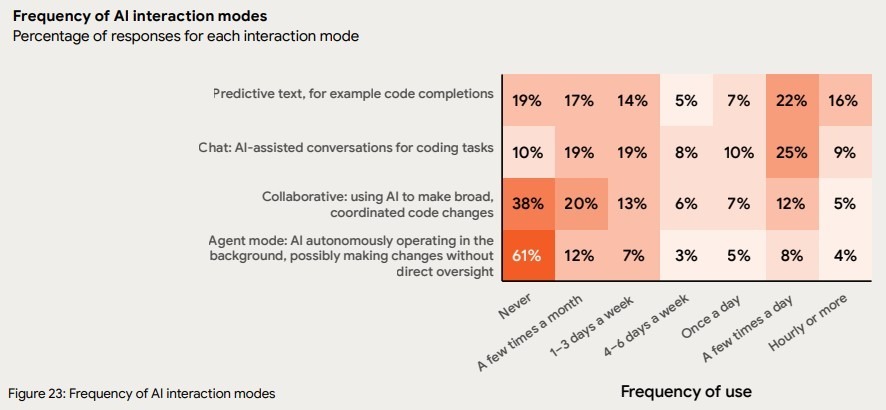
Even so, usage remains high in coding tasks.
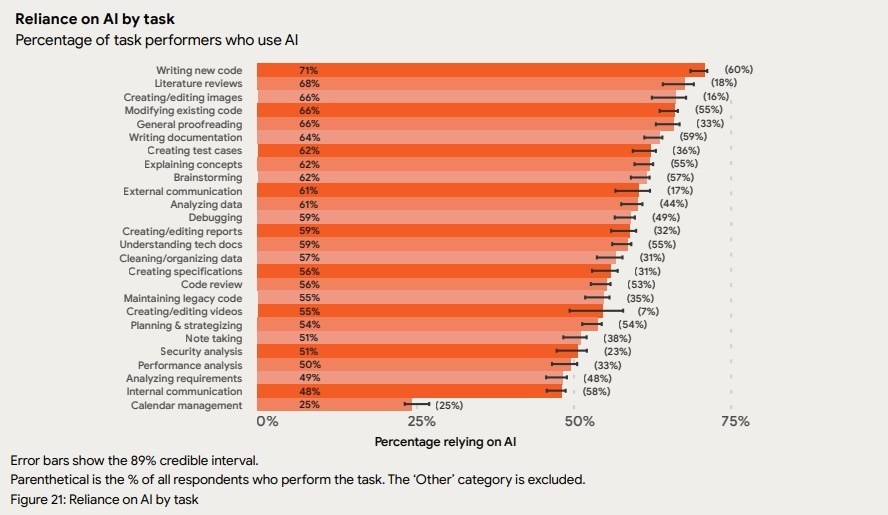
71% of respondents write code using AI, and 66% modify code with it. These numbers show how common these tools have become and how they’re used today.
Despite widespread usage, DORA paints a mixed picture for quality and productivity that we discussed in more depth here.
In fact, we saw varied perceptions about developer experience, code quality, and individual efficiency. Some engineers report meaningful gains, while others notice more review load and uncertainty in the generated output.
Trust varies as well.
The data shows that engineers approach AI-generated code with a “verify before commit” mindset.
And while that’s healthy, it also means that measuring your team’s productivity after adopting AI coding tools becomes essential. Without visibility into cycle time, review bottlenecks, and rework, teams can easily feel faster simply because the editor is faster—while actual delivery speed doesn’t improve. This dynamic was clearly highlighted in the METR Study.
AI coding assistants are amplifiers because they magnify your underlying ability (or inability) to move work through the software development process.
If your team already has a strong workflow, with clear reviews and healthy pipelines, AI will amplify that performance. But if your work routinely gets stuck in reviews, QA, or deployments, AI will intensify those weaknesses by creating more output than your system can handle.
A McKinsey study points to the same idea.
In this study, high-performing organizations with clear processes and advanced AI adoption reported:
These gains appeared in teams with strong flow, mature practices, and consistent delivery foundations.
However, the same acceleration can work against you.
If your work items stall in reviews, sit in queues, or bounce between teams, AI-based coding assistants push more partially completed work into those same choke points. They speed up the local task but widen the downstream buildup.
But there’s a difference between accelerating a specific part of the process versus accelerating the value creation of the whole process.
Axify’s VSM can help you.
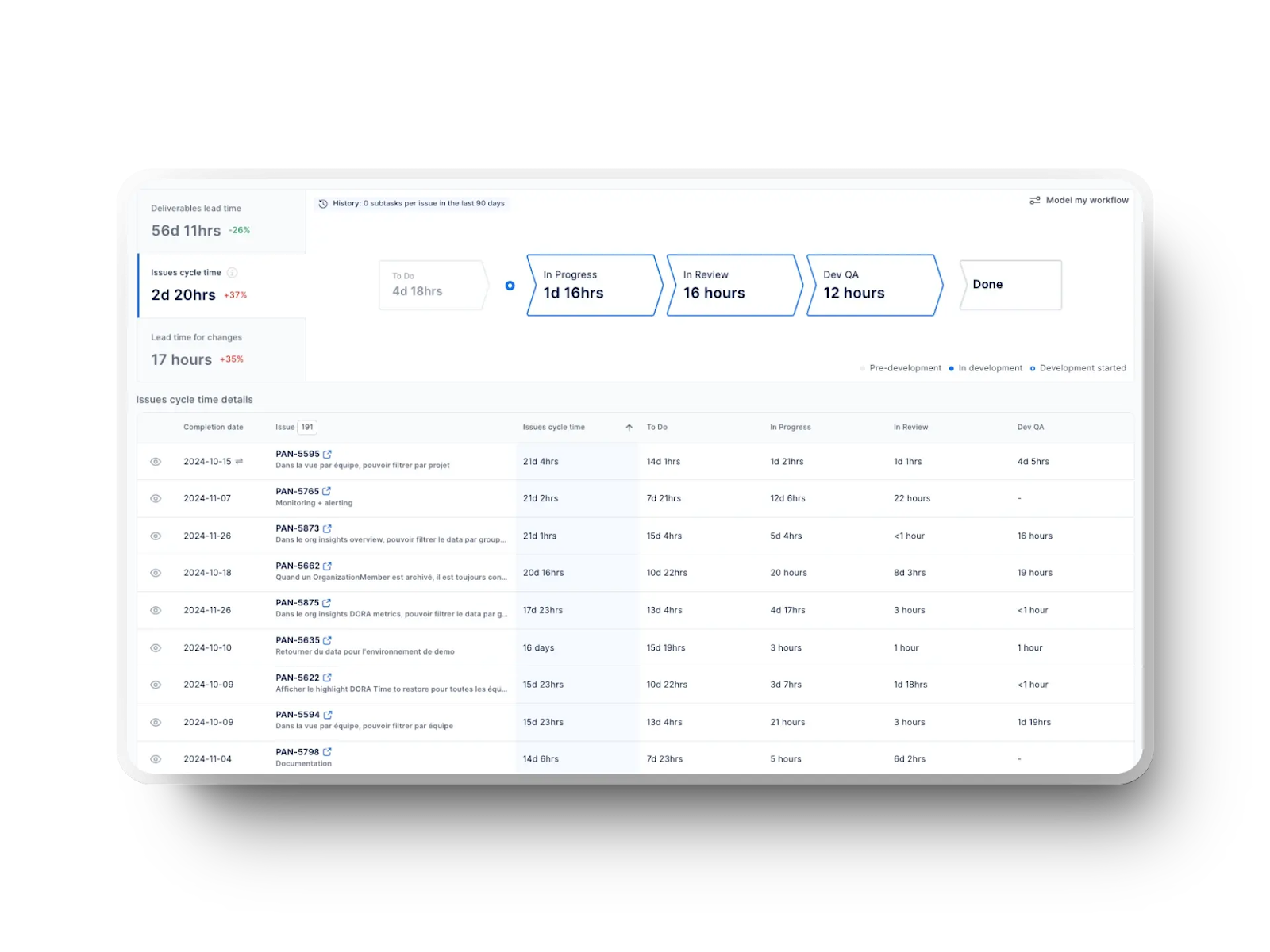
Our value stream mapping feature shows how work moves through each stage and makes it easy to see whether new tools you add/ practices you implement speed things up. It also shows where work stalls, so you can fix those gaps before you scale AI across your teams.
Axify’s AI Productivity Comparison is another tool you need.
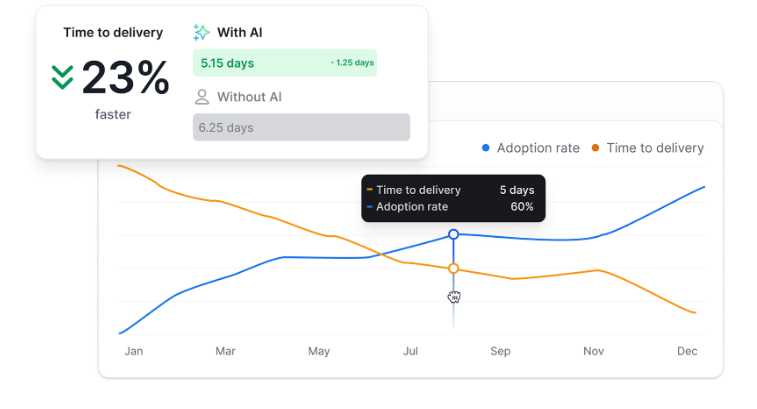
As you can see, it shows whether your time to delivery improves with an increase in AI adoption. This helps you confirm whether new tools, including AI coding assistants, create real system-level gains instead of short bursts of activity.
AI coding assistants deliver meaningful time savings, but mostly within the parts of the workflow where repetition, guidance, or pattern-matching dominate. Their impact is strongest at the task level. Besides, they become truly valuable when the surrounding delivery system supports fast feedback and smooth flow.
Here’s where they create real leverage:
To understand how these task-level improvements fit into your broader delivery flow and whether they really allow to generate value faster for your users, you need visibility across your entire workflow.
That’s what Axify’s value stream mapping provides.
As we explained above, it gives you a clear view of each stage of your delivery flow and shows where work slows down. These insights help you understand which parts of your process could benefit from more automation or support before you scale new practices, including AI. Plus, our VSM tool also helps you avoid placing more work into steps that already slow delivery.
AI coding assistants add speed, but that speed can create pressure in parts of the pipeline that depend on context, stability, or careful review.
So, these are the areas where new bottlenecks typically surface:
Measuring the real impact of an AI coding assistant requires looking beyond editor-level speed and focusing on how AI influences actual delivery outcomes. One way is to compare team performance before and after introducing AI—whether at the task level, across team flow metrics, or in how work moves through the entire delivery system. But this isn’t the only meaningful approach. You can also compare how many tasks are completed with vs. without AI support, or evaluate differences in performance between teams based on their level of AI adoption.
What matters most is using a structured measurement approach that reflects how your organization actually delivers software, so the improvements you observe translate into real impact.
Here’s a practical way to evaluate the impact of your new AI assistant.
Start by establishing how your teams perform today, but anchor your evaluation on the KPI that best reflects the entire delivery system: Time to Delivery.
This metric shows how long it takes for an idea or work item to move from inception to production. It captures delays across every stage of the workflow, which is why it’s one of the clearest ways to measure the impact of AI adoption. It’s also easy for anyone in the organization to understand, from engineers to executives.
Axify AI Productivity Comparison tool clearly measures how AI adoption influences time to delivery at the organizational, project, and team levels.
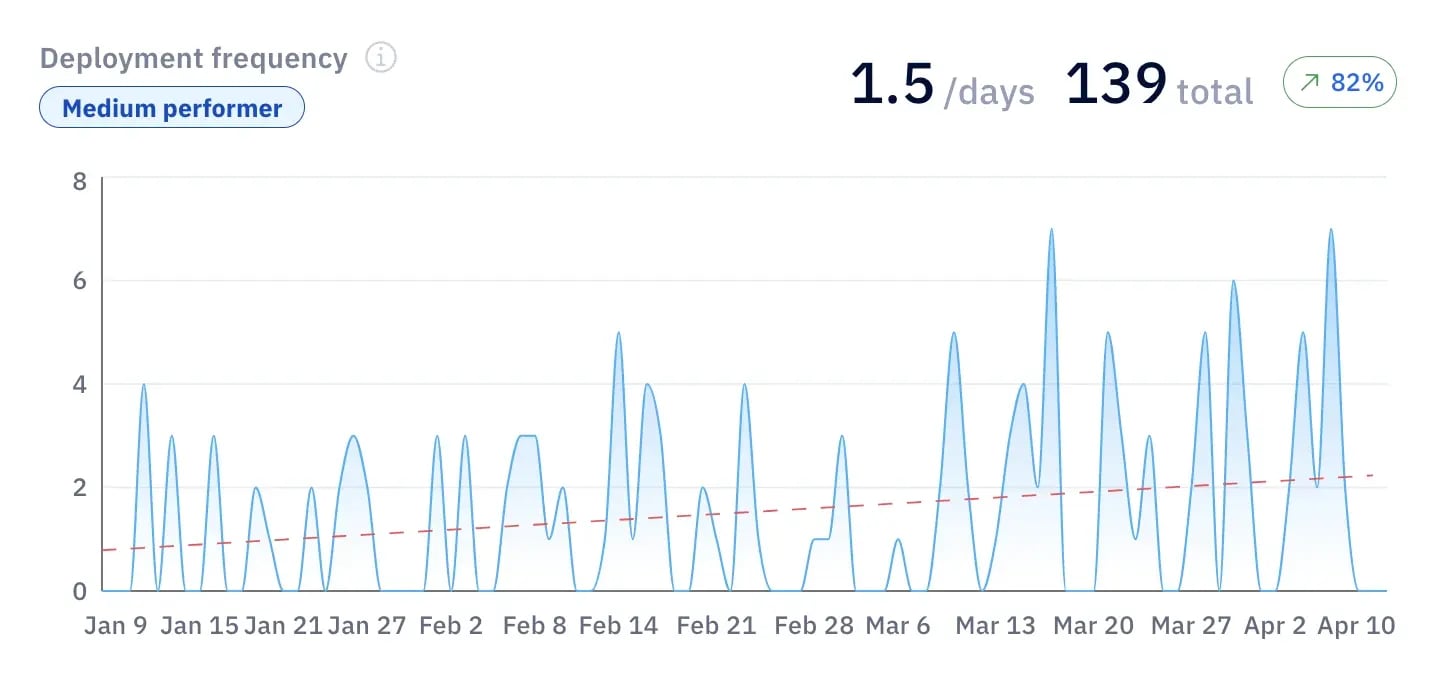
From there, you can also track cycle time, review duration, rework patterns, and deployment frequency. These indicators show where work slows down and how long value creation actually takes end-to-end.
Axify collects all of this automatically across projects, teams, and the organization, so your baseline reflects what truly happens.
A targeted rollout lets you observe how different environments handle the same tools. Teams vary in architecture, habits, and coordination patterns. These differences shape how well coding agents integrate with existing workflows and whether local acceleration creates or removes friction.
Once implementation is complete, Axify gives you an objective comparison across teams.
For example:
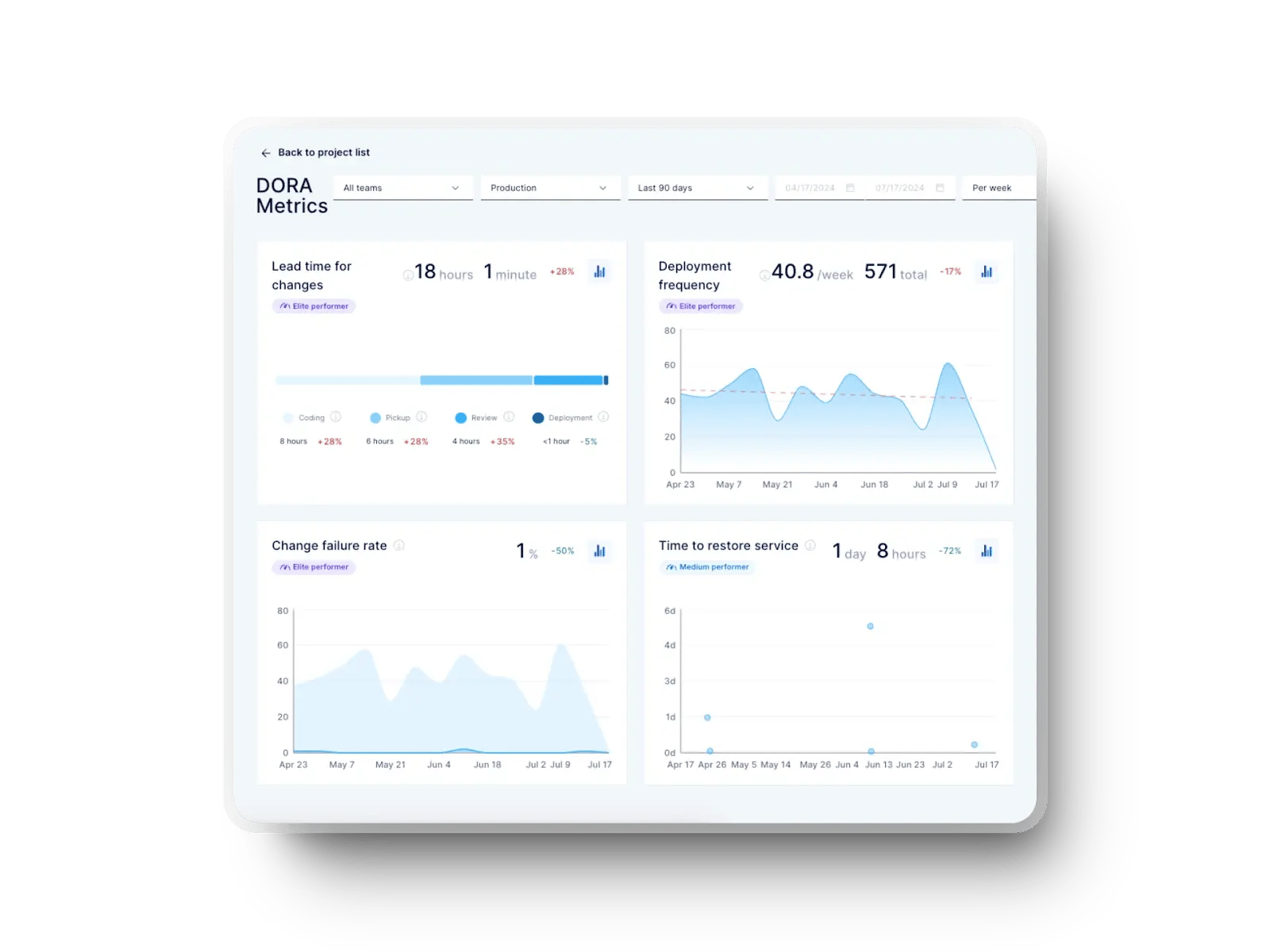
You can use our flow metrics to reveal issues or improvements in your workflow.
Our DORA metrics show changes in your delivery quality and stability.
Also, VSM notes whether tasks move through stages more smoothly or whether handoffs have become slower.
As you review these results, there are a few signals worth watching:
These patterns show whether AI is improving delivery or adding new organizational inefficiencies. With Axify, you see the difference early, long before assumptions turn into decisions.
AI won’t replace programmers. But it will do two things:
The real shift happens when you use these tools in a deliberate way.
Working smartly means treating assistants as accelerators that still rely on your judgment, rather than systems that make decisions on their own. It also means shaping your workflow so the gains show up in delivery metrics.
This opportunity grows as the tools improve, but the value depends on how your teams guide them.
This perspective builds on the themes you saw earlier in the article.
The goal is to help you understand how high-performing teams use AI in a way that strengthens engineering discipline rather than weakening it.
AI tools are now widespread in software development, but their impact varies dramatically across organizations. Some developers simply consume AI, while others actively direct it — and research shows this distinction matters.
Developers are not just executors; they should supervise and validate AI’s work. They must:
This vigilance is the foundation of better productivity.
From there, high-performing teams adopt a copilot mindset.
They use AI to accelerate but retain control over judgment and quality.
The best results arise when developers understand how and when to rely on AI and when to step away. This collaboration requires curiosity, rigor, and technical intuition, which are qualities that AI cannot replace.
If you do this correctly, the results will include:
As adoption grows, advanced organizations build on this by teaching critical trust. They train developers to detect errors, document AI-assisted decisions, and share learnings so teams benefit collectively.
This shifts AI from an automation layer into a learning partner that supports consistency and shared pride in the work.
AI coding agents save developers time, but mainly in teams with strong engineering foundations and stable delivery practices. In those environments, the tools act as amplifiers that help you move faster without weakening quality or adding new delays.
This gives you real gains across the delivery path and creates a clear advantage over teams that rely on less mature workflows.
For teams with weaker systems, the effect is reversed.
The same speed increases pressure on reviews, testing, and coordination, which exposes gaps and slows delivery instead of improving it. The difference comes down to workflow health rather than the tool itself.
Axify helps you see where your teams stand so you can decide whether AI will support improvement or magnify friction. If you want clear visibility into that impact, book a demo with Axify today.
