AI
13 minutes reading time

Stack Overflow's 2025 Developer Survey found that 19.3% of professional developers already use Cursor, making it one of the fastest-growing AI coding tools.
Teams adopt it because it promises faster coding, from multi-file edits to agent workflows that plan, change, and test code on their own.
Of course, faster code generation doesn't automatically lead to better software. The quality of the outcome still depends on the workflow around the tool: the context it receives, the review process, the testing strategy, and the engineering standards your team follows.
That is why we’ll recommend Cursor best practices that extend beyond prompting techniques and keyboard shortcuts. As adoption grows, engineering leaders also need to understand how Cursor affects review effort, development speed, AI costs, and long-term code quality.
In this guide, you'll learn both perspectives. We'll cover practical Cursor workflows for developers, along with the engineering practices leaders can use to evaluate adoption, measure impact, and scale AI-assisted development responsibly.
Let's get started!
Cursor is an AI-native code editor, built on VS Code, that combines code completion, chat, and coding agents that can plan, edit multiple files, run commands, and review changes inside your repository.
Because the agent works across files and the terminal, the way your team sets up context, rules, and review has a bigger effect on results than any single prompt.
Pro tip: Still choosing a tool? Our comparison of GitHub Copilot vs. Cursor covers workflow fit, cost, and ROI. If your teams also use other assistants, see our GitHub Copilot best practices and Claude Code best practices.
Before you let Cursor edit files, give it clear task boundaries, relevant configuration files, and tests it can run. That setup improves output accuracy before your pull request reaches review.
These are the developer practices that make Cursor safer inside a real repo.
Before Cursor edits any files, make sure the task is small enough to review and verify. For larger changes, use Plan Mode (Shift+Tab) first. Let Cursor identify the relevant files, ask clarifying questions, and propose an implementation plan before it starts generating code.
This reduces incorrect assumptions early, especially when your prompt doesn't contain all the information Cursor needs.
CursorBench found that real-world prompts have a median length of just 390 characters, compared with 1,185-3,055 characters in public benchmarks. In practice, that means Cursor frequently has to infer missing context unless you provide it explicitly.
So:
@app/api/tasks/route.ts @lib/tasks.ts Add due-date filtering and update tests.Find where task filtering is implemented, explain the files involved, then wait.@Past Chats, so Cursor pulls the relevant context without dragging the whole thread into the next AI dev tasks.Use Cursor Rules for instructions that should apply to every session, such as coding standards, required commands, or project-specific conventions. Store them in .cursor/rules/, commit them to Git, and keep them concise enough to review like any other source file.
# Commands
- `pnpm test`: run unit tests
- `pnpm typecheck`: check types

# Patterns
- Put API routes in `app/api/`
- Match `components/Button.tsx` for component structure
Unfortunately, many repositories include long rule files, which quickly become difficult for both developers and Cursor to navigate. A 2025 arXiv study of 401 open-source repositories found 1,876 .mdc files, with an average of 4.68 rule files per repository, an average length of 462.67 lines, and one file reaching 11,076 lines.
Instead of turning .mdc files into documentation dumps, keep them focused on reusable decisions. Move specialized workflows into SKILL.md files so Cursor loads those instructions only when they're relevant.
For example, a release skill can define the release checklist without adding those instructions to every coding session.
# Release Checklist Skill

Use this skill when preparing a release PR.

Steps:
- Run `pnpm test` and `pnpm typecheck`.
- Update `CHANGELOG.md` using the existing format.
- Check package version changes.
- Do not edit migration files unless the task asks for it.
This approach keeps your global rules lightweight while giving Cursor detailed guidance for specialized workflows when they're actually needed.
We recommend using agent workflows only when Cursor has a verifiable target, such as passing tests, a successful type check, or another clear success criterion. For test-and-build loops, let the agent run terminal commands automatically (the auto-run setting, formerly called YOLO mode).
Then constrain it with an allow list for safe commands like pnpm test, pnpm typecheck, tsc, mkdir, and touch. Keep destructive commands outside the allow list so Cursor can validate changes without executing high-risk operations.
Allowed: pnpm test, pnpm typecheck, tsc, eslint, mkdir, touch
Denied: rm -rf, git push, database reset, production deploy
Use hooks when the agent has a clear stop condition, such as passing tests or a clean type check. Hooks work best for repeatable workflows where Cursor can run a command, inspect the output, make a targeted fix, and try again until the task succeeds or reaches a predefined limit.
Example loop instructions:
After each code change, run `pnpm test`.
If tests fail, inspect the failure and fix only the related implementation.
Stop after tests pass or after 5 failed attempts.
Do not edit test files during this loop.
This keeps Cursor focused on the task instead of repeatedly changing unrelated files just to make the build pass.
When independent tasks can run in parallel, create separate Git worktrees and open each one in its own Cursor window. For example, one worktree can handle feature/auth, one bugfix/login, and another documentation updates.
For terminal-heavy work, pair Cursor with Claude Code instead of forcing one tool to handle both IDE editing and shell automation. Cursor can stay focused on code navigation and editing, while Claude Code manages longer terminal workflows and command execution.
Test-driven development gives Cursor a clear success criterion before it starts generating code.
Many engineering teams already work this way.
In the same 2025 arXiv study, 68% of repositories included QA-related guidance, such as tests, logging, error handling, or other verification requirements. That suggests teams increasingly treat verification as part of the prompt, not something added after implementation.
Write tests for applyDiscount(code, price).
Cover valid codes, expired codes, fixed discounts, and a $0 price floor.
This is TDD. Only write tests. Run them and confirm they fail.
Once the tests accurately describe the expected behavior, commit them. That locks the requirement before Cursor writes any implementation.
Then prompt:
Make these tests pass without changing the tests. Keep iterating until green.
This workflow reduces the chance that implementation details drift away from the original requirement. It also gives reviewers an objective way to verify whether Cursor solved the right problem instead of simply producing working code, so it protects dev productivity.
When visual accuracy matters, show Cursor the design instead of describing it. Attach a mockup or screenshot, reference the target files, and specify which elements must match, such as the layout, spacing, colors, typography, or component states.
For example:
Implement this dashboard card layout in @app/dashboard/page.tsx.
Match the spacing, card hierarchy, and button placement from the attached image.
Then open the page in the browser and verify the result.
That approach works well for straightforward UI work. For higher-fidelity implementations, connect the Figma MCP (Model Context Protocol) server so Cursor can read design tokens, variables, and component specifications directly from Figma instead of inferring them from an image. This is especially useful when your team relies on a design system, where consistent use of tokens helps reduce visual drift.
Tell Cursor exactly what information to retrieve before it starts generating code.
Use Figma MCP to inspect the selected dashboard card component.
Pull the spacing, typography, colors, border radius, and component states.
Then implement the card in @components/DashboardCard.tsx.
Reuse existing design tokens where they exist.
After implementation, open the page in the browser and compare it with the Figma component.
This gives Cursor a clear sequence. First, it reads the design source, then it maps tokens to code, and then it checks the rendered result in the browser.
Once the implementation is complete, use Cursor's integrated browser to validate the result. Ask it to open the page, capture screenshots, compare them with the original design, and iterate until the differences are resolved.
When you're debugging a visual issue rather than building a new component, attach a screenshot of the broken state. In most cases, showing Cursor the problem produces faster and more accurate fixes than describing it in text.
Cursor works best when it can inspect the same systems a developer would normally check before making a change. Without MCP servers, it can search your repository and edit files, but it lacks the surrounding context, such as issue history, related pull requests, production logs, or delivery data.
Start with MCP servers for the systems your team already relies on, such as GitHub, GitLab, Linear, or internal documentation. Before asking Cursor to write code, ask it to gather the relevant context first.
Use Linear MCP to read ENG-421.
Check related GitHub PRs and recent commits.
Then explain the likely files involved before changing anything.
This approach is especially valuable when the root cause isn't obvious. For example, if you're investigating a performance issue, Cursor can review the ticket, inspect logs through an approved MCP server, compare recent changes, and identify the most likely source of the problem before proposing a fix.
Pro tip: If off-the-shelf MCP servers don't fit your workflow, build a lightweight custom server around the internal systems your developers consult most frequently.
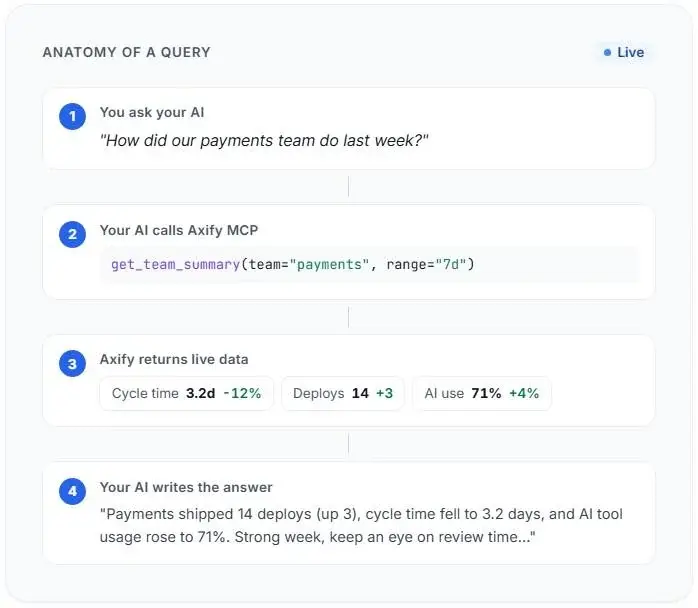
Axify's MCP server extends that idea to engineering intelligence. It gives AI clients access to delivery metrics like DORA, cycle time, AI adoption, and AI tool usage while respecting your existing Axify permissions. That lets engineering leaders ask delivery questions in natural language instead of manually combining data from multiple dashboards.
Before opening a pull request, ask Cursor to review your staged changes while the implementation is still fresh in your mind. It can catch issues that are easy to overlook after spending hours on the same code, such as missing error handling, weak validation, uncovered edge cases, inconsistent logging, race conditions, or unclear PR descriptions.
Review my staged changes before I open a PR.
Check bugs, edge cases, missing tests, error handling, logging, and project conventions.
Then list what reviewers are likely to question.
Think of this as your first review pass, not a replacement for human review. As AI-generated changes become more common, engineering teams need to decide which changes can safely move through lighter review and which still require closer human scrutiny.
You can strengthen that process further by enabling Bugbot on your repository.
During its beta, Cursor reported that Bugbot reviewed more than one million pull requests and identified over 1.5 million issues. It later achieved a 78.13% resolution rate across 50,310 analyzed PRs.
Use the first week to evaluate which findings are genuinely useful for your codebase. If the same review comment keeps appearing, update your rules so Cursor helps prevent the issue next time.
For example, add recurring review expectations to .cursor/rules/review.mdc:
- Public API endpoints must validate input before processing.
- Payment operations must be idempotent.
- Async operations that can fail must use try/catch or Result.Ask Cursor to generate the complete feature package in a single request: the implementation, unit tests, logging, and documentation. If you request only the feature code, reviewers may still need to ask how the behavior is tested, how failures can be traced, or how future developers should use the new functionality.
Implement task search in @app/api/tasks/route.ts and @lib/tasks.ts.
Add unit tests for empty queries, partial title matches, and invalid input.
Add INFO logs for successful searches and WARN logs for short queries.
Add docstrings for the exported search function.
Do not change unrelated files.
This works best because:
The same applies to tests and documentation. Generating them alongside the feature reduces avoidable review comments and gives both future developers and future Cursor sessions a stronger foundation to build on.
Cursor is no longer only an individual developer tool. TechCrunch reported that corporate buyers accounted for about 60% of Cursor revenue by early 2026, which makes team-level rules for AI harder to ignore. These are the practices you need for standards, cost visibility, adoption quality, and delivery measurement.
Once several developers start using Cursor, it’s important to standardize team practices. If everyone works differently, it's difficult to tell whether changes in review time, delivery speed, or AI costs come from the tool itself or inconsistent ways of using it.
We recommend standardizing three things across the team:
.cursor/rules/ in your repository and manage them like any other shared engineering asset. Review rule changes through pull requests, keep the files concise, and update them whenever reviewers repeatedly flag the same issue.Once those standards are in place, you also need a way to see whether teams are actually following them.
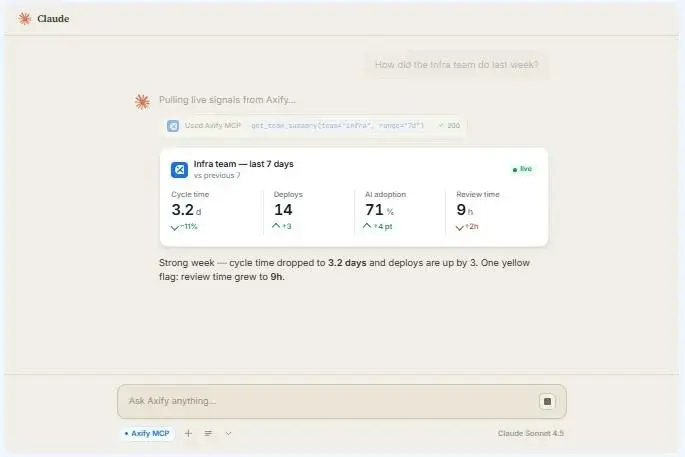
Axify's MCP server lets engineering leaders ask natural-language questions about team-level delivery metrics, DORA signals, cycle time, AI adoption, and AI coding tool usage directly from Cursor, Claude, ChatGPT, Gemini, Microsoft Copilot, or any other MCP-compatible client.
Instead of jumping between dashboards, you can ask questions like
and get the answer in the tool your team already uses.
Developers use Cursor in very different ways. One engineer may stay on Auto for routine edits, while another manually selects a frontier model for commit messages, small refactors, and quick explanations.
On a 25-person team, that difference adds up. One developer on Auto may cost $40/month, while another using Opus for low-value tasks could trigger $80+ in overages on the same seat.
That’s why we advise our clients to review model usage by task type, like autocomplete, tests, refactors, debugging, architecture planning, and review.
Avoid treating total AI spend as an aggregate, because this total obscures whether expensive models are being used for work that needs them. As a result, you are more likely to make some bad decisions, like:
Axify’s AI cost view breaks down AI cost and token usage by tool and model. Combine it with your task-type review to standardize model choices by task value, cost, and review risk, instead of relying on informal habits.
Pro tip: Our guide to AI cost optimization shows how to decide what to keep, cut, or downgrade once you see where the spend goes.
AI coding costs don't scale like traditional software licenses. Two developers with the same Cursor subscription can generate very different costs depending on the models they use, how often they rely on AI agents, and whether they also use tools such as Claude Code or API-based assistants.
As such, spend across your AI coding tools can swing widely from one month to the next, even when headcount stays the same.
That makes seat count only part of the picture. Engineering leaders also need to understand:
For example, your Cursor spend may decrease or stay the same, while Claude Code usage or internal API costs increase across the organization. Looking only at license counts won't reveal those trends.
Axify’s AI cost view, within AI Adoption & Impact, is built for that review. It surfaces current spend by AI tools and uses adoption and usage data to forecast what the cost could look like in 90 days if current trends continue.
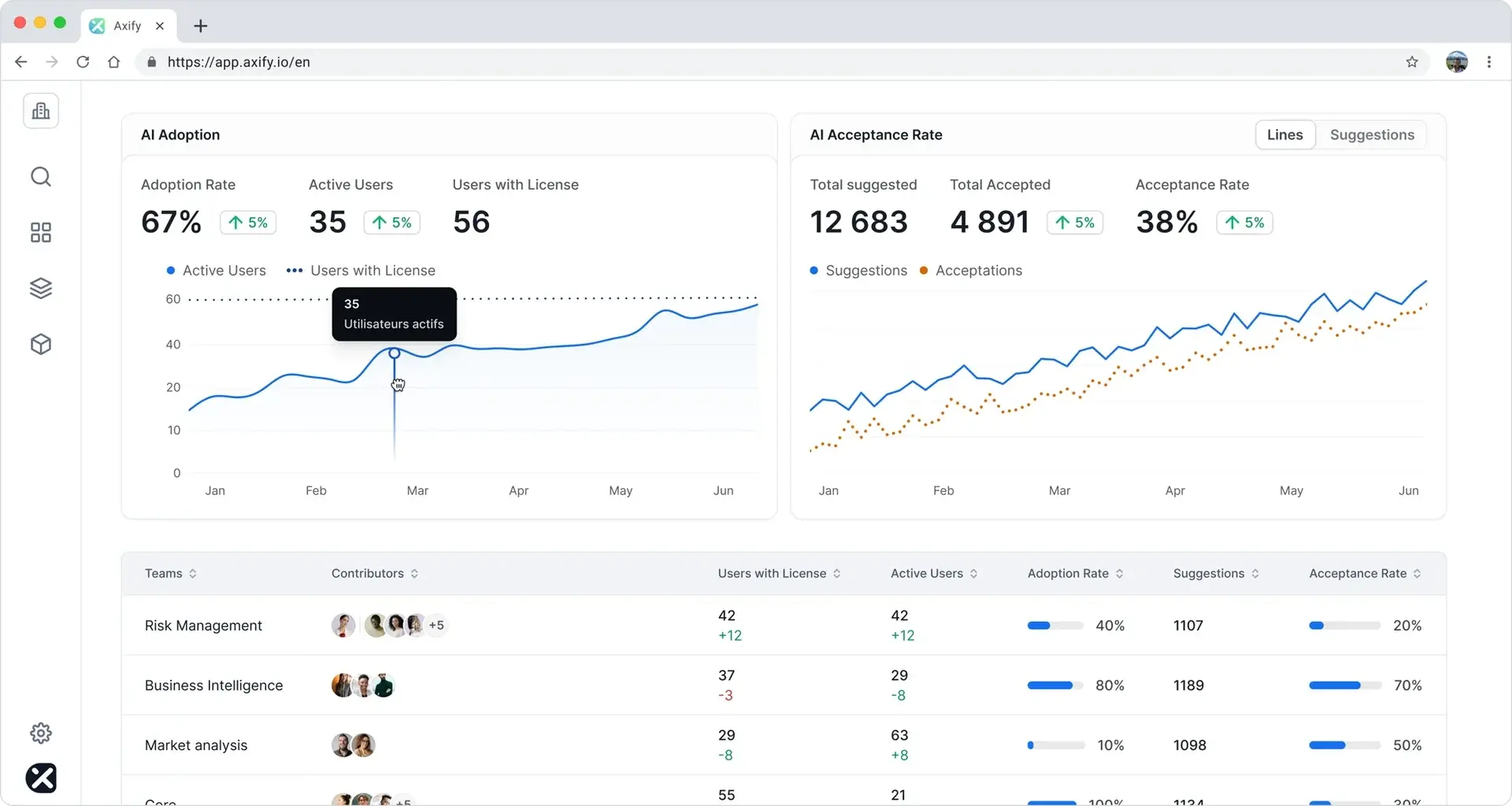
Looking at paid Cursor seats does not prove that your team is using Cursor well (or even at all). A developer who accepts occasional Tab completions and a developer who runs planned agent workflows are creating different cost, review, and delivery profiles. Your adoption review should account for those different behaviors, so:
Remember: DORA’s 2025 report, based on nearly 5,000 technology professionals, describes AI as an amplifier that magnifies strong organizational habits and existing dysfunction. In practice, a team with clear rules, small PRs, and strong tests can absorb AI-generated changes better than a team with weak review discipline.
Pro tip: If some of your teams use GitHub Copilot alongside Cursor, our guide to GitHub Copilot metrics shows which usage signals actually connect to delivery.
Axify’s AI Adoption and Impact feature tracks real usage signals across teams. It helps you see which teams are building durable AI habits and which teams are holding licenses they rarely use.
Before expanding Cursor to another 30 developers, make sure the initial rollout has actually improved delivery. Higher AI adoption doesn't automatically mean higher ROI, and about half of organizations investing in generative AI still can't confidently measure the return on those investments.
To avoid that:
That comparison tells you whether Cursor shortened delivery, shifted effort into review, or introduced additional rework.
The DORA ROI of AI-Assisted Software Development report adds an important nuance. Its J-Curve model shows that AI adoption often creates a temporary productivity dip while teams learn new workflows, adjust review practices, and integrate AI into their delivery process. Measuring ROI too early can make a successful rollout look like a failed one.
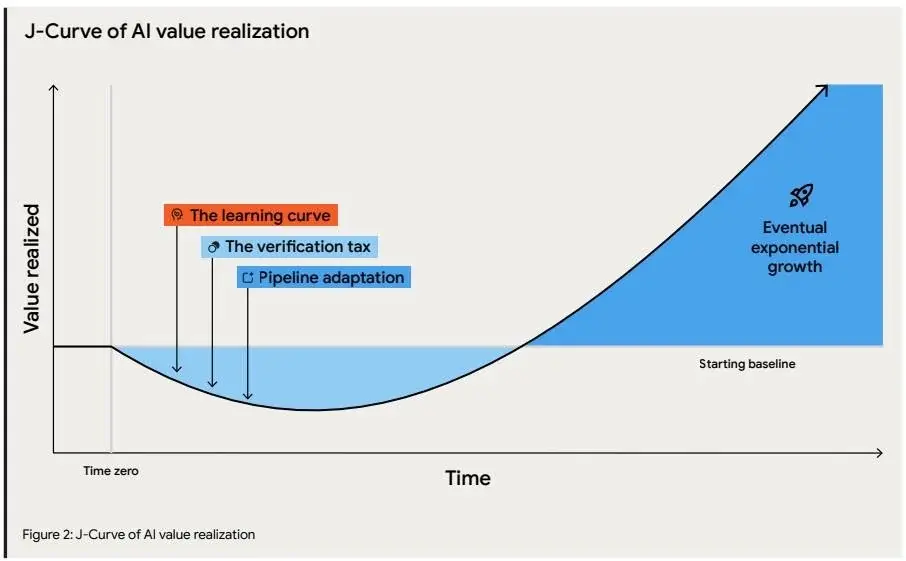
Source: DORA ROI of AI-Assisted Software Development report
Axify’s AI Impact tracking helps you see how AI tool adoption influences your engineering metrics. As such, you can see whether Cursor improves your delivery before you scale licenses across more teams. Our AI measurement framework explains how to structure that comparison.
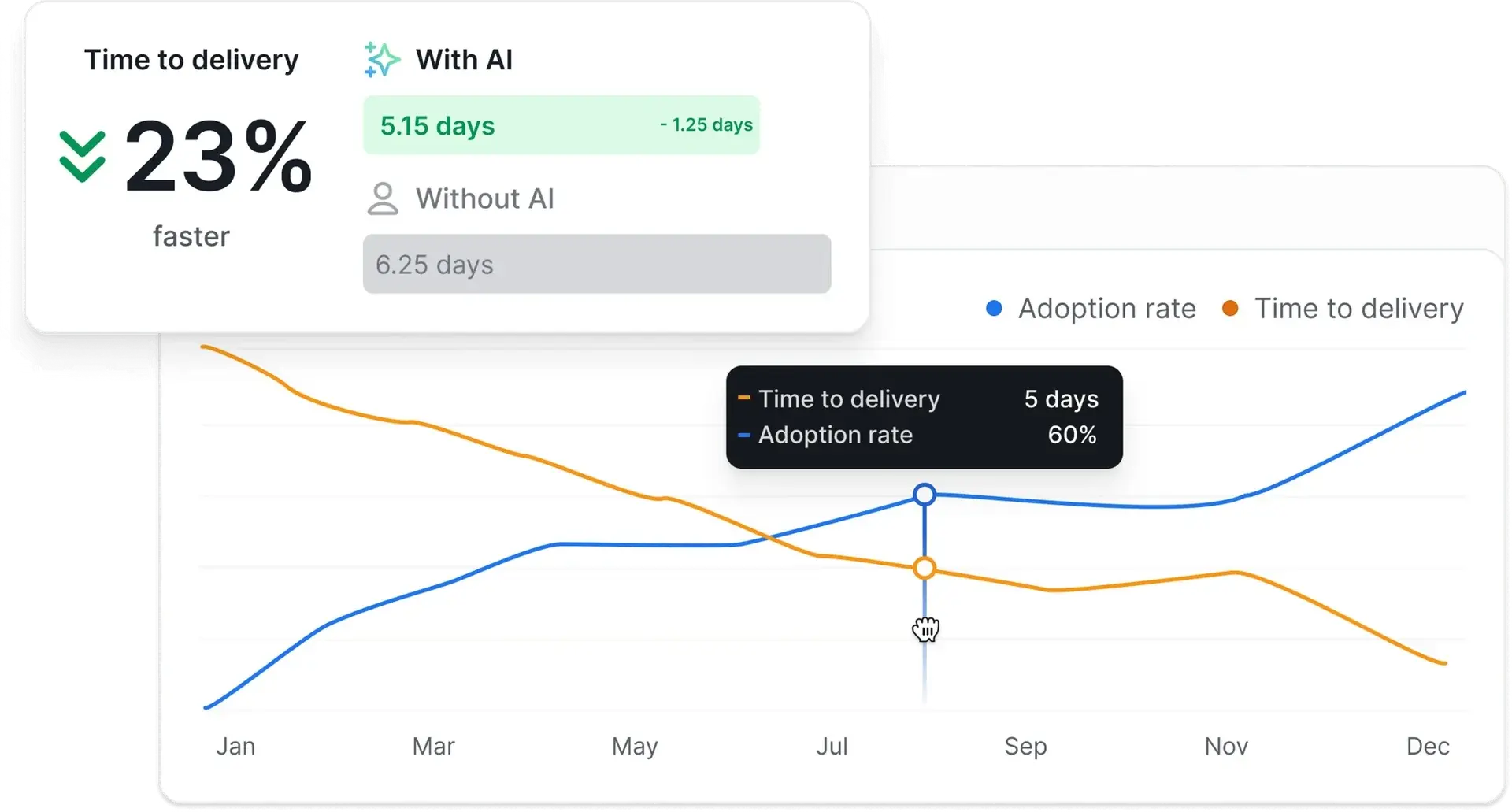
Tracking delivery metrics is useful only when it helps you make better decisions. So, after you review Cursor adoption, cost, review load, and delivery data, turn those findings into a small operating change your team can test.
Use a simple action process:
Many engineering intelligence tools show what is happening and leave the “what to do about it” work to the leader.
Axify Intelligence is different because it acts as an AI decision partner. It analyzes your delivery data, explains likely causes, recommends actions, and lets you apply those actions directly from the dashboard with a single click.
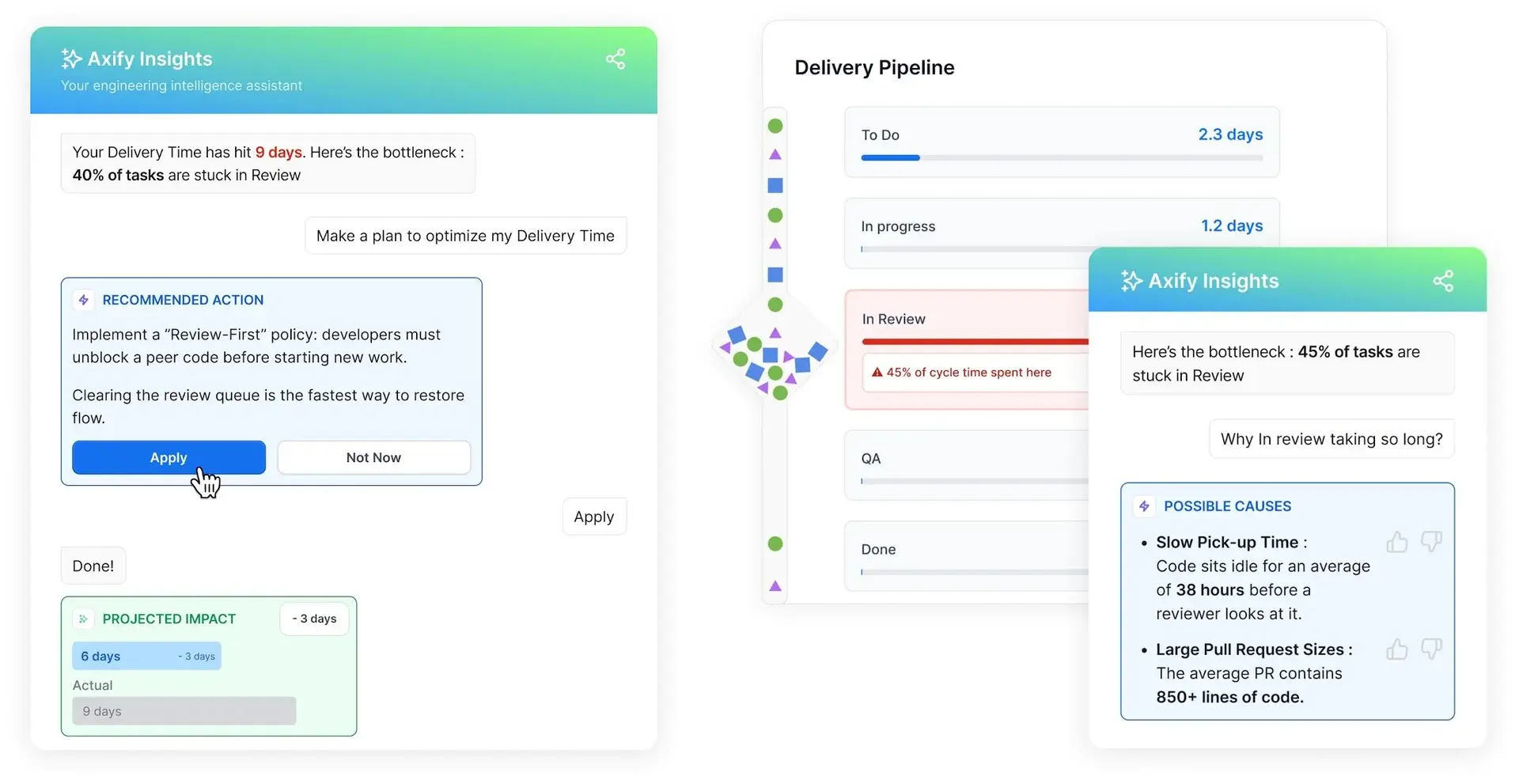
Choose Cursor plans based on how developers actually use the tool, even if team-wide enthusiasm is high.
The Teams plan ($40 per seat) adds centralized billing, admin controls, shared rules, usage analytics, and team management. Those capabilities become valuable once you need consistent governance across multiple developers.
Before upgrading, answer a few practical questions:
If only a limited subset of developers is using Cursor intensively, consider a mixed licensing strategy. It’ll be more cost-effective than upgrading everyone.
The same principle applies when comparing Cursor with alternatives such as GitHub Copilot Business. Compare tools based on how your teams actually work. Cursor's higher cost (compared to $19/ user for GitHub Copilot Business) is easier to justify if developers regularly use agent workflows, shared rules, Bugbot, and other team capabilities.
The AI cost view in Axify’s AI Adoption & Impact dashboard helps you compare costs across AI tools and models and forecast budgets, so licensing decisions are based on clear spending visibility.
Avoid standardizing workflows based only on vendor benchmarks. Benchmarks help identify promising capabilities, but they don't tell you how those workflows affect your engineering organization.
For example, CursorBench shows Composer 2 scoring 61.3, compared with 44.2 for Composer 1.5 and 38.0 for Composer 1. Those results justify testing newer workflows, but they don't tell you whether review time, defect rates, or cycle time improve in your own repositories.
Instead, run a four-week pilot with one engineering team.
Axify Intelligence helps explain why delivery metrics changed during the pilot and recommends improvements you can apply directly. If you want to investigate the results further, Axify's MCP server lets you explore team-level delivery patterns in natural language from inside Cursor.
Prompts change every week. Models change every few months. New AI tools appear every quarter. If your engineering process depends on remembering the "right" prompt, it won't stay consistent for long.
Instead, standardize the decisions behind your AI workflows. Decide when developers should use Plan Mode, when AI-generated changes require additional review, which models fit different types of work, and what evidence is required before code reaches production. Those rules survive even when the tools evolve.
That's also why measuring outcomes matters more than measuring prompts. Delivery metrics tell you whether your standards still work after the technology changes.
Axify helps engineering leaders make those decisions with evidence by bringing AI adoption, delivery impact, cost, and engineering intelligence into one place.
Want to see how your Cursor rollout affects delivery? Start your 14-day free trial of Axify.
Keep each task small enough to review, reference the files Cursor should change, and use Plan Mode for multi-file or risky work. Store shared conventions in .cursor/rules/, give the agent tests it can run, and treat its output as a first draft that still goes through human review.
Cursor is built on VS Code, so it keeps the same editor experience and most extensions. The difference is that AI is built into the core workflow, with codebase-aware chat, agents, and rules. Teams that mainly want inline suggestions can stay in VS Code with an assistant like GitHub Copilot, while teams that rely on agent-driven, multi-file work often prefer Cursor.
Share one set of Cursor Rules in the repository, define which models fit which task types, and require Plan Mode for multi-file changes. Then review adoption, AI cost, and delivery metrics together every few weeks so you can keep the practices that work and drop the ones that don’t.
Record your team’s cycle time, PR review time, and deployment frequency for a few weeks before the rollout, then compare the same metrics over an equal period after adoption. Compare similar types of work and watch review time closely, since faster coding can shift the delay into review instead of removing it.