AI
18 minutes reading time

GitHub Copilot vs. Cursor are two tools that dominate the AI coding assistant market, but they work differently. Copilot works as a plugin inside editors your developers already use, while Cursor is a standalone AI-native editor built as a VS Code fork.
This plugin-vs-platform decision matters because it affects rollout speed, governance, code review habits, and how much context the tool can use during multi-file work. Tech Insider uses the same plugin-vs-platform framing, which we’ll use as a starting point below, too.
However, both tools aim to streamline your workflow as much as possible. Your decision won’t be easy because both tools added AI agents, too.
That’s why you need a decision framework based on team-level ROI.
Note: This article focuses on Copilot and Cursor as two widely adopted tools in their respective categories. If you’re also evaluating autonomous terminal agents, see our companion article on measuring Claude Code’s impact.
Copilot adds AI to the editor your team already uses. Cursor replaces the editor with an AI-first one.
With Copilot, your developers stay in VS Code, JetBrains, Visual Studio, or Neovim. AI runs as an extension on top of those editors and suggests code as developers type, so the rollout doesn’t require a change in daily habits.
Cursor takes a different approach. Developers move to a standalone AI code editor built as a VS Code fork. Context awareness, multi-file editing, codebase navigation, and agentic task execution are built into the editor itself.
That design difference shows up in adoption.
Adoption numbers reflect both factors.
JetBrains reports that 29% of developers worldwide use GitHub Copilot at work; 18% use Cursor at work. The gap is consistent with what each tool requires: Copilot fits the existing setup, so adoption is broader; Cursor asks for a tool change, so adoption is narrower but more committed.
Both tools added agent capabilities in 2025–2026, and each agent reflects its original design:
The right question isn’t which tool is better. It’s which workflow fits how your teams actually build software. For a practical comparison, see the video below.
Now let’s compare where each tool has an advantage.
Neither tool wins everywhere; we advise you to pick the best tool for your team’s workflow. These are the areas that matter when you’re justifying adoption, cost, governance, or delivery impact.
| Category | GitHub Copilot | Cursor |
| Autocomplete | Better for boilerplate, routine completions, and small single-file edits. | Better when suggestions need broader project context. |
| Codebase context | Has workspace context, but it is not the core workflow. | Built around repo-level context and multi-file work. |
| Agent mode | Stronger for GitHub-native agent work, branches, PRs, tests, and reviews. | Stronger for autonomous editor-based coding and parallel agent runs. |
| Model flexibility | More centralized model control. | More task-level model routing for power users. |
| Editor support | Works across VS Code, JetBrains, Visual Studio, Neovim, and Xcode. | Requires switching to Cursor’s standalone editor. |
| Pricing | $19/user/month for Copilot Business, plus usage-based AI Credits after included allowance. | $40/user/month for Teams, with token-based pricing to monitor. |
| Best for | Broad rollout, governed teams, mixed editors, and inline AI assistance. | VS Code-heavy teams, complex refactors, and AI-first workflows. |
Copilot is stronger for single-file completions, boilerplate, and small code suggestions that reduce manual typing. This fits greenfield work, consistent codebases, and teams that want AI help inside their current editor without changing habits.
Cursor is stronger when the work spans several files, because speed and context matter more during refactors, migrations, or changes tied to the broader project structure.
Tech Insider’s testing found Copilot faster on routine completions and Cursor stronger on multi-step, multi-file work.
Cursor wins this category by design because the editor is built around repository-level context. That matters when your developers need to ask questions across files, trace dependencies, or change related modules without manually opening each file.
Copilot has added workspace context, but its cross-file awareness still works more like an added capability than the center of the workflow. So, if your team spends more time on legacy code, refactoring, or architecture-sensitive changes, Cursor gives developers more room to reason across the codebase.
Copilot’s Agent Mode fits teams already centered on GitHub. A developer can assign an issue, and Copilot creates a branch, analyzes files, runs tests, opens a PR, and responds to review comments. This connects AI work to your existing version control, review process, and audit requirements.
Cursor Composer gives developers more autonomy inside the editor, including broader codebase edits and parallel agent runs. This fits teams that want raw agentic coding capability without the GitHub-specific integration.
Copilot gives your developers access to several AI models, including OpenAI, Anthropic, and Google options, but model choice is more centrally managed. That fits teams that need policy control and fewer model-level decisions at the developer level.
Cursor gives developers more task-level routing, such as using a faster model for completions and a stronger reasoning model for multi-file edits. This helps power users but creates governance questions when your security or platform team needs tighter control over which models are available.
Copilot has the lower-friction rollout.
It works across VS Code, JetBrains, Visual Studio, Neovim, and Xcode. That matters if your backend teams use IntelliJ or PyCharm, frontend teams use VS Code, and senior developers refuse to leave Neovim.
Cursor requires a switch to its standalone editor.
That may be acceptable for VS Code-heavy teams. But it becomes a real adoption constraint when your teams rely on JetBrains workflows, custom extensions, or existing editor standards.
GitHub lists Copilot Business at $19 per user per month. Cursor lists Teams at $40 per user per month.
GitHub Copilot’s initial premium request model made this tool more predictable. However, since June 1, 2026, Copilot started using AI Credits for usage-based billing. Similarly, Cursor offers usage-based costs through Composer/Auto and third-party API pools.
For 50 developers, that means Copilot Business costs about $11,400 per year. Meanwhile, Cursor Teams costs about $24,000 per year, which creates a $12,600 annual gap.
That gap is not automatically a problem if you do choose Cursor, but it needs to be justified.
As such, you should track cost per PR, cost per completed ticket, review load, and cycle time on similar work. That way, you can base your decision on the real delivery impact and choose the tool that makes you most productive.
Speaking of productivity, let’s go over that in the next section.
There are already studies showing that tools like GitHub Copilot and Cursor can improve developer productivity, and we’ll review them below.
Copilot has a stronger enterprise evidence base because it has been tested inside larger organizations, focusing on existing engineering workflows.
In that context, a large Microsoft and Accenture study found a 26% increase in completed tasks for developers randomly assigned Copilot, using PRs, commits, and builds as output proxies.
Similarly, another case study across 50 developers found a 10.6% increase in pull requests and a 3.5-hour reduction in cycle time.
Developer sentiment also matters because adoption drops when a tool feels like a chore to use. For GH Copilot, 60-75% of users report feeling more fulfilled, less frustrated, and better able to focus on meaningful work.
That sentiment does not prove delivery impact, but it tells you the tool can reduce day-to-day friction enough for sustained use.
Side note: For a deeper view of what to track beyond usage, see our guide to GitHub Copilot metrics.
Cursor’s agentic capabilities are backed by research showing measurable gains in software delivery, particularly for tasks that require planning and coordination across multiple files.
A University of Chicago study analyzing tens of thousands of Cursor users found that organizations merged 39% more pull requests after Cursor’s agent became the default. The same study observed that experienced developers spent more time planning before coding and appeared more effective at using agents.
These findings suggest Cursor delivers the most value on work that benefits from repository-wide context, such as debugging, refactoring, and full-stack changes.
Industry reports point in the same direction, with teams citing 20-25% time savings on common development tasks and 30-50% shorter development cycles for more complex projects.
For engineering leaders, the takeaway is straightforward: evaluate Cursor on task types where planning, context gathering, and multi-file coordination are major parts of the work.
A METR randomized controlled trial on 16 experienced open-source developers found that developers using AI tools, primarily Cursor Pro with Claude Sonnet, were 19% slower while believing they were 20% faster.
That creates a nearly 40-percentage-point gap between perception and measurement. This does not erase the findings above, but it shows why your decision cannot rely on self-reported productivity or vendor case studies alone.
2. The second problem is technical debt.
Both Copilot and Cursor can increase development velocity. However, higher output can also lead to more rework, code churn, duplicated logic, larger pull requests, and lower review quality if engineering teams focus only on speed.
GitClear’s analysis of 211 million changed lines found an eightfold increase in duplicated code and a doubling of short-term code churn in AI-assisted development workflows. Meanwhile, a large study comparing 807 Cursor-adopting repositories with 1,380 matched controls found that early productivity gains were accompanied by lasting increases in technical debt that later reduced development velocity.
The lesson is the same for both tools: velocity metrics alone do not tell the full story. You also need to track review effort, rework, code churn, test coverage, and defects to understand the real impact on delivery performance. As a side note, this is also why AI code review tools need to be evaluated on review quality and rework reduction, not just faster feedback.
The problem is that both Copilot and Cursor provide usage dashboards, but neither connects usage data to downstream engineering outcomes.
That’s why the next step is measuring whether adoption actually improves delivery.
The benchmarks above are useful when evaluating tools, but what’s more important is comparing your team’s performance before and after adoption to verify the impact in your own environment. This helps you validate the tool’s actual impact and reconsider your investment if the expected gains don’t materialize.
Here’s how Axify can help.
Axify can analyze GitHub Copilot, Cursor, Claude Code, and other AI DevOps tools, then show data by tool, team, and line of business. That matters because you can compare adoption without asking each team to export separate dashboards or explain usage manually.
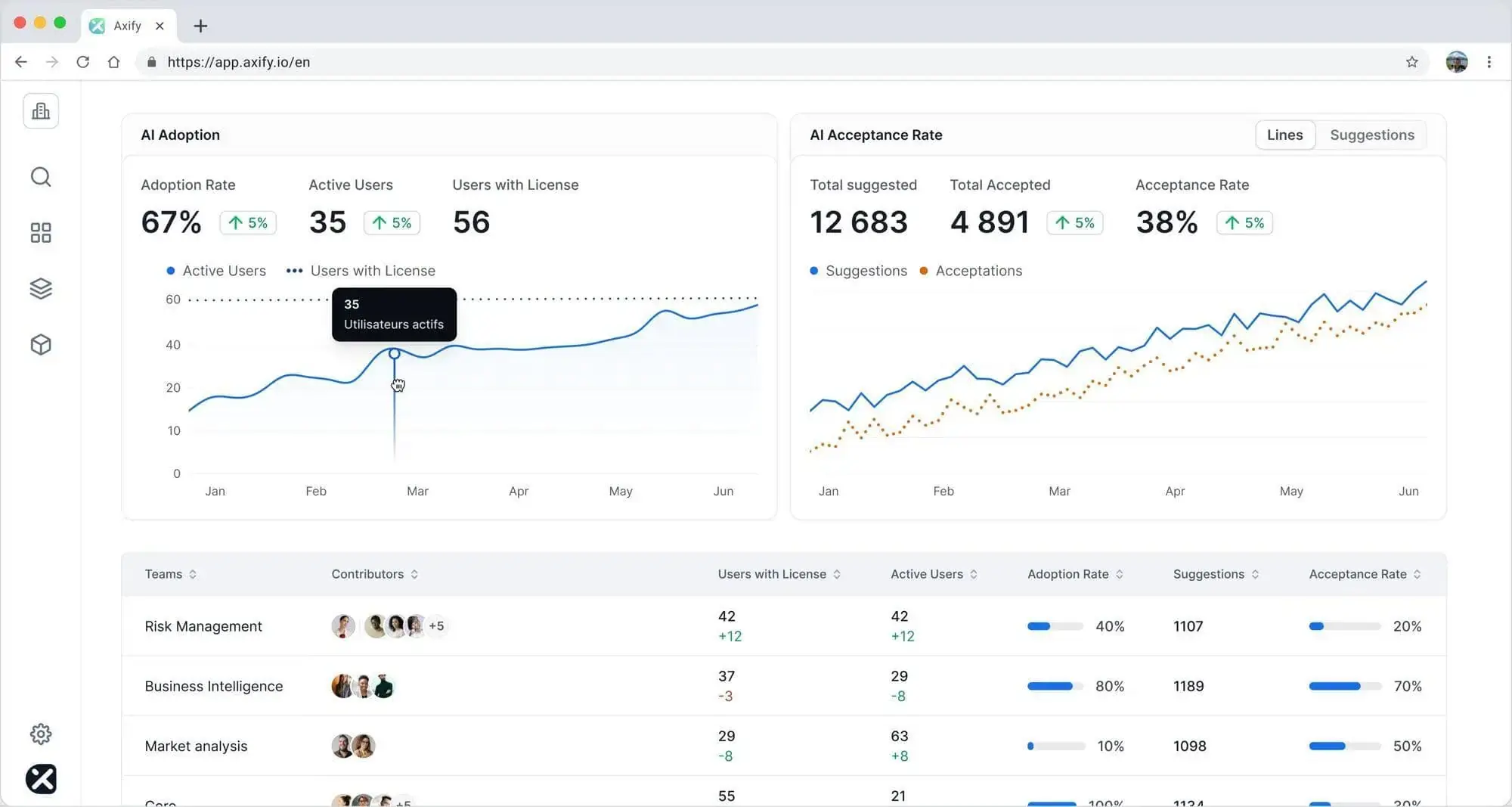
With Axify MCP, you can also access that same adoption and delivery data directly from Anthropic’s Claude, ChatGPT, Copilot, or any MCP-compatible AI assistant. Instead of switching between dashboards, you simply ask questions in natural language and get answers from live Axify data.
The goal is not to identify which team uses AI the most. It’s to understand whether AI-assisted work produces better outcomes. Two features can help here.
Axify Adoption and Impact correlates AI usage with cycle time, throughput, rework, pull request quality, delays, and other engineering metrics. This helps you determine whether adoption is improving performance or simply increasing activity.
Secondly, Axify MCP lets you ask questions inside your IDE, such as “Which teams have the highest AI adoption but the slowest cycle time?” or “Did our delivery performance improve in the Platform team last quarter, after we implemented Cursor?” and get answers based on your live engineering data.
That way, you can judge whether Cursor’s $12,600 annual cost premium for 50 developers is paying off, or whether Copilot’s vendor dashboard is overstating delivery value.
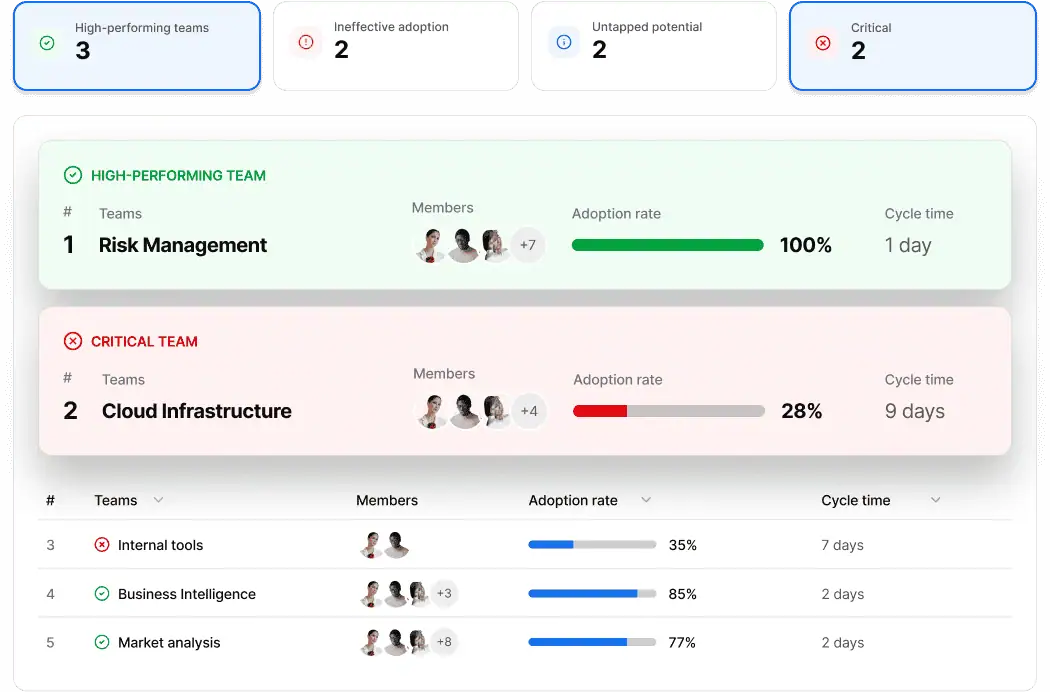
License count does not tell you whether a certain tool has become part of your daily work. Axify measures AI adoption across three DORA-aligned dimensions: actual usage, confidence level through acceptance rate, and habitual use through number of interactions.
This helps you see whether your developers simply tried a tool during launch week or if they consistently use it during real coding, review, and debugging work.
Different teams often benefit from AI tools in different ways. Cursor may create more value for a platform team working on multi-file refactors, while Copilot may be enough for feature teams doing smaller scoped work.
Axify lets you segment results by team, project, or business unit, making it easier to identify where adoption creates value and where it doesn’t.
Higher output is only valuable if quality remains stable.
Axify helps you track rework, pull request churn, and related delivery metrics alongside AI adoption so you can spot technical debt and quality issues before they affect future velocity.
Knowing that Cursor adoption correlates with a 15% decrease in throughput, longer review times, or higher rework rates is useful, but it doesn’t tell you what to fix.
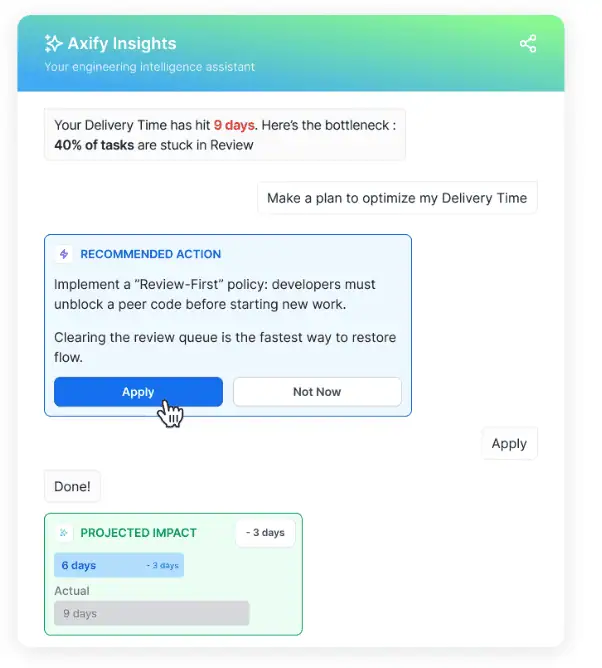
Axify Intelligence helps you uncover the bottlenecks affecting adoption and impact. In some cases, the problem may be process-related, such as excessive work in progress, long review queues, or poor pull request practices. In others, the issue may be tool fit. A team using Cursor for small, repetitive tasks may not see enough value from its agentic capabilities, while a team relying on Copilot for complex multi-file work may be using the wrong tool for the job.
Based on the patterns it detects, Axify Intelligence surfaces recommendations that help engineering leaders address workflow bottlenecks, improve adoption, and determine whether performance issues stem from engineering practices or the AI tools themselves.
Plus, you can apply those recommendations straight from the platform.
Start your free trial with Axify to compare Copilot and Cursor using your own delivery data.

This decision should start with how your teams actually build, review, and ship code. The right tool is the one your developers can adopt, your organization can govern, and your leadership team can measure against delivery data.
Choose Copilot if:
Choose Cursor if:
Consider running both when different teams have different work patterns.
For example, Copilot can serve your broad developer base because it has a lower cost and no editor switch. At the same time, Cursor can serve power users or platform teams working on complex architectural changes.
Increasingly more teams are adding both Copilot and Cursor in their AI tool stacks. In fact, 79% of OpenAI’s paying customers also pay for Anthropic. That suggests companies increasingly pay for multiple AI tools when they believe each tool supports a different workflow.
Of course, to make sure this decision is useful, keep monitoring both tools.
One thing worth ending on:
The Copilot-vs-Cursor decision doesn’t have to be permanent, and treating it as such creates more problems than it solves.
Pricing changes, new models ship, and adoption patterns change as your teams take on different kinds of work.
The team that committed to Copilot in Q1 because the rollout was easier may find Cursor pays off by Q4 once a platform group starts a large refactoring project. The team that paid the Cursor premium for power users may find Copilot’s GitHub-native agent mode now covers most of what they actually do.
Pick the tool that fits today, measure it against your own delivery data for a full quarter, and revisit the decision when the data tells you something has changed.
That’s a more honest process than the one most teams run, which is choosing once at procurement and defending the choice afterward.
You should test Copilot and Cursor for at least one full delivery cycle, ideally 4-6 weeks. That gives you enough completed tickets, PRs, reviews, test suite results, and rework patterns to compare similar work instead of judging a short pilot.
Leadership should set the approved tool policy, while developers should test tools within that policy. That gives teams room to evaluate different AI-assisted IDEs without creating unmanaged spend, scattered API keys, inconsistent security controls, or unsupported integrations inside Visual Studio Code and other development environments.
Measure Cursor's cost against cycle time, PR throughput, review time, rework, error rate, and churn on comparable tasks. If Cursor costs more but does not reduce delivery friction or improve complex work, the premium is hard to defend.
Treat delivery metrics as the decision baseline, then review why developers prefer Cursor. If the preference comes from specific workflows, such as debugging, maintaining large codebases, or working with Claude 4 through an API endpoint, keep Cursor for those teams and use Copilot where the measured delivery flow is better.