AI
15 minutes reading time

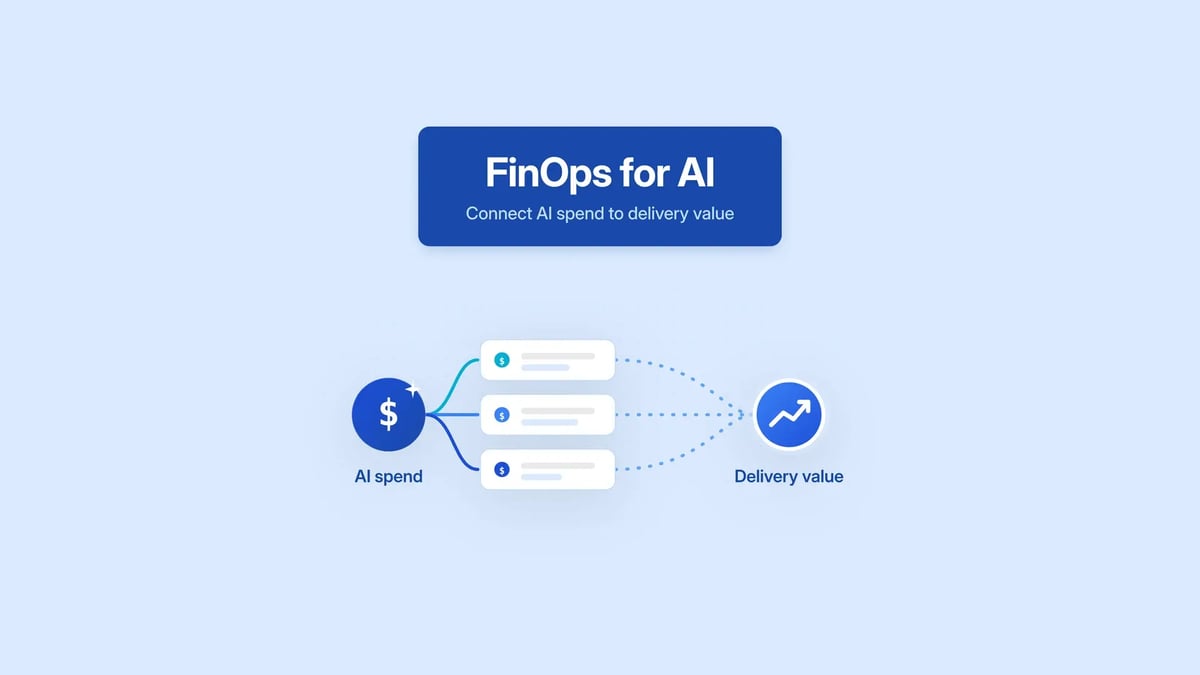
AI tools can get adopted fast, but their total cost can scale even faster. That cost may come from licenses, API calls, agent retries, longer prompts, or token-based billing.
FinOps for AI helps you control AI spend, but you need good cost visibility for that. You also need to know whether the budget you allocate for AI-powered workflows improves your delivery outcomes.
So, in this article we’re going to explain how to track AI spend, assign owners, and connect cost attribution to delivery data. You’ll also learn where cost management can fail, especially if you indiscriminately allocate the same AI budget across teams, tools, and workflows.
P.S. Axify measures and compares your team’s delivery performance with and without AI, so you can see exactly how AI adoption affects cycle time, DORA metrics, and other delivery indicators. Besides, our AI cost tracking feature lets you tie those delivery changes to your exact budget.

FinOps for AI is the practice of tracking, forecasting, and governing the cost of AI and ML workloads so spend stays tied to usage and delivery results.
It builds on traditional FinOps, but AI changes what shows up on the bill.
This is now standard FinOps work.
According to the State of FinOps 2026 Report, 98% of respondents manage AI spend, up from 63% in 2025 and 31% in 2024.
| “The practice you have for governing public cloud spend should naturally include AI. It is simply another bucket of spend that requires the same discipline and governance as any other technology.” - State of FinOps 2026 Report |
One distinction worth keeping clear:
With regular cloud workloads, you can trace spend back to compute hours, storage volume, or network usage. With AI workloads, the same task can cost different amounts depending on prompt length, model choice, retries, and which team is using which tool. That makes it harder to know what increased the bill.
Research backs this up.
The Tangoe State of Cloud report found that AI raised cloud expenses by 30%, and 72% of IT and finance leaders say GenAI-driven cloud spending is becoming unmanageable.
Five things drive that gap.
For large language models, one request is not one fixed unit of cost. Spend depends on input tokens, output tokens, context length, retries, model type, and provider pricing. A longer prompt, a larger context window, or a verbose response raises the bill even when the user thinks they are doing the same task.
This is the part most AI cost reviews can’t get past.
Most companies can’t do that at scale, which is why AI spend usually gets reported in aggregate and explained only after the fact.
Your AI budget increases because more teams have access to it. According to the Flexera 2026 State of the Cloud Report, every respondent uses GenAI in some capacity (45% extensively, 36% sparingly, 18% experimenting).
Basically:
Ownership gets unclear fast. To keep the bill explainable, you need owners assigned by team, tool, and workflow.
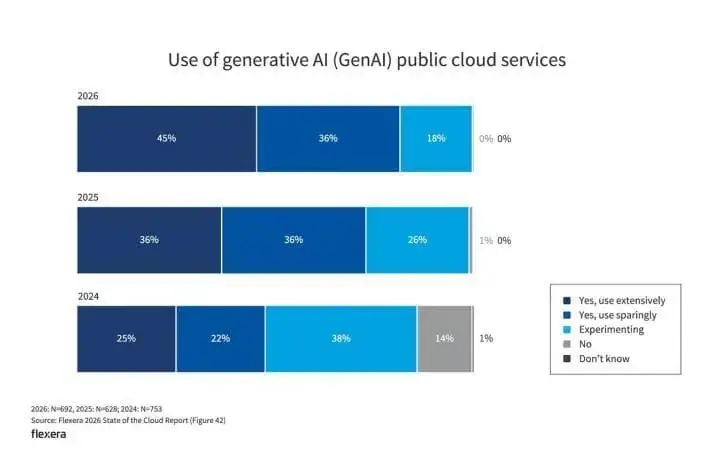
Source: Flexera 2026 State of the Cloud Report
Most companies use several AI vendors at once: Claude, OpenAI, Azure OpenAI, AWS Bedrock, GitHub Copilot, Cursor, and others. Each vendor has its own billing model, usage dashboard, and cost categories.
The problem is that finance sees total spend, engineering sees tool usage, and platform teams see infrastructure behavior. Without shared definitions, each group explains only part of the bill.
Tools like Claude Code and other AI agents can run multiple actions, retries, and parallel sessions from one instruction. That helps on larger engineering tasks, but it makes consumption harder to predict.
One agent task may read files, edit code, run checks, retry failed steps, and call a model several times. If the workflow fails twice, cost multiplies before a human reviews the result.
Teams tend to default to the newest or strongest model because it is easier than setting task-level rules. But you don’t need a premium model for summarizing logs, drafting test cases, or classifying support tickets.
That’s why we advise you to match model cost to task risk, output quality, and delivery impact.
Using the same high-cost model everywhere raises spend without a matching gain in cycle time, rework, or PR flow.
Once you can explain where AI spend goes, the next question is whether that spend pays back in delivery.
FinOps for AI should not stop at “how much are we spending?” That tells you where the bill increased.
It doesn’t tell you whether the spend made your engineering team faster, more stable, or more productive.
The stronger question is: what are you getting for that spend?
For engineering teams, that means tracking delivery performance before and after AI adoption and checking whether the cost is justified. Pick the delivery metrics tied to your team’s actual constraints.
AI cost only earns its place when one of those metrics improves.
Higher AI usage also doesn’t automatically equal better delivery.
Take an AI agent assigned to incident triage. It reads alerts, pulls logs, drafts a diagnosis, and assigns owners across hundreds of incidents a week. But if 40% of its assignments get reopened or rerouted and on-call engineers still do the real triage themselves, AI cost rose without improving the failed deployment recovery rate.
The spend went up; the metric the team actually cares about stayed flat.
If FinOps for AI shows where AI money goes, Axify shows whether that money improves how your teams deliver software, and where the next optimization should happen.
This leads us to our main section.
As we said above, a high AI usage does not automatically mean high productivity. Low AI usage does not automatically mean low value either. A practical AI ROI model compares cost, output, AI delivery impact, quality, and forecasting signals in the same review period.
These are the metrics you should track before you decide whether to increase or rebalance your AI usage.
Cost metrics show what you pay for AI tools and what AI adoption costs you beyond the invoice.
These are the cost signals to review:
Output metrics show whether AI usage increases completed work. Treat them as activity signals, not as proof that delivery improved.
These are the output signals to review:
Delivery impact metrics show whether AI changed your team’s actual delivery performance: how long work takes from start to release, how often deployments succeed, how much rework gets generated. This is where AI ROI becomes defensible, because you are comparing spend against measured delivery outcomes rather than against activity.
These are the delivery signals to review:
Quality metrics show whether faster work is safe to ship. AI can reduce coding effort while moving the work of catching defects from coding into review, QA, or production.
These are the quality and risk signals to review:
Forecasting metrics show projected AI spend before the finance team raises it. They also give platform and IT operations teams the data they need to plan access, budgets, and governance rules.
These are the forecasting signals to review:
Pro tip: Try Axify’s cost assessment capability, available in the AI Adoption and Impact feature. It lets you see how much you spend on AI tools and forecast future AI costs from adoption and usage data. Engineering leaders can identify projected overruns before the next finance review, finance gets visibility into upcoming AI spend, and teams can decide whether to expand, rebalance, or restrict AI usage before the bill arrives.
AI FinOps maturity needs stages because you cannot manage AI cost against delivery results until you can see what your teams are spending money on in the first place.
The FinOps framework uses a Crawl, Walk, Run model. The same model applies to AI spend, with each stage adding ownership, forecasting, or decision quality on top of the last.
At the Crawl stage, your first job is to identify which AI tools and workloads your teams are using. Unmanaged AI spend usually starts with small experiments, separate licenses, or API usage that never went through a shared review process, which means the company is paying for things finance doesn’t know exist.
Here are the actions to take:
The goal: To move to the next stage, you should be able to answer which AI tools are being used, by whom, and at what cost.
Once AI usage is visible, the next problem is explaining it. A cost increase you cannot attribute to a team, tool, workflow, or model choice is a cost you cannot do anything about.
Here are the actions to take:
The milestone: You’re ready for the next stage if you can explain why your AI spend changed and whether usage is moving in the right direction.
At the Run stage, mature teams treat AI cost as part of engineering performance planning. They don’t view it as a separate line item in cost management tools.
Here are the actions to take:
The milestone: You manage AI spend as a genuine engineering investment. You no longer perceive AI as a loose software expense. That means you can defend useful AI workflows in budget reviews, cut the ones that aren’t earning their cost, and correlate your AI spend with metrics like cycle time and CFR.
Reducing AI cost should not mean blocking useful engineering work. The goal is to make usage more deliberate. That way, you can keep the AI workflows that reduce your team’s effort and limit the ones that add spend without improving delivery.
Here’s what we recommend:
You don’t need the most expensive model or assistant for every workflow. A simple test-generation task, log summary, or documentation draft don’t need the same high-level agent as a complex architecture review.
So, compare team needs, task types, output quality, response speed, and cost before you make one AI tool the default for every AI developer workflow.
Agent loops, failed actions, and repeated prompts can raise costs unnecessarily. Even one request can trigger several model calls, tool calls, file reads, and retries. A practical solution is to set retry limits and review failed workflows that keep calling the same analytics API or model endpoint.
Bloated prompts, irrelevant files, and unclear instructions increase token usage and reduce output quality. If you send a full repository context for a small change, the model has more text to process and more room to return irrelevant output. Better prompt structure gives you cleaner responses and more reliable cost savings than cutting access broadly.
Many AI requests are repeats: the same internal policy question, the same dependency check, the same setup explanation, asked dozens of times across support tickets, engineering Slack threads, or onboarding workflows. Each repeat calls the model fresh and bills you fresh, even though the answer hasn’t changed.
Caching the approved answer to a stable, repeated question removes the duplicate inference cost without changing what the user sees. Start with the questions your teams ask the model most often, confirm the answer is correct and won’t change week to week, and serve the cached version until the underlying policy or dependency actually changes.
High usage is not automatically wasteful, and low usage is not automatically safe.
A senior engineer who uses AI heavily to clear reviewable work faster is producing value for the cost.
However, a low-volume workflow can still be expensive if it:
Review usage by workflow, not by total tokens. The question is not “who is spending the most,” but “what is each workflow costing per unit of useful output.”
The cost of an AI workflow is not only the cost of the model call. It is also the time your team spends reviewing, correcting, or recovering from what the model produced.
Take AI-drafted release notes.
The per-draft cost is a few cents. But every draft gets reviewed by engineering for technical accuracy, then by product for positioning, and sometimes by comms or legal before publishing. If the model misstates what a change does, attributes it to the wrong version, or undersells a security fix, each draft can take more total human time than a human-written one would have. The cheap-looking model call is the smallest line on the real bill.
Track downstream effects per workflow: review time, correction rate, rework, and follow-up incidents. A workflow with low per-call cost and high downstream cost is not a cheap workflow.
A FinOps platform can show where AI costs sit across invoices, vendors, usage dashboards, and cloud environments.
Axify adds the delivery context you need to decide whether that spend improved your teams’ workflows. Here’s how:
Axify’s AI Adoption and Impact feature tracks which AI tools teams use and at what level. Then, it compares performance before and after AI to see whether you’re actually delivering faster, higher-quality software. It also tracks adoption signals such as active users, licensed users, usage frequency, trust, habit, and acceptance rate.
That matters because a team can increase AI usage without improving flow. For example, if adoption rises but review time also rises, you have a workflow bottleneck to solve before expanding usage further.
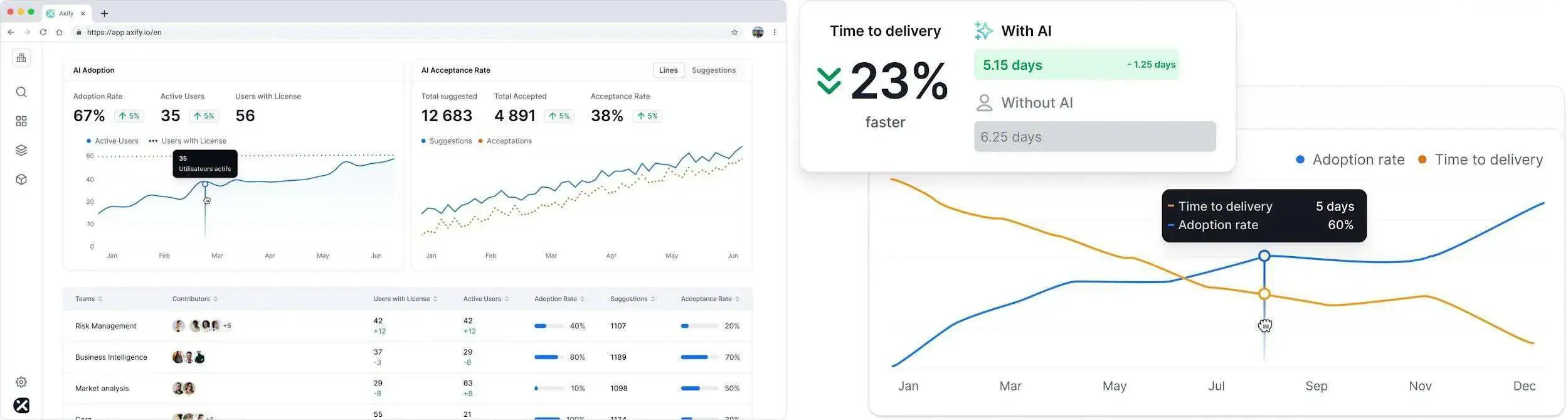
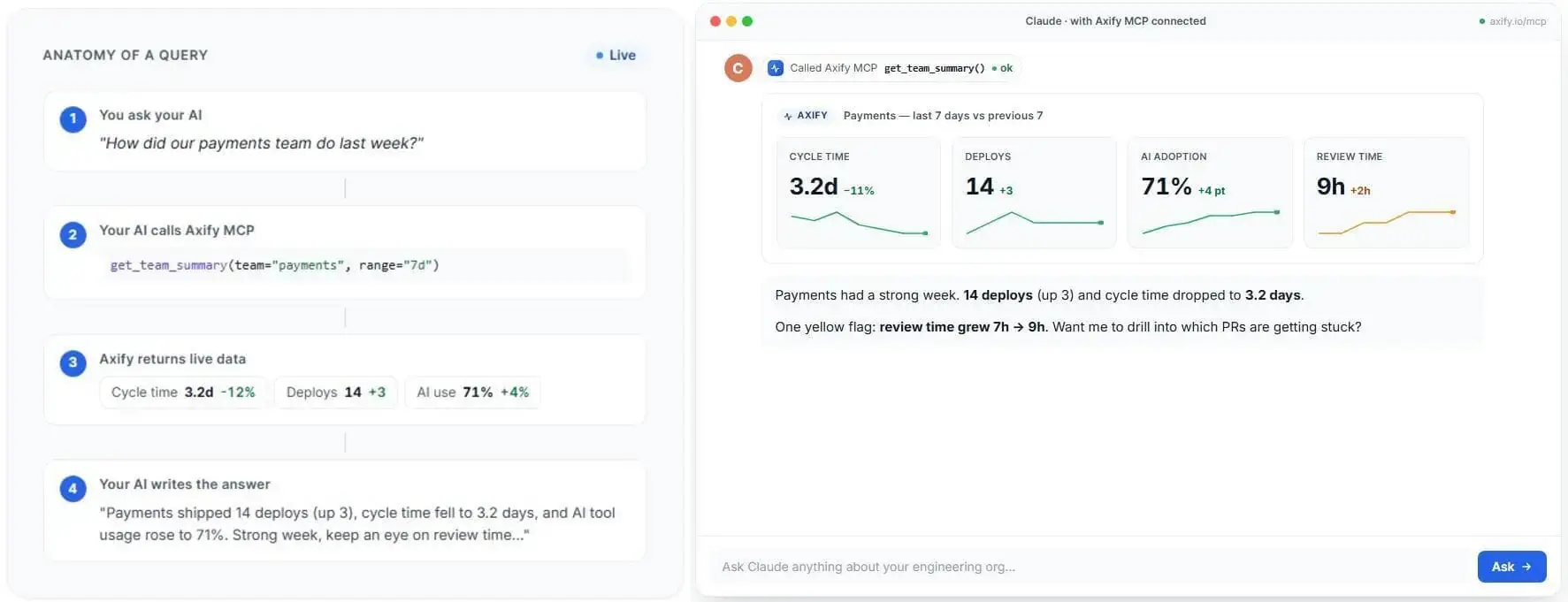
Axify MCP helps you get the same context and insights from the AI tools you’re using, as long as they have an MCP server integration.
As such, you can ask natural-language questions about your DORA metrics, cycle time, AI adoption, delivery signals, and team health without opening separate dashboards. The MCP server pulls live data from tools you’re using (such as Jira, GitHub, GitLab, Azure DevOps, and AI coding tool integrations). It also respects your existing Axify permissions.
So instead of asking, “Did my AI usage go up?”, you can ask a very specific question, like “Which teams increased AI adoption while cycle time stayed flat?” The MCP server retrieves the answer based on your engineering data, so the insights you get are highly relevant. Of course, you can ask follow-up questions to zero in on a piece of information faster.
Axify Intelligence adds the decision layer. It analyzes delivery performance, points to bottlenecks, explains likely causes, and recommends actions that you can take to improve your workflow. For example, it can show that delivery time increased because work is stuck in review, then suggest a review-first policy to clear the queue.
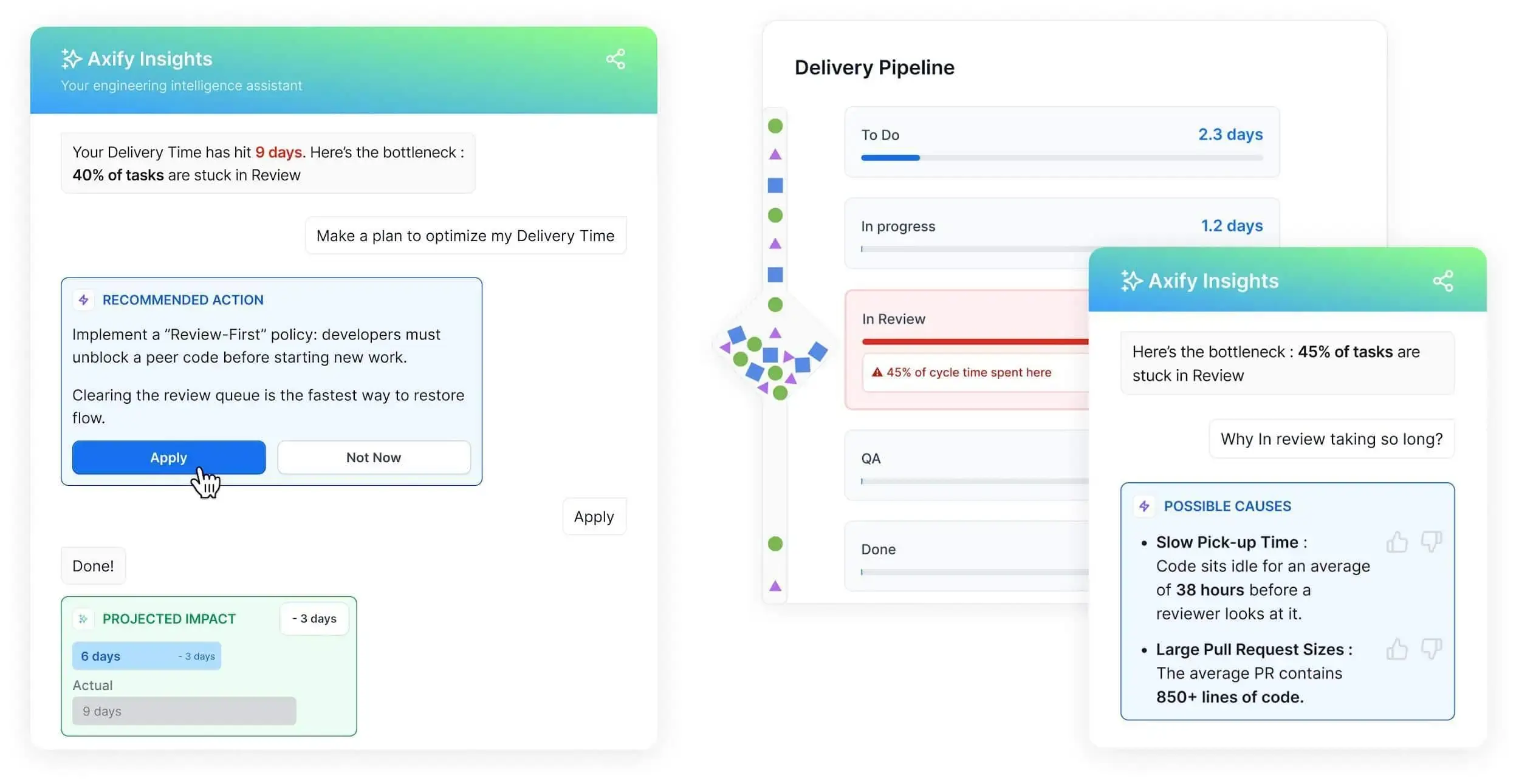
At Axify, the goal is not to replace AI FinOps platforms. Our goal is to show whether AI spend changes engineering performance, where it creates pressure, and which action you should review next.
Book a demo with Axify today to see how we can help.

Measure cost per workflow, not per user or per token. Tokens and users tell you consumption and adoption. Cost per workflow tells you what the spend produced. Example: for AI-assisted PR review, track AI cost against review time, rework, and merged PRs.
When the workflow runs on a recurring basis, has a named owner, and produces a measurable delivery outcome. A side prototype belongs in an experiment budget. A workflow the team now depends on belongs in production, with a forecast and a review cycle.
Show back should be first, so each team sees what it spent without the spend coming out of its budget. Move to chargeback once attribution rules are stable and teams understand their own usage. Charging back unstable numbers creates disputes that aren’t worth having.
Constrain the system, not the person. Approved tool list, model access rules per task type, budget alerts at tool and team level, retry caps for agent workflows, and a review step for any AI use case that touches production or customer data.
Quarterly at minimum, and immediately after vendor pricing changes, new model releases, or large adoption shifts. AI tooling changes faster than traditional software. A tool that earned its cost at rollout can become redundant or overpriced within two quarters.
Reviewer time, QA time, rework, enablement, security review, duplicated tools, and support load from incorrect AI-generated content. Vendor invoices show direct spend, not whether AI-generated work created larger PRs, more defects, or longer review queues. Invoice-only ROI overstates the return almost every time.