Delivery Performance
14 minutes reading time

Software teams want to ship faster, but delivery speed rarely slows because engineers lack motivation. In most cases, the slowdown comes from friction in the delivery system itself: long CI queues, unstable tests, overloaded code review stages, or changes waiting too long between workflow steps.
These issues are rarely visible in surface-level metrics like lines of code or developer coding speed. Teams may see activity increasing while flow efficiency quietly declines.
This article explains how to identify hidden sources of friction in your delivery workflow and address them systematically. That way, you can accelerate software development without sacrificing stability or developer experience.
Pro tip: Axify’s Intelligence layer detects emerging constraints, analyzes workflow history to explain likely causes, and recommends targeted actions engineering leaders can implement directly from the platform.
If you want to understand what is actually slowing your delivery system, see how Axify works.

Software delivery delays usually emerge from structural issues in the delivery system.
Common causes include:
These bottlenecks are not permanent. Once teams understand where delays originate, they can redesign workflows and processes to restore flow and improve delivery performance.
Pro tip: Axify’s Value Stream Mapping feature shows the full delivery workflow and reveals where work slows down across stages such as review, integration, and deployment. Instead of relying on metrics reflecting individual activity, teams can identify structural bottlenecks that affect delivery performance.
Software development accelerators are pre-built assets teams reuse to reduce implementation time.
They include frameworks, shared components, internal libraries, and automation that remove repetitive work from the delivery pipeline. Teams reuse these assets instead of rebuilding common functionality such as authentication flows, dashboards, or UI patterns.
Accelerators also include internal tooling that supports delivery work, such as engineering metrics dashboards, CI/CD templates, and standardized testing pipelines. These assets reduce setup work across services and keep teams aligned on common implementation patterns.
Used well, accelerators affect delivery mechanics in several ways:
Accelerators are most useful in large codebases and multi-team environments where repeated patterns appear across services. Shared assets reduce duplicate work, shorten onboarding time for new services, and make it easier to enforce common validation gates in CI and release pipelines.
Here are the specific ways you can use accelerators to remove friction and delays and, overall, improve delivery flow.
Before changing your process, determine exactly where work is delayed.
Start by measuring how long work items spend in each stage of your workflow: planning, development, review, testing, and deployment. The bottleneck is the stage where work accumulates or waits the longest.
Use these metrics:
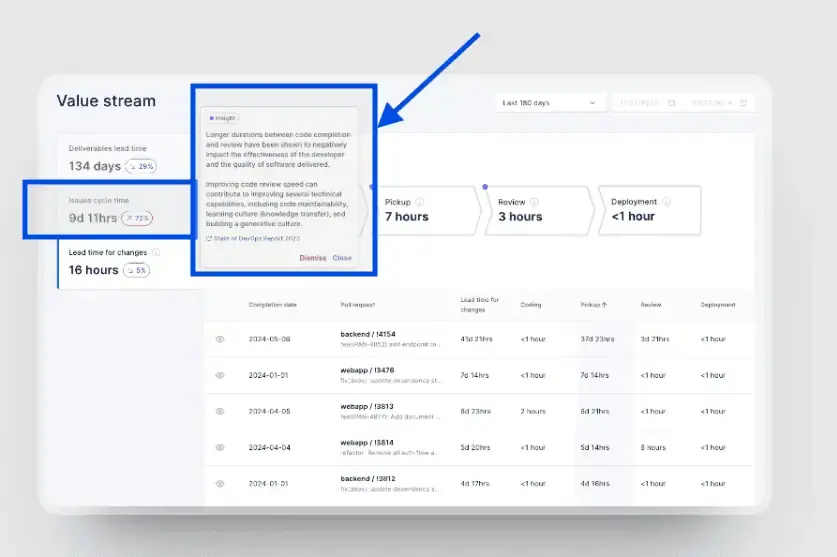
A value stream map makes this easier to see by showing how long work stays in each stage and where queues form. For example, you may find that pull requests wait two days for review but only one hour in testing. That identifies review as the constraint.
This analysis is difficult to perform manually. Data is split across tools such as Jira, GitHub, and CI systems, and delays are not visible without combining these sources.
Tools like Axify centralize these metrics and show where time is spent across stages. This allows you to identify the bottleneck without manually collecting and comparing data.
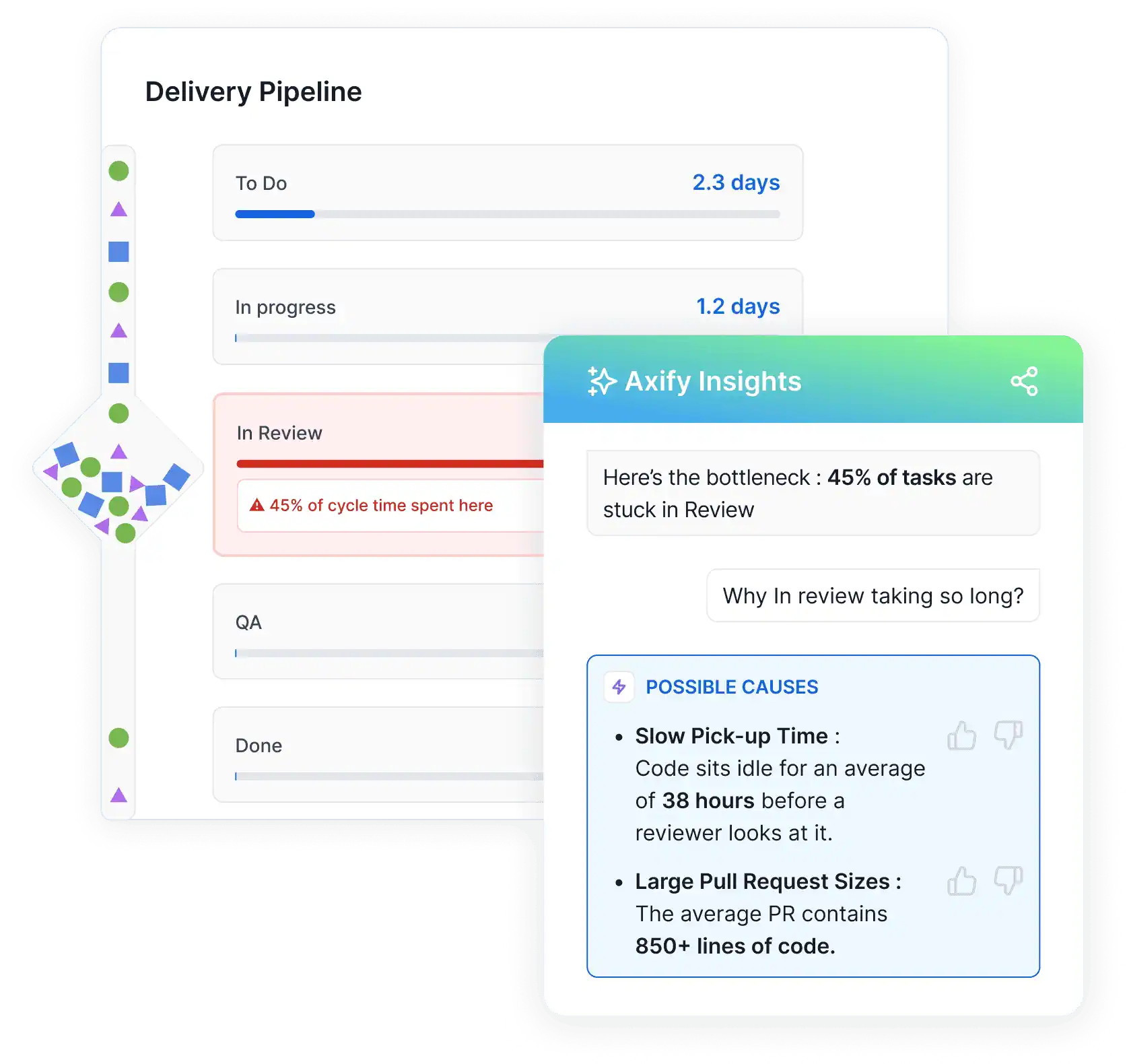
Here’s how easy it is to see the problem, along with potential causes and solutions:
Identifying a bottleneck is only the first step. The next question is what to change, and that decision should come from delivery data.
Engineering intelligence tools help by collecting metrics from repositories, issue trackers, and CI systems, then showing aging tasks, high WIP, and other bottlenecks in your workflow.
Axify is one of the software engineering platforms that analyzes your historical delivery data from PRs, reviews, CI runs, and deployment cycles.
Axify Intelligence goes further by connecting these metrics to likely causes and recommended actions that you can implement directly from the platform, like so:
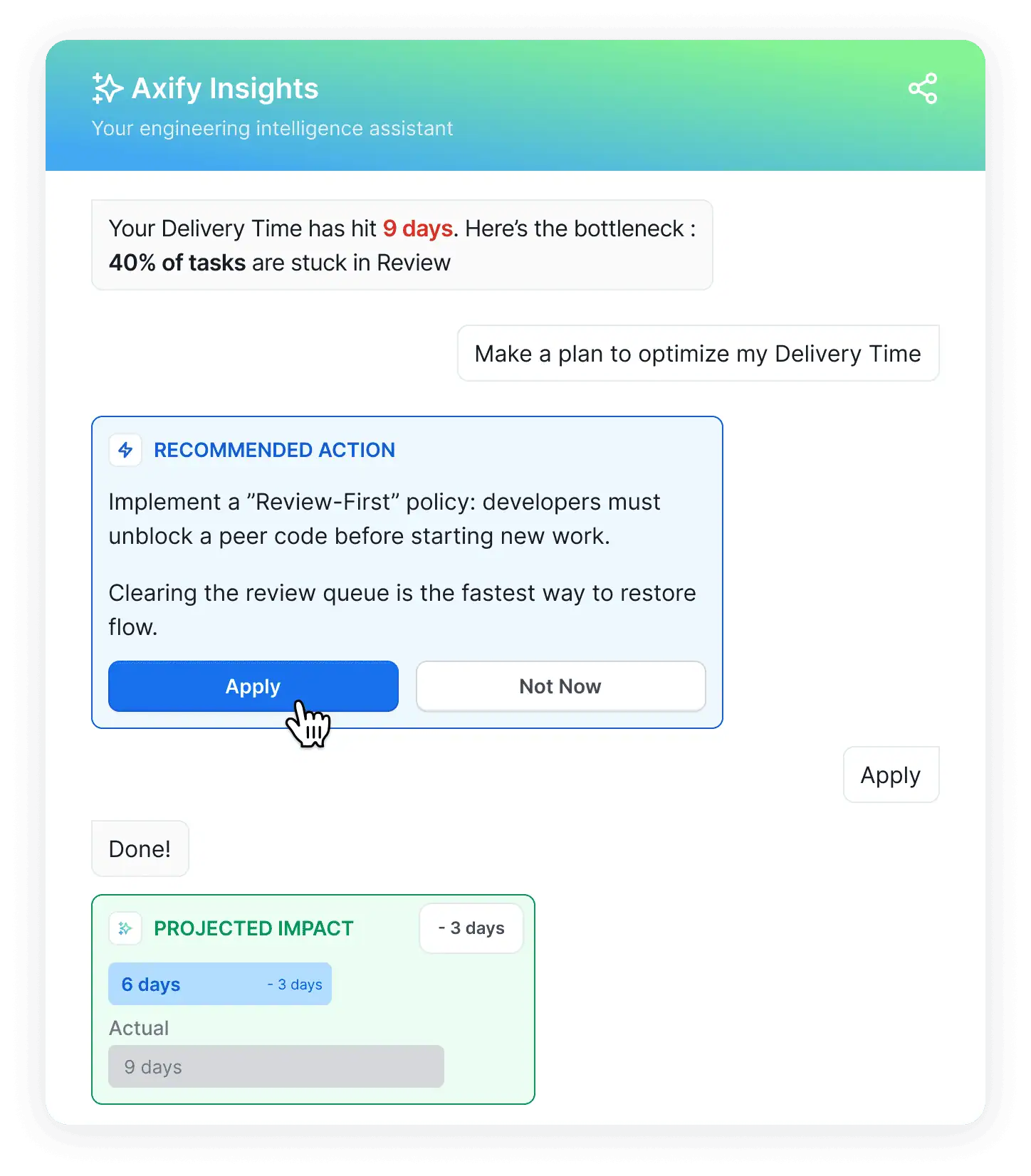
You can also query the Axify AI assistant in natural language, asking questions like “Why did cycle time increase last sprint?”
The platform connects the question to relevant engineering metrics and historical delivery trends. This helps you quickly identify which part of the delivery workflow changed and decide what process adjustment to test in the next iteration.
Reducing work in progress is essential for maintaining a steady delivery flow. When too many items are active at the same time, review queues expand, feedback slows down, and cycle time increases. This is especially true in Agile teams, where high WIP is a major factor behind roughly 25% of projects ending up late or over budget.
In software delivery systems, work can accumulate in multiple places: development tasks, pull requests awaiting review, validation steps in CI pipelines, or releases waiting for coordination. These queues may remain invisible until teams analyze delivery data across their tools.
Axify shows these patterns by consolidating engineering data from platforms such as Jira, Azure DevOps, GitHub, and GitLab. By analyzing how work moves across planning, development, review, and validation stages, you can identify where work begins to accumulate.
Typical issues include:
%20in%20Axify.webp "Work in progress (WIP)")
When these patterns appear, engineering leaders can respond by limiting active work, redistributing review responsibilities, improving CI capacity, or encouraging smaller work batches that move through the system faster.
A real example shows how these changes affect delivery performance.
At the Business Development Bank of Canada (BDC), two development teams analyzed where work accumulated across their workflow. The main issues were delays before development started, late QA involvement, and high work in progress.
They introduced several changes:
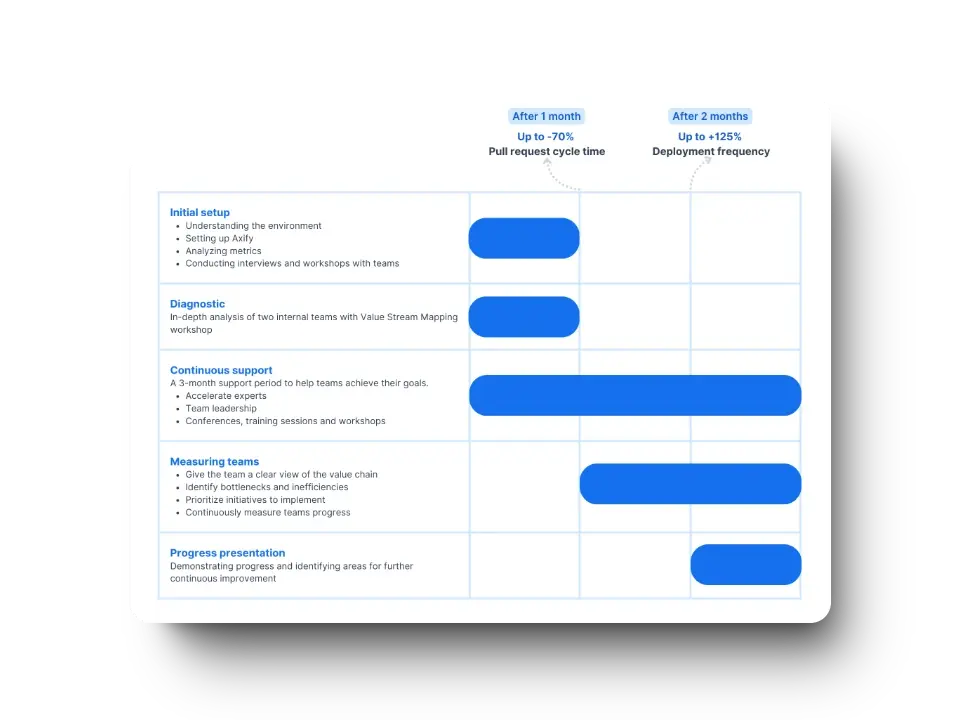
After three months:
These results show that reducing WIP and removing early-stage delays can significantly improve delivery speed without increasing team size.
Once WIP is under control, the next step is improving release cadence.
Smaller work batches move through delivery systems faster. When teams group large amounts of work together, reviewers must understand more context, validation takes longer, and feedback arrives later. Larger batches also increase the risk that defects remain hidden until late stages of testing or deployment.
Smaller batches reduce that complexity.
When work items are limited in scope, reviewers can evaluate them more quickly, automated tests run faster, and issues surface earlier in the delivery cycle. Faster feedback allows developers to correct problems while the implementation context is still fresh.
Besides, smaller batches make AI adoption easier, according to DORA.dev, because they mitigate the risk of AI-induced software delivery instability.
Frequent integration also improves flow stability.
Instead of waiting for large feature bundles to be completed, teams continuously merge smaller increments of work into the main codebase. This approach reduces merge conflicts, shortens validation cycles, and keeps the delivery pipeline moving steadily.
As a result, teams that structure work into smaller batches typically experience faster feedback loops, more predictable delivery flow, and lower coordination overhead across the development process.
Code reviews protect implementation quality, but poorly structured review workflows can slow delivery. When work batches become large or reviewer capacity is limited, review queues grow and feedback arrives late.
Delivery metrics help you identify these patterns.
Signals such as review queue time, PR cycle time, and time to first review reveal where work waits in the review stage.
Teams may notice:
For example, the graph below shows a PR cycle time breakdown in Axify; we can see that coding and review time decreased, but pickup time increased. That shows a problem with queue management or WIP limits.

These metrics indicate you need to make some workflow adjustments; in our experience, they rarely (if ever) point to individual performance issues.
Pro tip: You can analyze these metrics at different levels. At the team level, they show how review capacity and workload are distributed. At the organizational level, they identify broader patterns such as shared bottlenecks, uneven review ownership across teams, or systemic delays in specific repositories or services.
We encourage engineering leaders to respond by encouraging smaller work batches, redistributing review responsibilities, or introducing clearer review expectations.
Automation tools such as formatting checks or linting can also reduce manual effort during reviews, which means reviewers can focus on design and risk
Testing usually becomes a delivery bottleneck when validation depends heavily on manual checks or long regression cycles. Strategic test automation helps you detect defects earlier and keep feedback cycles short.
Parallelizing tests is one way to reduce validation time. Instead of running test suites sequentially, we encourage you to distribute tests across multiple workers or environments so validation can happen concurrently. This shortens CI pipeline duration and accelerates feedback for developers.
Remember: Parallel execution only works well when the test suite is stable. Flaky tests create false failures, trigger reruns, and slow down the delivery pipeline. You can address this by improving test isolation, stabilizing test environments, and ensuring deterministic test setup.
In our experience, automation also reduces regression bottlenecks.
When critical regression checks are automated and integrated into CI pipelines, teams can validate changes continuously instead of waiting for long manual testing phases.
Organizations that strengthen automated testing practices tend to see meaningful improvements in delivery speed.
For example, when BDC worked with Axify to refine its QA processes and introduce earlier validation practices, teams reported an 81% reduction in time spent on quality control, helping accelerate delivery while maintaining reliability.
Continuous integration and continuous delivery (CI/CD) accelerate software development by reducing integration delays and shortening feedback cycles. Instead of waiting for large releases, teams validate and integrate work continuously as it moves through the delivery pipeline.
This starts with short-lived branches and frequent merges.
In trunk-based development, developers integrate small increments of work into the main branch regularly. This reduces merge conflicts and prevents large integration events that slow delivery.
Automated pipelines enforce these practices.
Each commit triggers CI to build the code, run automated tests, and perform fast-failing security or quality checks. When pipelines run consistently across environments and use the same build artifacts, teams reduce configuration drift and validation errors.
Fast feedback is critical. CI systems report build and test results within minutes, allowing developers to address failures while the implementation context is still fresh. Parallel test execution and optimized pipelines further shorten validation time.
When these practices are applied consistently, the impact on delivery metrics is measurable.
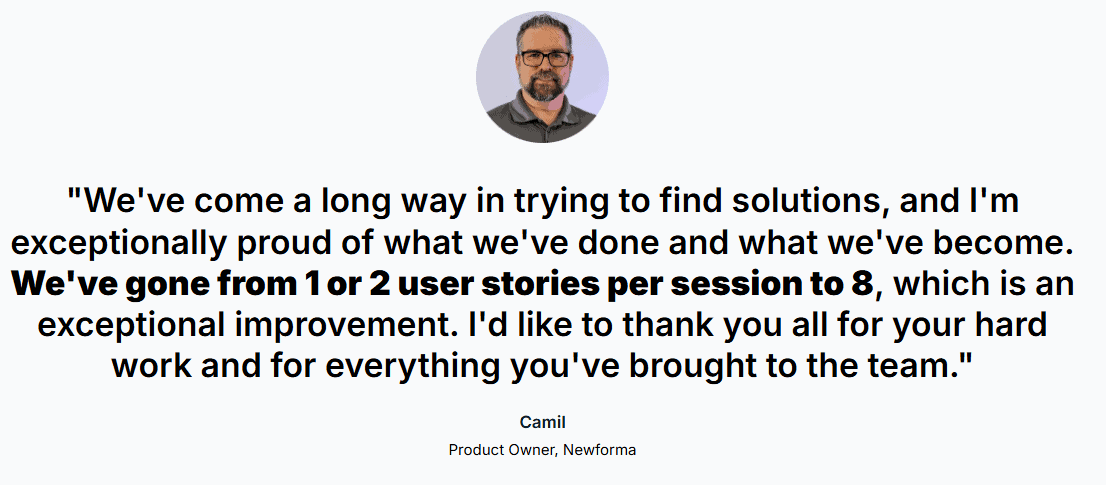
For example, Newforma improved their CI/CD workflows by focusing on pipeline consistency, continuous validation, and identifying bottlenecks in integration and review stages.
After five months:
These results show that improving CI/CD practices can significantly increase release frequency while reducing delays across development and review stages.
Rework slows delivery because engineers must revisit work that was previously considered complete. Instead of moving forward, teams spend time correcting defects, revising implementations, or addressing issues discovered after review or deployment.
Engineering teams can reduce rework by monitoring targeted quality indicators.
Tracking these signals helps you identify areas of the codebase or stages in the delivery process where defects repeatedly appear. You can then improve testing practices, strengthen reviews, or adjust work batch size to prevent recurring fixes and maintain steady delivery flow.
Technical debt accumulates when you prioritize short-term delivery over long-term maintainability. Small compromises in architecture, testing, or code clarity may speed up work temporarily, but over time they increase system complexity and slow future development.
That’s why 91% of CTOs view technical debt as their biggest challenge.
To manage technical debt, start by tracking it explicitly. Add it to your backlog, flag areas of the codebase that repeatedly generate defects, and document architectural shortcuts that will require future refactoring. When debt is visible, it becomes easier to prioritize and manage.
Next, schedule refactoring regularly. Instead of postponing improvements indefinitely, allocate time to simplify code, reduce unnecessary dependencies, and strengthen automated tests. Regular refactoring prevents small issues from turning into larger structural problems.
Finally, avoid uncontrolled accumulation. If delivery pressure constantly pushes refactoring aside, technical debt compounds and gradually slows your delivery system. Maintaining smaller work batches, clear code standards, and disciplined review practices helps you address issues early.
Effective software delivery depends on teams taking full ownership of their code, processes, and outcomes. When engineers are empowered to make decisions, they take accountability for the entire lifecycle of their work, ultimately accelerating problem‑solving and supporting continuous improvement across the organization.
However, unclear ownership often introduces delays. Work may move between teams, reviews may stall, or operational responsibilities may become fragmented.
Following your delivery data in Axify reveals these patterns.
These insights help engineering leaders identify coordination gaps and clarify ownership across repositories, services, and operational responsibilities.
Research suggests context switching can reduce developer productivity by 1-2 hours per day due to mental ramp-up after interruptions.
When teams minimize context switching, they can stay focused on active delivery work and sustain higher‑quality output.
To achieve this goal, we recommend focus blocks (typically 90–120 minutes). These allow sustained work on tasks such as refactoring or complex debugging by batching similar work and reducing interruptions from notifications or ad-hoc requests.
You can schedule 3–6 focus blocks weekly per project and review their effectiveness during regular team syncs to refine durations. We also advise you to:
You can eliminate 10 hours of meetings per sprint by moving routine updates to async boards and video briefs for more consistent knowledge sharing.
You can also replace or supplement daily standups with asynchronous status updates that maintain visibility into progress, blockers, and pull request activity without requiring live attendance.
Pro tip: Establish structural safeguards to protect focus time, such as designated no-meeting days or meeting-free blocks later in the morning to preserve uninterrupted development time. Require agendas with clear objectives, and make attendance optional for contributors who are not directly responsible for the decision or work.
Another good solution is to increase collaboration with stakeholders early in the planning stage.
This helps you cut unnecessary meetings later down the line. We advised our client Newforma to apply this tactic, which contributed to a 95% reduction in delivery time for them.
Faster onboarding directly accelerates team scalability, and giving new engineers immediate visibility into how work flows is a key part of that equation.
Engineering leaders can create centralized, living resources that shorten developer ramp-up from months to weeks.
In turn, this leads to faster software development.
For instance, build a single, version-controlled onboarding hub covering setup guides, architecture diagrams, coding standards, and FAQs. Include timelines (Day 1 access checklist, Week 1 shadowing, and 60-day goals with mentor assignments for feedback on skill acquisition and contribution readiness.
Use progressive disclosure: start with essentials like repo clones and tool logins, then layer in rationale for processes and standards.
Schedule check-ins at 30/60/90 days for two-way feedback on onboarding materials and workflows, integrating with Axify for early visibility into your performance.
Recent research shows that AI coding assistants alone can boost developer productivity by 2.1%. Specifically, AI tools can increase software delivery throughput by automating repetitive SDLC tasks, like test generation, refactoring, and documentation updates.
Additionally, they generate inline code suggestions, boilerplate, and test scaffolding during implementation. This may lead to faster completion for well-scoped tasks.
But those benefits can fade if the AI tools you adopted add complexity or need constant oversight to fix mistakes. The same can happen if your workflow isn’t streamlined. According to the 2025 DORA report, AI acts as an amplifier of your processes, whether good or bad.
Delivery risks that reduce long-term throughput include:
The first step is to understand where AI can add the most value. Axify’s value stream metrics can pinpoint SDLC phases where adding an AI tool makes the most sense.
Let’s take this example:
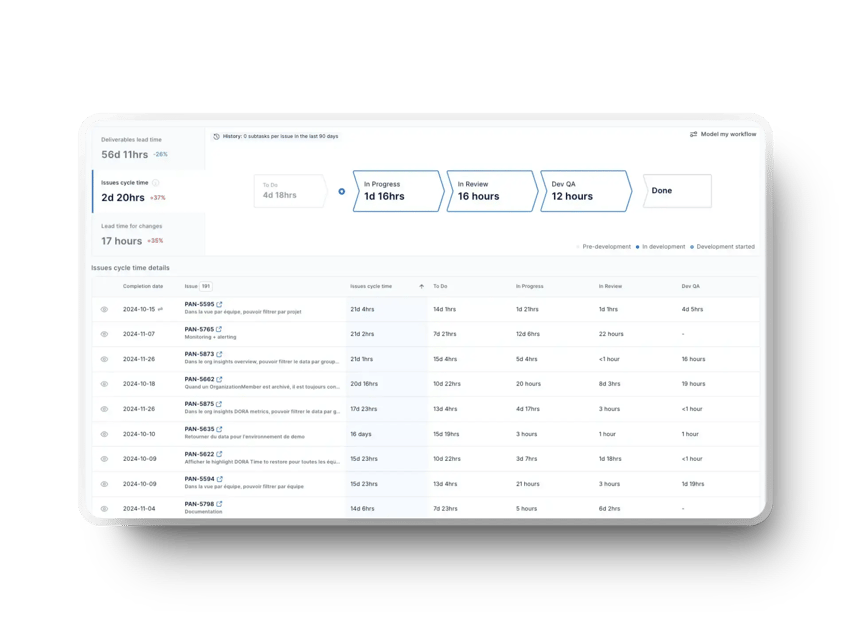 In the screenshot above, we can see that work spends over four days in “To Do” and more than a day in “In Progress,” while review and QA stages take only hours.
This pattern suggests the main constraint is not code review or validation, but how quickly development work progresses once it starts.
In this case:
Now, the next step is measuring AI’s actual impact to ensure it drives meaningful improvements.
Adopting AI tools does not automatically improve delivery performance. The impact depends on where you use those tools and how they affect existing constraints.
To evaluate this, compare delivery metrics before and after adoption. Focus on measurable changes in:
For example, if AI usage increases but cycle time and rework remain unchanged, the tool is not improving delivery. If throughput increases but rework also rises, the tool may be introducing instability.
You should also track how AI tools are used across teams. Key dimensions include:
You should analyze these dimensions alongside delivery metrics to determine whether AI improves implementation speed, reduces review time, or introduces additional rework.
Axify measures AI adoption by collecting usage signals from assistants such as GitHub Copilot, Cursor, Claude Code, and other AI development tools. It then gives you a centralized view of how AI is actually used across projects, teams, and repositories.
With this data, engineering leaders can answer questions such as:
Like so:
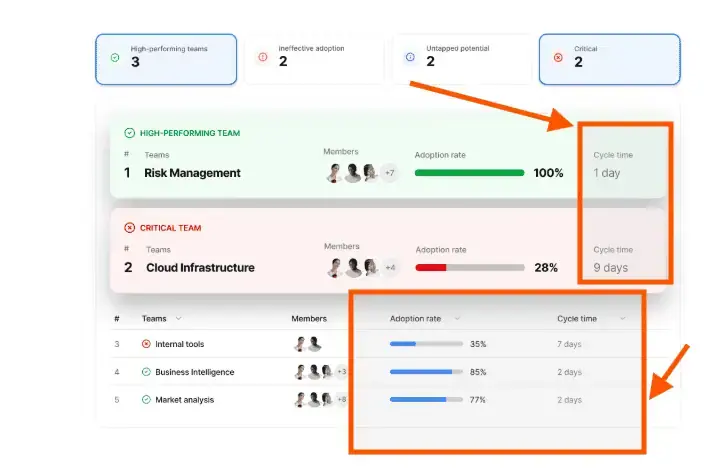
Figuring out the right answers to these questions helps you accelerate software development.
Many engineering leaders grapple with determining the right moment to expand their teams.
However, Brooks's Law highlights a key engineering management trade-off: adding people can increase long-term capacity, but it can also slow delivery in the short term, especially when the project is behind schedule or work is tightly coupled.
That’s because:
The appropriate time to scale the team is when the workflow can support additional contributors without increasing PR wait time, review backlog, or coordination overhead. Typical signals include:
Accelerating software delivery should not come at the expense of developer well-being. Yet in practice, sustained delivery pressure leads to the opposite outcome. Industry research suggests that around 80% of developers report experiencing some form of burnout, usually driven by constant interruptions, unrealistic deadlines, and unstable delivery processes.
To increase delivery speed without exhausting teams, focus on system improvements such as:
If you want to accelerate software development sustainably, we recommend to first track delivery metrics that show how work flows through your system. Monitor whether quality increases (or at least, remains stable) as speed increases.
Focus on metrics that reflect both flow efficiency and delivery stability:
When you see cycle time improving, deployment frequency increasing, and change failure rate and rework indicators remaining stable or improving, you can confidently conclude that your acceleration efforts are increasing delivery performance correctly (i.e., with no added instability).
Accelerating software development rarely comes from adding more developers or pushing teams to work harder. In most cases, delivery improves when you remove the constraints slowing work down.
Reducing work in progress, improving feedback loops, and addressing technical debt helps work move through the delivery system more smoothly. When teams focus on flow instead of raw output, delivery becomes faster and more predictable.
The key is turning delivery data into clear signals so you can identify bottlenecks and improve how work moves across your development pipeline.
If you want system-level visibility to identify bottlenecks, monitor delivery flow, and measure the real impact of AI tools, Axify helps you turn engineering data into actionable decisions that accelerate software delivery.
Get in touch today to turn engineering data into clear, actionable decisions that drive faster development.

According to recent data, a standard business website typically requires 1–2 months of development, whereas a complex application platform can demand 7–12 months or more from a full software team.
Of course, delivery speed depends on system complexity, team structure, and process efficiency. That’s why recent DORA data presents performance as distributions. For example, many teams deliver changes within one day to one week, while others take weeks or months. Deployment frequency and recovery time follow similar ranges.
Instead of relying on averages, track your own cycle time, deployment frequency, and recovery time, then compare where you fall within these ranges to assess improvement.
Not always. Adding people increases coordination overhead and onboarding time. Teams typically slow down in the short term before scaling improves output. Expanding capacity only works if workflow bottlenecks are already under control.
AI accelerates software development in teams with good processes and workflows. If your work routinely gets stuck in reviews, QA, or deployments, AI will intensify those weaknesses by creating more output than your system can handle.
Short-term boosts may be necessary, but sacrificing quality increases technical debt and slows long-term delivery. Sustainable acceleration improves both speed and stability rather than trading one for the other.
Efficiency isn’t about working harder. It’s about minimizing waiting time, rework, and handoffs. If delays are caused by systemic constraints rather than individual productivity, the system (not the team) needs adjustment.
Focus on one bottleneck at a time. Reduce work in progress, shorten feedback cycles, and eliminate a single major source of delay. Rapid, targeted improvements outperform large structural overhauls.
Working faster increases effort, but accelerating development improves the system. Only system improvements create sustainable gains. So, remove bottlenecks, reduce friction, and tighten feedback loops so your team delivers more with less effort. This approach builds sustainable, compounding efficiency.