AI
19 minutes reading time

Getting Claude Code approved is often the easy part. The harder challenge is rolling it out across dozens or hundreds of developers while maintaining security, controlling costs, driving adoption, and proving business value.
That pressure is growing because developer interest is moving fast, especially in large enterprises. Anthropic's own Smartsheet case study reports that 49% of Smartsheet employees were actively using Claude Enterprise within 2.5 weeks of launch.
However, while purchasing licenses is great news for Anthropic, it doesn’t reflect whether companies are genuinely putting those licenses to good use. If you’ve purchased Claude Code Enterprise but aren’t getting the most out of it, you might have a management problem.
In this guide, we’ll explain how to evaluate this tool across deployment, governance, compliance, adoption, and ROI. You will see what to approve, what to measure, and where scaling can create extra review work or cost.
Let’s get started!
Like any enterprise AI platform, Claude Code Enterprise offers stronger governance and collaboration features than individual plans, but those benefits come with additional operational complexity and cost.
Claude Code Enterprise is Claude Code’s plan for organizations that need centralized access, security controls, and usage management across engineering teams.
You use Claude Enterprise as the workspace where admins manage users, policies, and controls. Meanwhile, Claude Code gives developers access to the coding agent inside approved engineering workflows.
That matters when you need more than individual usage. Claude Enterprise adds SAML SSO, SCIM, role-based permissions, admin tooling, audit logs, and enterprise controls on top of what Team offers. Large context windows (up to 1M tokens, depending on the model) are available on paid plans, so they are not by themselves a reason to move to Enterprise.
This setup fits you when developers work across large repositories, sensitive systems, or regulated workflows. It also helps when engineering, IT, security, and finance all need to approve the rollout before teams can use Claude Code.
Enterprise rollout changes what you need from your coding tool before giving individual access to your developers. So, let’s see the features you should review:
Any tool used in real repositories, customer-facing systems, and regulated workflows needs strong security and compliance features, and Claude Code Enterprise is no exception. So from that point of view, your review process has to cover access, retention, auditability, and code risk.
A Veracode 2025 report shows the importance of shortlisting your AI tools properly.
The study tested 100+ AI models and found that 45% of AI-generated code samples failed security tests and introduced OWASP Top 10 vulnerabilities. Java had a 72% security failure rate, while Python, JavaScript, and C# had failure rates of 38%, 43%, and 45%.
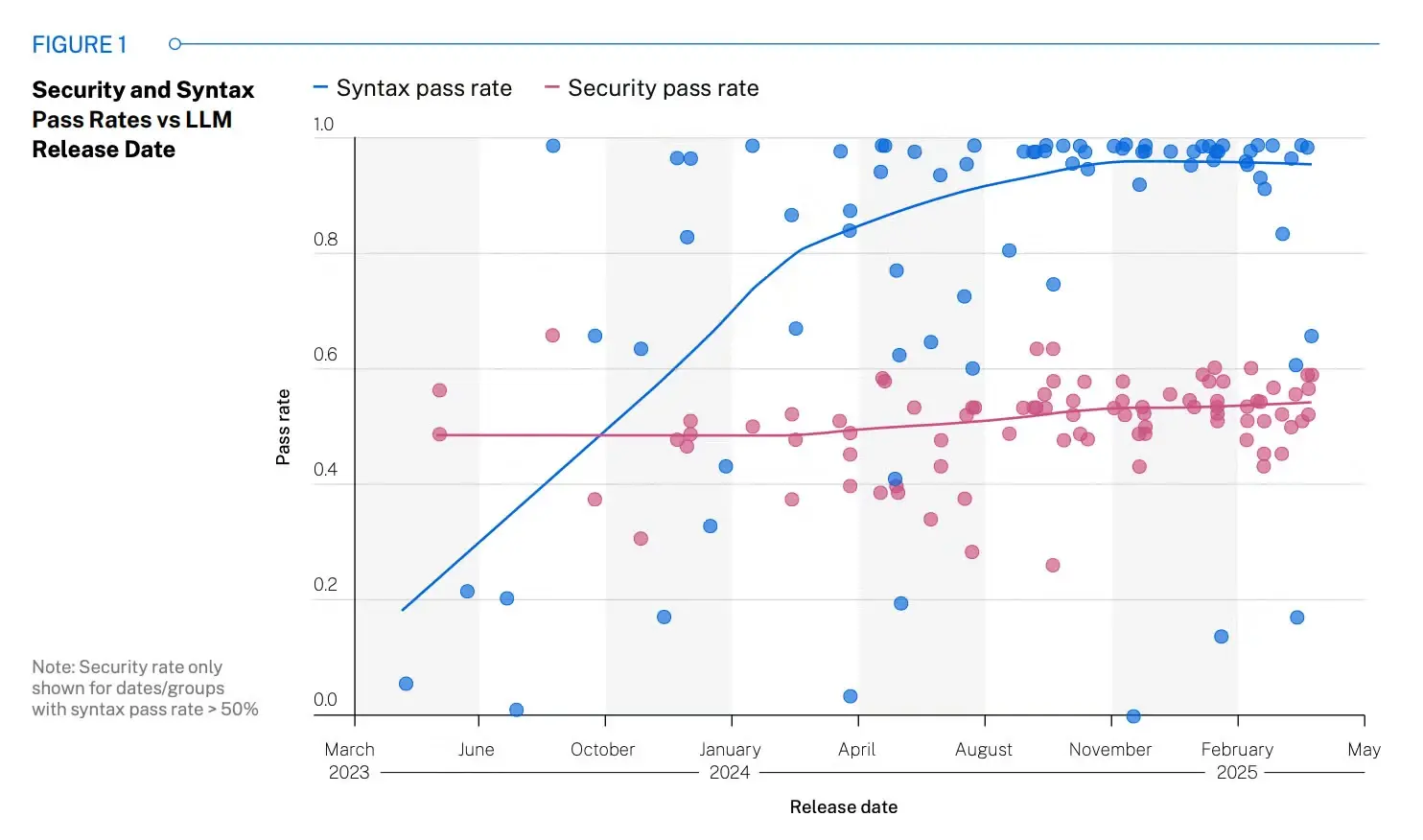
Source: Veracode 2025 report
By that, we don’t mean your team should avoid AI-assisted coding. It means you need controls before usage spreads.
These are the main security and compliance areas you should review.
Is Claude Code SOC 2 compliant? Yes. According to its Trust Center, Anthropic holds SOC 2 Type I and Type II reports, ISO 27001:2022 and ISO/IEC 42001:2023 certifications, and offers a HIPAA-ready configuration with a BAA. Your security team should still review the current reports during procurement to check that the controls match your internal vendor review process.
So, review:
If your customers ask for proof of vendor controls, SOC 2 documentation helps your security and compliance teams answer those requests without relying on product claims alone.
Data security depends on:
As such, your assessment should cover retention settings, customer data handling, training policies, and data protection controls.
This matters because developers may use Claude Code for source code, tickets, logs, architecture notes, and internal documentation. If retention rules are unclear, you may create approval risk for legal, security, or customer-facing compliance teams.
Pro tip: We recommend defining which repositories, file types, and prompts are allowed before the rollout expands.
Identity and access management determines who can use Claude Code, what they’re allowed to do, and how that access changes throughout their time at your organization. For enterprise teams, the four core controls are:
Manual invitations may be enough during a small pilot, but they become difficult to manage as adoption grows across teams. The controls above help organizations scale Claude Code without turning user administration into a manual process because:
If you work in healthcare, finance, legal, or government, Claude Code review needs to match your regulatory requirements. That means checking retention, access controls, auditability, vendor documentation, and where data is processed.
This matters because regulated teams cannot approve Claude Code only as a developer tool. They need to understand how it fits into privacy rules, client obligations, internal risk policies, and audit requests.
Claude Code Enterprise changes how developers work inside repositories. Larger context windows, repository analysis, and agentic workflows allow Claude Code to handle more complex implementation tasks, but they also increase the amount of work that needs review.
Anthropic’s internal Claude Code usage analysis illustrates that shift:
At the same time:
As Claude Code takes on longer workflows, engineering teams need stronger repository standards to keep outputs consistent. That includes:
Remember: As Claude Code takes on larger implementation and planning tasks, every session needs consistent guidance on project conventions, testing expectations, architecture, and review requirements. Otherwise, two developers can ask for the same feature and receive different solutions simply because the repository didn’t provide enough context.
Administration features help you manage usage after the first teams adopt Claude Code. Centralized management, user provisioning, spend controls, analytics, and policy enforcement give platform and DevEx teams a way to manage the rollout from one place.
As adoption grows, administration is no longer just about granting access. Teams also need visibility into how Claude Code is used, which changes it influences, and whether AI-assisted work can be traced when something goes wrong.
GitLab research shows why that visibility matters:
That is why enterprise governance should include:
Without them, teams may believe they have sufficient oversight until they need to investigate a real production issue.
Governance should also extend to AI spending.
Without visibility into token consumption and usage by team, finance may see rising AI costs while engineering only sees growing adoption. Bringing those views together makes it easier to decide whether higher usage reflects better delivery outcomes or simply higher operating costs.
Claude Code Enterprise becomes more valuable when it connects to the systems your teams already use. Common enterprise integrations include:
Many organizations also connect Claude Code to internal developer tooling, such as MCP servers, CI/CD pipelines, container environments, and custom developer portals. Those integrations extend Claude Code beyond the IDE, allowing it to retrieve context, inspect systems, and perform approved development tasks.
As those capabilities grow, integration governance becomes just as important as the integrations themselves. Define clear policies for:
Treat every connector as another extension of your engineering environment rather than another plugin. The goal is to give Claude Code enough context to be useful without giving it broader access than each workflow requires.
Pro tip: If you’re still comparing tools before standardizing Claude Code, check out our guide to the best AI coding assistants. It will help you compare workflow fit, governance needs, and team-level measurement before you commit to one rollout path.
Claude Code Enterprise pricing combines seat-based access with usage-based billing, so you need to evaluate both before estimating the total cost.
| Plan | Who it fits | Listed pricing | What finance should review |
|---|---|---|---|
| Team Standard | Teams with 2 to 150 users | $20 per seat/month annually or $25 monthly | Predictable seat-based cost |
| Team Premium | Teams with 2 to 150 users that need higher usage | $100 per seat/month annually or $125 monthly | Higher fixed cost per user |
| Enterprise | Organizations that need enterprise controls and broader rollout | $20 per seat plus usage at Anthropic API rates | Variable usage cost by model, task, and adoption level |
The way you purchase the platform also changes the buying process:
If you’re evaluating the Enterprise plan, confirm the current minimum seat requirement and API usage terms during procurement. Those details affect budget forecasts, renewal planning, and the total cost of ownership.
Claude Code Enterprise cost depends on more than the number of seats you buy. The largest cost differences usually come from how teams use the tool after rollout.
The main cost drivers include:
This is why a pilot can look predictable while a broader rollout becomes harder to forecast. A 30-developer pilot may show moderate usage, but after expansion, one platform team may use Claude Code heavily for architecture, debugging, and repo-wide analysis while another team barely uses it.
The DORA 2026 ROI report is useful here because it reminds leaders to model AI costs as a full investment. Its sample calculator includes licensing, additional usage, training, and infrastructure costs, which is a better way to think about enterprise AI budgeting than seat count alone.
Axify’s AI Adoption & Impact dashboard helps connect those cost drivers with actual usage and delivery outcomes. Its AI cost view lets finance and engineering compare Claude Code spend across teams, AI tools, and models, and forecast where costs are heading.
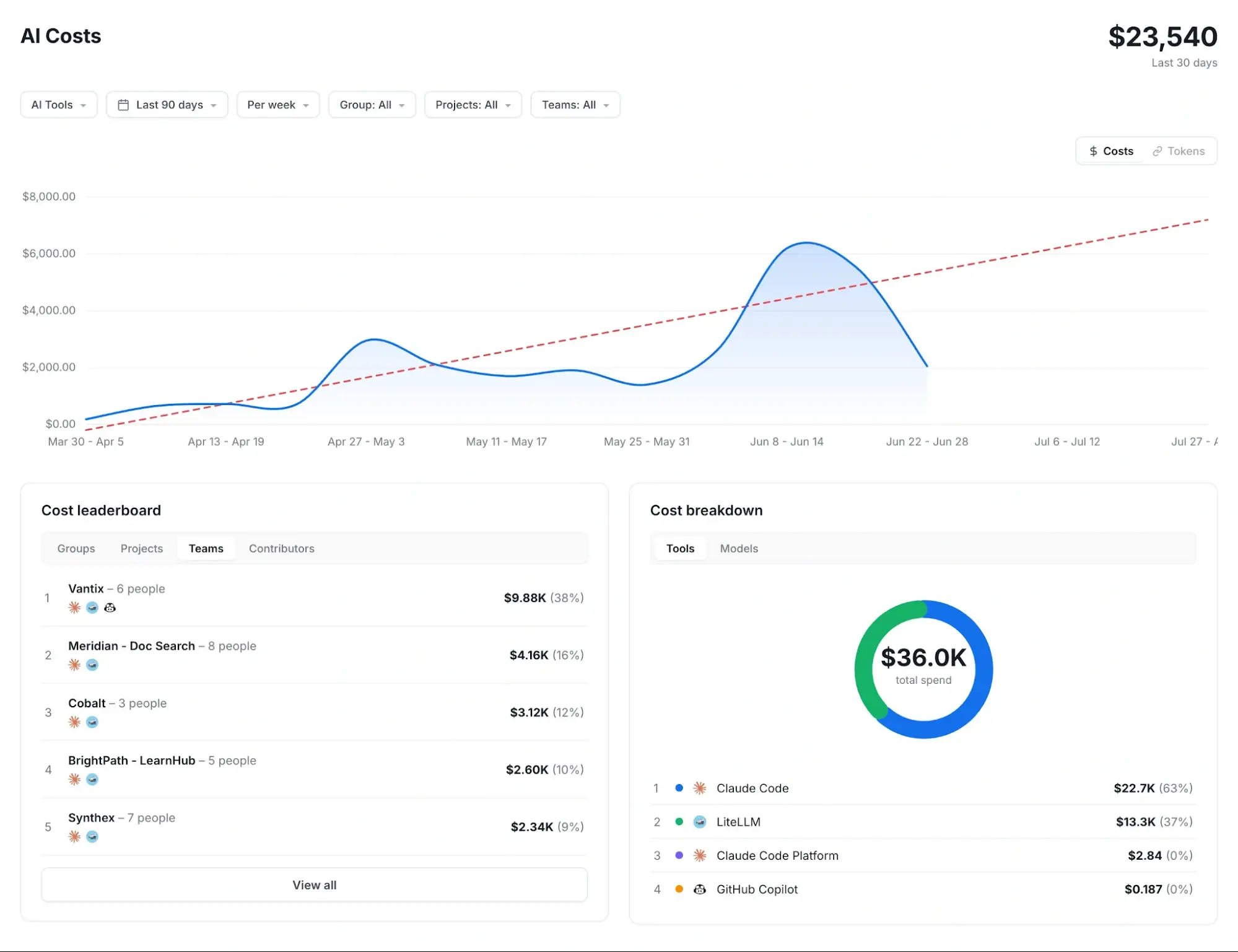
Pro tip: To set up Claude Code cost tracking by team, budgets, and spending limits, read our guide to Claude Code token usage.
That makes the cost conversation more practical. You can see whether higher Claude Code spend is connected to meaningful delivery activity, such as shorter review time, faster cycle time, or fewer blocked items, or whether it mostly reflects heavier token usage without a clear delivery gain.
Claude Team fits you when you need a controlled pilot. Claude Enterprise fits you when you need enterprise-wide governance, auditability, and automated access control.
Remember: the wrong plan creates either too much process too early or too little control too late. For that reason, review your security, identity, usage, and rollout needs before deciding.
These are the main differences to check before you choose a plan:
| Decision area | Claude Team | Claude Enterprise |
|---|---|---|
| Best fit | Pilots, departments, smaller teams | Large teams and org-wide rollout |
| Identity | Google/Microsoft SSO | SAML SSO and SCIM |
| User access | Manual admin control | Automated user provisioning |
| Governance | Basic admin settings | Granular roles, policies, and user groups |
| Compliance | Lower compliance needs | Audit logs, compliance API, US-only inference option, and custom terms |
| Cost control | Seat-based billing with spend limits | Usage at API rates, spend controls, and deeper usage analytics |
Claude Team is a good choice when you’re still validating how Claude Code fits your engineering workflows. It works well for pilots, departmental rollouts, and smaller engineering organizations where a small group of administrators can manage users, permissions, and billing without creating unnecessary overhead.
So at this stage, you’re typically answering questions such as:
If manual administration, basic governance, and seat-based billing are still sufficient for your team, Claude Team is usually enough.
Claude Enterprise becomes the better choice when manual administration stops scaling with your rollout. That usually happens once Claude Code expands across multiple engineering teams, business units, or regulated environments where different groups require different permissions, policies, and reporting.
At that point, your challenge is no longer deciding whether Claude Code provides value. It’s making sure every new team can adopt it without creating more administrative work, security risk, or cost uncertainty.
Enterprise features such as SCIM provisioning, granular roles, audit logs, usage analytics, and centralized administration make that possible by automating tasks that would otherwise become increasingly difficult to manage manually.
A successful Claude Code rollout starts with a small operating model before becoming an organization-wide standard. The objective is to understand how it changes engineering workflows, review practices, and delivery before expanding it further.
We advise you to start with a pilot team that has real delivery work, active code review, and enough senior support to give useful feedback. Before the pilot begins, capture baseline metrics such as cycle time, pull request size, review time, deployment frequency, and rework.
Also define success criteria in advance.
These should include active usage, accepted use cases, review load, developer feedback, and delivery trends. After that, gather feedback from developers, reviewers, engineering managers, and platform teams.
Pro tip: Define a timeline for each success criterion before the pilot starts. Adoption, for example, rarely grows in a straight line, so measuring too early can make a successful rollout look less effective than it actually is.
Once the pilot identifies repeatable workflows, document them.
At a minimum, standardize:
This gives Claude Code the same project context across repositories and reduces variation between developers, prompts, and sessions. Our list of Claude Code best practices covers what to put in these standards.
According to the GitLab research we cited above:
To avoid those challenges, define permissions, repository access, MCP policies, and review requirements before additional teams connect Claude Code to internal systems.
Cost control starts with usage monitoring, adoption visibility, spend management, and forecasting. Claude’s Team and Enterprise analytics can show chats per day, percentage of users with one or more chats, total chats across 1 week, 1 month, 3 months, and 1 year, plus Claude Code usage and activity metrics.
That gives you a starting view, but finance will still need to compare costs with team activity and delivery outcomes.
That brings us to the next point...
Claude Code impact should be measured at the team and workflow level to see whether delivery is getting easier or harder. The practical question is whether Claude Code changes adoption, delivery flow, cost, and review load in ways you can defend to leadership.
We’ll discuss all those points below.
Start by measuring adoption before measuring ROI. If developers rarely use Claude Code, it’s difficult to determine whether the tool is underperforming or simply underused. We recommend tracking active users, adoption rates, usage frequency, and team adoption patterns.
Axify’s AI Adoption and Impact feature helps you visualize active users, users with licenses, adoption rate, acceptance rate, and an AI adoption score built on three pillars (reflexive use, reliance, and trust), by team and across tools.
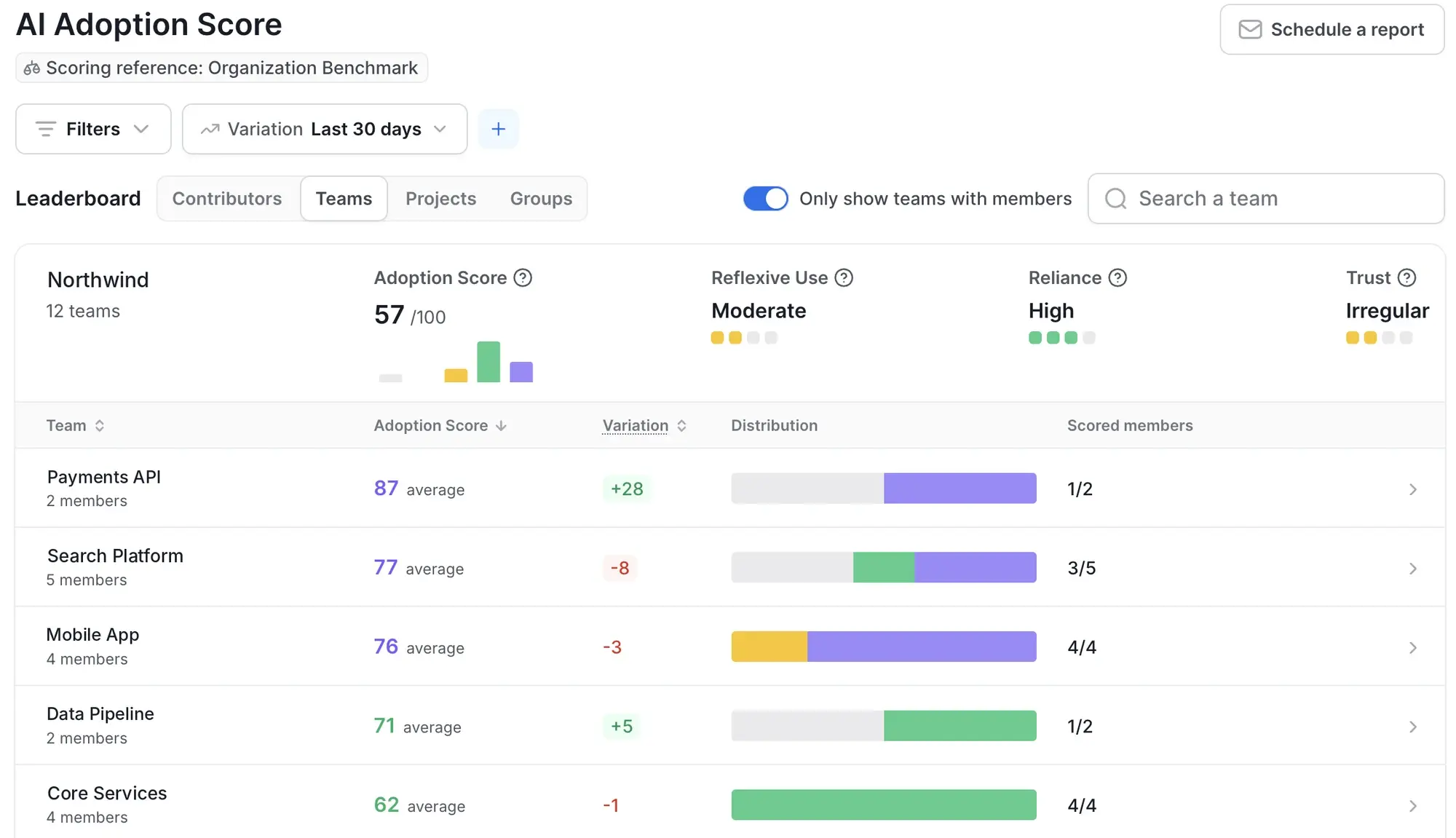
This gives you a cleaner adoption baseline before leadership asks for ROI. It also helps you avoid treating purchased licenses as proof of adoption when only a few teams are using Claude Code consistently.
After adoption is visible, compare delivery performance before and after rollout. Look at cycle time, throughput, review time, pull request flow, rework, deployment frequency, and failure trends.
This comparison matters because higher usage does not automatically prove better delivery.
Take the Smartsheet case study published by Anthropic as an example: Smartsheet engineers using Claude Code ship 3x more code and merge 31% more pull requests than peers on the same teams.
You may see similar numbers in your own organization, but your team still needs to check whether more code also means faster flow, stable quality, and manageable reviews.
Axify’s AI Adoption and Impact feature tracks delivery trends by team, project, or business line over time, so you can compare the periods before and after introducing Claude Code Enterprise.
Axify MCP also lets you ask delivery questions from Claude and get answers from live Axify data. For example, you can ask which teams adopted Claude Code fastest and whether their cycle time, pull request flow, or review queues changed during the same period.
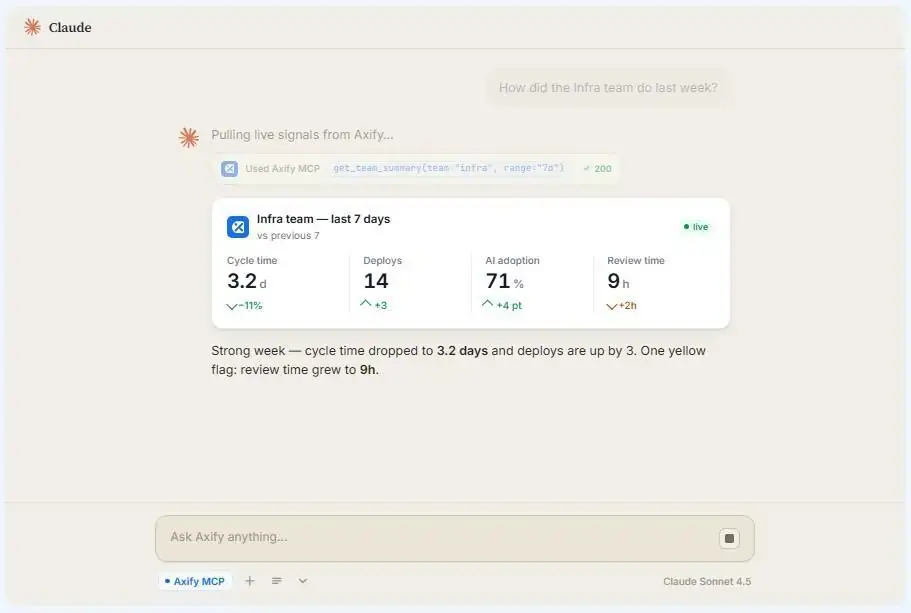
That matters because Claude Code’s impact should be reviewed against the same delivery metrics your teams already use. If adoption rises while review time or rework also rises, the rollout needs workflow changes before it needs more seats.
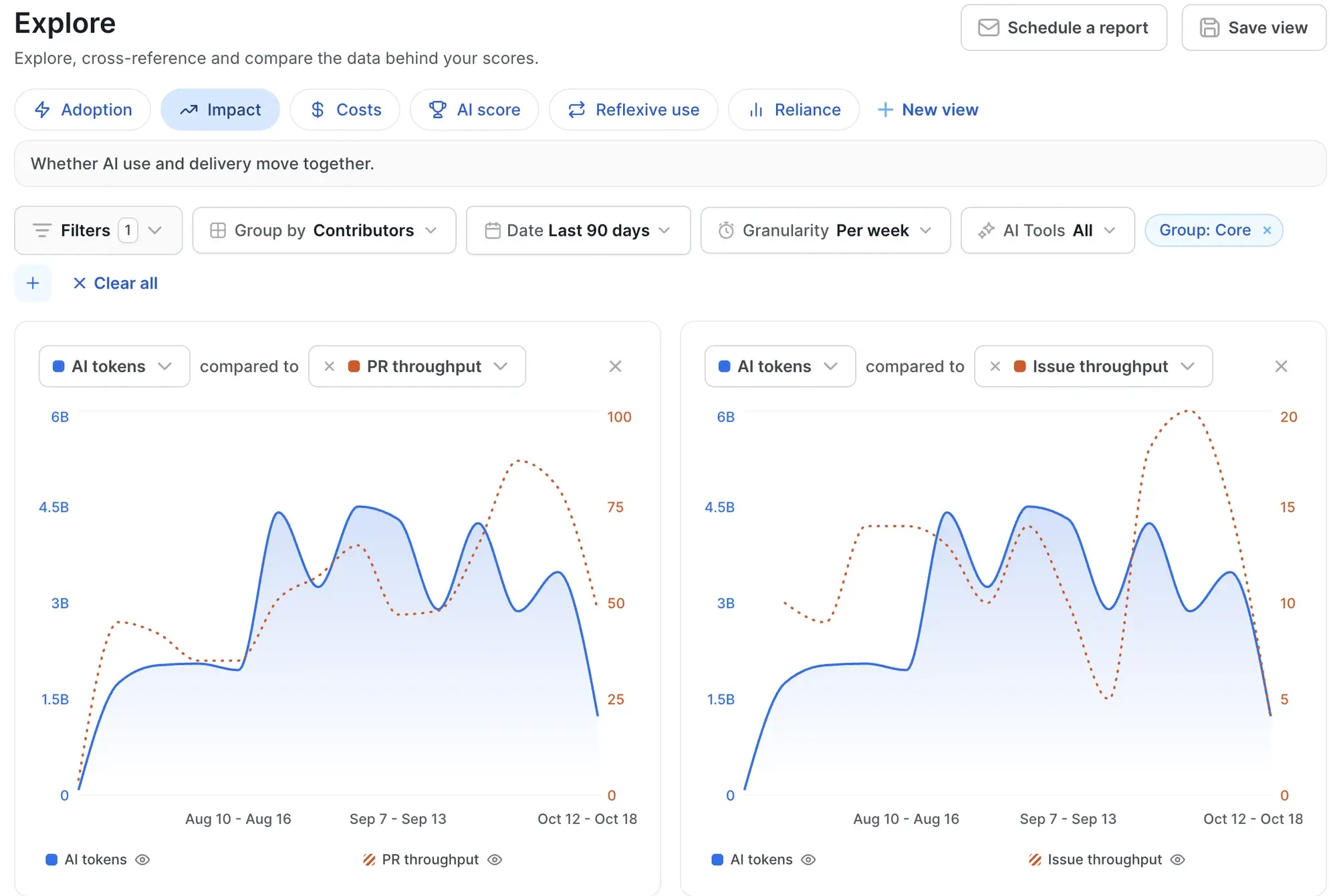
Reviewing AI cost without engineering outcomes gives you only half the picture. Higher spending may reflect broader adoption and better delivery or simply more AI usage without measurable improvements. That’s why you should:
Pro tip: The DORA 2026 ROI report describes a J-curve: a temporary productivity dip while teams adapt their workflows, before gains show up. Early cost reviews can therefore reflect learning costs rather than long-term value, so make sure your cost reviews follow the same review periods you use for delivery metrics.
Axify’s AI cost view, part of the AI Adoption & Impact dashboard, shows AI spend by tool and model and forecasts future costs using adoption and usage data. Combined with delivery metrics, it helps engineering and finance evaluate whether higher AI spend is producing better engineering outcomes.
Different large language models and coding tools perform better on different tasks.
For example, a 2026 task-stratified study of AI-assisted pull requests found documentation tasks had 82.1% acceptance, while new features had 66.1% acceptance. The same study found Claude Code led in documentation acceptance at 92.3% and feature acceptance at 72.6%.
Axify shows adoption and cost by tool and model, so you can check where Claude Code spend concentrates and compare it with the delivery trends of the teams using it. That helps you decide whether to use Claude Code broadly or focus it on documentation, planning, refactoring, or feature work.
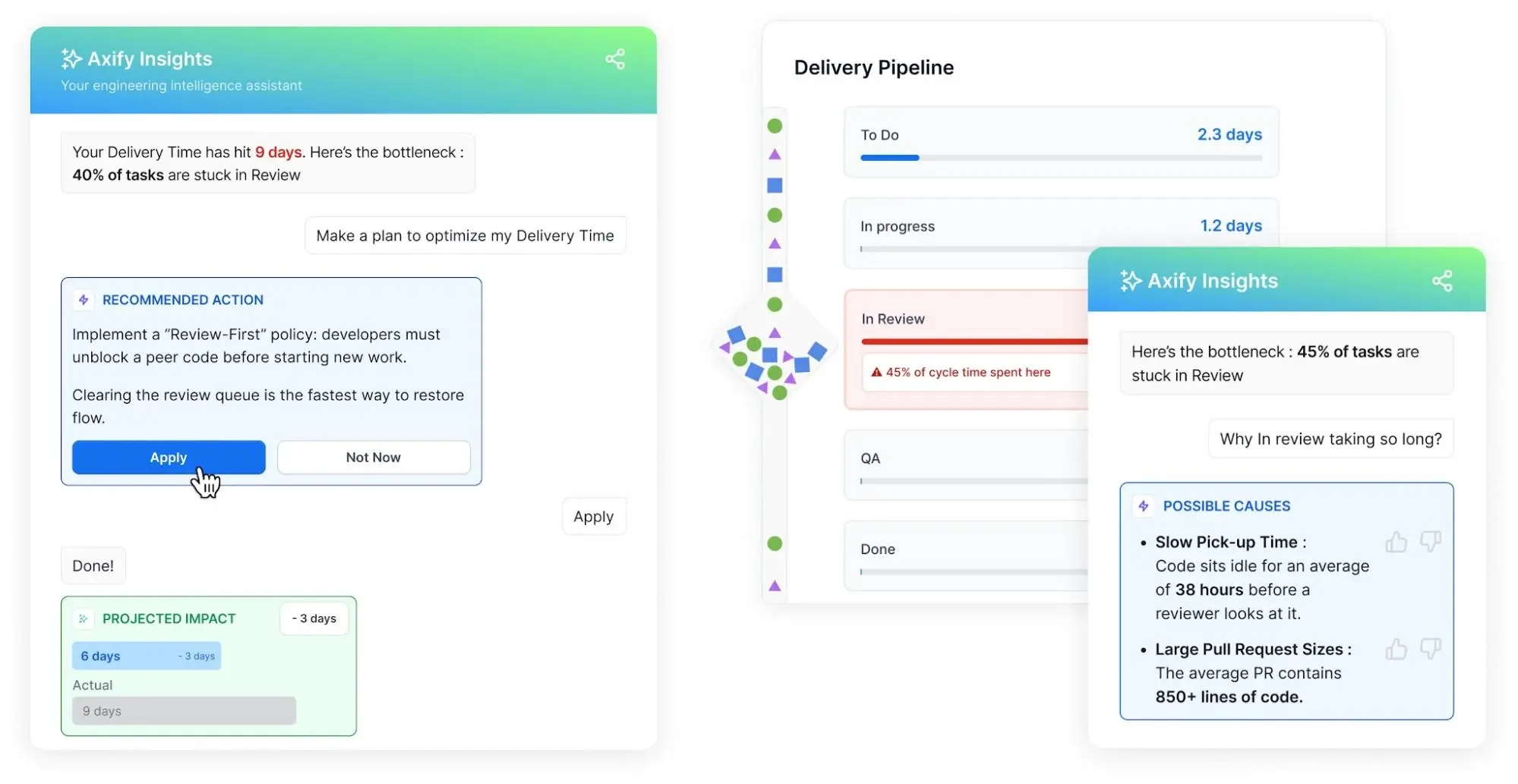
You can use Axify Intelligence when metric trends show a change and you need to understand why. It analyzes delivery data, surfaces bottlenecks, and gives recommendations you can review and implement from the dashboard.
You can also ask follow-up questions and inspect the supporting data, before reaching a decision.
For example, if Claude Code adoption rises but delivery slows, Axify Intelligence can help you inspect whether the issue is review backlog, larger pull requests, too much work in progress, or unclear ownership. Then, it can suggest potential solutions, like adjusting review rules, team ownership, WIP limits, or data processing workflows, depending on the cause.
Citing Google Cloud research, DORA’s 2026 ROI report notes that 88% of early adopters using agentic AI are already seeing positive returns.
However, each organization should pick the AI tool that fits their workflows best. The Enterprise plan from Claude Code is only worth it if it brings real delivery improvements. That’s why you should measure adoption, delivery flow, review load, and cost before expanding access.
But while you’re still in the decision stage, here’s when we’d recommend Claude Enterprise vs the Claude Team plan:
Claude Code Enterprise becomes easier to govern when you define what would make you expand, pause, or limit usage before the rollout starts. That means setting decision thresholds early.
For example, if adoption rises but review time also increases, you may need better task rules before adding more seats. If cost grows faster than accepted workflows, finance may want a usage review before approving additional investment.
This gives engineering, platform, and finance teams a shared decision framework.
To make those decisions confidently, it’s better to have adoption, cost, and delivery data in the same place rather than scattered across different dashboards.
Axify brings those signals together so you can decide when Claude Code is ready to expand, where adoption needs more support, and which teams are creating measurable engineering value.
Want to see Claude Code adoption, cost, and delivery in one view? Book a demo of Axify.

A Claude Code Enterprise pilot should run for at least 8 to 12 weeks before you judge impact. The sample calculator in DORA’s 2026 ROI report assumes a 15% productivity drop over the first three months (the J-curve), so evaluate after developers have had time to adjust workflows, prompts, and reviews.
Engineering managers should introduce Claude Code gradually. Start by defining approved use cases, documenting repository-specific guidance in CLAUDE.md, and setting clear testing and review expectations. Then review AI-assisted pull requests regularly, identify recurring issues, and update your team standards so developers learn from shared feedback instead of individual trial and error.
Platform teams can reduce extra review work by requiring smaller pull requests, clear acceptance criteria, tests, and documented Claude Code usage patterns. This helps reviewers check assumptions faster and prevents large AI-assisted changes from reaching review without enough context.
The biggest mistakes are scaling access before governance, considering purchased licenses as sufficient proof of adoption, and failing to monitor quality after rollout. The DORA 2026 ROI framework recommends measuring engineering outcomes alongside AI adoption because improvements in one area can be offset by declines in another. That’s why delivery metrics such as review time, rework, defects, and change failure rate should remain part of every rollout review.
Build the business case by comparing adoption, delivery flow, review time, rework, cost, and incidents before and after the pilot rollout. That gives engineering, finance, and security the same evidence when deciding whether to expand, adjust, or limit usage.