Delivery Performance
14 minutes reading time

In 2026, your delivery metrics may look better than they are. Cycle times can be down, and pull requests can be moving faster, so you may think your workflow is better. Still, high velocity can sometimes mask a higher degree of instability.
With high AI adoption, code churn has increased by 861%, with significantly more code removed than added. That matters because lots of removed code points to wasted resources for review, testing, and sprint capacity.
If you want to avoid all that, you’re on the right page.
While most online code churn guides cover the theoretical basics, this one goes further. We’ll discuss:
Let’s get right to it!
Code churn measures how much newly written code is changed, deleted, or rewritten within a short period after its introduction, typically 21 days. The goal is to identify work that did not remain stable after implementation.
Remember: The 21-day window is a practical heuristic, not a strict rule. It reflects the observation that most issues tied to initial implementation (i.e., misunderstood requirements, design flaws, or coding mistakes) tend to surface and be corrected within the first few weeks through reviews, testing, and early usage.
By contrast, code modified several weeks later is more likely to be part of normal software evolution, such as feature enhancements, optimization, or scheduled refactoring.
You can measure code churn in two ways.
Looking at both metrics gives a more complete picture. For example, a team might add 2,000 lines while deleting 1,900.
But how is code churn calculated? The simple formula below gives you the answer:
| (Lines of Code Changed ÷ Total Lines of Code) × 100 |
The result shows what percentage of the codebase changed during the selected measurement period.
You can calculate code churn at different levels, depending on the question you’re trying to answer:
To collect the underlying Git data, you can start by measuring added and deleted lines over a chosen time window:
| git log --since="30 days ago" --numstat --pretty=format: | awk ’NF==3 {added+=$1; deleted+=$2} END {print "Added:", added, "Deleted:", deleted, "Changed:", added+deleted}’ |
Next, compare the total number of changed lines with the size of the codebase. For example, if your team changed 500 lines in a 10,000-line codebase, the code churn rate is 5%.
The measurement window also affects the conclusions you can draw.
According to Scrums.com, an acceptable code churn rate is usually below 25% for a healthy team, with elite teams staying under 15% and teams above 35% likely losing sprint capacity to rework.
Of course, your code churn rate depends on your product stage, release cadence, architecture, and the type of work your team is doing. A team building a new product will naturally rewrite more code than a team maintaining a mature platform.
That said, industry benchmarks are still useful because they provide a starting point. If your team’s churn is significantly higher or lower than expected, it gives you a reason to investigate whether the underlying workflow has changed.
| Team performance tier | Churn rate range | What this typically signals |
| Elite | Under 15% | Code generally remains stable after implementation, with relatively little rework. |
| High-performing | 15-25% | Normal iteration with a manageable amount of rework. |
| Industry median | 25-35% | Worth investigating whether requirements, implementation, or review practices are creating avoidable churn. |
Once you pass 35%, churn becomes a practical delivery problem because your team spends more review time and testing effort on code that gets rewritten soon after. But very low churn deserves attention too, because your teams may be avoiding necessary refactoring or improvements to fragile code.
Remember: Always interpret benchmarks alongside your own delivery metrics. High churn is not automatically a problem during greenfield development or major refactoring, but if it rises together with review time, defects, or delivery delays, it usually signals avoidable rework rather than healthy iteration.
High code churn usually reflects one thing: the team is discovering important information after implementation has already begun. Sometimes that is expected. More often, it points to problems in planning, design, review, or collaboration.
The most common causes include:
Not necessarily. The important question is not whether churn is high, but why it is high.
Healthy churn accompanies major refactoring, greenfield development, technical debt reduction, or periods of rapid experimentation. In those situations, rewriting code is an expected part of improving the system. It’s not about correcting avoidable mistakes in your software development work.
The interpretation changes when churn is driven by the causes we discussed above (e.g., unclear requirements, architectural issues, weak acceptance criteria, or repeated implementation mistakes). Those patterns suggest the team is solving the same problem multiple times instead of moving delivery forward.
For engineering leaders, code churn is most valuable as a diagnostic signal. It tells you where to investigate next, whether that means improving requirements, strengthening design reviews, reducing pull request size, or refining how AI coding tools are introduced into the development workflow.
AI coding changes the pace of software development. Your teams can produce working implementations much faster, but they can also generate incorrect assumptions, duplicate patterns, or unnecessary code just as quickly.
Pro tip: Whether code churn increases depends less on the AI tool itself and more on the planning, review, and engineering practices around it.
DORA's 2026 ROI of AI-assisted Software Development report supports that idea, describing AI as an amplifier of existing engineering capabilities. It also points to a “verification tax” (the review and validation effort that replaces the time saved on writing code) as a key driver of the early productivity dip teams see after adoption. The report's framing is blunt: AI’s value isn't measured by the code it produces, but by which bottlenecks it removes.
If you’re an engineering leader, these are the patterns worth watching.
AI can increase output before it improves delivery. Developers produce more code in less time, but that doesn’t mean more of that code survives.
2026 research from GitClear and GitKraken Insights found that AI tools correlate with up to 9x higher code churn. Also, a Stack Overflow 2025 survey reports that, according to 66% of developers, AI outputs are “almost correct” but still flawed.
That matters because “almost correct” code can pass a quick review, then return as rework when edge cases, naming patterns, or architectural constraints surface.
AI generates solutions based on the context it receives. Without shared architectural guidance, different developers may solve the same problem in different ways, creating duplicate logic and inconsistent implementation patterns.
In fact, code duplication is up 4x with AI-assisted coding, which suggests more copied logic and weaker code reuse.
The issue grows when review queues are already strained. AI-generated PRs reportedly wait 4.6 times longer for review than human contributions, so your team may find problems later, when fixes cost more time and affect more work.
So if your team is rolling out AI coding tools, establish coding standards and shared implementation patterns early instead of cleaning them up later.
AI shortens the implementation stage, but your review process still determines whether the code stays in the codebase. If reviews, testing, or architectural discussions can’t keep up, more recently written code will need to be rewritten.
That’s why code churn is such a useful metric when you’re evaluating the impact of AI adoption in your company: it tells you whether AI is helping your team build durable software or simply helping them generate rework more quickly.
Reducing code churn means finding where rework enters your delivery process and fixing it before code reaches production. In most teams, that happens during planning, implementation, review, or validation.
Many churn problems begin before anyone writes code. If requirements are incomplete, developers and AI tools fill the gaps with assumptions that later need to be rewritten.
This week, try this: Require every feature ticket to include the user flow, edge cases, acceptance criteria, and explicit out-of-scope scenarios. For example, a billing ticket should define how failed payments, refunds, tax changes, and existing subscriptions are handled before implementation begins.
Large pull requests make it easier for important issues to slip through review. Reviewers naturally focus on the primary workflow, while naming issues, duplicated logic, weak error handling, or behavior that conflicts with another module receive less attention.
This week, try this: Set a soft limit of roughly 300-500 changed lines or one user-facing behavior per pull request. If a PR exceeds that size, split it by workflow, API boundary, or feature area. Then compare PR size with review time to see whether larger changes consistently generate more rework.
Well-defined tests reduce churn because they clarify expected behavior before implementation begins. This is particularly valuable for AI-assisted development, where generated code can satisfy the prompt without fully satisfying the business requirement.
This week, try this: Require a failing test for every bug fix and at least one acceptance test for every new feature. Remember that code coverage tells you which lines executed; your assertions determine whether the correct behavior was actually verified.
Simple tickets work well for small changes. Features involving permissions, billing, integrations, data migrations, or multiple services usually need a shared specification before implementation starts.
This week, try this: Create a lightweight one-page template covering expected behavior, affected services, data changes, failure scenarios, and review risks. A shared specification gives both developers and AI tools a clearer target while giving reviewers a documented baseline for validation.
AI-assisted code doesn’t necessarily require stricter reviews, but it can fail in ways that human-written code doesn’t. For example, AI-assisted code may be syntactically correct while still missing product context or architectural constraints.
Tracking it separately helps you understand whether AI changes are creating new risks or simply changing where engineering effort is spent.
This week, try this: Tag pull requests as AI-assisted, human-authored, or mixed. Compare churn, review time, rollback rate, and defect density across each category over a rolling 30-day period.
Code churn becomes most useful when it acts as an early warning rather than a KPI. If you set a maximum threshold for your code churn, you can see risky patterns and inspect them before merge.
This week, try this: Configure your CI pipeline to flag pull requests that repeatedly modify the same files within 21 days or exceed your team’s churn threshold. Use those alerts to trigger deeper review, and don’t automatically block the merge. The goal is to catch unstable implementation patterns without discouraging healthy refactoring.
As a leader, you reduce code churn by changing the system around the team. Developers can tighten tickets and PRs, but you control tool choices, review expectations, training, and the metrics used to judge whether AI is helping or creating cleanup work.
These are the leadership moves to prioritize.
First, decide whether your team needs an AI coding assistant or an AI coding agent. Assistants work best when developers stay involved in the code-writing process, review suggestions line by line, and use AI for scoped tasks. Agents need stronger guardrails because they can tackle larger projects with less step-by-step human control.
That choice can directly affect code churn. The more autonomy you give an AI system, the more important review, testing, and architectural validation become. Otherwise, larger AI-generated changes may introduce rework that’s harder to identify and isolate.
Cost is another factor. AI agents generally consume more tokens than coding assistants, and correcting or discarding large AI-generated changes increases the cost of using them.
With Axify’s AI cost feature, you can use AI cost data inside AI Impact and Adoption to compare per-tool spend against adoption and usage.
It also helps you forecast near-term AI costs, so you can see whether spend is likely to rise before the cost shows up unexpectedly in your expenses.
That makes it easier to see whether increased usage reflects productive adoption or simply growing software costs.
Different AI tools support different workflows. A team using Cursor for repository-wide changes may develop different review patterns than a team using GitHub Copilot for inline assistance or Claude Code for larger implementation tasks.
Axify’s AI Model Comparison helps you see which models developers use, for which tasks, and how those choices affect delivery. That gives you a stronger basis for standardizing tools than simply buying licenses based on preference.
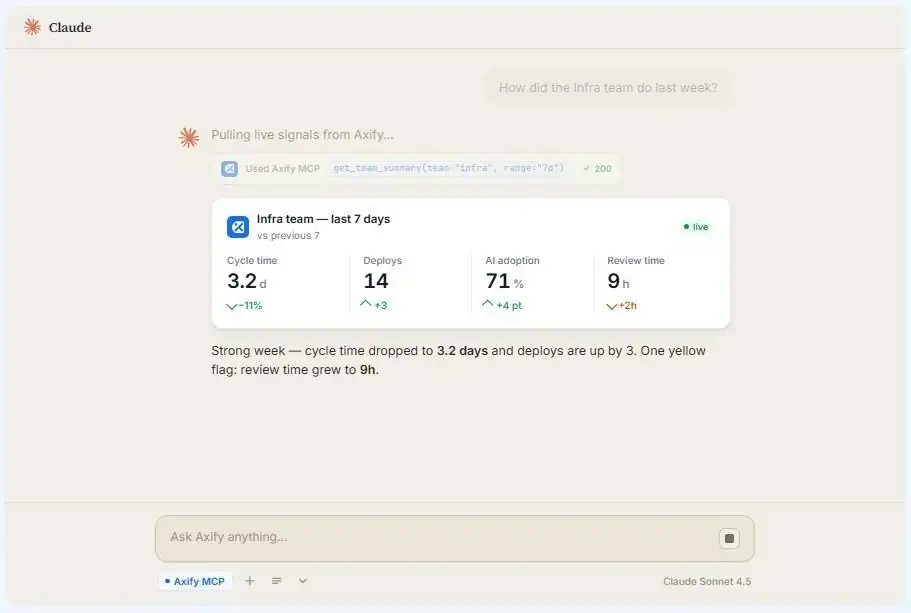
Axify’s MCP server makes those insights even easier to explore. Instead of navigating dashboards to find the right chart or filter, you can ask questions in natural language from Claude, Cursor, or any other MCP-compatible client. That includes more complex questions, such as comparing delivery patterns between teams or identifying which AI tools reduce code churn without increasing review time.
Pro tip: Read our other guide on GitHub Copilot vs CursorTrain Teams on the Churn Patterns You Actually See
Generic AI training rarely addresses the problems your teams actually face.
From our experience, the most effective coaching targets the failure patterns already visible in your engineering data.
For example:
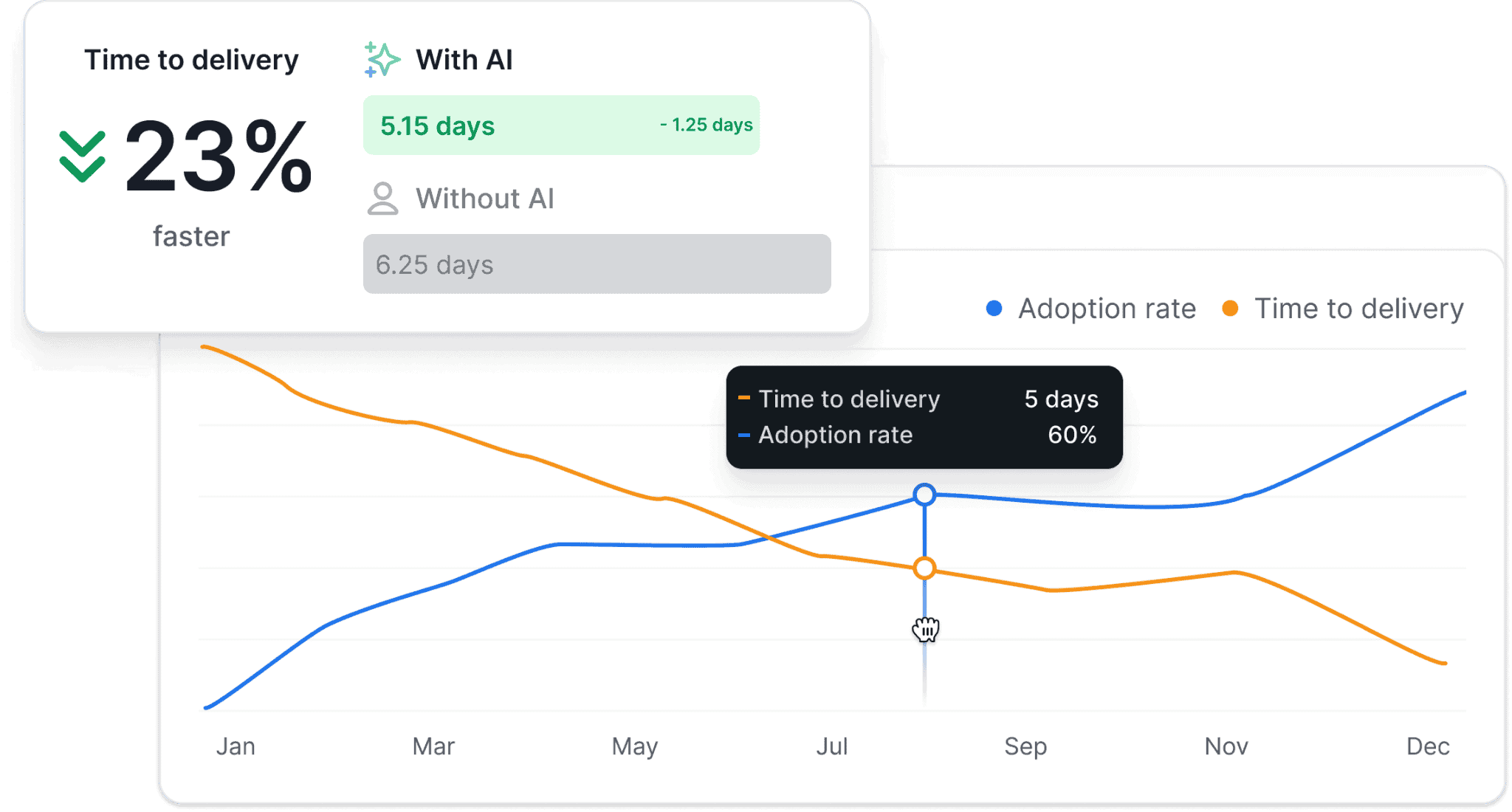
Before you scale AI usage, compare delivery trends before and after adding AI tools to your workflow. Axify’s AI Impact tracking shows how your engineering metrics changed after AI tool adoption, so you can see whether you have shorter delivery time, better review flow, or more rework.
That gives you the evidence to decide whether a workflow deserves wider adoption, additional coaching, or a different implementation approach.
Before buying more AI licenses or setting higher adoption targets, ask a different question: Is your AI-assisted code surviving its first few weeks, or is your team rewriting it shortly after merge?
Review code churn by team, repository, pull request type, and time window, then compare it with review time, defects, and delivery speed. Those metrics reveal whether AI is helping your teams build more durable software or simply produce more code.
That’s where Axify helps. It connects AI adoption, code churn, delivery performance, and cost in one view, so you can see which workflows deserve to scale, which teams need coaching, and where AI is creating more rework than value.
Book a demo to see what those patterns look like in your own engineering organization.

Code churn shows how much code you rewrite, delete, or change shortly after it was created. Cycle time shows how long your work takes to move from development to production. Looking at both metrics together helps you distinguish productive iteration from rework. For example, shorter cycle time means little if a large share of that code is rewritten a few days later.
What are other metrics to measure code churn?
Other metrics you can use with code churn include files changed, commit frequency, code complexity, test coverage, code quality reviews, and defect density. Together, these metrics help you understand whether churn comes from broad change scope, fragile code, weak tests, or recurring defects.
Git, GitHub, GitLab, and Bitbucket give you the raw commit and code-change data needed to calculate code churn. Engineering intelligence platforms such as Axify build on that data by connecting churn with AI adoption, pull request flow, review time, delivery metrics, and engineering trends, making it easier to understand why churn is happening, where, and how to fix it.