Delivery Performance
17 minutes reading time

Progressive delivery means a gradual release of features to end users but it entails specific strategies to control exposure in production.
We’ll discuss these strategies and steps below, with real tools you can implement.
In this article, you will learn how progressive delivery works, how it differs from continuous delivery, and how to apply it in practice.
Pro tip: Get clear answers on what’s slowing your delivery and what to fix next with Axify Intelligence. It analyzes your pipeline, explains bottlenecks, and recommends specific actions so you can act without manual analysis.
Progressive delivery is the practice of releasing features gradually to selected groups of users while validating system behavior and business impact in production.
Instead of exposing a feature to all users at once, you control access using mechanisms such as feature flags and targeting rules. This allows you to test changes in real conditions and expand rollout only when results are acceptable.
This approach relies on four key elements:
For example, a canary release may start with 5% of traffic. You then measure latency and error rates, and expand only if those metrics stay stable and no rollback condition is triggered.
The book on progressive delivery explains how this model connects delivery with business value. It draws from companies like GitHub and AWS to show how controlled feature rollout leads to real user impact.
Now, let's see how progressive delivery differs from continuous delivery.
Continuous delivery focuses on ensuring that code can be deployed safely at any time. Teams may already use techniques such as A/B testing or blue/green deployments to reduce release risk.
Progressive delivery introduces a different approach to releasing features. The key practical difference is the use of feature flags to control who sees a feature and when. This allows teams to deploy code to production without exposing it to all users immediately.
For example, a feature can be enabled only for internal users or a small percentage of traffic, then expanded gradually based on system performance and user behavior.
The difference in goals reflects this shift. Continuous delivery answers whether you can deploy safely. Progressive delivery focuses on whether you should expand a release based on real-world signals.
Pro tip: If you want a deeper breakdown of deployment mechanics, read our article on continuous delivery.
This leads us to the benefits of using progressive delivery.
Progressive delivery changes how you manage risk, feedback, and release decisions inside real software delivery systems.
Here are the main benefits and how they show up in your day-to-day work:
Next, let's discuss the key techniques you should use for progressive delivery.
Progressive delivery works because it gives you control over what features reach users in production, as well as how and when they do. To make that control real, you need to implement progressive delivery correctly. Here’s how to do that:
Feature flags (or feature toggles) let you control whether a feature is visible to users without deploying new code.
Instead of releasing a feature to everyone at once, you wrap it in a simple condition in your code. This allows you to turn the feature on or off, or show it only to specific users, directly in production.
In practice, this means you can:
Feature flags are the foundation of progressive delivery because they give you runtime control over feature access, which makes every other progressive technique possible.
To validate user behavior after applying this technique, you need to monitor:
Progressive delivery adoption continues to grow because teams need more control over exposure. In fact, around two-thirds of organizations are expanding or piloting progressive delivery, and 45% already use feature flags. The figure below shows that feature flags are becoming a standard part of modern feature management.
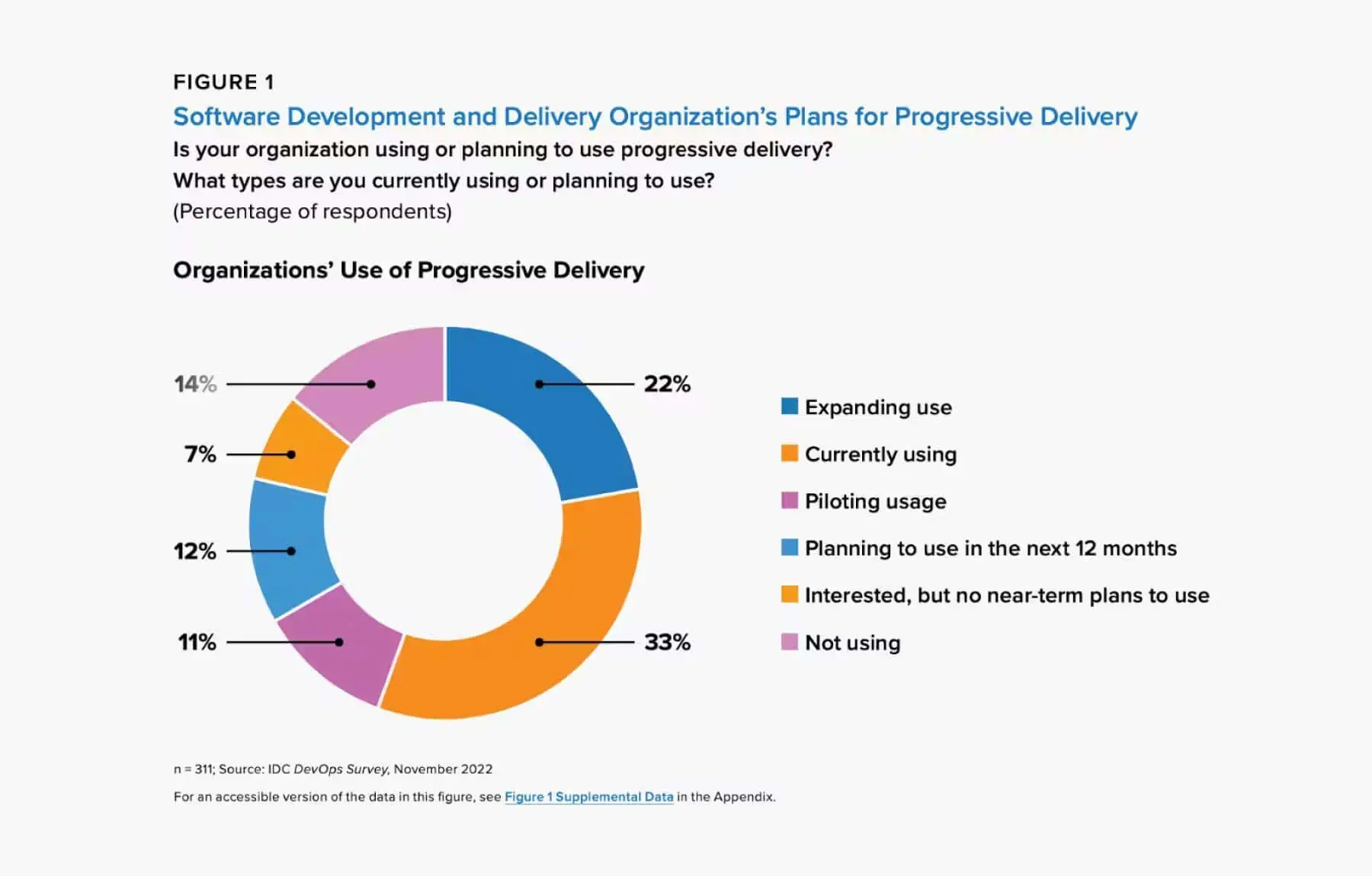
Source: IDC DevOps Survey
This means gradually exposing a new version of the application to a small percentage of production traffic before full rollout. A canary release uses traffic-based segmentation, such as routing 1%, 5%, or 10% of requests to the new version before expanding exposure. This shifts your deployment strategy from all-at-once releases to controlled progression.
We advise you to monitor system health during each step. Also, make sure automated rollback is triggered if predefined thresholds, such as error rate or latency, are exceeded. This solves two concrete problems:
To make canary releases effective, you should track:
At this stage, we advise you to focus on system behavior. Treat canary releases as a system stability check, not as a product validation tool. They tell you if the system can handle the change, but do not indicate whether that specific change improves user behavior or outcomes.
After confirming stability, you can evaluate user behavior and feature performance. A/B testing means comparing variations across controlled cohorts. This introduces a structured feedback loop into your software development process.
We advise you to make sure that each test starts from a hypothesis, defines success criteria, and checks statistical significance thresholds. This process lets you make better rollout decisions.
Good A/B testing in software delivery solves decision risk at the product level:
Also, you can measure outcomes through:
This approach is already widely adopted at least among tech giants.
Microsoft, Google, and other enterprise tech companies also run over 10,000 A/B tests annually (across software development, as well as advertising and UX). And they all experience good results, including but not limited to, higher revenue.
That’s why we encourage you to make experimentation part of your standard engineering practices tied to product strategy.
All previous techniques depend on one thing: visibility into system behavior. And good monitoring tools streamline observability.
To make progressive delivery work, you must correlate what you observe:
Examining these variables together helps you connect cause and effect better.
For example, you can link a latency spike to a specific rollout, service version, and user cohort. That kind of connection helps you then make better release decisions.
That’s why we advise our clients to start by monitoring DORA metrics and flow metrics. These signals help you understand not just if a deployment succeeded, but how it affected delivery speed, stability, and behavior across the system.
So, let's go over the gradual rollout process now.
Progressive delivery follows a structured loop: insights, hypothesis, experiment, analysis, learning, and progressive rollout.
Each step builds on the previous one, so decisions are based on real production and user signals. As you expand rollout, you may start seeing issues that were not visible with a small group of users, such as performance slowdowns, unexpected errors, or changes in user behavior.
These are the steps that guide the process:
Each rollout starts with identifying an opportunity, friction point, or performance issue from real system behavior.
You can identify opportunities or issues from:
Be very diligent here because weak inputs lead to weak experiments.
Once the problem is clear, you define a testable hypothesis. This step turns an observation into a measurable expectation tied to a specific metric, such as error rate, latency, or task completion rate.
For example, enabling a new feature for a subset of users may reduce error rate or improve system performance under real usage conditions.
A useful hypothesis typically includes:
In some cases, you may also define a target (for example, a percentage improvement), but this is not always required.
This structure helps you interpret results clearly. Without a defined metric and expected outcome, it becomes difficult to determine whether a change had the intended effect.
With a hypothesis in place, you move into execution. The goal is to test safely without affecting all users at once.
You run the experiment by:
Remember: Deployment does not mean full release, so exposure stays controlled. To learn more, you can check our guide on release vs deployment to clarify this difference.
Also, enforce consistency.
There should be no scope or metric changes during the experiment, since that would invalidate the results.
After the experiment, compare the results of the exposed cohort against the control group to see if you notice a measurable shift in the target metric. If the difference is statistically significant, you can assume that change wasn’t caused by random variation.
As such, your hypothesis is validated.
At the same time, you must monitor system performance to confirm the experiment does not introduce errors, latency, or resource issues.
For that, we advise you to track three types of signals:
You need to analyze these types of signals together because improvements in one area can create problems in another. A rollout may increase conversion while degrading latency, or reduce errors while slowing down delivery. In other words:
Once results are clear, you extract specific findings from them. Even a failed experiment provides information about which metric changed, which cohort was affected, or which part of the implementation introduced problems.
You clarify:
This step prevents repeating the same rollout or experiment without understanding why the previous rollout succeeded or failed. Each result feeds the next decision instead of resetting the process.
If results validate the hypothesis, you can expand exposure to a certain feature in controlled steps. Of course, continue monitoring as production scales.
If the results do not validate your hypothesis, disable the feature. Next, you can either revise the implementation, change the rollout conditions, or rewrite the hypothesis before testing again. This keeps rollouts safe while still allowing continuous improvement.
Progressive delivery only works if you implement it correctly. Here are the best practices we recommend.
If you’re more of a visual learner, you can also watch this video posted by DORA:
Rate of production does not equal rate of adoption; to balance them, consider user experience as your North Star. Frequent deployments can happen many times per day, but users cannot absorb constant feature releases without friction.
If everything reaches users instantly, confusion builds and adoption drops.
This is why we recommend that deployment must stay separate from release. Progressive delivery gives you control over when users actually experience new features or updates, which keeps adoption aligned with real usage patterns.
Progressive delivery only works when the system around it supports fast, controlled rollouts. Teams need enough resources so engineers do not wait on infrastructure or approvals. They need autonomy to manage rollouts, feature flags, and decisions directly.
At the same time, you need alignment between teams so everyone’s moving in the same direction instead of shipping conflicting changes.
You should also implement automation to remove manual steps from rollout, monitoring, and rollback. Continuous iteration then becomes easier because small releases move safely through the system.
Releasing to 100% of users immediately creates unnecessary risk. A gradual rollout starts with a small cohort and expands step by step as confidence increases. As we explained above, this approach reduces the release risk and surfaces issues early.
But it’s even better if you deliver the right feature or update to the right users at the right time. After all, not all people will use your software solutions in the same way. They won’t need the same features. A gradual, feature-based release is beneficial because you can gather more relevant feedback and optimize your product.
Production is the only environment where real user behavior and real system scale exist. Staging environments cannot fully replicate traffic patterns, edge cases, or load conditions.
Because of that, meaningful validation must happen in production. Progressive rollout makes this safe by exposing new functionality to a limited group of users first, so potential issues affect only a small portion of the user base.
This allows teams to detect problems early, validate system behavior under real conditions, and expand rollout with greater confidence.
Shipping is a part of the SDLC, so it should not be treated as a goal in itself. A feature only matters when users adopt it, and, as such, leads to better activation rate, completion rate, or retention.
Progressive delivery helps you shift your focus from output to outcome.
That’s why we encouraged you to base your rollout decisions on outcome-related metrics like feature usage, conversion rate, error rate, and drop-off points.
Progressive delivery only works if each rollout gives you clear signals about what to do next.
When you release a feature to a subset of users, you observe how the system behaves under real conditions and how users interact with the change. These signals allow you to evaluate whether the rollout is moving in the right direction or introducing new risks.
Based on what you observe, you can expand the rollout, adjust the feature, or stop it altogether. Basically, each release feeds a continuous loop of learning and adjustment.
Automation removes repeated manual work that slows down delivery. Rollouts, monitoring, and rollbacks should all run automatically once defined.
Once a problem is solved, it should not be solved again manually. In many cases, AI can help you implement automation faster by identifying patterns and suggesting actions based on system behavior.
Small, frequent releases reduce risk because each task is easier to isolate when the batch (i.e., group of tasks) is small. When an issue appears, the source is clear and can be fixed quickly.
Fixing issues fast leads to better iteration, which means you’re delivering more value to end users over time. By comparison, large, high-risk releases slow down iteration and value production.
Not all users want the same experience at the same time. Feature flags and configuration allow different cohorts to access different functions of your software.
This reflects a shift in how software is delivered nowadays. Software is no longer shipped as a fixed package. Instead, users interact with a system that adapts to their needs through controlled exposure.
AI can make or break progressive delivery depending on how you’re implementing it. Next, we’ll discuss how AI should support progressive delivery, potential mistakes you can make, and how to implement it correctly.
AI may support progressive delivery by:
This reduces analysis latency. As a result, you can move from deployment data to rollout action faster, while still grounding decisions in measurable system behavior.
Those benefits above depend on how AI is used. These are the most common mistakes we’ve seen many companies make.
AI-assisted coding can accelerate deployment frequency. If you produce more code, that code is likely to be deployed to a production environment faster.
However, if that code isn’t well written, the change failure rate also increases. More changes then create more volatility. Without progressive controls such as flags, cohorts, and rollback thresholds, failure risk rises with release volume.
According to the DORA 2025 report, 71% of developers use AI to write code, but stop there. That leaves a gap before starting a certain task and after deployment, where the harder decisions still need support.
In practice, many teams still don’t use AI to evaluate experiment results, interpret delivery metrics, and recommend rollout adjustments. That means faster code generation is not matched by faster decision-making.
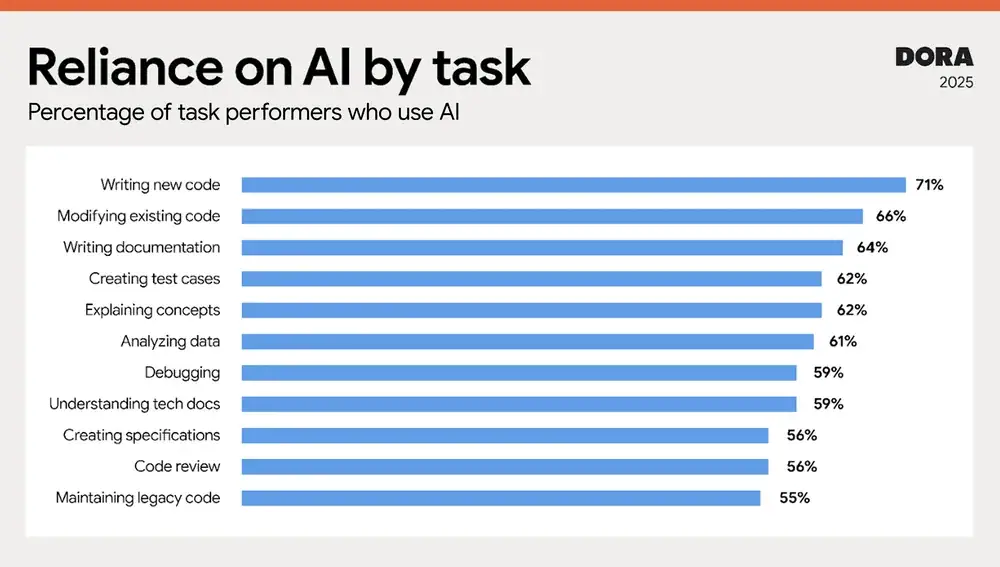
Source: 2025 DORA State of AI-assisted Software Development report
Automation can also create risk when you implement it without proper governance. Blind automation can auto-scale broken services, expand unstable rollouts, and hide systemic weaknesses. So, automation must stay tied to measurable thresholds and review points.
AI shouldn't be used just to speed up code output before release.
You should use AI to:
“AI amplifies both good and bad delivery systems. If progressive delivery discipline exists, AI strengthens it. If it does not, AI magnifies instability.”
Alexandre Walsh
Axify's VP of Engineering and Product Manager
That is the practical standard. When you’ve already implemented good rollout controls, telemetry, and decision rules, AI makes your system better. If you don’t already have good workflow practices, AI increases the speed of unstable releases.
Progressive delivery helps you see how certain features perform in real-life conditions. However, these experiments and the conclusions you draw from them only matter if they lead to better engineering decisions.
That is what Axify helps you do. Keep reading to find out how.
First, you need a consistent way to track your metrics before deciding what to do next. Axify gives you that baseline through flow and DORA metrics. You can track these essential indicators across teams and projects.
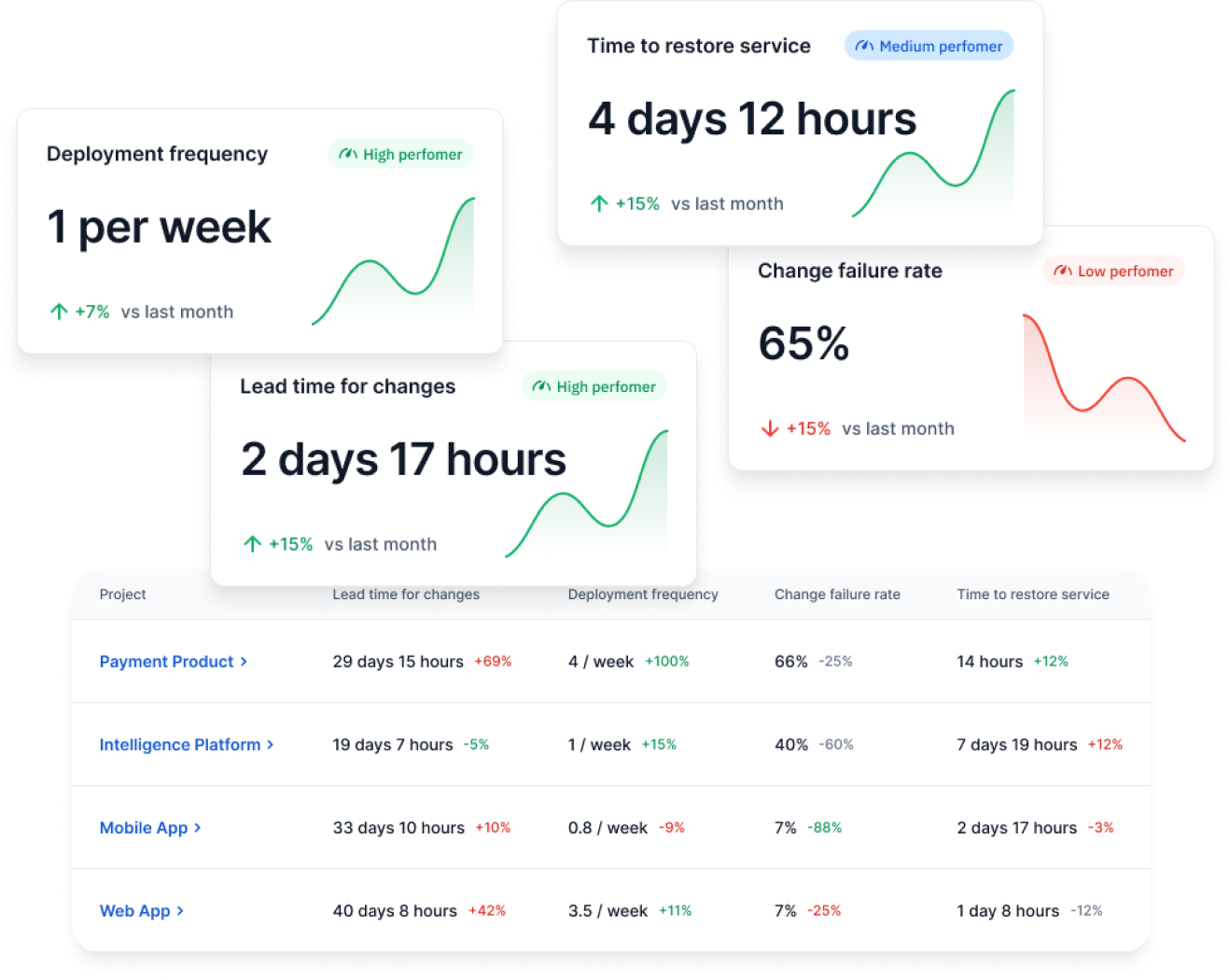
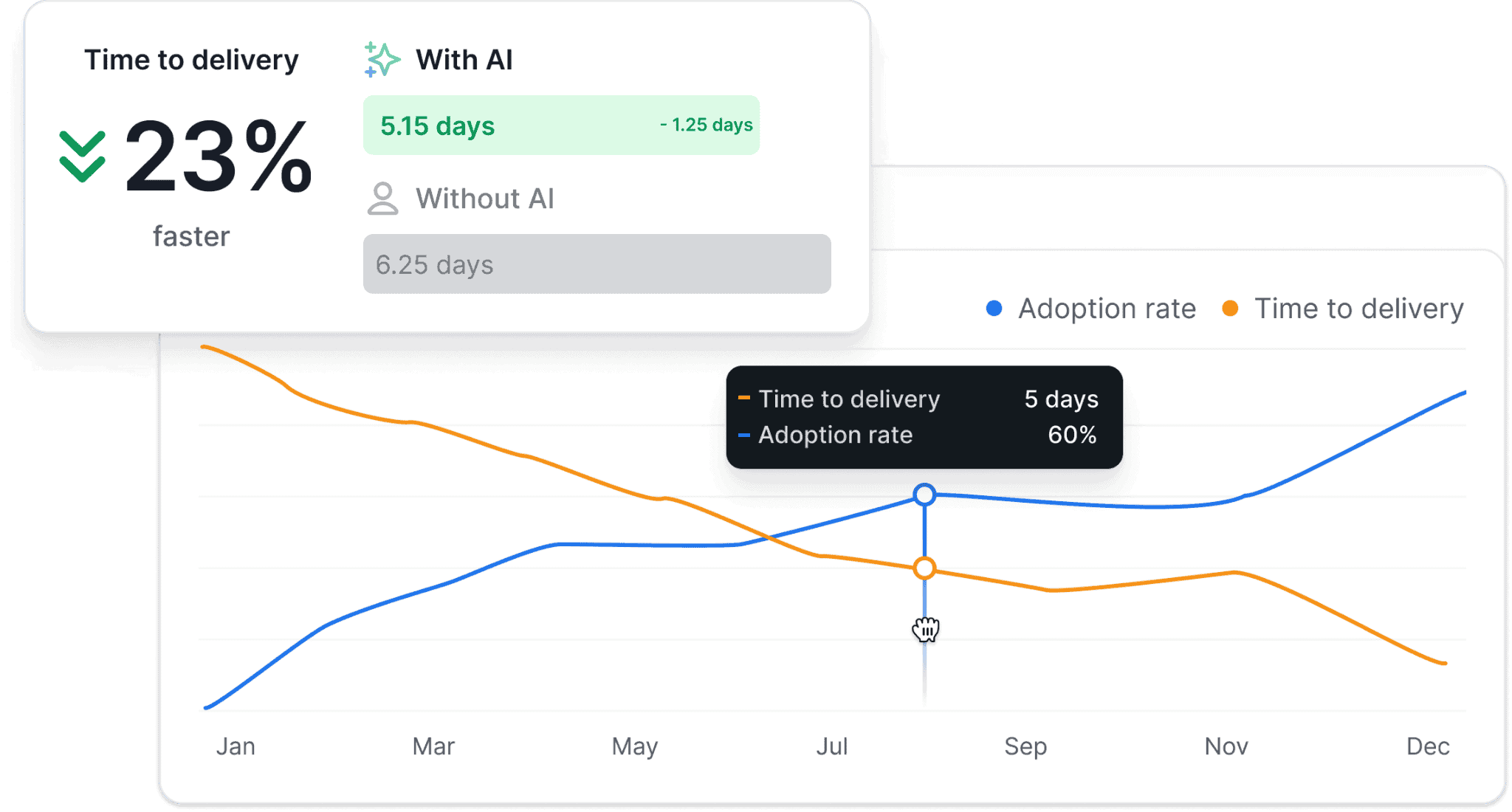
You can also use our AI impact analysis feature.
This feature compares your delivery performance before and after AI implementation. As such, you can see specific changes in your engineering metrics with and without AI tools, such as a faster time to delivery in teams who’ve adopted AI faster. Like so:
Of course, you can also track adoption rate, the number of active users, acceptance rate, tool-level usage, and more, like so:
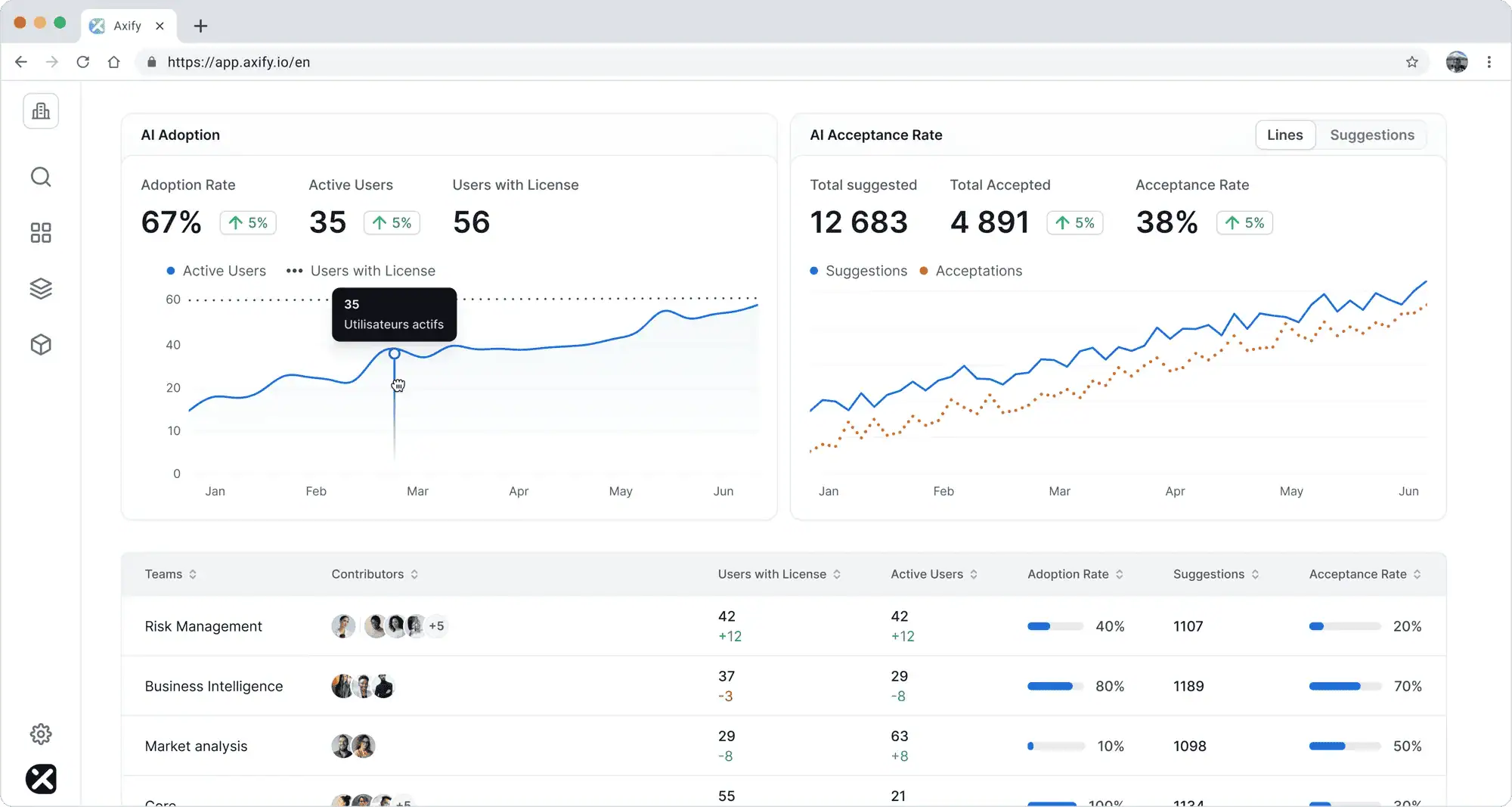
That matters because higher coding speed does not automatically mean faster delivery. Axify connects adoption to delivery outcomes and lets you compare before-and-after patterns instead of relying on assumptions.
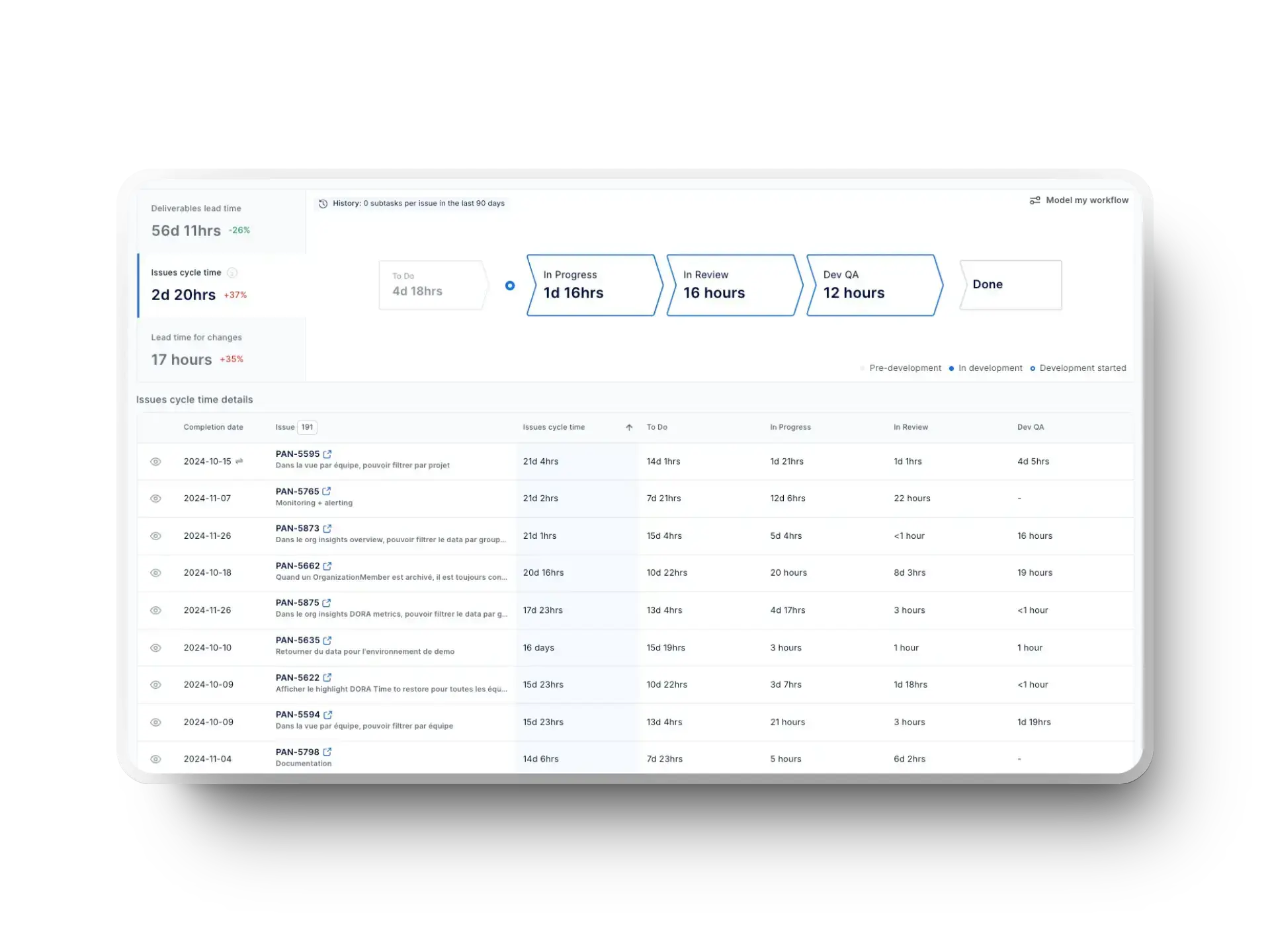
Another question is where rollout friction appears inside the delivery system. Axify’s Value Stream Mapping shows the full development cycle, so it can point to potential issues. For example, you can track metrics like item cycle times, so you can see which stage consumes the most time.
As such, Axify VSM helps you identify where rollout slows, detect review bottlenecks, and measure cycle time shifts during experiments. That leads to a faster, more complete analysis which, in turn, leads to better decisions.
And if you need more help with those decisions, you’ll find the best tool in the next section:
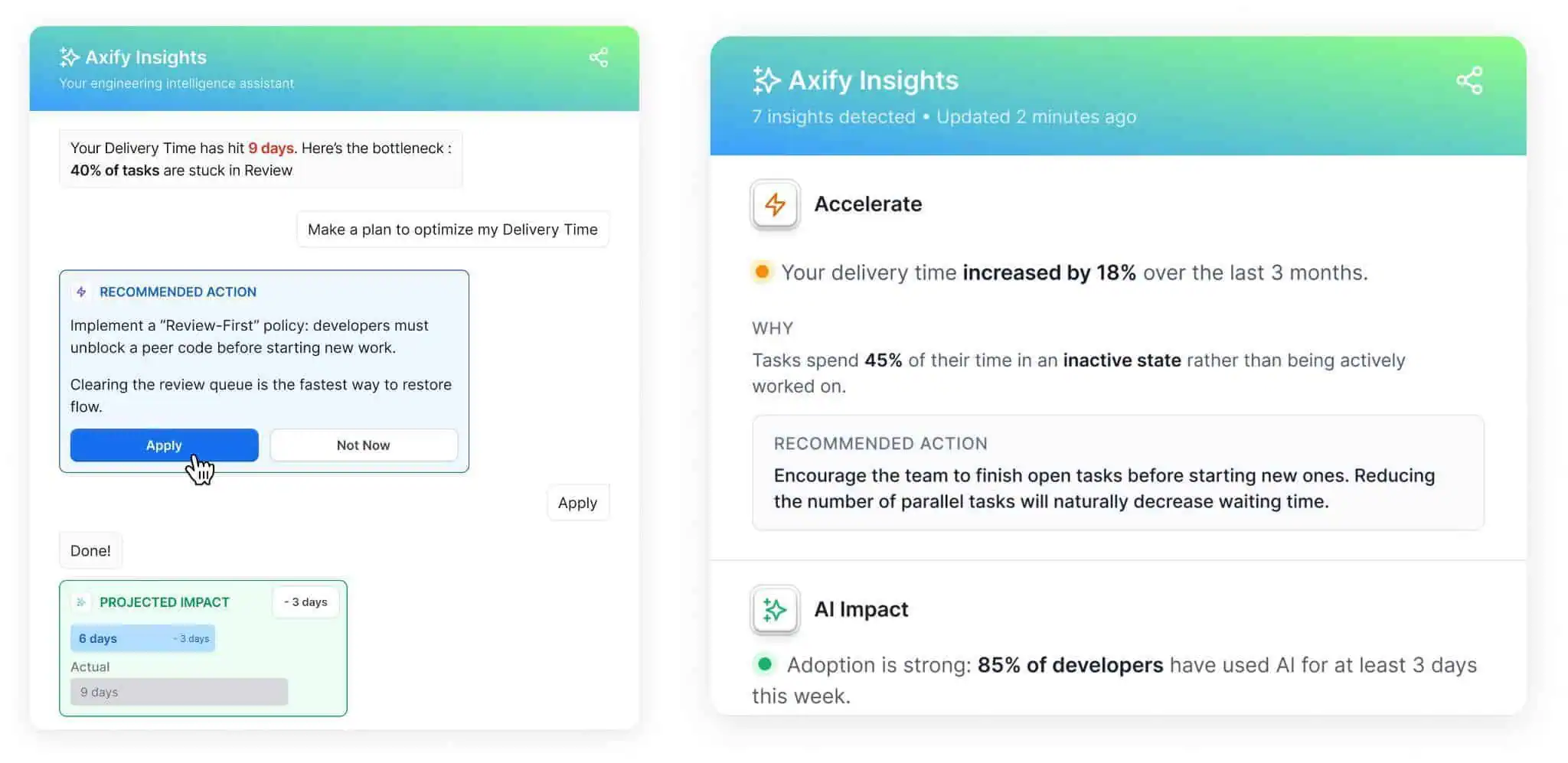
Axify Intelligence acts as your decision layer. It analyzes your delivery performance, offers actionable insights, and recommends actions based on historical delivery data. These actions can also be implemented right from the platform with just one click.
And if you need more information, our intelligent chatbot allows you to ask it directly, using natural language. It can then suggest possible causes and targeted actions based on your delivery trends.
Here’s how easy it is to use it:
Progressive delivery gives you a practical way to release features gradually, test effects safely, and expand release only when real-world signals support that decision.
Because rollout happens in controlled steps, you can reduce risk, validate user impact, and connect system behavior to delivery outcomes.
So, follow the best practices and implement the tools we discussed in this article to streamline progressive delivery in your own company.
No, progressive delivery does not require microservices. You can apply it in a monolith, modular monolith, or microservices architecture as long as you can control exposure, observe behavior, and reverse changes safely.
Progressive delivery reduces deployment risk by limiting how many users are exposed to a new feature. Because exposure starts with a small cohort, you can catch errors, latency issues, or adoption problems before they spread across your full user base.
AI can strengthen progressive delivery by improving both how fast you deliver and how well you evaluate releases. Coding assistants can speed up implementation and iteration, allowing you to ship smaller updates more frequently. At the same time, AI helps analyze rollout data, detect patterns, and identify risks earlier. This makes it easier to decide whether to expand, adjust, or stop a rollout based on real signals. However, for AI to help, you need to already have good workflow practices.
You should track technical, behavioral, and delivery metrics during progressive rollout. That includes error rate, latency, resource consumption, adoption, retention, conversion, cycle time, review time, and change failure rate.
Axify supports progressive delivery by turning rollout data into measurable decisions. It gives you flow metrics, DORA metrics, value stream visibility, and AI-driven recommendations so you can understand what metrics shifted and why, plus what to adjust next.