Delivery Performance
12 minutes reading time

Shipping code is only one part of managing a software delivery system.
What matters more is how work actually moves through SDLC stages over time. Performance metrics for software developers help you evaluate delivery flow, review speed, deployment stability, and release reliability at the team level.
These signals show how quickly work moves, where reviews slow down, and how often releases succeed without rollback. As a result, you can see whether delays come from review queues, handoffs, blocked work, failed deployments, or unstable releases across your delivery pipeline.
In this article, we discuss which delivery metrics expose bottlenecks and support decisions. You will also learn how to implement these metrics and measure delivery performance without micro-managing.
Performance metrics for software developers are quantifiable signals that show how work moves through pull requests, code review, CI, deployment, and recovery. They also reveal where work slows down, fails, or waits across the delivery path.
Remember: Pick metrics that describe system behavior rather than individual output.
That’s why we advise you to measure team performance rather than individual performance. This leads us to our main point.
Delivery metrics can be grouped by what they reveal about your delivery system. These categories reflect delivery speed, stability, flow efficiency, AI impact, and collaboration. Let’s review them below.
Delivery speed metrics show how quickly work travels from active development until it reaches production. Slow speed or a decelerating velocity compared to the typical trend indicates a problem. Not solving it leads to delayed releases and reduced delivery predictability.
To see those trends and understand the causes behind them, focus on these metrics:
These metrics give you a more complete picture of flow velocity across your delivery system. As such, you can use them to identify where reviews, queues, or handoffs slow delivery.
Speed does not tell you whether a delivery system is reliable. A fast pipeline still fails if releases cause production issues, trigger rollback, or require hotfixes. That’s why you should track stability metrics, which show whether features reach production safely and consistently.
These metrics help you evaluate reliability across your delivery pipeline:
From our perspective at Axify, these metrics clarify an important principle: speed without stability does not define software delivery performance. We explain how you can balance both in this article.
Even when speed and stability appear healthy at a high level, work can still slow down inside the delivery pipeline. That slowdown usually happens in queues, handoffs, or review stages. To understand where work stops moving, you should focus on these metrics:
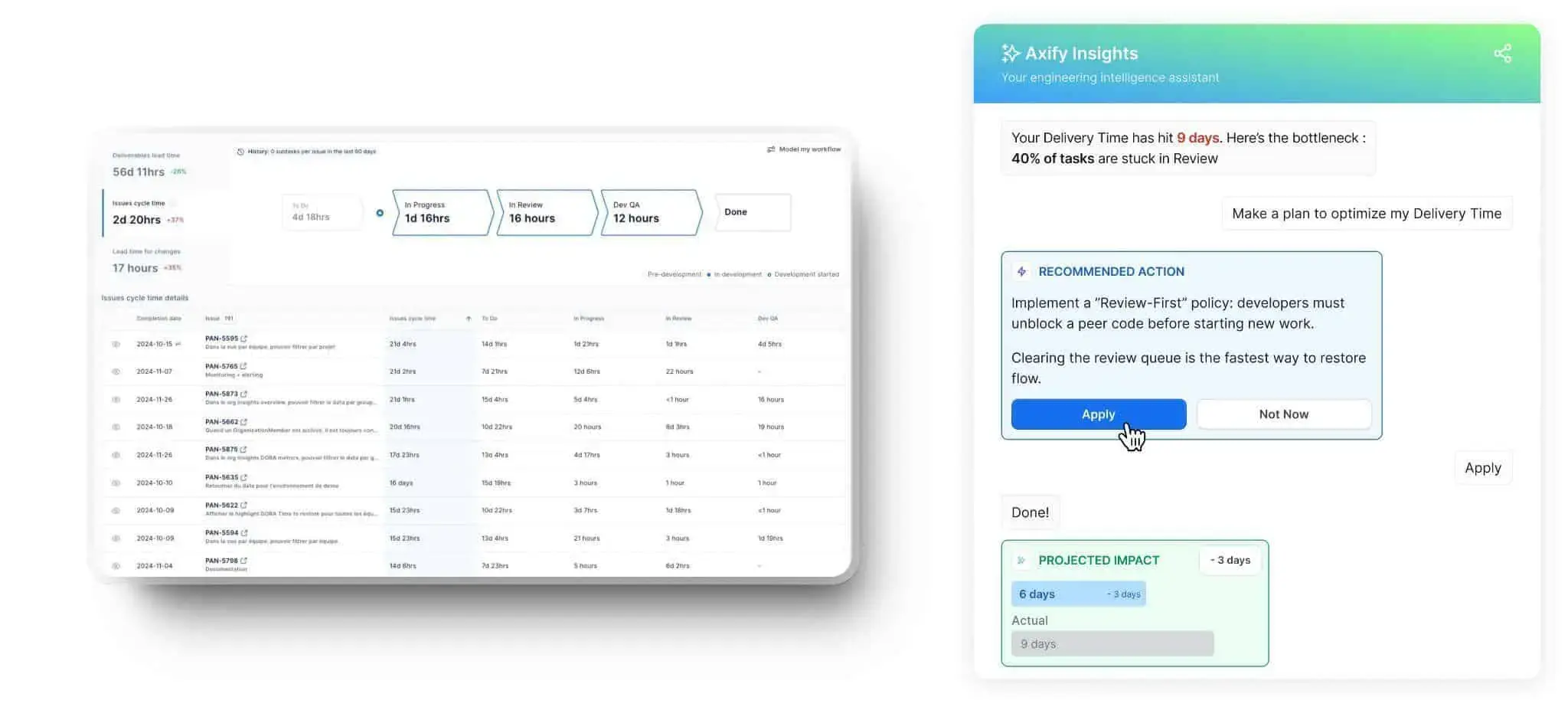
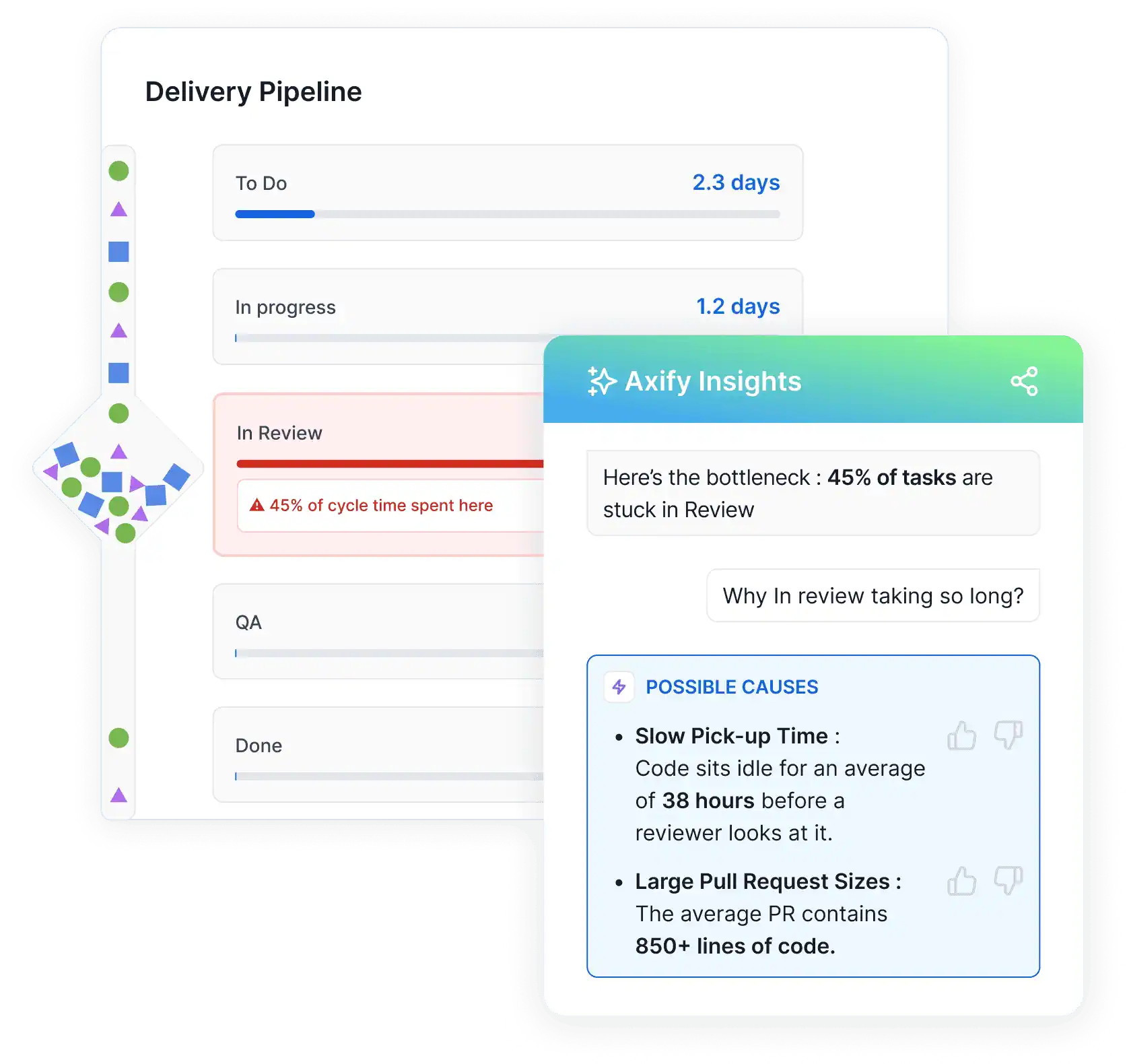
Axify's Value Stream Mapping (VSM) makes these delays visible by mapping how work moves through each stage of the delivery pipeline. You can see which phases consume the most time and where work begins to queue.
Axify Intelligence then analyzes this workflow data to pinpoint the exact bottleneck, explain what is causing it, and suggest actions that help teams restore flow.
AI adoption across engineering teams is increasing, but faster coding does not automatically mean faster delivery. You need measurable evidence that the AI tools you implemented improve your workflow and results. That means tracking adoption signals and comparing delivery performance before and after AI enters the workflow.
First, measure whether your teams actually use AI.
AI adoption metrics such as active users, AI-assisted commits, and suggestion acceptance rate show whether AI tools become part of regular engineering workflows. For example, the acceptance rate reveals how often developers trust and apply AI suggestions instead of ignoring them.
Next, measure whether adoption improves delivery outcomes.
Compare cycle time, lead time, review duration, and deployment performance between periods with and without AI support. These comparisons show whether AI shortens handoffs, reduces review friction, or simply speeds up local coding tasks while the overall system remains unchanged.
This is where Axify’s AI Impact capability becomes valuable.
Axify connects AI usage data with delivery metrics so you can compare team performance with and without AI across the same workflow definitions. Our SEI platform tracks adoption levels, acceptance behavior, and changes in delivery performance to show whether AI actually accelerates delivery or introduces new bottlenecks.
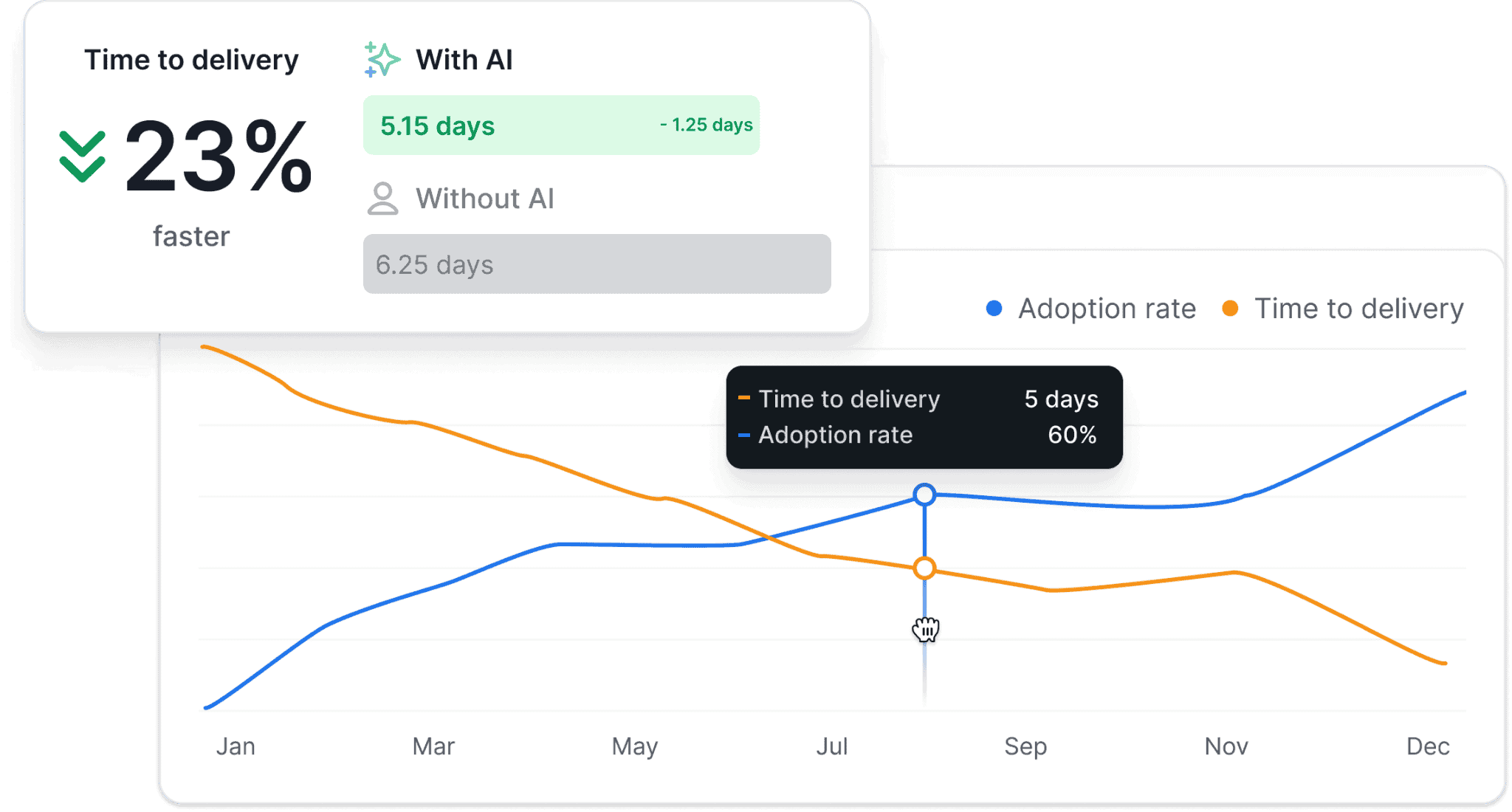
Pro tip: We believe that you should always treat AI as a measurable change in the system. If delivery metrics do not improve as adoption increases, the issue is not the model itself but how AI fits into your workflow.
Delivery metrics do not fully explain why the system behaves as it does across planning, reviews, and execution. Collaboration patterns, developers’ focus time, and satisfaction levels also influence delivery outcomes.
Track the signals below to understand whether the system remains sustainable over time:
Remember: We advise you to treat these signals as system indicators rather than performance reviews.
We’ll discuss the practical framework of implementing these metrics in a second. For now, let's see why following performance metrics doesn’t automatically improve your team’s performance.
There are several reasons why simply following developer performance metrics fails to drive improvement. The most frequent ones include:
Now that you’ve seen the mistakes, here’s how to measure actual performance in software development.
Measuring developer performance does not require tracking individual activity. Instead, you should focus on signals that explain how work moves through SDLC stages. Here’s what we recommend:
Start by defining the outcome you want to improve. Common goals include reducing delivery delays, lowering defect rates, or improving release reliability.
Clear outcomes help you pick the right metrics that reflect the right bottlenecks and lead to the right decisions.
Next, select metrics that reflect how work flows through the delivery pipeline. These usually include signals related to review time, deployment frequency, or delivery stability.
We advise you to cover multiple dimensions of your delivery system. As a practical starting point, select a small set of metrics across key areas such as:
This balanced view helps you understand your system’s throughput and stability at the same time.
Remember: In our experience, 3 to 5 well-chosen metrics across 3 different categories are usually enough to identify meaningful patterns.
Before teams can improve, they need a consistent way to measure performance.
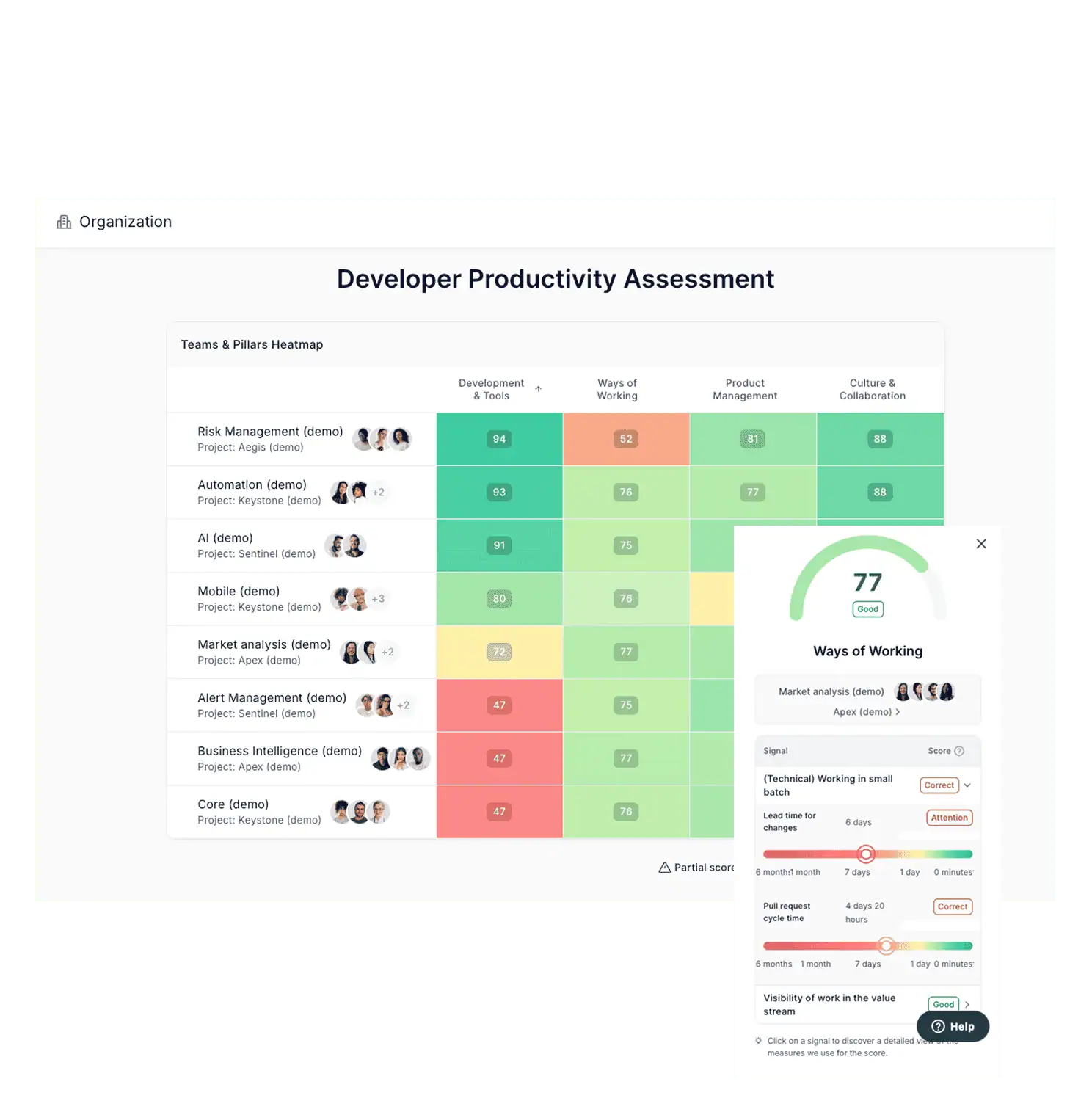
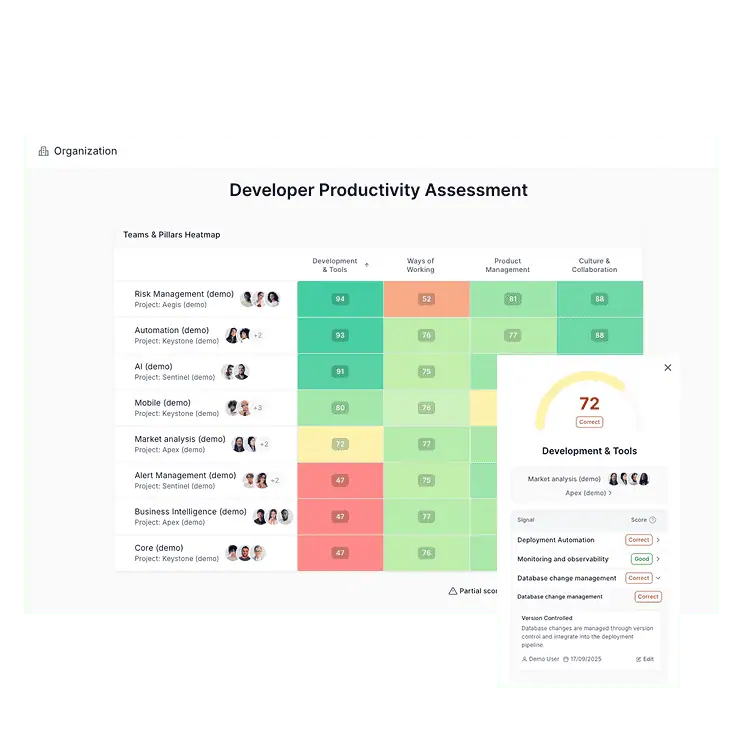
Axify’s Developer Productivity Assessment standardizes how performance is evaluated across teams using four pillars:
This removes ambiguity and ensures every team is measured against the same criteria.
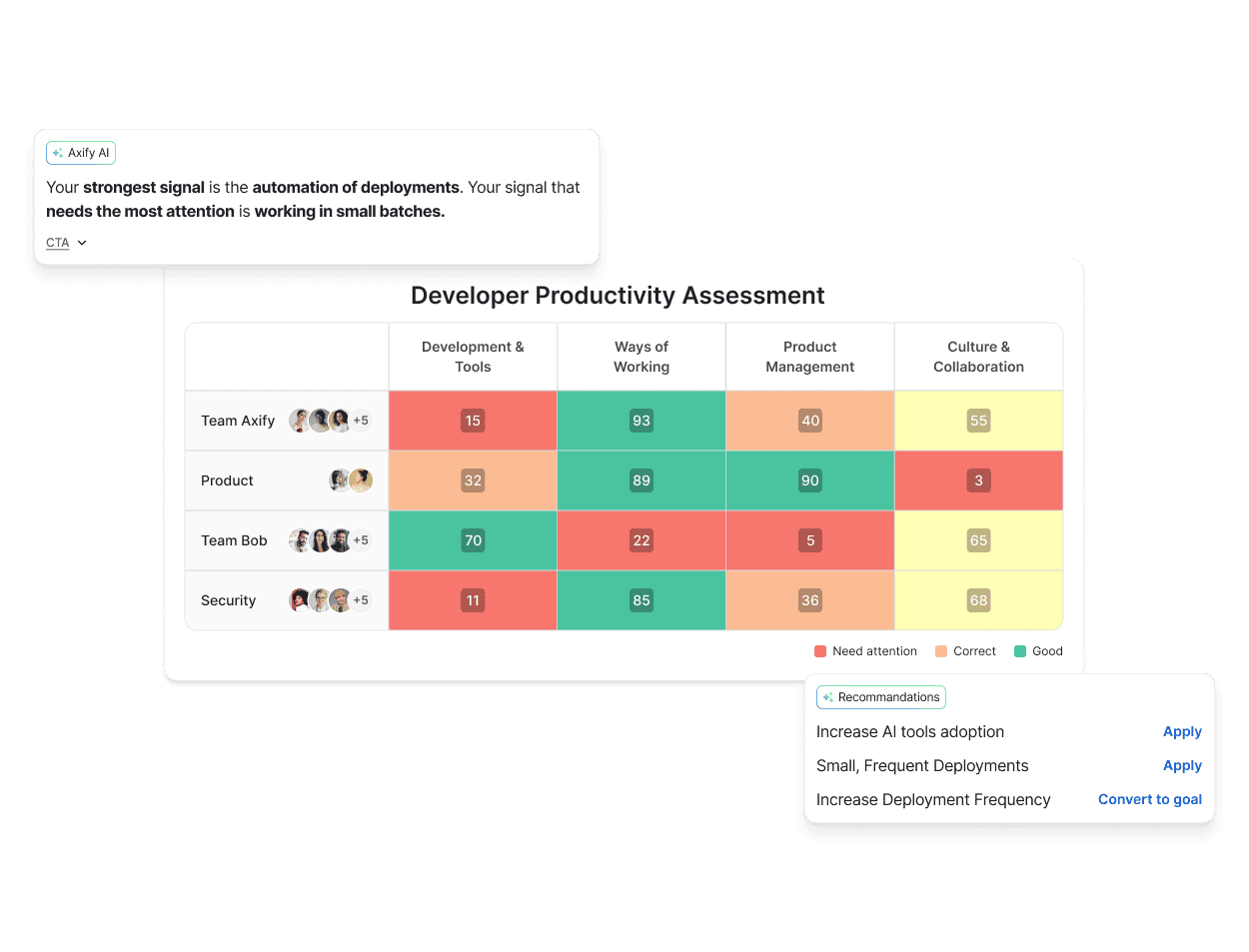
It also showcases the most pressing issues with target recommendations, as well as your highest-performing teams that can be turned into KOLs to inspire, motivate, and increase organizational performance.
At this stage, the goal is not to fix individual problems, but to understand how the system behaves across teams.
For example:
Axify’s Developer Productivity Assessment highlights these patterns automatically, so you can focus on the highest-impact issues
You will also see which teams show stronger delivery patterns.
Those high-performing teams can then become practical reference points, inspiring and educating other teams. That’s because their workflows usually show how specific practices (e.g., smaller pull requests or automated deployment pipelines) reduce delays.
Next, we encourage you to focus on a single improvement decision and test it in practice.
For example, if review queues delay releases, your team might test smaller pull requests or dedicated review rotations. Pick the action that makes more sense in your context and observe how the system responds.
With a baseline established, test targeted improvements in the workflow. These interventions might involve adjusting review ownership, introducing automation, or refining CI pipeline validation.
For example, one enterprise study analyzing AI-assisted engineering workflows found that introducing AI into developer workflows reduced pull-request review cycle time by 31.8%. However, this doesn’t mean the same practice will automatically work in your organization.
Finally, use metrics to guide operational decisions. When review queues grow or failure rates increase, the data should trigger changes in workflow policies, ownership models, or delivery practices.
The point is to use your metrics dashboard as a valuable decision support, not as passive reporting.
This leads us to our next point, where you learn how to move from metrics visibility to decisions.
Once an action improves delivery flow, make it part of your standard workflow.
The productivity assessment then helps track progress across teams over time. Teams that adopt effective practices usually show more consistent delivery patterns, while others can learn from those examples and adopt similar approaches.
Over time, this creates a consistent feedback loop. Metrics reveal delivery patterns, teams test targeted improvements, and successful practices gradually spread across the organization.
If you need a faster way to make engineering decisions that improve your team’s performance, keep reading the next section.
Many engineering analytics tools showcase trend lines and create benchmark reports.
Leaders can see that delivery slowed or that review time increased, but the tool rarely explains why those changes happened or what action would improve them.
Axify Intelligence solves that issue.
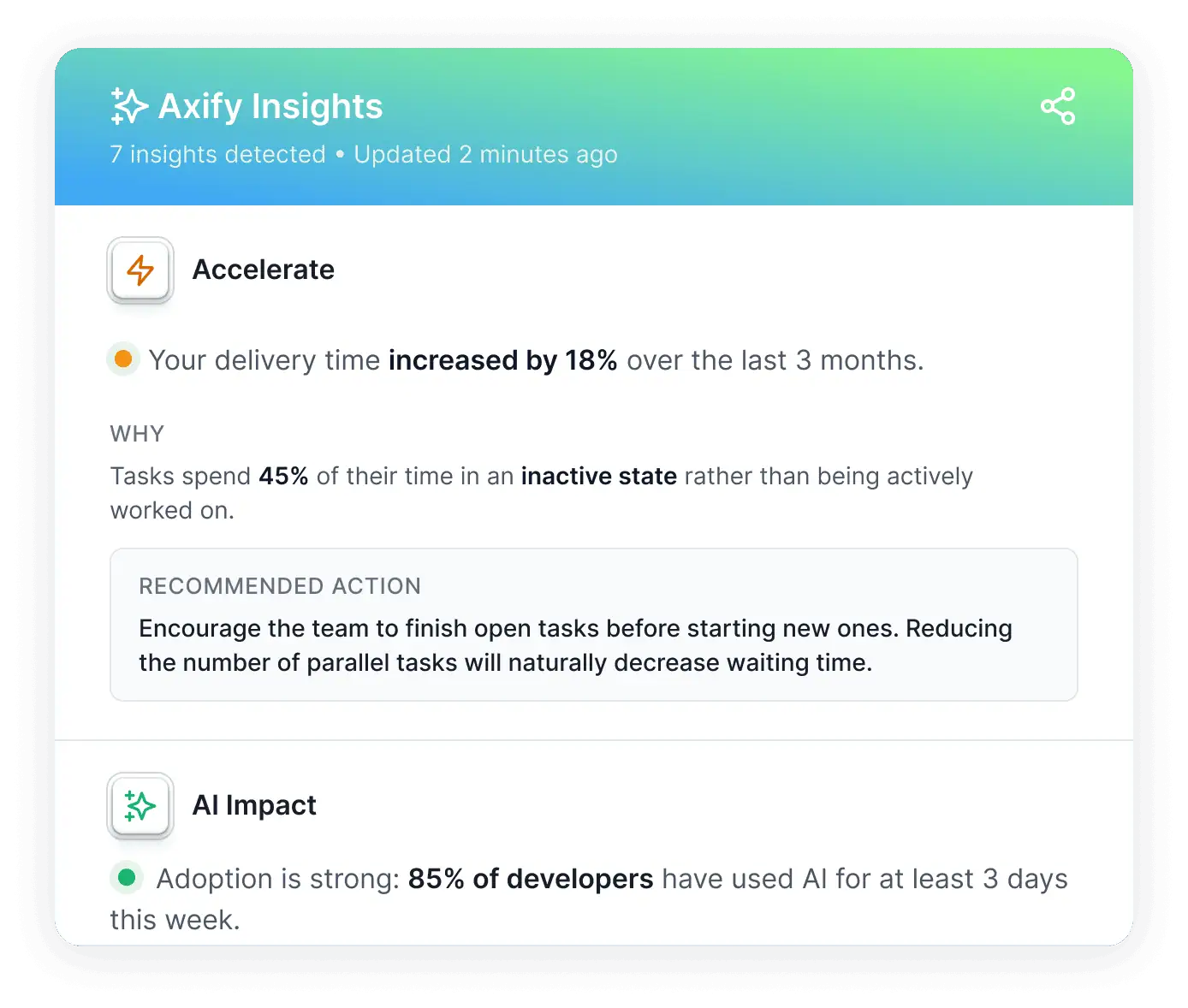
Axify Intelligence analyzes your delivery data continuously and gives you decision-ready insights. Here’s how.
1. This analysis starts with pattern detection.
The system monitors trends and changes across multiple delivery signals. It then identifies recurring issues such as growing review queues, increasing pull request size, or rising work-in-progress. When these patterns indicate emerging delivery constraints, Axify surfaces them automatically with contextual explanations.
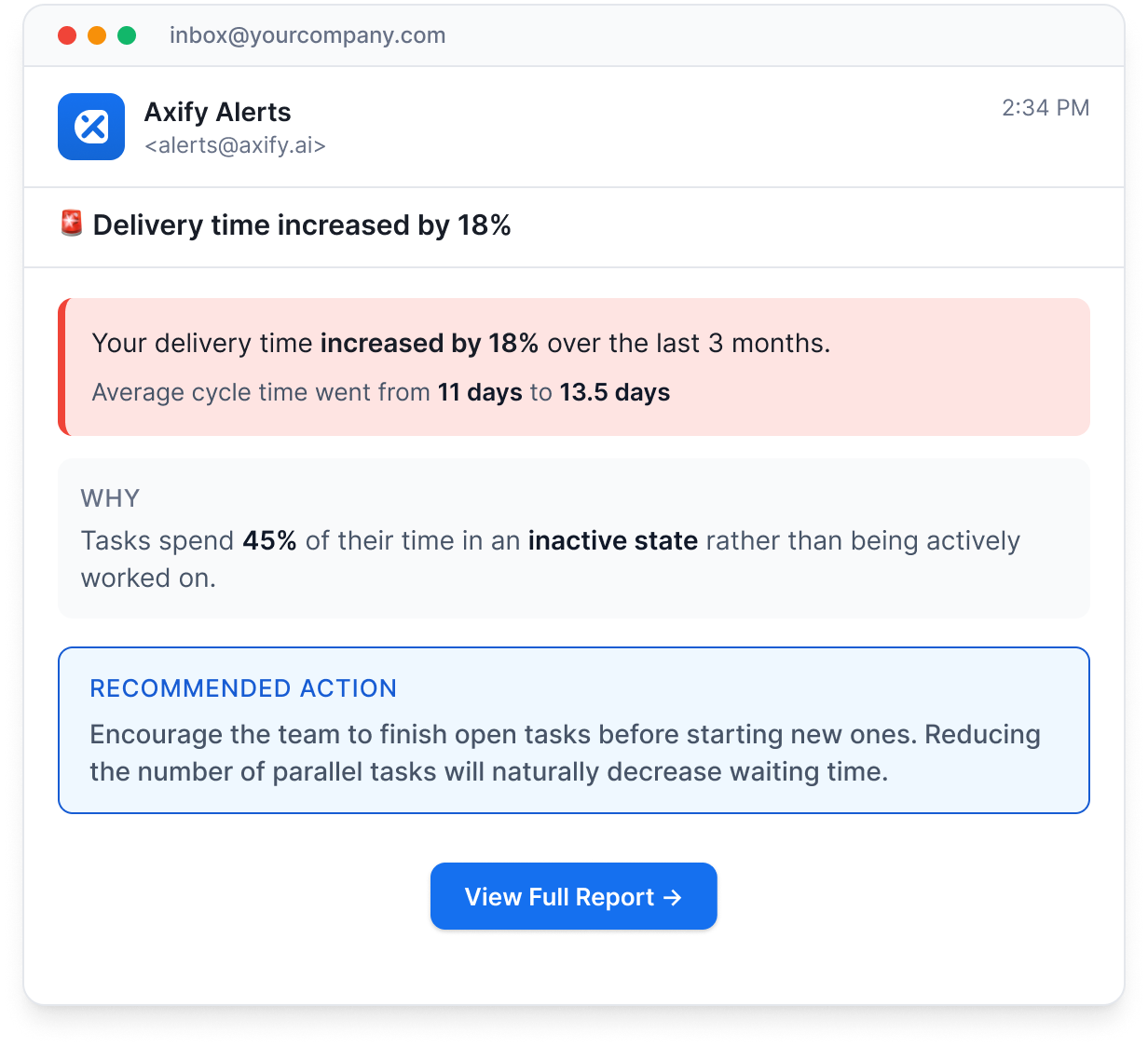
2. The platform also detects anomalies in real time.
If delivery time increases or cycle time shifts unexpectedly, Axify highlights the change and provides the underlying workflow context. This allows engineering leaders to understand the cause without manually analyzing multiple dashboards.
3. It gives context-aware recommendations for your organization.
Most importantly, Axify Intelligence goes beyond diagnosis by proposing context-aware recommendations. The system suggests workflow adjustments, such as review policy changes, ownership adjustments, or sequencing changes that could restore delivery flow.
Before leaders interact with the system conversationally, Axify surfaces these insights as a structured executive summary. From there, leaders can explore the data through dashboards or ask the AI assistant deeper questions about delivery behavior.
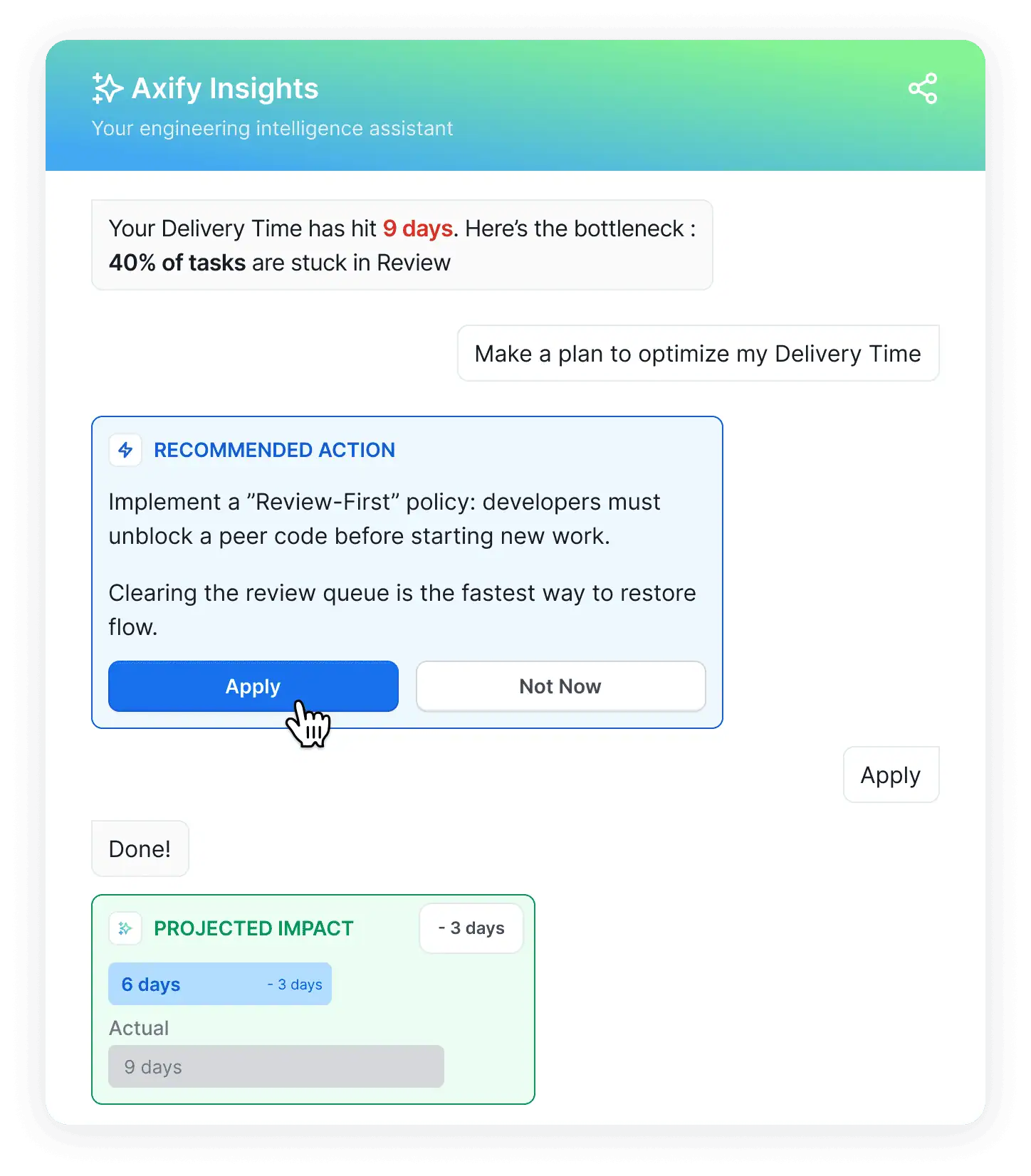
4. The result is faster decision velocity.
Instead of spending review meetings debating causes and solutions, you can:
Now, we want to give you a helpful framework for using these metrics to drive growth.
As we explained in this article, performance metrics give you workflow visibility.
Signals such as cycle time, review queues, deployment frequency, and change failure rate reveal whether pull requests, CI pipelines, and releases move without delay or slow down in queues, handoffs, or failed changes.
But visibility alone does not change delivery outcomes.
Once these signals expose where work stalls, you can adjust review practices, pipeline automation, or ownership models to improve your delivery.
In the long run, making good operational decisions based on correct measurement improves delivery reliability and predictability.
Remember: if you want visibility, precise insights, and concrete actions to resolve workflow constraints, book a demo with Axify today!
No, performance metrics are not the same as productivity metrics. Performance metrics show how work moves through your delivery pipeline. Productivity metrics attempt to describe output, while performance metrics help you understand how the system behaves so you can fix bottlenecks inside the workflow.
No, developer performance should not be measured individually because they don’t give you the complete picture of how your delivery system behaves. Individual metrics also distort developers’ behavior because they start optimizing individual numbers instead of improving the delivery flow.
The most important DORA metrics are deployment frequency, lead time for changes, change failure rate, and failed deployment recovery time. These metrics show how quickly your team ships code, how long changes take to reach production, and how stable releases remain after deployment.
You measure AI’s impact on developers by comparing delivery metrics before and after teams start using AI tools. Platforms such as Axify track signals like AI adoption, accepted code suggestions, and changes in delivery patterns. This comparison shows whether AI actually reduces delays in coding, review, and release workflows.
A good cycle time benchmark is typically between three and seven days. This range usually reflects a workflow where pull requests stay small, reviews happen quickly, and deployments move through CI/CD pipelines without long queues. Shorter cycle times typically indicate that work moves with fewer delays from active development through review and release.