AI
19 minutes reading time

AI can now generate thousands of lines of production-ready code from a detailed specification.
A specification is a detailed document defining the entire system contract, rules, and boundaries before you start coding. As such, code generation becomes much faster, but specification quality may take longer.
The spec becomes the working instruction set for people and AI systems across the software development lifecycle, and when that instruction set is unclear, faster output can give your team more review work, more rework, and more defects to trace later.
That’s why you need a high-quality plan first. That’s exactly what spec-driven development (SDD) is.
To help you achieve that, this article focuses on the questions most SDD discussions skip:
Just to give you a preview, we’ll discuss how to evaluate it through requirements, review, QA, ownership, delivery metrics, and AI-assisted development. We’ll also review examples, SDD tools, and more.
Let’s get started.
Spec-driven development is a software engineering methodology and delivery approach where a detailed specification is written and locked in before any code is created.
Instead of writing code or prompting an AI on the fly, the team creates a structured blueprint (the specification) that acts as the absolute source of truth. The AI or developer then uses this blueprint to automatically generate, test, and deploy the software exactly as planned.
In practice, you define what the feature must do, what is out of scope, which constraints apply, and how the result will be verified. That spec then guides humans and AI coding assistants through the same development process.
AI accelerates SDD because code can now be generated much faster. As a result, teams may need more time to review, test, and validate it.
Data from McKinsey proves this: generative AI reduced task completion time by 35-45% for code generation. Meanwhile, high-complexity tasks (where we can include review, testing, and validation, among others) saw less than 10% time savings.
So, the lesson is clear: If you don’t lock in a precise spec before the AI starts typing, you will spend all your saved time fixing its mistakes. Spec-driven development solves this by reducing interpretation work upfront, ensuring that accelerated code output aligns perfectly with system architecture from day one.
In SDD, code is no longer the main working artifact like it is in traditional development. Of course, code still matters, but the spec becomes the reference point for planning, implementation, review, and QA.
Below are the other differences stemming from this core distinction:
| Area | Traditional Development | SDD |
| Primary artifact | Code | Specification |
| Unit of work | Story/task | Feature/spec |
| Developer focus | Implementation | Verification |
| Review focus | Code | Spec + code |
| AI role | Optional | Core workflow |
TDD stands for test-driven development. This is a design methodology that treats automated tests as the definitive functional specification for production code. It flips the traditional lifecycle by mandating that a unit test must exist and fail before any new operational code is written. Here’s how it works:
Agile is a software development methodology that breaks a project down into short, iterative development cycles called sprints. Instead of delaying testing and planning to the end of a massive project, Agile forces these phases to happen daily. Requirements evolve continuously based on real-time feedback from the previous sprint’s deployment.
SDD complements both test-driven development and Agile by adding a crystal-clear layer before any implementation begins. It makes requirements, architectural constraints, and verification criteria explicit enough for both human developers and AI coding agents to follow without confusion.
However, like TDD, SDD requires investment. You are adding deliberate design work upfront to eliminate severe defects later. Microsoft Research reported that TDD teams achieved a 40–90% reduction in defect density, but required 15–35% longer to complete projects.
SDD demands a similar discipline. While writing a detailed specification adds time before coding starts, its true return on investment must be measured downstream. Teams should judge SDD’s success by whether that upfront effort successfully reduces AI code rework, shortens human code reviews, and stabilizes overall delivery consistency.
Depending on how deeply a team adopts this discipline, SDD generally evolves across two stages:
Once you understand how SDD reshapes the development lifecycle, the next question is why teams are urgently adopting it now.
Teams are exploring spec-driven development because AI code generation is faster but not always better. Prompting without enough context or having weak requirements means that code is not as high quality as it should be. As such, delivery slows because you’ll spend more time on review, rework, and late defect fixes. SDD done right may solve this issue.
The main promise of spec-driven development is simple: important decisions happen before implementation starts. As such, you define requirements, constraints, and expected behavior in a format that both humans and AI systems can follow.
When done well, SDD creates several advantages:
For most teams, the success of SDD should be measured by whether it reduces clarification cycles, requirement churn, and avoidable rework throughout the delivery process.
SDD breaks down when the spec becomes another artifact that nobody owns, updates, or verifies during delivery. In that case, the spec adds process weight while the real decisions still happen in chat threads, code review, or emergency fixes.
These are the common failure points:
Those pros and cons stem from the way in which SDD changes day-to-day delivery, so that’s what we’ll discuss next.
SDD changes the SDLC by moving more delivery risk into the specification stage, where you can still correct it cheaply. That matters because once AI starts producing code from unclear instructions, your team may spend less time typing code and more time finding where the generated implementation missed the intent.
These are the main SDLC changes you need to plan for.
In SDD, requirements stop being a starting note for developers and become the working input for the full delivery system. Product still owns customer intent, but engineering now needs to check whether that intent is specific enough to guide architecture, dependencies, constraints, edge cases, and release expectations.
That makes specification quality a delivery concern.
For example, a billing specification should define expected customer behavior, data rules, failure states, and the systems affected by the change. If those details are missing, an AI agent may still generate working code, but reviewers will have to reconstruct the real requirements during review.
This also affects estimation.
A 2021 survey of 121 Agile practitioners across 25 countries found that 98% considered documented information moderately to extremely important for effort estimation. 73% would re-estimate a task when the documented information changed.
For your team, that means changing the spec should trigger a planning check because the effort, risk, and validation scope may have changed as well.
Spec-driven development makes implementation easier and faster. When AI can generate plans, tests, documentation, and production-ready code from a specification, your team’s focus moves toward coordination, validation, and decision-making.
This changes how engineering time is spent.
Instead of asking whether developers can build a feature quickly enough, teams spend more time deciding whether the specification is complete, whether the implementation matches the intended behavior, and whether the resulting changes are safe to release.
Teams that recognize this shift early tend to adapt more successfully than teams that continue optimizing only for coding speed.
SDD can change how teams structure planning and delivery. Instead of treating individual user stories as the primary unit of work, teams begin with a feature-level specification that describes the complete behavior they want to deliver.
That specification can then be broken into smaller implementation, testing, review, and release tasks.
A feature-level spec may cover multiple user stories, shared design decisions, acceptance criteria, dependencies, and rollout requirements. Teams may still use tickets, but those tickets become implementation units that support the feature, not independent units of value.
This changes what teams pay attention to during planning and delivery:
| Traditional Focus | Potential SDD Focus |
| Story points | Feature complexity |
| Velocity | Lead time |
| Tickets completed | Features delivered |
| Individual tasks | End-to-end outcomes |
This approach works best when the feature is reasonably well understood. When requirements are still evolving, every change to the specification can affect implementation scope, testing requirements, review effort, and release planning.
That’s why you should treat feature specifications as living artifacts that evolve alongside your work, not static documents needed only at the start of a project.
SDD moves quality work earlier because acceptance criteria, spec reviews, and automated checks happen before the team invests heavily in implementation.
The cost logic is clear.
NIST’s defect-cost model shows that an error found during requirements or architecture costs 1x to fix. Meanwhile, the same error can cost 5x during coding or unit test, 10x during integration or system test, 15x during beta, and 30x after release.
This becomes more important as AI software development accelerates implementation. In a traditional workflow, those mistakes may take days or weeks to spread through the codebase. In an AI-assisted workflow, they can spread in hours.
That changes the economics of quality. As AI-generated output increases, the cost of a flawed specification increases as well. Teams that invest in specification reviews, acceptance criteria, and early validation can prevent problems that would be far more expensive to fix later in their delivery process.
That’s why you need to have good specifications to start with, which brings us to the next point:
Your team should treat the specification as a shared artifact with one named owner. Otherwise, unclear ownership turns SDD into uncontrolled documentation-driven development.
That matters because the spec guides everything from planning to AI-assisted implementation, review, and testing. If nobody owns updates, your team may generate code from outdated assumptions and catch the mismatch during review.
These are the ownership rules you need:
SDD becomes easier to understand when you look at how it changes real delivery work. The examples below show three very different situations.
Amazon Web Services’ Kiro is one of the clearest examples of spec-first development moving into mainstream engineering workflows.
A developer describes a requirement in natural language, and Kiro generates user stories, acceptance criteria, a technical design, and an implementation plan. Teams can review those artifacts before implementation begins, then use AI assistance to execute individual tasks.
Requirements, design decisions, and implementation steps remain visible throughout the workflow. Product, engineering, and QA can review assumptions, identify gaps, and refine the plan before code generation starts.
When a major cloud vendor builds specifications directly into the development process, it signals a broader shift toward structured AI-assisted delivery.
The opposite pattern is ad-hoc prompting without a shared specification. Ad-hoc prompting can work well for prototypes, experiments, and small changes. Problems usually appear when multiple developers or agents make related changes across the same codebase.
Imagine two developers working on the same product area over several weeks.
One asks an AI assistant to add validation to a checkout flow. Another later requests similar validation for account creation. Both changes work, but each follows a different pattern. One validates email addresses in the frontend, while the other performs validation in the API. Error messages differ, edge cases are handled differently, and future developers are left guessing which implementation should be reused.
The team responds by creating a specification that defines validation rules, error handling requirements, accepted input formats, and ownership of the validation logic. Every future implementation references the same document.
A month later, new validation work follows the same pattern across both flows. Reviewers spend less time debating behavior, duplicate implementations stop appearing, and engineers can update validation requirements in one place instead of tracking down multiple versions of the same rule.
Imagine a team replacing a legacy billing system that has accumulated years of business logic, integrations, and edge-case handling. The project affects payment processing, invoices, reporting, customer notifications, and several internal services.
Before implementation begins, the team creates a specification that documents the target architecture, API contracts, migration rules, compatibility requirements, rollout plan, and acceptance criteria.
That specification becomes the reference point for every team involved. Developers use it to implement changes, QA uses it to build test scenarios, and reviewers use it to verify whether the implementation matches the expected behavior.
As the project progresses, questions inevitably arise. Should old invoice formats remain supported? What happens if a migration fails halfway through? Which services can be upgraded first, and which depend on backward compatibility?
Instead of answering those questions independently in tickets, meetings, or chat threads, teams resolve them in the specification and update the shared plan.
The result is fewer conflicting assumptions, fewer surprises during integration testing, and a smoother rollout. Most importantly, teams spend less time revisiting architectural decisions that were already discussed and approved earlier in the project.
A useful specification gives humans and AI agents the same working instructions. If the specification is vague, the AI agent will fill gaps with guesses, and the reviewer will pay for those guesses during review.
These are the parts your spec should include:
Several tools now support spec-first workflows by helping teams move from requirements to planning, implementation, and verification.
These are some good options.
Kiro gives you a structured SDD workflow: requirements, design, then tasks. You describe what you want in natural language, and the tool turns that into user stories, acceptance criteria, a technical design, and a sequenced task list. Teams that want more visibility into planning decisions find this approach useful because requirements and implementation plans remain reviewable before development begins.
Spec Kit gives you a structured specification workflow that fits into AI-assisted planning. You can use it to define the feature, turn the spec into a plan, and break the work into implementation tasks.
This can be useful for teams that want specifications to remain part of the development workflow rather than living in separate documents.
OpenSpec focuses on collaborative specification development. Product, engineering, and QA teams can contribute to requirements before implementation begins.
This is particularly useful for features that involve multiple business rules, compliance requirements, customer-facing workflows, or cross-functional dependencies. Examples include billing systems, onboarding flows, permissions, approval workflows, and integrations with external platforms, where product, engineering, support, security, or legal teams may all need input before development starts.
Most teams can start with specifications stored alongside their codebase and managed through existing development workflows.
Dedicated SDD tools become more valuable when specifications start influencing planning, reviews, testing, compliance, or coordination across multiple teams. At that point, teams often need stronger traceability, clearer ownership, and a more structured workflow than a collection of documents can provide.
You can tell that SDD is working if you see meaningful delivery changes across requirements, implementation, review, QA, and AI usage. If you pilot SDD on one team, compare the same metrics before and after adoption, using the same project type and review period.
These are the areas to track.
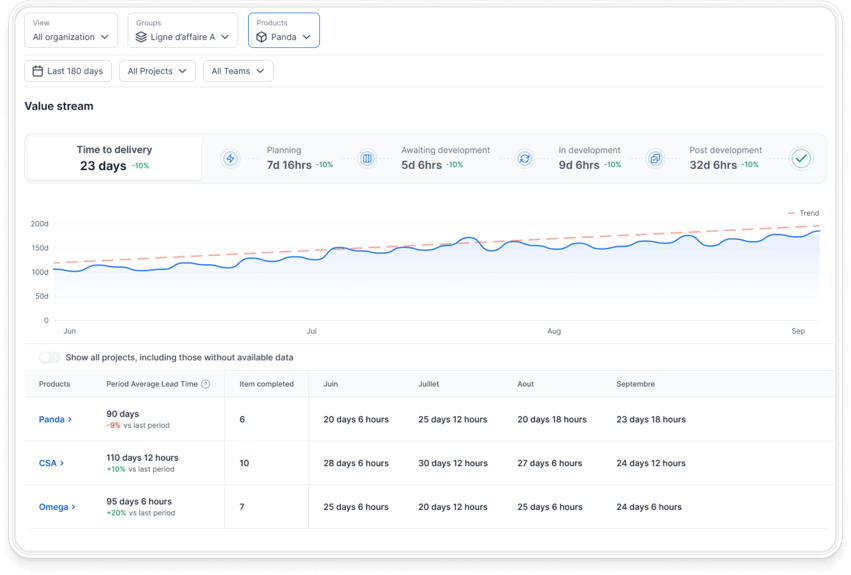
Start with velocity-related metrics like lead time, cycle time, or deployment frequency. If SDD works, your team should move a feature from approved spec to production with fewer stalled handoffs, fewer clarification loops, and fewer late changes.
Axify helps you track these delivery patterns through DORA metrics and value stream metrics. So, you can see whether the pilot reduced delivery time or only moved work from coding into other SDLC stages.
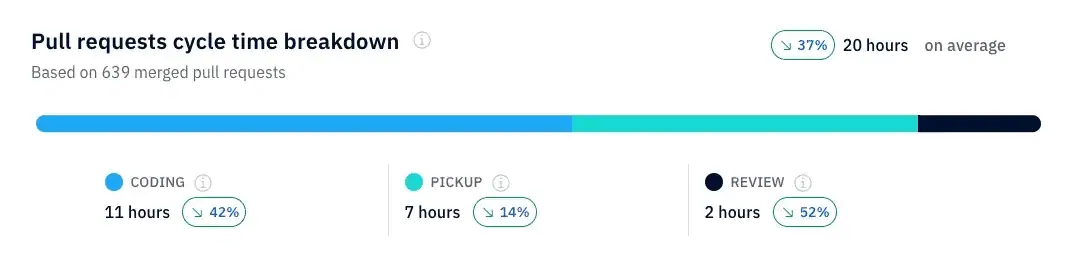
Track review duration, testing effort, and validation workload. Our advice is to assume SDD usually reduces implementation effort while increasing verification effort. That tradeoff is acceptable only if the extra review catches unclear requirements, edge cases, or integration risks earlier.
Axify can help you spot whether review is becoming the new bottleneck by tracking pull request cycle time for each stage. If PR review time grows while rework and defects stay the same, the spec process you’ve implemented may be adding work without reducing delivery risk.
Quality outcomes can be tracked through metrics like defects, rework, production incidents, rollbacks, and change failure rate. 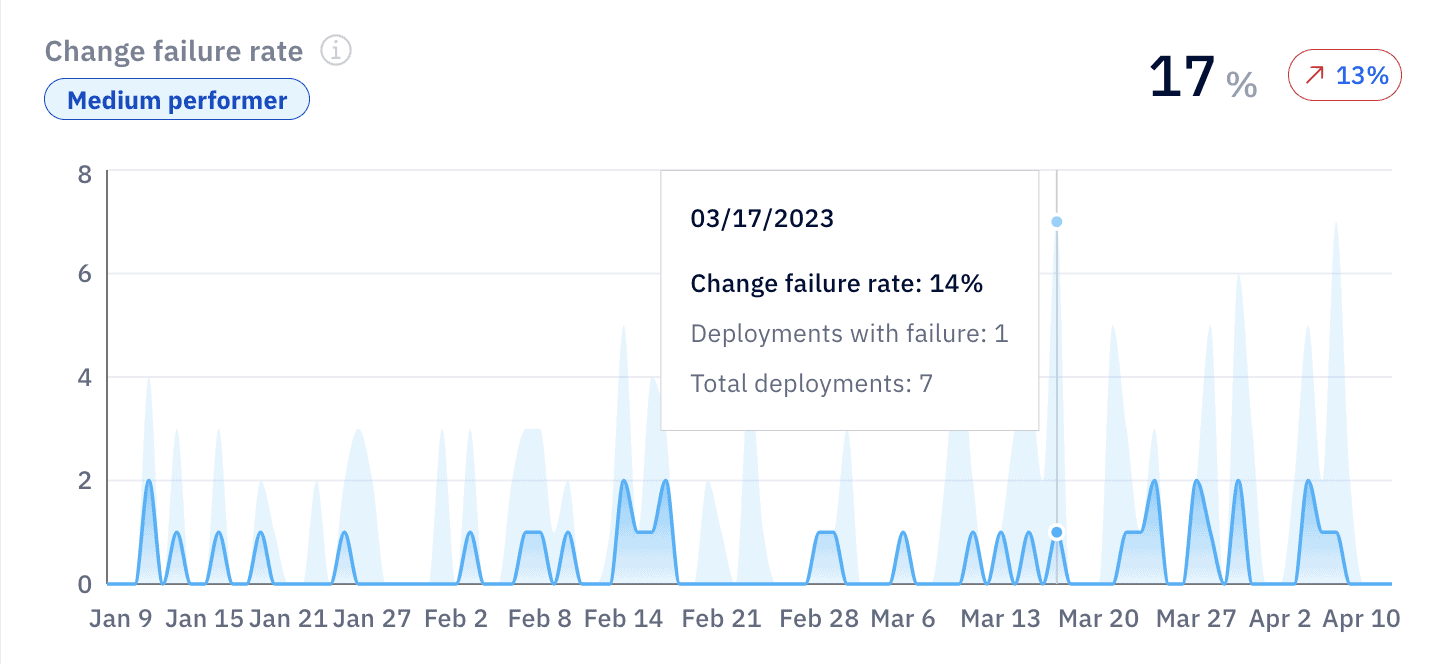
A good SDD pilot should mean fewer unclear requirements reach production. If quality stays the same (or drops) while your team spends more time writing and reviewing specs, investigate why. For example, your specifications may be too generic to guide implementation, too detailed for the type of work being delivered, or disconnected from code review and testing workflows.
AI coding agents typically accelerate SDD adoption because they eliminate the friction of writing blueprints by turning specifications into instant, automated code generation. In fact, AI agents reduce the friction of writing specs by generating boilerplate, flagging architectural violations, and handling multi-file refactors, which makes teams more likely to keep specs current.
For that reason, teams should evaluate AI adoption and SDD adoption together.
Measure both adoption and outcomes:
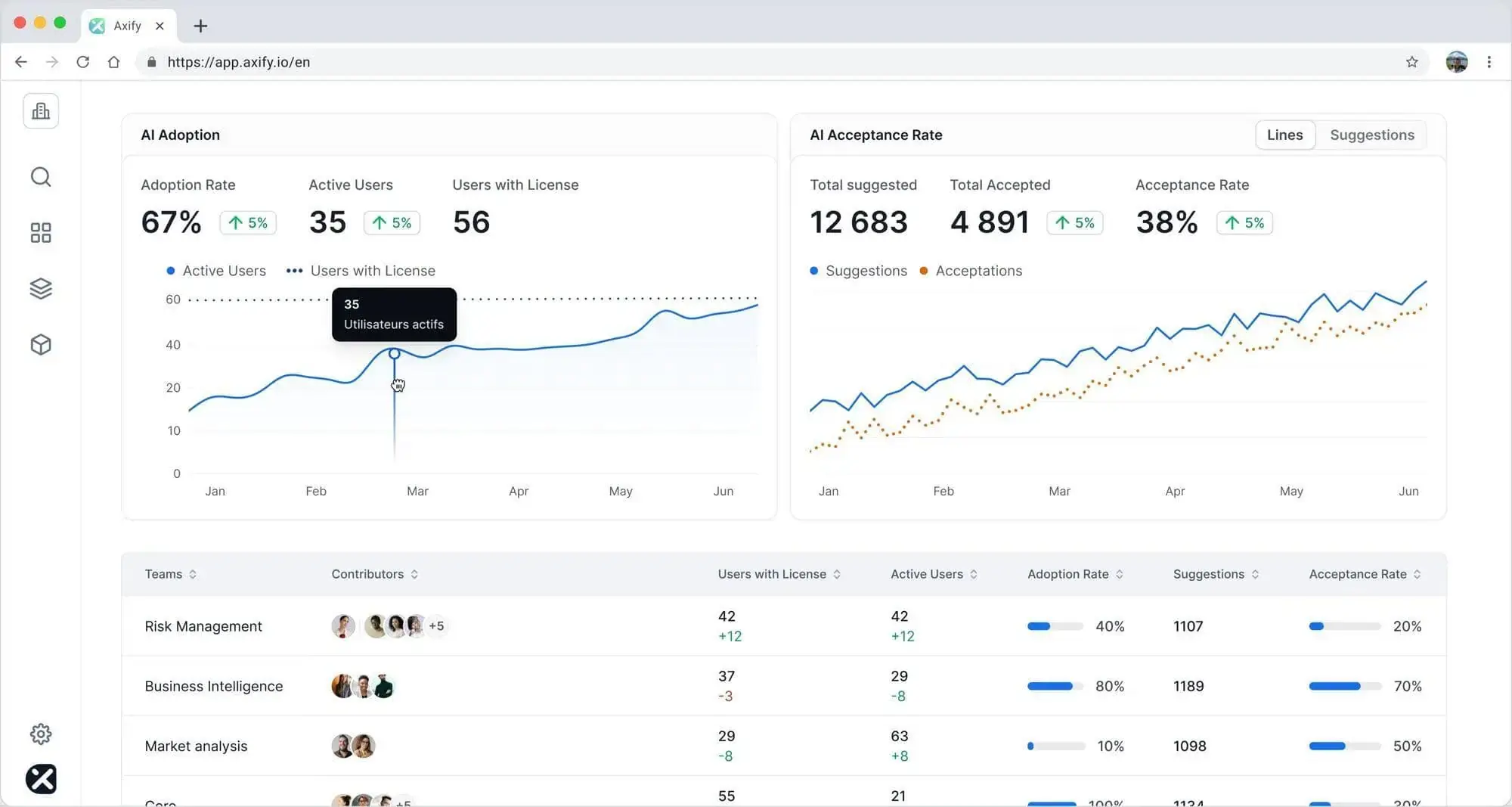
Axify’s AI Adoption and Impact dashboards connect those signals because it shows how AI usage changes across teams and how those changes relate to delivery performance.
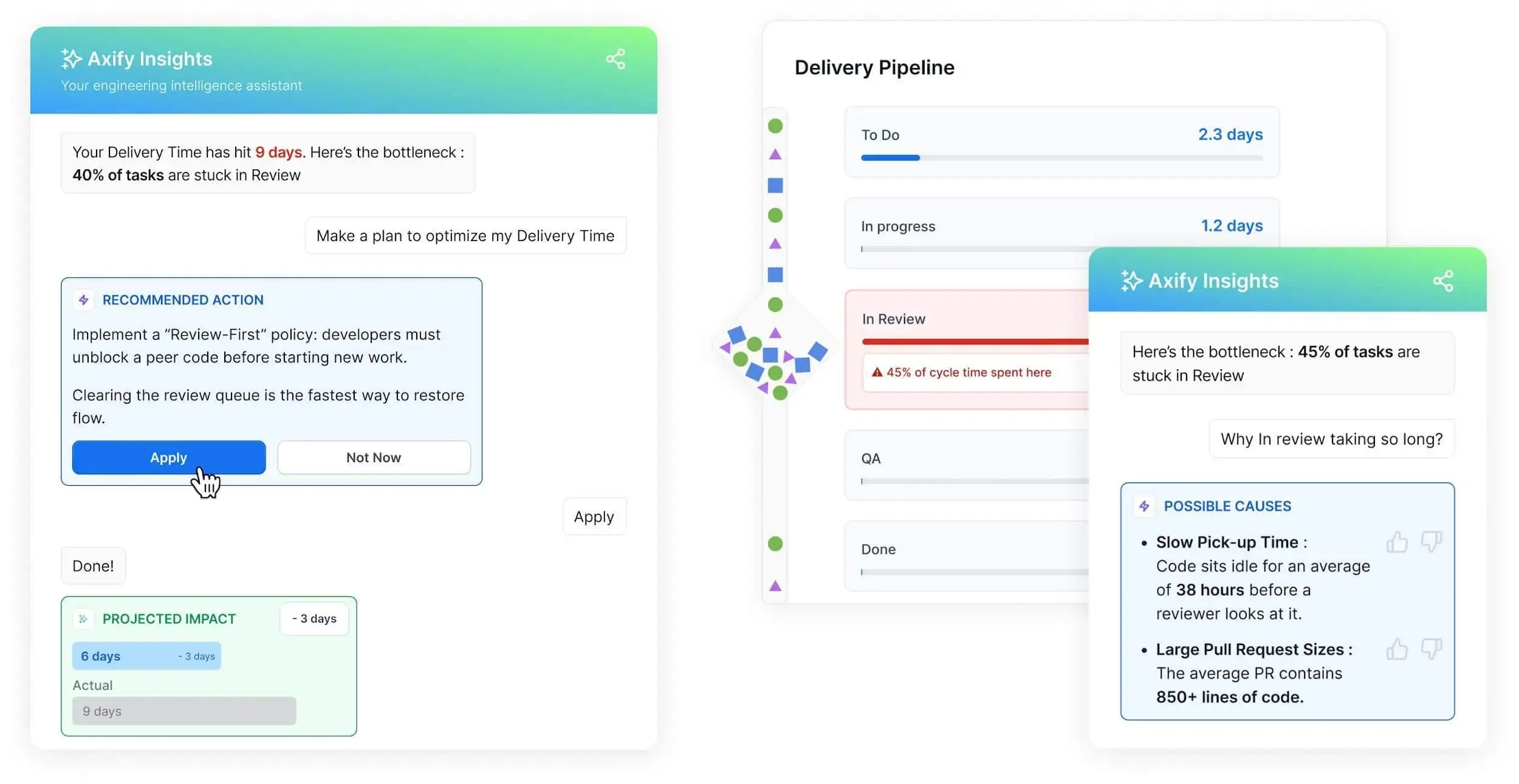
Axify Intelligence adds another layer by letting engineering leaders ask questions in natural language. You can now investigate delivery trends, adoption patterns, bottlenecks, and performance differences across teams, then receive recommendations based on your live engineering data.
The most reliable way to evaluate SDD is to compare the same delivery indicators before and after adoption. Use the framework below to organize your measurements and identify whether the pilot is creating meaningful improvements.
| Area | Before SDD | After SDD | Decision Signal |
| Speed | Lead time and cycle time | Same metrics | Did delivery get faster? |
| Review | Review duration | Review duration | Did verification become a bottleneck? |
| Quality | Defects, rework, incidents | Same outcomes | Did the risk move earlier? |
| AI usage | Tool usage and acceptance | Same signals | Did agents support the workflow? |
Use this pilot data to decide whether SDD deserves a broader rollout, should stay limited to complex features, or needs a lighter specification process.
SDD should reduce the cost of getting useful output from AI. However, vague specifications can lead agents to regenerate code, consume more tokens, and create larger review workloads. Those costs may rise even when implementation appears faster.
Axify’s AI Cost Management capabilities help you:
For an SDD pilot, compare AI costs before and after introducing structured specifications for similar types of work. Then assess those costs alongside cycle time, review duration, rework, and quality. If clearer specifications reduce repeated prompts, unnecessary code regeneration, or review effort, the pilot should improve the cost-to-impact ratio.
SDD is most useful when delivery problems can be traced back to unclear requirements, inconsistent implementation decisions, or coordination challenges across teams. The goal is to prevent costly misunderstandings before implementation begins, not to add another documentation process.
We recommend starting with one team, one project, and one feature that is important enough to measure. Before the pilot starts, capture delivery speed, quality outcomes, review effort, and AI adoption. Then compare the same signals after the feature ships.
Axify can help you track whether SDD changes lead time, cycle time, review duration, rework, PR cycle time and merge time, and AI usage across the pilot period. With that data, you can decide whether SDD deserves a broader rollout or should stay limited to specific types of work.
Successful SDD adoption starts with a clear problem statement. Teams that see the strongest results usually know exactly what they want the process to improve, whether that’s reducing requirement churn, coordinating large cross-team projects, improving AI-generated output, or making architectural decisions easier to review.
Start with a single feature or initiative. Define the outcome you want to improve, establish a baseline, and evaluate the results after delivery. That way, you’ll have evidence about where SDD creates value and where existing workflows are already enough.
Axify helps you evaluate that decision with delivery and AI adoption data. Our software engineering intelligence platform lets you:
Curious how that works? Book a demo with Axify today!

No. Full specifications are most useful for complex features, cross-system changes, and work delegated to AI agents. You may only need clear acceptance criteria for small bug fixes and routine maintenance. The required level of detail should reflect the change’s risk, ambiguity, and coordination needs.
Yes, but expect more discovery work upfront. Legacy systems tend to have undocumented rules and dependencies that you must identify before writing a reliable specification. So, start with a contained workflow because it’s safer than attempting to document the entire codebase at once.
An SDD pilot usually needs four to eight weeks, or enough time to deliver one representative feature from specification through production. You need to evaluate implementation, review, release, and early production outcomes, so don’t end the pilot as soon as the code is merged.
Most teams need both. Natural language captures business behavior, scope, and constraints, while schemas, contracts, tests, or diagrams express technical rules more precisely. The right format is whichever makes the requirement unambiguous and verifiable by developers, reviewers, and AI agents.
Store specifications in version control and update them through the same change process as the implementation. A pull request should show when code changes affect requirements, constraints, or acceptance criteria, with one named owner responsible for approving the updated specification.
Developers need stronger requirement analysis, system design, and verification skills. Writing code well is still important, but more of their value comes from identifying ambiguity, defining constraints, evaluating AI-generated implementations, and deciding whether the delivered behavior matches the intended system design.