AI
11 minutes reading time

AI coding tools can help your engineering teams code faster, but that does not prove faster software delivery. You prove AI ROI for software engineering when shorter cycle time and healthier deployment frequency come with stable quality, faster recovery, and less rework.
And let's not forget that you must also account for licenses, model usage, training, review, and the adoption dip.
DORA’s 2025 research gives you reason for caution because 90% of respondents used AI at work and over 80% believed it increased productivity, while 30% reported little or no trust in its output. That’s why you need delivery data showing whether faster coding indeed reaches production without extra correction or stability costs.
In this guide, we will show you how to validate the ROI of AI coding tools with real engineering data. You will also see:
Pro tip: Use the free AI ROI calculator below to estimate your current return before applying the framework.
Let’s get started!
AI ROI in software engineering measures how much business value you gain from AI-assisted work. You create positive value when AI helps reclaim engineering capacity, shorten feature delivery, reduce defect rates, speed incident response, or complete higher-priority work.
To calculate the real financial impact, you must also count licenses, model usage, training, review, rework, and rollout costs.
Use this formula to compare the measurable value you gain with your full AI investment:
| AI ROI (%) = [(Value Generated − Total AI Investment) / Total AI Investment] × 100 |
|---|
Pro tip: Don’t count estimated hours saved as an automatic value. Faster code generation creates a return only when you turn that time into delivered work, fewer bottlenecks, and lower incident costs.
It also includes better quality or capacity intentionally reassigned to higher-value engineering work. This distinction keeps your Generative AI ROI based on measurable engineering results.
No single metric can prove whether your AI investment pays back. Because of that, you need six connected layers that show how your team performed before AI and whether people use it consistently. You also need to know what changed in delivery and quality, what the change cost, and whether it produced measurable financial value.
| Layer | What It Measures | Example Metrics |
|---|---|---|
| Baseline | How your team performed before AI | Cycle time, PR review time, deployment frequency, change failure rate, mean time to recovery, and rework |
| Adoption, according to the DORA 2025 report | Whether your team uses AI consistently | Usage covers active use and frequency. Habit covers repeated use over time. Confidence can be approximated through acceptance rates and how AI-assisted changes hold up in review. |
| Delivery Impact | Whether your work moves faster | Coding time, cycle time, ticket resolution time, and deployment frequency |
| Quality & Stability | Whether faster work creates additional risk | Rework, reopened tickets, defects, incidents, and change failure rate |
| Cost | What your AI usage costs | Licenses, token or API spend, training, review time, and model costs |
| Business value | Whether your investment pays back | Reclaimed capacity, avoided defects, faster releases, and incident savings |
Start with a baseline covering at least one representative delivery period before your AI rollout, such as the previous eight to twelve weeks.
Next, review performance at the team or project level using issue trackers, source-control systems, CI/CD platforms, and incident-management tools. This gives you cycle time, pull requests, deployments, rework, and production incidents from the same workstream.
Also, a valid comparison reviews similar work from the same team across equal periods.
Comparing a maintenance team’s current AI-assisted work with another team’s earlier greenfield project gives you little evidence because task complexity, review requirements, and release processes differ. That mismatch can make AI appear responsible for changes caused by the work itself.
Once you have a baseline, connect AI adoption with delivery and quality results.
DORA’s 2024 research shows why you must review these layers together. A 25% increase in AI adoption was associated with a 3.4% improvement in code quality and a 3.1% improvement in code-review speed. As AI adoption increased, the report also estimated that delivery throughput decreased by 1.5% and delivery stability decreased by 7.2%.
That means you can have better code-level metrics and weaker system-level delivery simultaneously. That’s why adoption alone cannot prove developer productivity or ROI.
After measuring delivery and quality, correlate verified metrics with capacity or financial estimates. Shorter cycle time may reclaim engineering capacity, while fewer incidents can reduce response costs.
Earlier releases may have financial value when they affect revenue, renewals, or support volume during the same review period. For example, suppose your team reduces median cycle time from 10 to 8 days over 12 weeks, while a planned release reaches customers 2 weeks earlier and support volume remains stable.
That evidence can support a decision to expand AI use for the same workflow. If support requests rise sharply, additional correction work may reduce the estimated return.
Remember: Avoid calculating financial value based on work performed by individual developers. Revenue and renewals also depend on pricing, sales cycles, release timing, and customer demand, so individual attribution would misrepresent how the result was produced.
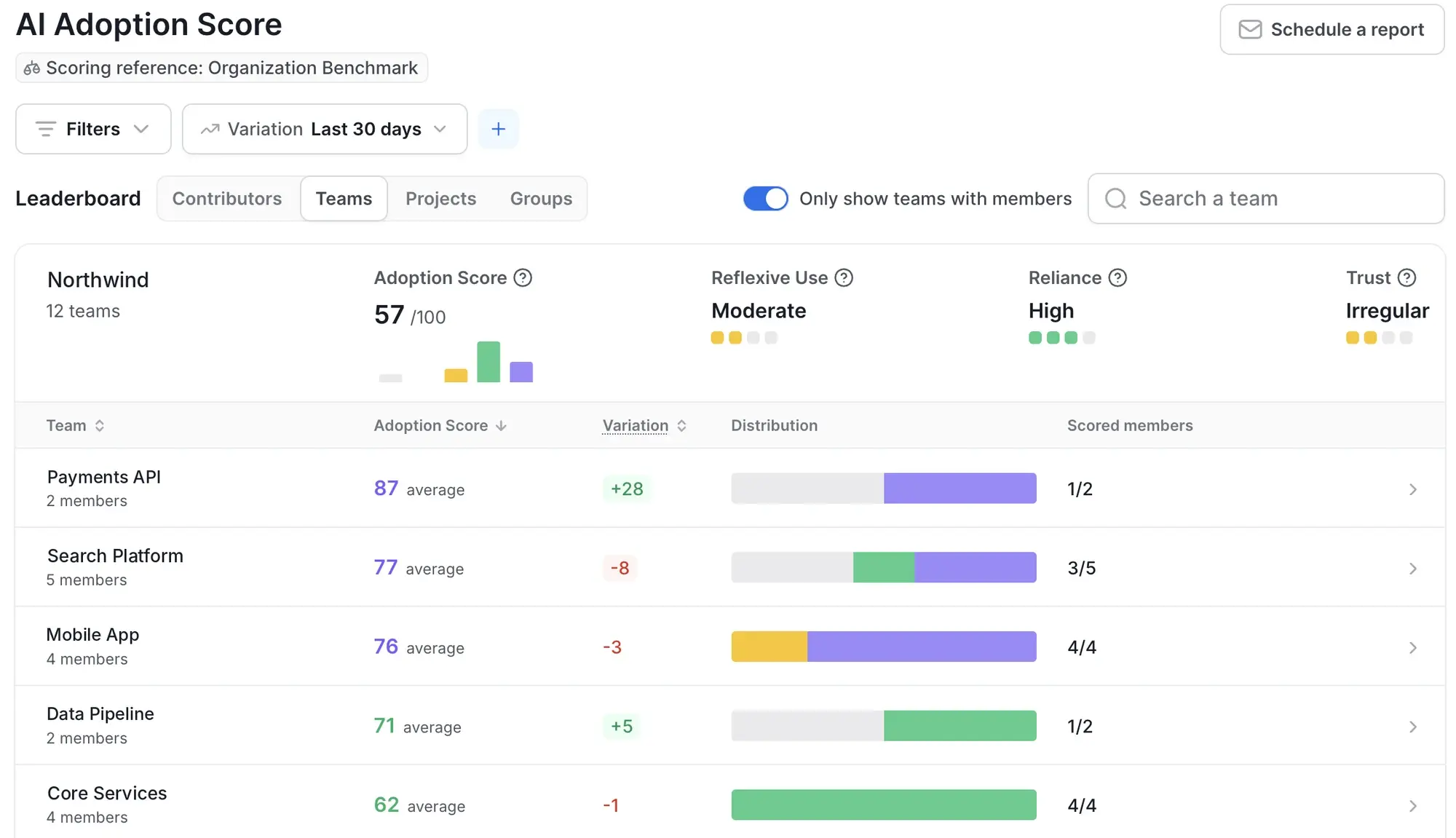
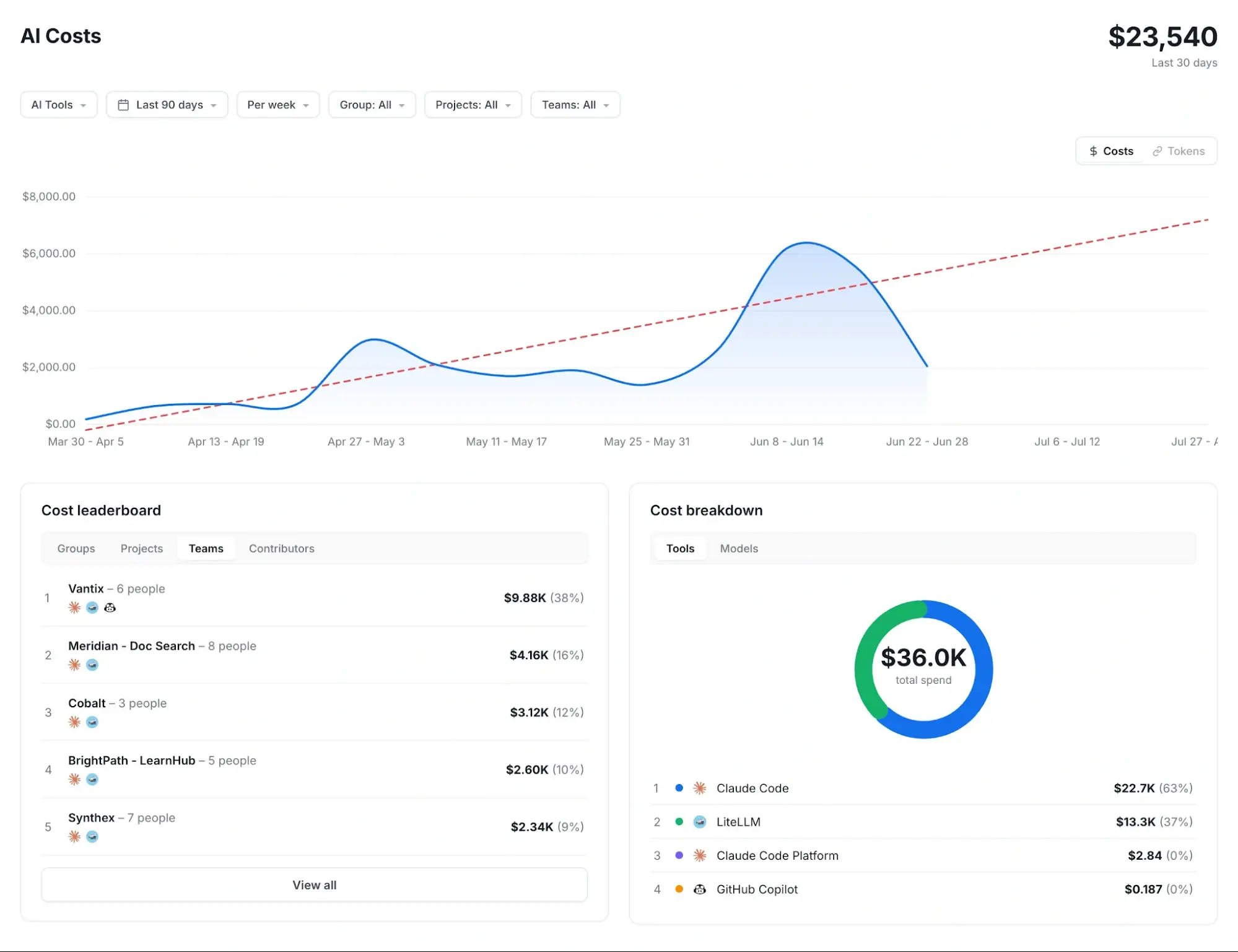
Axify’s AI Adoption & Impact feature helps you trace adoption to delivery impact and then connect that impact with cost. You can compare delivery performance before and after your rollout, and across teams with different levels of AI adoption, using cycle time, review time, throughput, and DORA metrics by team, project, or business line.
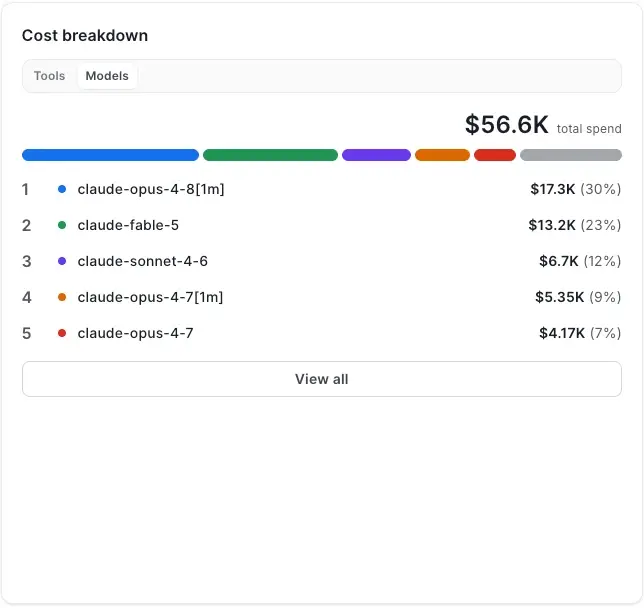
Axify also breaks down AI cost and token usage by tool and model, alongside actual usage. This gives you evidence for deciding which AI-assisted software development workflows to scale, adjust, restrict, or discontinue.
The free AI ROI calculator helps you estimate whether your AI investment can return more value than it costs. It also shows which assumptions have the greatest effect on your result.
The quick estimate needs five inputs:
You can then adjust the other assumptions, which are pre-filled with conservative values: the share of saved time lost to review and rework or not reinvested in delivery work, working weeks, training and rollout costs, changes in change failure rate or defect costs, the value of faster releases, your rollout stage, and how your inputs were obtained.
The calculator then gives you:
The calculator gives you a useful estimate based on your assumptions. It can model saved time, tooling costs, delivery improvements, and downstream work.
Axify provides deeper proof by connecting those assumptions to AI adoption, before-and-after delivery metrics, review time, and AI cost by tool and model.
Suppose 50 developers have AI coding tool licenses, and 80% of them (40 developers) use the tools every week. Each active developer saves about 2 hours per week over 46 working weeks. Your fully loaded cost is $175,000 per developer per year, or about $84 per hour over 2,080 paid hours. You spend $40 per developer each month on licenses and tokens ($24,000 per year), and training and integration add $25,000. These are the calculator’s default values.
Your gross time saving is 3,680 hours, worth $309,615. If 30% of that time goes to reviewing and reworking AI output, or isn’t reinvested in delivery work, you retain $216,731. Against a first-year investment of $49,000, your estimated ROI is 342%, with a payback period of about 1.6 months. In year 2, without the one-off costs, ROI rises to about 803%.
That estimate becomes credible only if you intentionally reinvest the capacity and see shorter cycle time while rework and change failure rates remain stable. And your assumption that AI can increase capacity has supporting evidence.
Microsoft Research combined three randomized field experiments involving 4,867 developers, and developers with an AI coding assistant completed 26.08% more tasks. This finding supports testing a capacity gain, although you still need delivery data to confirm that additional completed work reaches production.
Now suppose your 30% estimate proves too optimistic. If review and correction absorb 85% of the saved time, your capacity value falls to $46,442.
If a higher change failure rate also creates $75,000 in additional defect and incident costs, your first-year cost rises to $124,000. Your ROI becomes negative 63%. Because recurring costs alone exceed the value created, the investment never pays back at these inputs.
Both scenarios use the same licenses and developer costs. The difference comes from workflow health, so counting faster coding while excluding verification, code churn, rework, and stability costs inflates your return.
Your calculator result provides a starting estimate. Axify helps you test its assumptions against measured engineering data.
These are the capabilities you can use:
You can review these measures together by team, project, or business line. This helps you decide which AI systems and workflows to scale, adjust, or discontinue.
Try the free AI ROI calculator above, then start a free trial of Axify to test your assumptions against real delivery data.
You pick cost-effective AI subscriptions by keeping tools whose measured effects on cycle time, review time, deployment frequency, or stability justify their full cost.
We already explained that your full cost includes licenses, model usage, training, review, rework, and risk, but below are five hidden costs to review.
Further Reading: You can use Axify’s FinOps for AI guide for deeper guidance on attributing spend by tool, team, model, and workflow.
Your team may experience an initial productivity decline before AI use creates consistent value.
DORA 2026 describes this as a J-curve effect. Developers need time to identify suitable tasks, recognize unreliable output, adjust reviews, and build repeatable workflows. An early dip does not prove the tool has failed. You should still count training hours, workflow changes, and any temporary increase in cycle time as rollout costs.
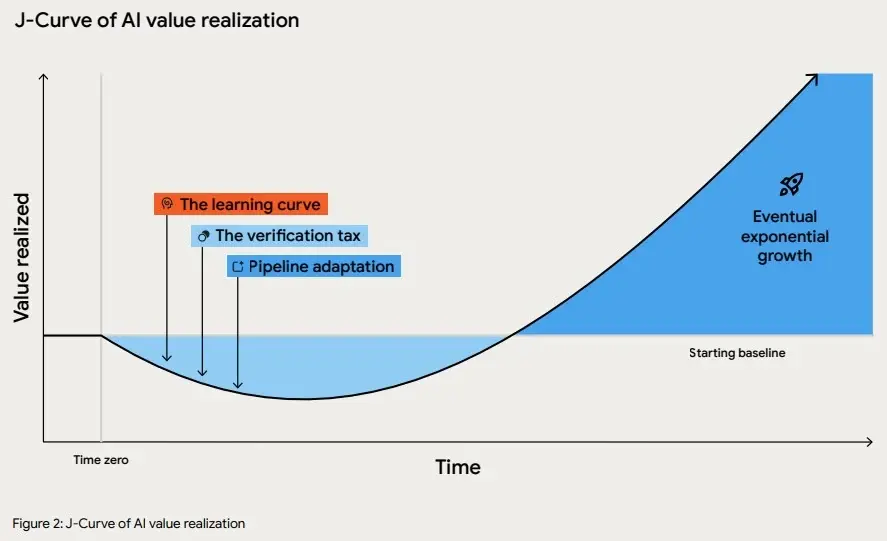
Source: DORA 2026 Report
A sound review compares the same team and work type across equal periods before and after adoption. Judging the first few weeks against mature performance can lead you to cancel a useful tool too early. It can also hide a poor rollout if you assume every early decline will recover.
Faster code creation can move work into PR review, testing, and correction. Once those queues grow, your coding-time savings shrink at the team level.
Sonar’s 2026 survey of more than 1,100 developers found that 38% believe AI-generated code requires more review effort than human-written code. In addition, 59% describe the effort needed to review, test, and correct AI output as moderate or substantial. That work reduces the net value of faster initial code generation.
This is why you need quality metrics alongside usage metrics to measure your AI investment return. So, you should track PR review time, major change requests, reopened tickets, QA effort, and rework. Counting generated or accepted code alone can make a costly review burden look like a productivity gain.
Your team can write more code while features take the same time (or more!) to reach production. This happens when AI shortens coding time, while review, testing, architecture approval, or release management remains the main bottleneck. In that case, you improve local productivity while system-level delivery stays unchanged.
METR observed this gap in a controlled study of 16 experienced open-source developers completing 246 tasks in repositories they already knew. The developers expected AI to make them 24% faster and still believed afterward that they had been 20% faster. The measured result showed that AI made them 19% slower.
That’s why perceived speed is weak evidence of AI productivity. So, compare coding time with end-to-end cycle time and deployment frequency over the same period before you renew or expand a subscription.
Your spend can rise through unused seats, overlapping AI solutions, long prompts, premium models, and repeated agent calls. Agentic workflows may read files, run tests, retry failed steps, and call a model several times from one instruction. One failed workflow can therefore consume far more than its visible request suggests.
So, you need to review active seats and cost per completed workflow by team, model, and task type. Match model cost to task risk and required output quality. Our guide to AI cost optimization covers the main levers in more detail.
Using an expensive Generative AI model for log summaries or routine test drafts can raise spend without reducing cycle time, review effort, or rework. This view also helps you remove duplicate subscriptions and limit retries that repeat without useful output.
AI-generated code can work today and still increase your future maintenance, refactoring, or security-review costs. Your exposure is greater in legacy systems, poorly understood code paths, and high-risk production areas with limited tests or weak review controls.
Veracode tested more than 150 AI models across 80 coding tasks and found that only 55% of generated solutions passed its security tests. The other 45% introduced a known security flaw, even though more than 95% of the output was syntactically correct.
Therefore, code that appears complete can still create correction and security costs. Before you scale a tool, compare security findings, defects, and code rewritten within 30 to 60 days before and after the rollout, on comparable work.
AI ROI varies by task type, codebase health, team maturity, and available review capacity. You will usually see the earliest returns from repetitive, structured, low-risk work because reviewers can verify the output quickly. Ambiguous or security-sensitive work requires more system context and human judgment.
Here are the common ROI patterns by task type:
| Task Type | ROI Potential | Why |
|---|---|---|
| Test generation | High | Repetitive, structured, easy to review |
| Documentation and runbooks | High | Saves time on low-risk supporting work |
| Log summaries and incident context | High | Speeds up investigation when reviewed by humans |
| Small bug fixes | Medium-high | Useful when context is narrow, and tests exist |
| Code review support | Medium-high | Helps spot issues, but human review still matters |
| Greenfield feature scaffolding | Medium | Fast output, but quality gates still needed |
| Legacy refactoring | Medium-low | Requires deep system context |
| Complex architecture decisions | Low as automation, useful as assistant | Needs human judgment |
| High-risk production changes | Conditional | ROI depends on review, tests, and controls |
Axify’s AI cost view breaks down cost and token usage by model and tool, so you can check whether premium models go to the work that needs them. For example, you may use a cheaper model for documentation or log summaries while reserving a stronger model for complex debugging or high-risk code review support.
A phased plan helps you measure changes without creating a reporting burden. Each stage gives you the evidence needed for the next decision. Here are the four stages you can follow.
Before introducing AI, you should record cycle time, review time, deployment frequency, change failure rate, failed deployment recovery time, rework, defects, tool spend, and available team capacity. You should also document where work currently waits.
This context matters because AI may increase coding output while your delivery speed remains unchanged. If review, QA, or release coordination already limits delivery, additional code may simply create longer queues.
During early adoption, you should track active users, usage frequency, accepted suggestions, coding time, pull request volume, pull request size, and review time. Compare these signals with your baseline and across teams with different adoption levels.
You should also assess DORA’s three adoption dimensions. Usage shows whether developers actively use AI, habit shows whether that use continues, and confidence can be approximated through accepted suggestions and downstream review results.
Once adoption becomes consistent, you can compare cycle time, ticket resolution time, rework, reopened tickets, review rejection rates, and defects. Use similar work types because unrelated projects can create misleading results.
For a tool-specific example, see how to approach measuring Claude Code impact. This stage also helps you identify the AI productivity paradox. Coding may become faster while your overall delivery remains flat because work still waits for review, testing, or release approval.
At this point, you can calculate the value generated, total investment, payback period, and your confidence in the underlying data. For example, compare cycle time and support volume across the same 12 weeks to see whether faster delivery also created more customer issues.
From there, you can scale, restrict, retrain, or change specific workflows, models, and tools. Treat three to six months as an early measurement window. You may need longer when adoption remains uneven, workflows are changing, or the J-curve dip continues.
Your first measurement cycle shows where AI creates value and where costs or delivery delays reduce the return. From there, you can improve AI ROI through the following actions:
Your AI investment creates value only when faster coding leads to shorter cycle time, stable quality, and earlier releases. That means you should judge tools through the delivery system, including review time, rework, defects, incidents, and costs.
If coding accelerates while work waits for review or testing, your measured return will expose the constraint instead of rewarding extra output. From there, you can redirect AI toward tasks where your team gains usable capacity, choose models by workflow, and strengthen the controls that protect delivery.
What to read next: Open our guide to the 20 best AI coding assistants for 2026 and compare your options.
Want to test your AI ROI assumptions against real delivery data? Start your 14-day free trial of Axify.

Measure the value generated from reclaimed capacity, fewer defects, faster delivery, and operational improvements. Then subtract the full cost of AI tools, training, review, rework, and adoption. Do not measure AI coding ROI from coding speed alone. Faster code only becomes ROI when it improves delivery outcomes or frees capacity for valuable work.
Individual paid plans for AI coding tools generally cost between $10 and $40 per user per month (for example, GitHub Copilot Pro is $10 and Pro+ is $39, and Claude Pro is $20). Power tiers for heavy "agentic" use run from about $100 to $200 per month, such as Claude Max or Cursor Ultra. Apart from subscription costs, also account for API or token usage, training, integration, review time, and rework.
Control LLM costs by tracking usage by team, tool, workflow, model, prompt size, retries, and output quality. Then match model cost to task complexity and business risk. For a tool-specific example, see our guide to Claude Code token usage.
You can use cheaper or faster models for low-risk tasks like summaries, tests, and documentation. But use stronger models for complex debugging, architecture support, or high-risk code paths where quality matters more than cost.
You can see early signals in a few weeks, but reliable ROI usually needs at least one full measurement cycle. Three to six months is a useful early window for measuring adoption, delivery impact, and quality.
Teams should also account for the J-curve effect, where productivity may dip at first as developers learn the tool, adapt workflows, and add verification steps.
Usually not for assisted coding: a plan of $10 to $40 per developer per month is small next to a developer’s fully loaded cost. The picture changes with heavy agentic use, where long sessions, retries, and premium models can push token spend for a single developer much higher. Instead of comparing AI with salaries, track cost per accepted or delivered task by tool and model, and check that the spend comes with shorter cycle time and stable quality.