Delivery Performance
18 minutes reading time

Imagine this:
You have delivery data, but your review meetings are still slow because each team measures work differently, so you cannot compare reports.
Enter DX Core 4.
This framework provides a shared structure for how engineering metrics are measured and grouped, so delivery reviews focus on what changed and what action to take. With consistent definitions and data sources, teams can connect execution signals to business outcomes without introducing another layer of reporting.
In this article, we'll break down the framework at the definition and data-source level. You will see how it compares to other models and how to apply it without driving reporting noise or metric gaming.
Let's dive in.
DX Core 4 is a measurement framework that standardizes how delivery performance is defined, compared, and reviewed across teams. It establishes shared metric definitions, clear data sources, and consistent interpretation rules, which reduces debate during planning and executive reviews.
At its core, the DX Core 4 framework groups signals into four dimensions: Speed, Effectiveness, Quality, and Impact. These dimensions act as a common structure (not a scoring system). We encourage you to use them together instead of optimizing them in isolation.
Remember: DX Core 4 is not an operating model, and it does not replace team-level diagnostics or workflow analysis. Instead, it provides a stable measurement layer that sits above existing tools and processes.
The DX Core 4 was developed by Laura Tacho and Abi Noda, with input from DX advisors including Dr. Margaret-Anne Storey, Dr. Nicole Forsgren, Dr. Thomas Zimmerman, and others involved in SPACE, DORA, and DevEx research.
You can check out this YouTube video if you want to dive even deeper:
This leads us to our next point.
When reviewing delivery performance across our clients’ teams, we frequently see one problem repeated:
The data exists, but it is not organized in a way that supports clear decisions.
DX Core 4 metrics address this by grouping signals into distinct dimensions, each tied to a specific type of review or planning question.
Here, we organized the metrics by dimension so it is easier to scan what each group measures and why it matters.
Speed metrics show how quickly work moves from intent to production and where flow slows down. These signals are most useful when start and end events are fixed and applied consistently across teams:

Effectiveness metrics focus on whether teams can deliver meaningful work without excess friction. These metrics typically combine system data with calibrated survey input:
Quality metrics track whether production deployments introduce issues that affect users or operations, and how quickly teams restore normal service when something goes wrong.
These metrics make release risk and recovery performance visible, so teams can detect patterns (for example, rising rollback volume or slower incident recovery) and adjust how they build, review, test, and release changes.
Impact metrics connect delivery performance to business outcomes that are reviewed at the product, portfolio, or company level. These metrics are typically defined outside the engineering tooling itself, so they must use consistent definitions and reporting periods to avoid misinterpretation:
This list establishes how delivery outcomes can be connected to business results. Next, we’ll focus on the DX Core 4 metrics that teams can act on directly.
The most actionable DX Core 4 metrics are the ones with clearly defined start and end events and a direct link to delivery outcomes. These metrics help teams decide when to release, how large changes should be, and how much delivery risk is acceptable.
In most organizations, the clearest operational signals come from the DORA metrics and from business measures tied to shipped work.
Lead time for changes and deployment frequency show how quickly code moves from commit to production and how often value is actually released. As such, they can help you shape release planning and batch size.
Change failure rate and recovery time indicate how often releases cause production issues and how long it takes to restore service.
Revenue-linked metrics connect delivery activity to business results by tracking outcomes associated with shipped work.
Examples include:
Reviewing these trends alongside delivery risk and throughput helps leadership decide where to continue or pause investment.
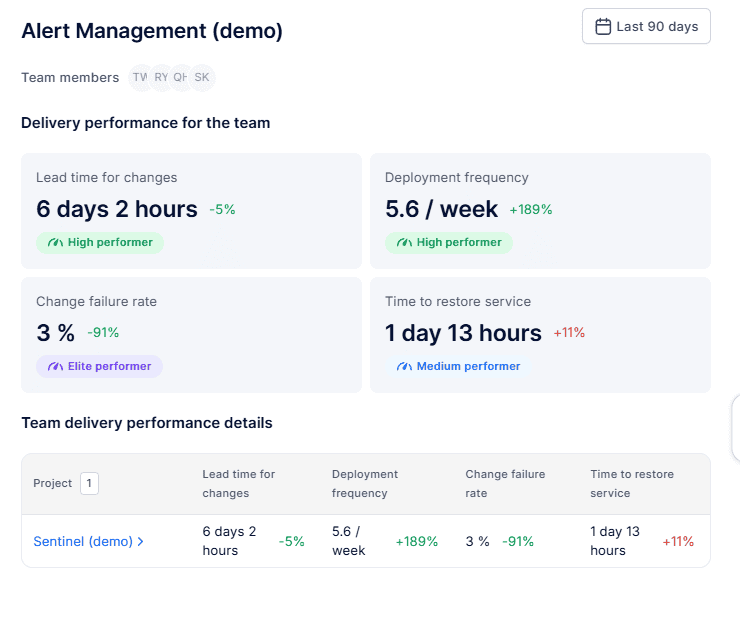
Axify collects delivery data directly from systems such as Jira, Azure DevOps, GitHub, and GitLab to calculate DORA metrics as well as flow metrics (cycle time, WIP, throughput, etc.) using consistent definitions.
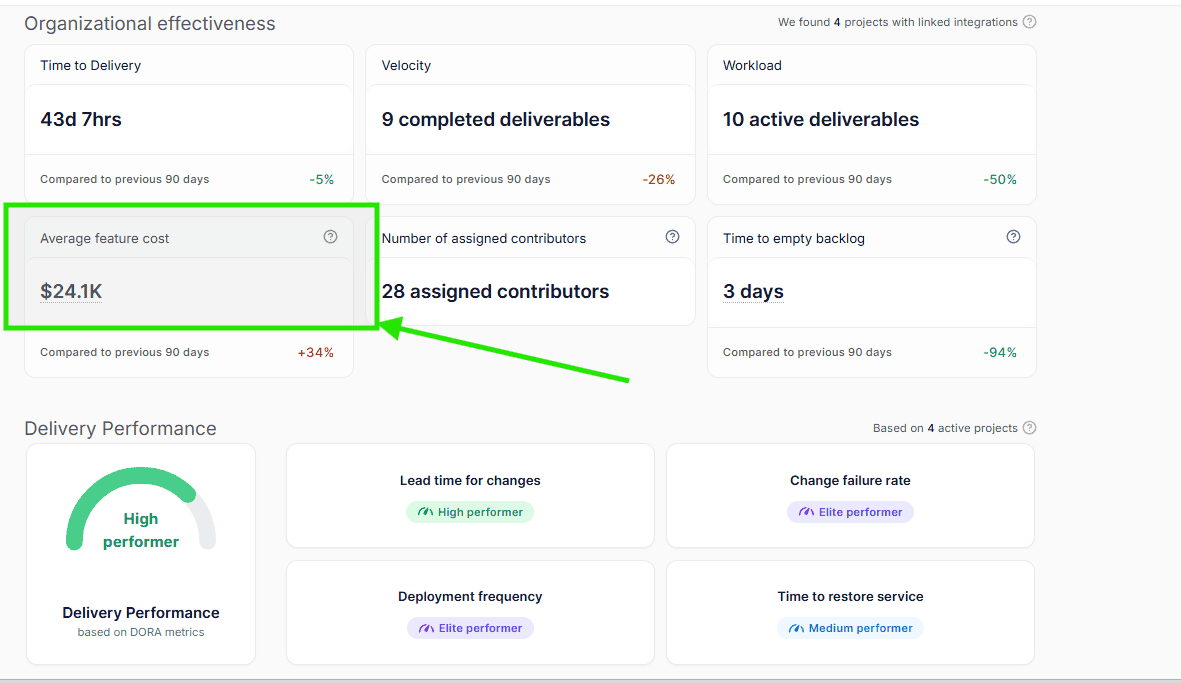
Axify also lets you configure an average engineering cost to translate delivery performance into financial outcomes. This includes feature cost changes, cost deltas, and FTE-equivalent capacity gained as flow and throughput improve during operational reviews.
You can see it in the “Organizational Effectiveness” view, like so:
Some DX Core 4 metrics are useful only when interpreted with strict context, while others should be reviewed exclusively at the organizational level. When these metrics are treated as direct performance targets, changes in the reported values may reflect reporting artifacts or external business factors rather than actual improvements in delivery performance.
In those cases, teams can end up optimizing numbers that do not correspond to faster, safer, or more predictable delivery.
These include:
This metric becomes misleading when it is counted without normalizing for repository structure, expected review depth, or change size. A team can increase the number of pull requests simply by splitting one large change into several smaller ones. The reported PR count rises, but lead time, review effort, and defect risk may remain unchanged.
This metric does not hold meaning at the individual team level because revenue is primarily influenced by pricing strategy, sales execution, and market demand. A team may deliver features consistently while revenue fluctuates due to external factors that engineering does not control.
At the organization level, it can be reviewed as a long-term trend, but it should not be used to evaluate day-to-day delivery decisions.
Composite metrics become difficult to act on when the calculation method is not visible. If a score drops from 72 to 65 but the underlying inputs are unknown, teams cannot determine whether the change came from longer cycle times, increased incident volume, or reduced developer experience. Without traceability to specific workflow events, the metric cannot guide corrective action.
Remember: Without explicit guardrails (such as fixed definitions, consistent time ranges, and supporting operational metrics) these metrics absorb variation they cannot explain. Reviews then shift toward debating the reported numbers instead of identifying specific changes to release planning, staffing, or workflow. This slows decision-making rather than improving it.
Choosing between DORA, SPACE, and DevEx is rarely a tooling decision. It is usually a governance question: which metrics are reviewed, how often they are reviewed, and which audience is responsible for acting on them.
Engineering leaders often struggle to decide which model to use in recurring delivery reviews. DX Core 4 was proposed as a framework that combines operational delivery metrics with experience and business outcome signals into a single review structure. A short overview of that intent is discussed here:
The differences below clarify how each model is typically applied.
DX Core 4 and DORA share the same operational foundation based on four metrics:
These metrics are calculated from the same underlying events in version control, CI/CD pipelines, and incident management systems.
The distinction appears during review and decision-making.
The difference between DX Core 4 and SPACE is primarily about measurement depth versus comparability across teams.
Therefore:
|
SPACE is typically more useful when diagnosing friction within a specific team. |
DX Core 4 is more useful when running standardized delivery reviews across multiple teams or business units. |
The difference between DX Core 4 and DevEx frameworks is mainly scope.
In practice:
|
DX Core 4 can surface where delivery performance is degrading. |
DevEx analysis is used to identify the specific causes and corrective actions. |
Implementing DX Core 4 is less about adding new metrics and more about locking down definitions, data paths, and review rules. Here, we'll break down implementation into concrete steps, from sourcing data to avoiding common failure modes that reduce trust.
DX Core 4 uses data that already exists in delivery systems. To keep results comparable across teams, each system must record events with reliable timestamps and ownership.
Typical data sources include:
No.
DX Core 4 is a structured framework, not a requirement to instrument every metric at once. The value comes from selecting a small, balanced set of metrics that answer the specific question your team is trying to solve.
Start with the review goal to establish the right metrics to track.
If the problem is delivery speed, focus on:
If the concern is release risk, prioritize:
If leadership questions onboarding or sustainability, begin with:
Impact metrics are typically added once delivery and quality signals are stable, since they require consistent definitions and longer reporting windows.
The principle is balance. At minimum, teams should track:
That combination prevents over-optimizing a single dimension (for example, pushing speed while degrading reliability).
As definitions mature and trust increases, additional metrics can be layered in without destabilizing review processes.
Remember: If you cannot explain why you’re tracking a metric, don’t add it yet.
Before reviewing any metrics, teams must define how each metric is calculated and ensure every group uses the same rules. If these definitions are left to individual tools or teams, reports will not match during executive reviews.
The required setup decisions include:
DX Core 4 measurement depends on connecting operational data sources into a single, traceable reporting layer. A suitable tool must capture events from code, planning, deployment, and incident systems, apply consistent calculation rules, and preserve historical definitions so trends remain comparable.
1) A DX Core 4 tool should make metric definitions visible and verifiable. For each reported value, reviewers must be able to see:
Without that traceability, teams cannot confirm whether changes in a metric reflect real workflow changes or differences in data collection.
2) Visibility across workflow stages is also necessary.
For example, if lead time increases from two days to five, the tool should show how much time was spent in coding, review, testing, and deployment queues. Total duration alone does not indicate where intervention is required.
3) Normalization rules must also be explicit.
When comparing teams, the tool should account for factors such as team size, repository structure, and service ownership. Without those adjustments, differences in architecture or staffing can appear as performance gaps.
4) Changes to metric definitions must be recorded and controlled.
If the definition of “deployment” or “failure” is modified, the tool should log when the change occurred and which reports are affected. This prevents historical comparisons from becoming invalid.
5) The metrics should be linked directly to the workflow steps teams can influence.
Examples include review time, deployment frequency, or incident recovery time. If metrics are presented only as high-level summaries, review meetings focus on describing trends instead of deciding which process to adjust.
Most DX Core 4 implementations lose credibility because teams apply different definitions or rely on incomplete data, not because the required data is unavailable. The same issues appear repeatedly:
When definitions are consistent and data sources are traceable, DX Core 4 provides a stable way to review delivery performance over time. If definitions vary or data is incomplete, review meetings tend to focus on reconciling reports rather than deciding what to change next.
That brings us to the next question:
DX Core 4 is worth adopting when a consistent, decision-ready measurement layer is missing across teams. The framework pays off when delivery data already exists but cannot be compared or trusted at the organizational level. In that case, standard definitions and fixed review rules reduce debate and shorten planning cycles.
DX Core 4 works best when DORA practices are already stable, and instrumentation is reliable, so your DORA metrics are captured using consistent timestamps.
The framework becomes effective when these elements are documented and applied consistently:
When these rules remain stable, reports stay comparable as more teams are added. Review meetings can then focus on deciding which initiatives to fund, where delivery risk is increasing, and where throughput is improving.
DX Core 4 is particularly useful when leadership needs a small, consistent set of indicators that show delivery speed, reliability, and business outcomes together without re-analyzing raw data every review cycle.
DX Core 4 is less effective when:
In those cases, the first step should be to fix the issues we outlined. Applying the framework before those foundations are in place will create conflicting reports instead of clearer decisions.
DX Core 4 metrics should be reviewed in a way that improves delivery decisions without pressuring teams to change how they report work.
The practices below address the most common misuse patterns:
DX Core 4 defines how engineering performance should be reviewed across delivery speed, reliability, effectiveness, and business impact. Implementing that framework consistently is most effectively achieved with a Software Engineering Intelligence (SEI) platform that can unify workflow data under shared definitions.
Axify is an SEI platform that operationalizes DX Core 4 using recorded workflow events and consistent calculation rules.
Rather than introducing a new set of delivery metrics, Axify connects planning, development, deployment, and incident data so the same delivery signals can be reviewed across teams and over time.
Here’s how:
DX Core 4 groups performance into four categories, but those categories depend on reliable event data to remain comparable.
Axify calculates the underlying delivery metrics directly from recorded workflow events:
Because each metric uses consistent event boundaries, changes in delivery speed can be reviewed alongside stability and reliability without reconciling definitions between teams.
DX Core 4 identifies what should be measured, but teams also need to see where work is slowing inside the delivery process.
Axify adds flow analysis that explains changes in delivery metrics:
These flow signals are calculated from the same underlying workflow events used to compute the DORA metrics, such as commits, pull requests, deployments, and incident records. Because both sets of metrics rely on identical source events, teams can trace problematic changes in certain metrics back to specific stages in the delivery process without reconciling separate data models.
Moreover, the Value Stream Mapping feature in Axify shows you those stages from request to release, making it clear where work is waiting (e.g., extended review queues, delayed approvals, or testing bottlenecks).
Instead of seeing only that lead time increased, you can see which stage caused the increase.
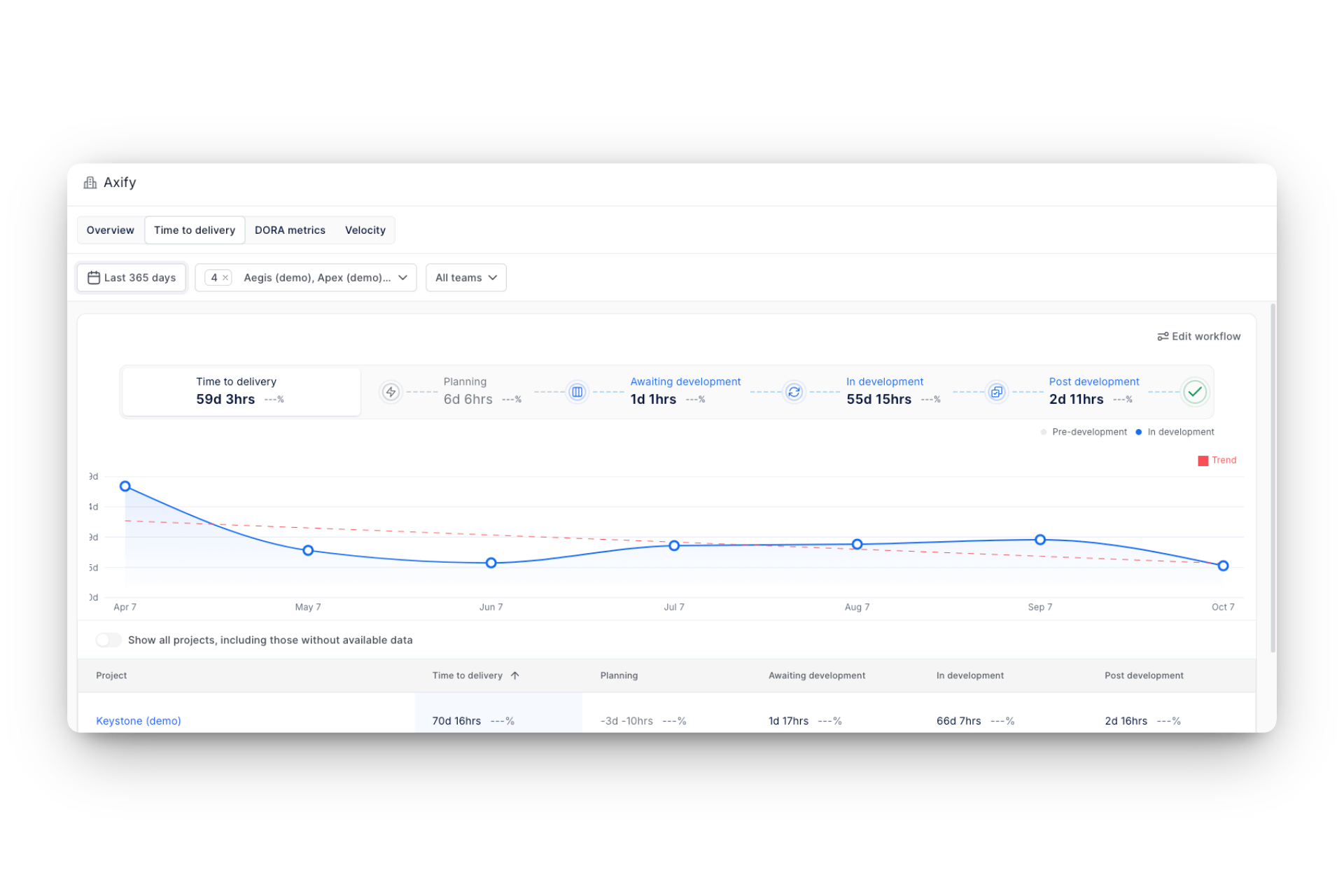
Historical comparisons then confirm whether process adjustments reduce those delays over time.
Axify Intelligence analyzes delivery history and recent workflow activity to highlight where constraints are emerging and where changes will have the greatest impact on delivery performance.
Instead of generating generic recommendations, Axify Intelligence:
Teams can use it to:
Because the insights are tied directly to recorded workflow events, each recommendation can be traced back to the commits, pull requests, deployments, or incidents that influenced the metric.
Axify’s AI Performance Comparison feature allows organizations to evaluate how AI tools affect delivery outcomes using observable metrics.
The current components include:
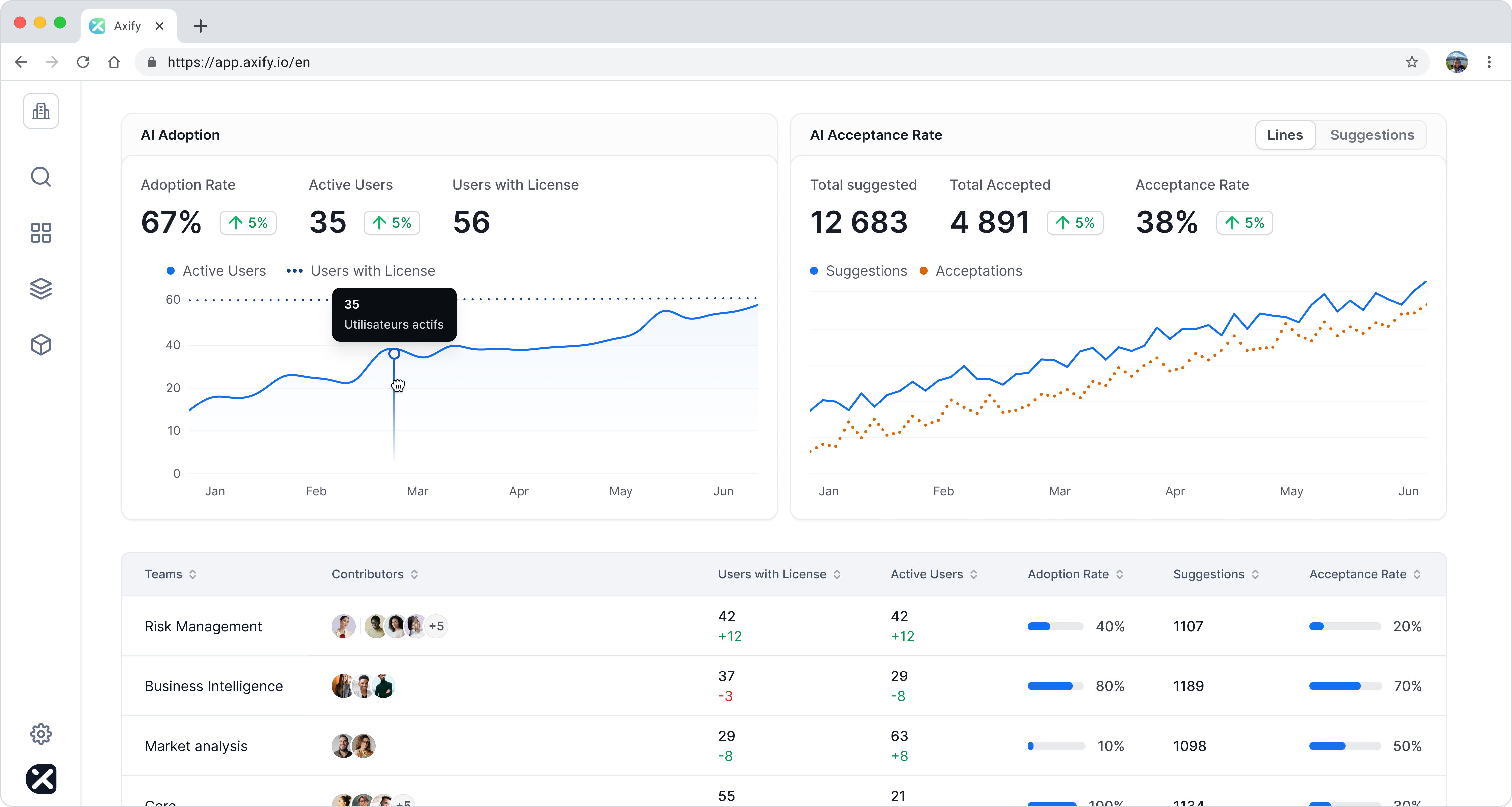
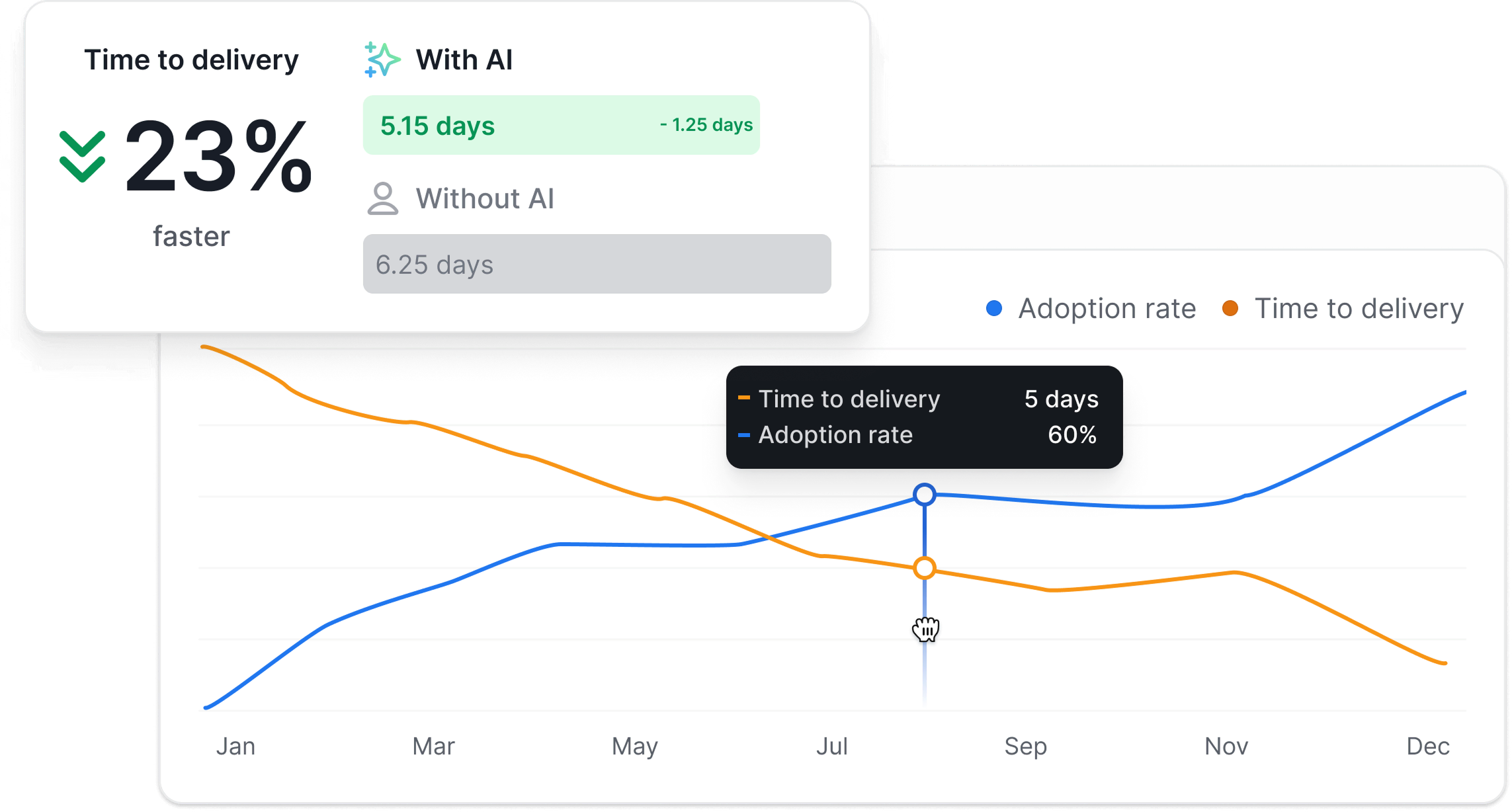
Together, these views provide a data-driven way to evaluate whether AI tools are improving delivery speed and stability in practice, rather than relying on anecdotal feedback.
Before improvements can be measured, teams need a consistent starting point.
The Developer Productivity Assessment provides a structured evaluation of how teams deliver software across four operational pillars:
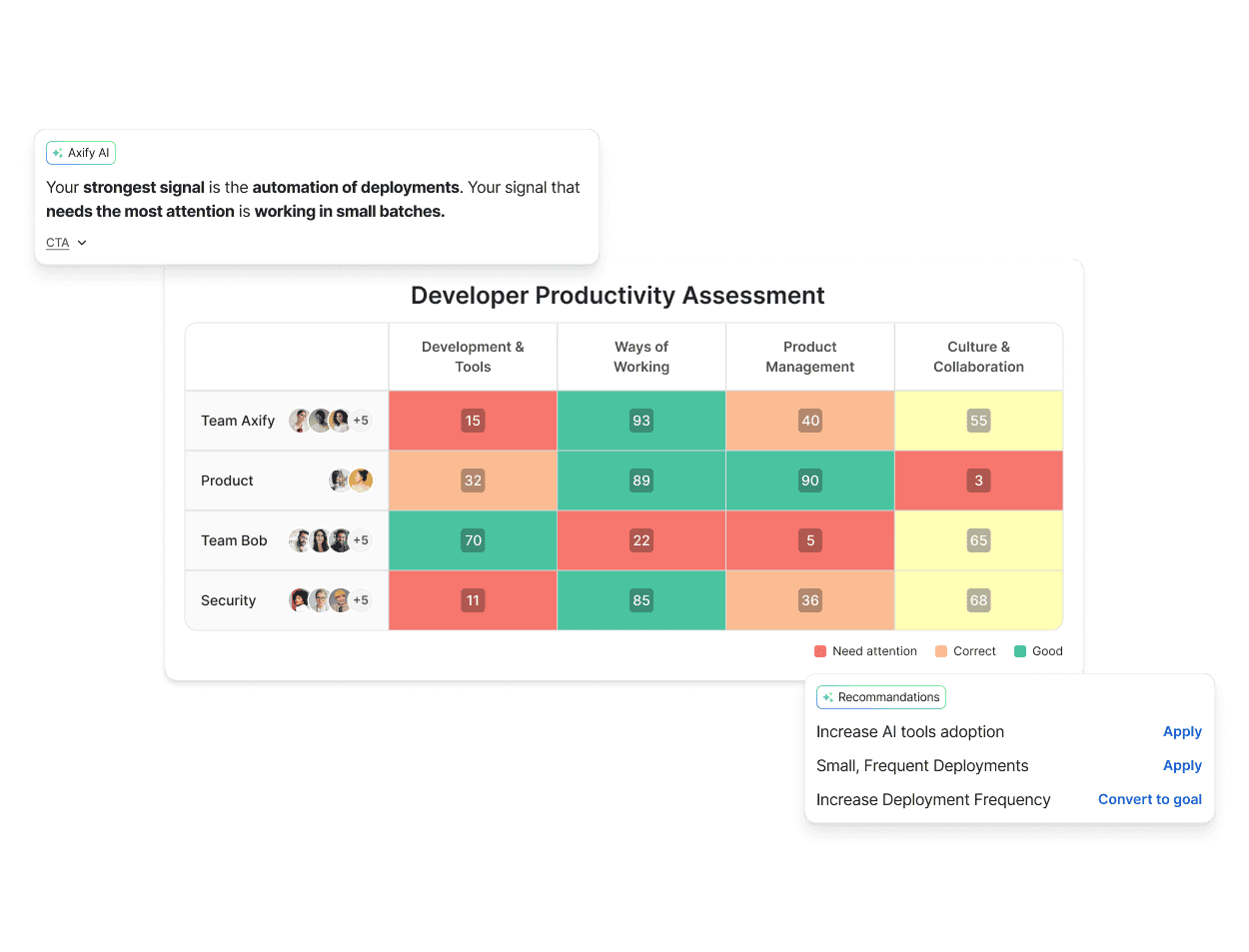
The assessment combines system data with a short questionnaire to establish a consistent starting point. The resulting report highlights strengths, identifies constraints, and tracks changes over time using the same measurement criteria.
This baseline helps organizations:
DX Core 4 gives engineering leaders a practical way to review how work actually moves from idea to production and how those changes affect reliability, cost, and outcomes.
Axify builds on that structure by turning everyday delivery activity into a clear view of where work slows down, where risk is increasing, and which improvements are actually making a difference. With flow analysis, AI-driven insights, and side-by-side comparisons of new tools like AI coding assistants, teams can see what is changing in their delivery process and decide what to adjust next.
If you want to understand how your own teams are performing today (and where the biggest gains are likely found), book a demo with us today and review your delivery data together with a product specialist.

DX Core 4 is a measurement framework that groups engineering performance into four dimensions: Speed, Effectiveness, Quality, and Impact. It provides shared definitions for how delivery performance is reviewed across teams so results can be compared using the same calculation rules.
DX Core 4 includes both operational and perception-based signals. Common examples include:
These metrics are intended to be reviewed together rather than optimized individually.
No. DX Core 4 includes the four DORA metrics as its delivery foundation but extends them with additional signals related to developer experience, effectiveness, and business outcomes. DORA focuses on speed and reliability, while DX Core 4 provides a broader review structure.
Developer productivity is evaluated by reviewing multiple indicators together, such as lead time for changes, throughput, reliability, and developer experience signals. Instead of relying on a single output metric, DX Core 4 looks at how consistently teams deliver working software and how much friction exists in the workflow.
Metrics such as pull requests per engineer, revenue per engineer, or opaque composite scores can become misleading if used as performance targets without context. These values can change because of reporting practices or external business factors rather than improvements in delivery performance.
Yes. DX Core 4 can be implemented using existing systems such as version control, issue tracking, deployment pipelines, and incident management tools, as long as metric definitions and data sources are standardized. However, maintaining consistent calculations across teams usually requires automation to avoid manual reporting and definition drift.